Advanced TCP
I. Port Numbers
Standard port numbers are assigned by the Internet Assigned Numbers Authority (IANA). These numbers are divided into specific ranges, including well-known ports (0 - 1023), registered ports (1024 - 49151), and dynamic/private ports (49152 - 65535).
If we examine the port numbers used by these standard services and other TCP/IP services (Telnet, FTP, SMTP, etc.), we find that most of them are odd numbers. There is a historical reason for this: these port numbers were derived from NCP port numbers (NCP was the Network Control Protocol, used as ARPANET’s transport-layer protocol before TCP). Although NCP was simple, it was not full-duplex, so each application required two connections, and even/odd pairs of port numbers were reserved for each application. When TCP and UDP became the standard transport-layer protocols, each application needed only one port number, so the odd-numbered ports inherited from NCP were used.
II. TCP Initial Sequence Number
In a TCP datagram, there is a Sequence Number. If the sequence number can be guessed, TCP’s vulnerability becomes apparent.
If the sequence number, IP address, and port number are chosen appropriately, anyone can forge a TCP segment and thereby disrupt a normal TCP connection [RFC5961]. One way to defend against this behavior is to make the initial sequence number (or ephemeral port number [RFC6056]) relatively difficult to guess; another is encryption.
Linux uses a relatively complex process to choose its initial sequence number. It uses a clock-based scheme and sets a random offset for the clock for each connection. The random offset is obtained by applying a cryptographic hash function to the connection identifier (the 4-tuple consisting of 2 IP addresses and 2 port numbers, i.e., the 4-tuple). The input to the hash function changes every 5 minutes. In the 32-bit initial sequence number, the highest 8 bits are a secret sequence number, while the remaining bits are generated by the hash function. The sequence numbers generated by this method are difficult to guess, but still increase gradually over time. Reports indicate that Windows uses a similar scheme based on RC4 [S94].
III. TCP Maximum Segment Size
The maximum segment size refers to the largest segment that the TCP protocol allows to be received from the peer, and therefore it is also the largest segment the peer can use when sending data. According to [RFCO879], the maximum segment size records only the number of bytes of TCP data and does not include the associated TCP and IP headers. When a TCP connection is established, each communicating party must state the maximum segment size it allows in the MSS option of the SYN segment. This 16-bit option specifies the value of the maximum segment size. If it is not specified in advance, the default maximum segment size is 536 bytes. Any host should be able to handle IPv4 datagrams of at least 576 bytes. Calculated using the minimum IPv4 and TCP headers, TCP requires a maximum segment size of 536 bytes for each send, which exactly forms a 576-byte IPv4 datagram (20+20+536=576).
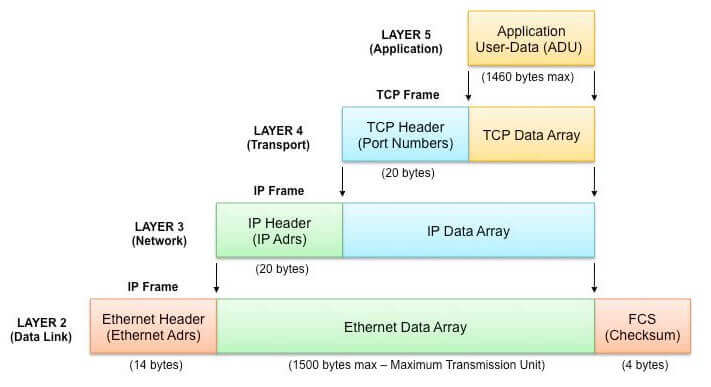
The maximum segment size is 1460. This is the typical value in IPv4, so the IPv4 datagram size correspondingly increases by 40 bytes (1500 bytes in total, the typical value for the Ethernet maximum transmission unit and the Internet path maximum transmission unit): a 20-byte TCP header plus a 20-byte IP header.
When IPv6 is used, the maximum segment size is usually 1440 bytes. Because the IPv6 header is 20 bytes larger than the IPv4 header, the maximum segment size is correspondingly reduced by 20 bytes. In [RFC2675], 65535 is a special value used together with IPv6 jumbograms to specify an effectively infinite maximum segment size. In this case, the sender’s maximum segment size is equal to the path MTU minus 60 bytes (40 bytes for the IPv6 header and 20 bytes for the TCP header). It is worth noting that the maximum segment size is not a negotiated result between the two TCP peers, but a limiting value. When one party sends its maximum segment size option to the other, it is stating that it is unwilling to receive any segment larger than that size for the entire duration of the connection.
IV. Solutions for Excessive CLOSE_WAIT
Scenario: the system generates a large number of “Too many open files” errors.
Cause analysis: during communication between the server and the client, the server failed to close sockets, resulting in closed_wait. As a result, the number of handles opened by the listening port reached 1024, all in the close_wait state. Eventually, the configured port was exhausted, causing “Too many open files” and preventing further communication.
The reason the close_wait state appears is that the passive closer has not closed the socket, as shown in the attached diagram:
Solution: two measures are feasible.
I. Fix:
The reason is that calling the ServerSocket class’s accept() method and the Socket input stream’s read() method causes the thread to block, so setSoTimeout() should be used to set a timeout (the default setting is 0, meaning a timeout never occurs); timeout determination is cumulative. After it is set once, the blocking time caused by each call is deducted from that value until another timeout setting is made or a timeout exception is thrown.
For example, if a certain service needs to call read() three times and the timeout is set to 1 minute, then if the total time of the three read() calls for one service invocation exceeds 1 minute, an exception will be thrown. If this service is to be performed repeatedly on the same Socket, the timeout must be set once before each service invocation.
II. Workaround:
Adjust system parameters, including handle-related parameters and TCP/IP parameters.
Note:
/proc/sys/fs/file-max is the limit on the number of files that can be opened by the entire system, controlled by sysctl.conf;
ulimit modifies the limit on the number of files that can be opened by the current shell and its child processes, controlled by limits.conf;
lsof lists the resources occupied by the system, but these resources do not necessarily consume open file descriptors; for example, shared memory, semaphores, message queues, memory mappings, and so on occupy those resources but do not consume open file descriptors;
Therefore, what needs to be adjusted is the limit on the number of files opened by the current user’s child processes, that is, the configuration of the limits.conf file;
If the value of cat /proc/sys/fs/file-max is 65536 or even larger, there is no need to modify it;
If ulimit -a shows that the value of the open files parameter is less than 4096 (the default is 1024), use the following method to change the open files parameter value to 8192:
- Log in as root and modify the file /etc/security/limits.conf vi /etc/security/limits.conf Add xxx - nofile 8192 xxx is a user. If you want it to take effect for all users, replace it with * . The value you set depends on the hardware configuration; do not set it too high.
#<domain>      <type>     <item>         <value>

*         soft    nofile    8192
*         hard    nofile    8192

#All users can use 8192 file descriptors per process.
- Make these limits take effect
Make sure the files /etc/pam.d/login and /etc/pam.d/sshd contain the following line:
session required pam_limits.so
Then have the user log in again for the changes to take effect. - In bash, you can use ulimit -a to check whether the changes have been applied:
I. Modification method: (temporarily effective; after restarting the server, it will revert to the default value)
sysctl -w net.ipv4.tcp_keepalive_time=600
sysctl -w net.ipv4.tcp_keepalive_probes=2
sysctl -w net.ipv4.tcp_keepalive_intvl=2
Note: When tuning Linux kernel parameters, verify that the adjustments are appropriate by observing their impact during peak business traffic.
II. If the above changes take effect, make the following changes so they persist permanently. vi /etc/sysctl.conf
If the configuration file does not contain the following entries, add them:
net.ipv4.tcp_keepalive_time = 1800
net.ipv4.tcp_keepalive_probes = 3
net.ipv4.tcp_keepalive_intvl = 15
After editing /etc/sysctl.conf, restart network for the changes to take effect.
/etc/rc.d/init.d/network restart
Then run the sysctl command to apply the changes; at that point, you are basically done.
Reason for the change:
When the client sends a FIN before the server for some reason, the server will perform a passive close. If the server does not actively close the socket and send a FIN to the Client, the server-side Socket will be in the CLOSE_WAIT state (rather than the LAST_ACK state). Typically, a CLOSE_WAIT lasts for at least 2 hours (the system default timeout is 7200 seconds, i.e., 2 hours). If the server program causes the system to accumulate a large number of CLOSE_WAIT connections that consume resources, the system will usually crash before they are released. Therefore, another way to address this issue is to shorten this duration by modifying TCP/IP parameters, specifically the tcp_keepalive_* parameter family:
tcp_keepalive_time:
/proc/sys/net/ipv4/tcp_keepalive_time
INTEGER, default value is 7200 (2 hours)
When keepalive is enabled, the frequency at which TCP sends keepalive messages. Recommended value: 1800 seconds.
tcp_keepalive_probes: INTEGER
/proc/sys/net/ipv4/tcp_keepalive_probes
INTEGER, default value is 9
The number of TCP keepalive probes sent to determine that the connection has been broken. (Note: keepalive probes are sent only when the SO_KEEPALIVE socket option is enabled. The default count generally does not need to be changed, though it can be reduced appropriately depending on the situation. Setting it to 5 is reasonable.)
tcp_keepalive_intvl: INTEGER
/proc/sys/net/ipv4/tcp_keepalive_intvl
INTEGER, default value is 75
The frequency at which probes are retransmitted when no acknowledgment is received. This is the interval for sending probe messages (how many TCP keepalive probes are sent before the connection is considered failed). Multiplying this by tcp_keepalive_probes gives the time after probing starts before a non-responding connection is killed. The default is 75 seconds, meaning an inactive connection will be dropped after about 11 minutes. (For typical applications, this value is somewhat high and can be reduced as needed. In particular, web servers should reduce this value; 15 is a reasonable setting.)
【How to verify】
The system no longer reports “Too many open files”.
The number of sockets in the TIME_WAIT state does not grow rapidly.
On Linux, you can use the following command to check the server’s TCP states (connection state counts):
netstat -n | awk '/^tcp/ {++S[$NF]} END {for(a in S) print a, S[a]}'
Example returned result:
ESTABLISHED 1423
FIN_WAIT1 1
FIN_WAIT2 262
SYN_SENT 1
TIME_WAIT 962
V. TIME_WAIT State
The TIME_WAIT state is also known as the 2MSL wait state. In this state, TCP waits for twice the Maximum Segment Lifetime (MSL), sometimes also referred to as the doubled wait. Each implementation must choose a value for the Maximum Segment Lifetime. It represents the maximum amount of time any segment is allowed to exist in the network before being discarded. We know this time limit is bounded because TCP segments are transmitted as IP datagrams, and IP datagrams have a TTL field and a hop limit field. These two fields limit the effective lifetime of an IP datagram.
[RFC0793] sets the Maximum Segment Lifetime to 2 minutes. However, in common implementations, the Maximum Segment Lifetime may be
30 seconds, 1 minute, or 2 minutes. In most cases, this value can be modified. On Linux, the value of net.ipv4.tcp_fin_timeout records the timeout duration that the 2MSL state needs to wait (in seconds). On Windows, the following registry key also stores the timeout:
HKLM\SYSTEM\currentcontrolSet\Services\Tcpip\parameters\TcpTimedWaitDelay
The valid range for this key is 30–300 seconds. For IPv6, you only need to replace Tcpip in the key with Tcpip6.
As for why the 2MSL wait time needs to be configured, see here.
VI. TCP Reset Segments
The TCP header contains the RST flag field. A segment with this field set is called a “reset segment,” or simply a “reset.” In general, when TCP detects that an arriving segment is invalid for the associated connection, it sends a reset segment. (Here, the associated connection refers to the connection identified by the 4-tuple in the TCP and IP headers of the reset segment.) A reset segment usually causes the TCP connection to be torn down quickly.
Reset segments have the following uses:
- Responding to connection requests for nonexistent ports.
- Terminating a connection.
- Handling half-open connections.
- Handling time-wait errors.
Explanation of a time-wait error:
When the client is in the TIME_WAIT state and suddenly receives an old segment from the server, TCP sends an ACK in response, containing the latest sequence number and ACK number (K and L, respectively). However, when the server receives this segment, it has no information about the connection, so it sends a reset segment in response. This is not a server problem, but it can cause the client to transition prematurely from TIME_WAIT to CLOSED. Many systems specify that reset segments should be ignored while in the TIME_WAIT state, thereby avoiding the issue described above.
VII. Nagle’s Algorithm
In an ssh connection, a single keystroke often triggers data transmission. With IPv4, one keystroke generates a TCP/IPv4 packet of about 88 bytes (with encryption and authentication): a 20-byte IP header, a 20-byte TCP header (assuming no options), and 48 bytes of data. These small packets (called tinygrams) incur fairly high network transmission overhead. In other words, compared with the rest of the packet, the proportion of useful application data is very small. This problem has little impact on LANs, because most LANs are not congested and these packets do not have to travel very far. On WANs, however, they increase congestion and severely affect network performance. John Nagle proposed a simple and effective solution in [RFCO896], now known as Nagle’s algorithm.
Nagle’s algorithm requires that when a TCP connection has data in flight (that is, data that has been sent but not yet acknowledged), small segments (with a length less than the SMSS) cannot be sent until all in-flight data has been ACKed. After receiving the ACK, TCP must collect these small pieces of data and coalesce them into a single segment for transmission. This approach forces TCP to follow a stop-and-wait procedure: it can continue sending only after receiving ACKs for all in-flight data. The elegance of the algorithm lies in its self-clocking control: the faster ACKs return, the faster data is transmitted. In relatively high-latency WANs, reducing the number of tinygrams is even more important; the algorithm reduces the number of segments sent per unit time. In other words, the RTT controls the packet sending rate.
Problems Caused by Nagle’s Algorithm and Delayed ACKs
If delayed ACKs are used directly together with Nagle’s algorithm, the result may be less than ideal. Consider the following scenario: the client uses delayed ACKs when sending a request to the server, while the server’s response data is not suitable for transmission in the same packet.
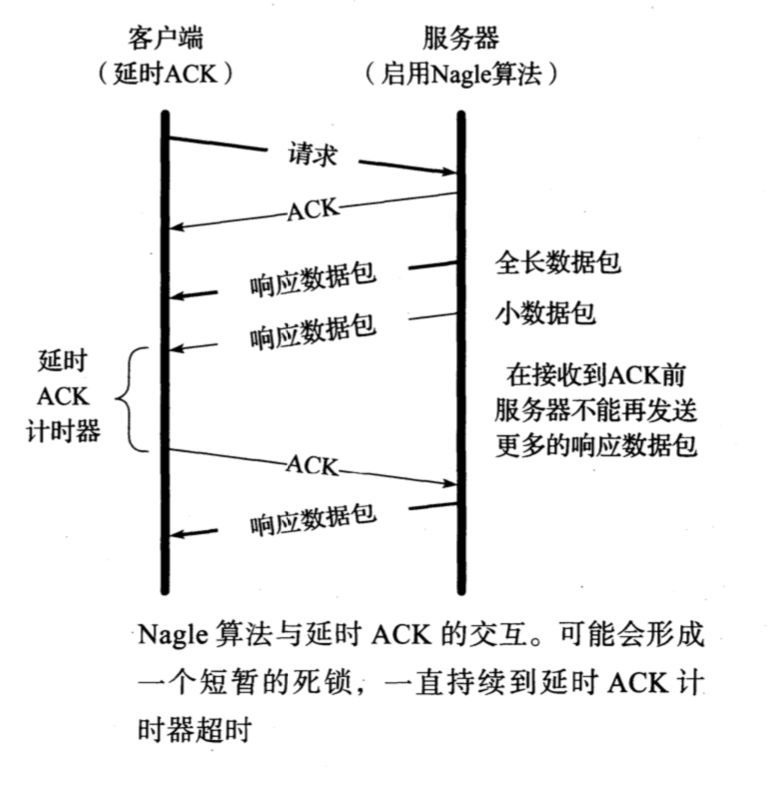
As shown above, after receiving two packets from the server, the client does not immediately send an ACK. Instead, it waits, hoping to piggyback the ACK on outgoing data. Normally, TCP should return an ACK after receiving two full-sized data packets, but that is not the case here. On the server side, because Nagle’s algorithm is in use, no new data can be sent until an ACK is received, since at most one packet is allowed to be in flight at any time. Thus, the combination of delayed ACKs and Nagle’s algorithm leads to a kind of deadlock (both ends are waiting for the other to act) [MMSV99] [MMO1]. Fortunately, this deadlock is not permanent; it is resolved when the delayed ACK timer expires. Even if the client still has no data to send, it no longer needs to wait and can send only the ACK to the server. However, during the deadlock, the entire transport connection is idle, degrading performance. In some cases, such as the ssh transmission here, Nagle’s algorithm can be disabled.
Applications that require low latency, such as real-time online games, should disable Nagle’s algorithm.
There are several ways to disable Nagle’s algorithm; the Host Requirements RFC [RFCl122] lists the relevant methods. If an application uses the Berkeley sockets API, it can set the TCP_NODELAY option. Alternatively, the algorithm can be disabled system-wide. On Windows, use the following registry key:
HKLM\SOFTWARE\Microsoft\MSMQ\parameters\TCPNoDelay
This double-byte value must be added by the user and should be set to 1. For the change to take effect, the message queue also needs to be reset.
VIII. TCP Security Protocols and Layering
Security services at the link layer aim to protect information in one-hop communication; security services at the network layer aim to protect information transmitted between two hosts; security services at the transport layer aim to protect process-to-process communication; and security services at the application layer aim to protect information manipulated by applications. At each layer of communication, it is also possible for applications independent of the communication layers to take responsibility for protecting data (for example, a file can be encrypted and sent as an email attachment).
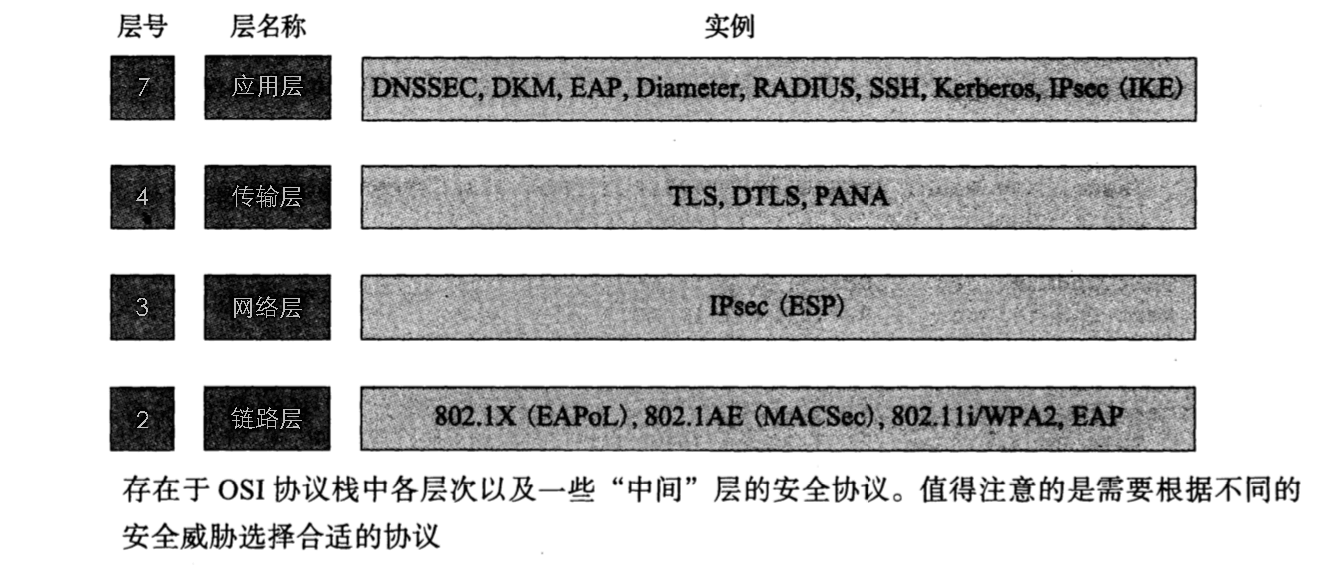
The figure above shows the most common security protocols used with TCP/IP.
Some security protocols target a specific protocol layer, while others span multiple protocol layers. Although they are not discussed as frequently as TCP/IP protocols, some link technologies (including their own encryption and authentication protocols) begin providing security at Layer 2. In TCP/IP, EAP is used to establish authentication that includes multiple mechanisms, such as machine certificates, user certificates, smart cards, passwords, and so on. EAP is commonly used in enterprise environments with back-end authentication or AAA servers. EAP can also be used for authentication in other protocols, such as IPsec.
IPsec is a collection of protocols that provides Layer 3 security, including IKE, AH, and ESP. IKE establishes and manages security associations between two parties. A security association involves authentication (AH) or encryption (ESP), and can run in either transport mode or tunnel mode. In transport mode, the IP header is modified for authentication or encryption; in tunnel mode, the IP datagram is placed entirely inside a new IP datagram. ESP is the most popular IPsec protocol. All IPsec protocols can use different algorithms and parameters (cipher suites) for encryption, integrity protection, DH key agreement, and authentication.
Moving up the protocol stack, Transport Layer Security (the current version is TLS 1.3) protects information between two applications. It has its own internal layering, consisting of a record-layer protocol and three message-exchange protocols: the Change Cipher Spec protocol, the Alert protocol, and the Handshake protocol. In addition, the record protocol supports application data. The record layer is responsible for encrypting data and ensuring its integrity according to the parameters provided by the Handshake protocol. The Change Cipher Spec protocol is used to change a previously established pending protocol state into the active protocol state. The Alert protocol indicates errors or connection issues. TLS used with TCP/IP is the most widely used security protocol, and it also supports encrypted web browser connections (HTTPS). A variant of TLS called DTLS applies TLS to datagram protocols such as UDP and DCCP.
IX. Short-Lived Connections, Parallel Connections, Persistent Connections, and Long-Lived Connections
Short-Lived Connections
Short-lived connections are mostly used for frequent, point-to-point communication where the number of connections must not be too large. Establishing each TCP connection requires a three-way handshake, and closing each TCP connection requires a four-way handshake. This is suitable for scenarios with high concurrency where each user does not need to operate frequently.
However, in business scenarios where users need to perform frequent operations (such as new-user registration or submitting e-commerce orders), frequent use of short-lived connections causes performance latency to accumulate.
For infrequent operations such as user login, short-lived connections can be considered.
Parallel Connections
As an optimization for short-lived connections, people came up with the idea of opening multiple connections, forming parallel connections.
Parallel connections allow the client to open multiple connections and execute multiple transactions in parallel, with each transaction having its own TCP connection. This can overcome the idle time and bandwidth limits of a single connection, allowing latency to overlap. If a single connection does not fully utilize the client’s network bandwidth, the unused bandwidth can be allocated to load other objects.
In the PC era, parallel connections were widely used to take full advantage of modern browsers’ multithreaded concurrent download capabilities.
However, parallel connections also introduce certain problems. First, parallel connections are not necessarily faster, because bandwidth resources are limited and each connection competes for that limited bandwidth. As a result, the performance improvement may be very small, or even nonexistent.
On typical machines, the number of parallel connections is 4–6.
Persistent Connections
After HTTP 1.0, HTTP devices are allowed to keep TCP connections open after transaction processing completes so that existing connections can be reused for future HTTP requests. TCP connections that remain open after transaction processing completes are called persistent connections.
The time parameter for persistent connections is usually set by the server, such as nginx’s keepalivetimeout. The keepalive timout value means that after the TCP connection created by an HTTP request finishes transmitting the last response, it must still be held for keepalive_timeout seconds before the connection starts to close;
In HTTP 1.1, all connections are persistent by default, unless explicitly declared otherwise. HTTP persistent connections do not use separate keepalive messages; they simply allow multiple requests to use a single connection. However, the default connection expiration time for Apache 2.0 httpd is only 15 seconds, and for Apache 2.2 it is only 5 seconds. The advantage of a short expiration time is that multiple web page components can be transferred quickly without tying up multiple server processes or threads for too long.
Compared with parallel connections, persistent connections provide the following advantages:
- They avoid the time and bandwidth cost of opening/closing a new connection for every transaction;
- They avoid the performance degradation on each new connection caused by TCP slow start;
- The number of parallel connections that can be opened is actually limited, while persistent connections can reduce the number of connections that need to be established;
Long-Lived Connections
Long-lived connections are essentially very similar to persistent connections. Persistent connections focus on the HTTP application layer and specifically mean that after a request ends, the server closes the established connection only after its configured keepalivetimeout has expired. A long-lived connection means that the client and server first establish a connection, keep it open after it is established, and then send and receive messages until one side actively closes the connection.
Long-lived connections have a very wide range of applicable scenarios:
- Monitoring systems: back-end hardware hot-swapping, LED changes, temperature changes, voltage changes, and so on;
- IM applications: sending and receiving messages;
- Real-time quotation systems: for example, stock market quote pushes;
- Push services: built-in push notification services in various apps;
X. Heartbeat Issues
The Necessity of Heartbeats
Although TCP provides a KeepAlive mechanism, it cannot replace application-layer heartbeat keepalive. The main reasons are as follows:
(1) After the Keep Alive mechanism is enabled, the TCP layer sends the corresponding KeepAlive probes when the timer expires to determine whether the connection is available. The default interval is 7200s (two hours). After failure, it retries 10 times, with a timeout of 75s each time. Obviously, the default values cannot meet the requirements of mobile networks;
(2) Even if the default values in (1) are modified, they still cannot fully meet business requirements. TCP KeepAlive is used to detect whether a connection is alive, but it cannot detect whether both communicating parties themselves are alive. For example, if a server becomes overloaded for some reason and cannot respond to any business requests, TCP probes may still determine that the connection is healthy. This is a typical case where the connection is alive but the service provider is effectively dead. For the client, the best choice in this situation is to disconnect and reconnect to another server, rather than continuing to believe the current server is available and repeatedly sending requests that are bound to fail.
(3) A socks proxy makes Keep Alive ineffective. The socks protocol only forwards concrete TCP-layer data packets and does not forward packets that are implementation details of the TCP protocol itself. Therefore, if an application uses a socks proxy, TCP’s KeepAlive mechanism becomes ineffective.
(4) Keep Alive can fail in some complex situations, such as when a router goes down or a network cable is unplugged directly;
KeepAlive is not suitable for scenarios that require detecting whether both parties are alive. Such scenarios still need to rely on application-layer heartbeats. Application-layer heartbeats also provide greater flexibility: they can control detection timing, intervals, and processing flow, and can even carry additional information in heartbeat packets.
Factors Affecting Heartbeat Intervals
Application-layer heartbeats are an effective way to check connection validity and determine whether both parties are alive. However, heartbeats that are too frequent consume more power and traffic, while heartbeats that are too infrequent affect the real-time nature of connection detection. In the industry, heartbeat interval configuration and optimization are mainly based on the following factors:
- NAT timeout – Most mobile wireless network operators remove the corresponding entry from the NAT table when there has been no data communication on a link for a period of time, causing the link to break;
- DHCP lease – When the DHCP lease expires, it must be proactively renewed; otherwise, continuing to use an expired IP may occasionally cause long-lived connections to disconnect;
- Network state changes – Switching between mobile networks and WIFI networks, network disconnection and reconnection, and other network state changes can also turn a long-lived connection into an invalid connection;
The following are some NAT timeout values for network operators.
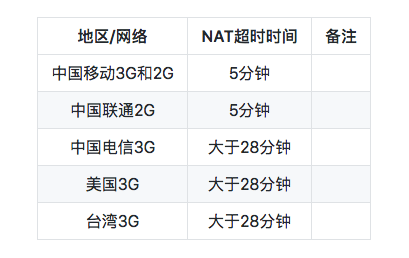
Therefore, heartbeat packets are generally configured to be sent at intervals of around 3 minutes.
Smart Heartbeats
a) Delayed heartbeat testing method: This is the prerequisite for accurate test results. We believe that after a long-lived connection is established, three consecutive successful short-interval heartbeats can largely ensure that the environment for the next heartbeat is normal.
b) One success is conclusive; failures require consecutive accumulation: Success is absolute, while only multiple consecutive failures may be considered a failure.
c) Avoiding critical values: We use a value slightly smaller than the calculated heartbeat interval as the stable heartbeat interval to avoid the critical value.
d) Dynamic adjustment: Even if we do not find the best value during a complete smart heartbeat calculation process, we still have opportunities to correct it.
Background requiring heartbeat packets:
a. Operators’ signaling storms.
b. Operator network upgrades, with NAT timeouts tending to increase.
c. Alarm consumes power, while heartbeats consume traffic.
Dynamic heartbeats introduce the following states:
a. Foreground active state: screen on, WeChat in the foreground, period minHeart (4.5min), ensuring user experience.
b. Background active state: WeChat has been in the background for less than 10 minutes, period minHeart, ensuring user experience.
c. Adaptive calculation state: incrementally increase the heartbeat interval and try to obtain the maximum heartbeat period (sucHeart).
d. Background stable state: maintain a stable heartbeat using the maximum period.
Older versions of WeChat maintained a heartbeat interval of 4.5 minutes, or about 270 s.
The strategy can be as follows:
Start with an initial heartbeat interval of 180 s. Each time a heartbeat packet is sent, delay the next one by 30 s. If each heartbeat packet can be sent successfully, keep extending the interval. The purpose is to find the longest heartbeat interval. Once a connection failure is detected, reconnect. After reconnecting, first reduce the accumulated heartbeat duration before disconnection by 20 s, and then try to send heartbeats using this new heartbeat interval. Gradually find an optimal value. If the connection fails 5 consecutive times, reconnect again and try with the initial heartbeat interval of 180 s.
XI. QQ and WeChat
In the early days, QQ mainly used the TCP protocol, but later shifted to using UDP to maintain online presence and TCP to upload and download data. Today, UDP is QQ’s default operating mode, and it works well. It is likely that this approach has also been carried over to WeChat.
A simple verification: log in to the PC version of QQ, close any extra QQ windows and leave only the main window, then minimize it. After a few minutes, check the system’s network connections. You will find that the QQ process no longer holds any TCP connections, but there is UDP network activity. At this point, when sending a chat message, or opening other windows and features, you will find that the QQ process starts using TCP connections.
After login succeeds, QQ has a TCP connection to maintain online status. The remote port of this TCP connection is usually 80. When logging in via UDP, the port is 8000.
Message transmission between QQ clients uses UDP. Because the domestic network environment is very complex, and many users share a single Internet connection through proxy servers, in these complex conditions the probability that clients can establish TCP connections with each other is relatively low, which severely affects message delivery efficiency. UDP packets can traverse most proxy servers, so QQ chose UDP as the primary communication protocol between clients.
Tencent uses an upper-layer protocol to guarantee reliable transmission: after a client sends a message using UDP, once the server receives the packet, it needs to send back an acknowledgment packet using UDP. This ensures that messages can be transmitted without loss. The reason a client may see “message sending failed” while the other party still receives the message is that the message sent by the client was already received and successfully forwarded by the server, but the client did not receive the server’s acknowledgment packet due to network issues.
To summarize:
Login uses the TCP protocol and HTTP protocol. Sending messages between friends mainly uses the UDP protocol. Transferring files within an intranet uses P2P and does not require server relay.
Reference:
《TCP/IP Illustrated, Volume 1: The Protocols》
GitHub Repo: Halfrost-Field
Follow: halfrost · GitHub
