A First Look at How Go Compile Commands Execute
Introduction
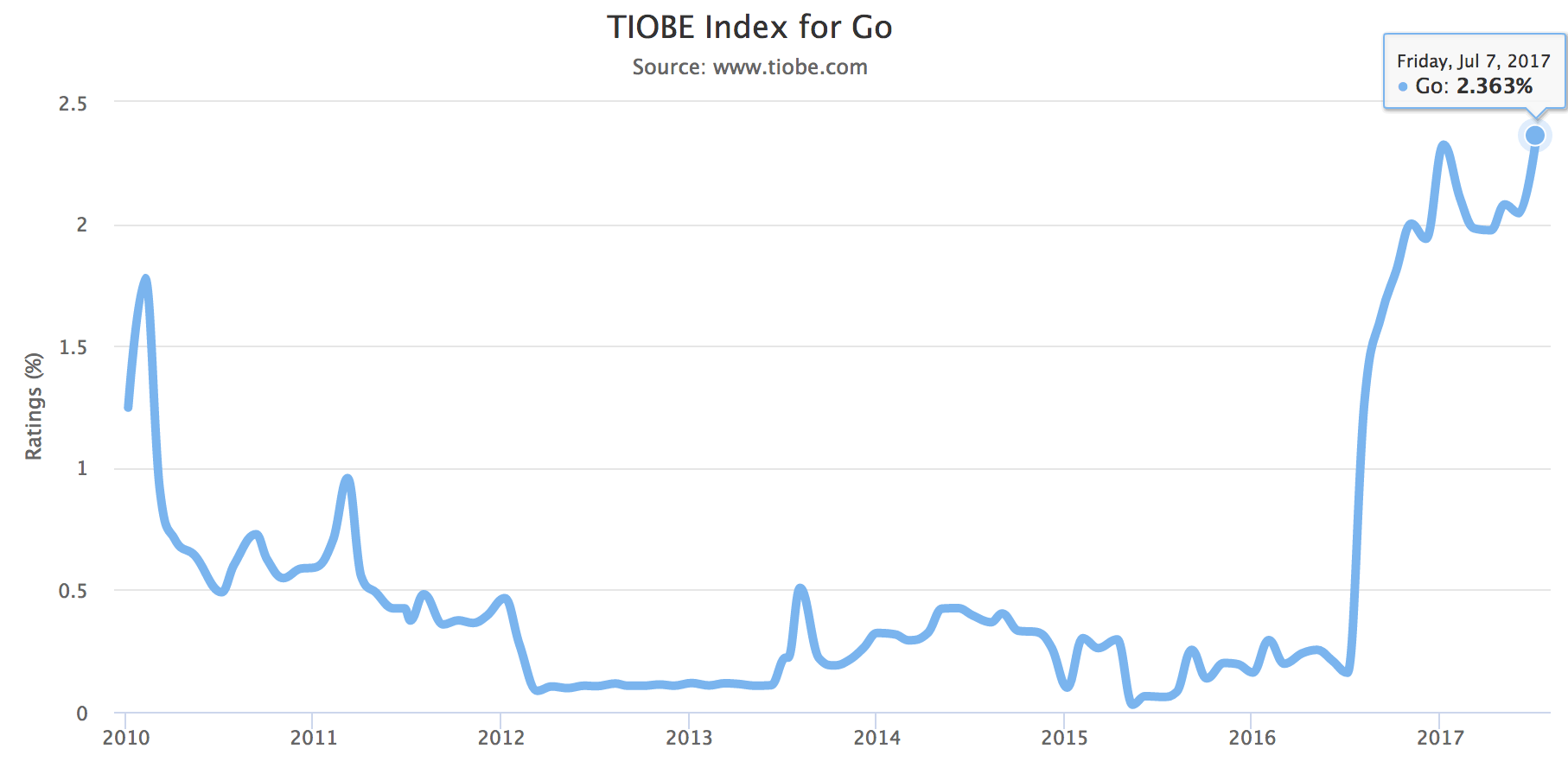
Go has risen very rapidly in programming language rankings over the past two years. Although Go is a statically compiled language, it has a scripting-like syntax and supports multiple programming paradigms (functional and object-oriented). The most attractive aspect of Go may be its native support for concurrent programming (there is a big difference between native support at the language level and support via third-party libraries). Go provides very strong support for network communication, concurrency, and parallel programming, allowing it to better leverage large numbers of distributed and multi-core computers. Developers can achieve this through the concept of goroutines—lightweight threads—and then use channels to communicate between goroutines. Go automates segmented stack growth and goroutine multiplexing on top of threads.
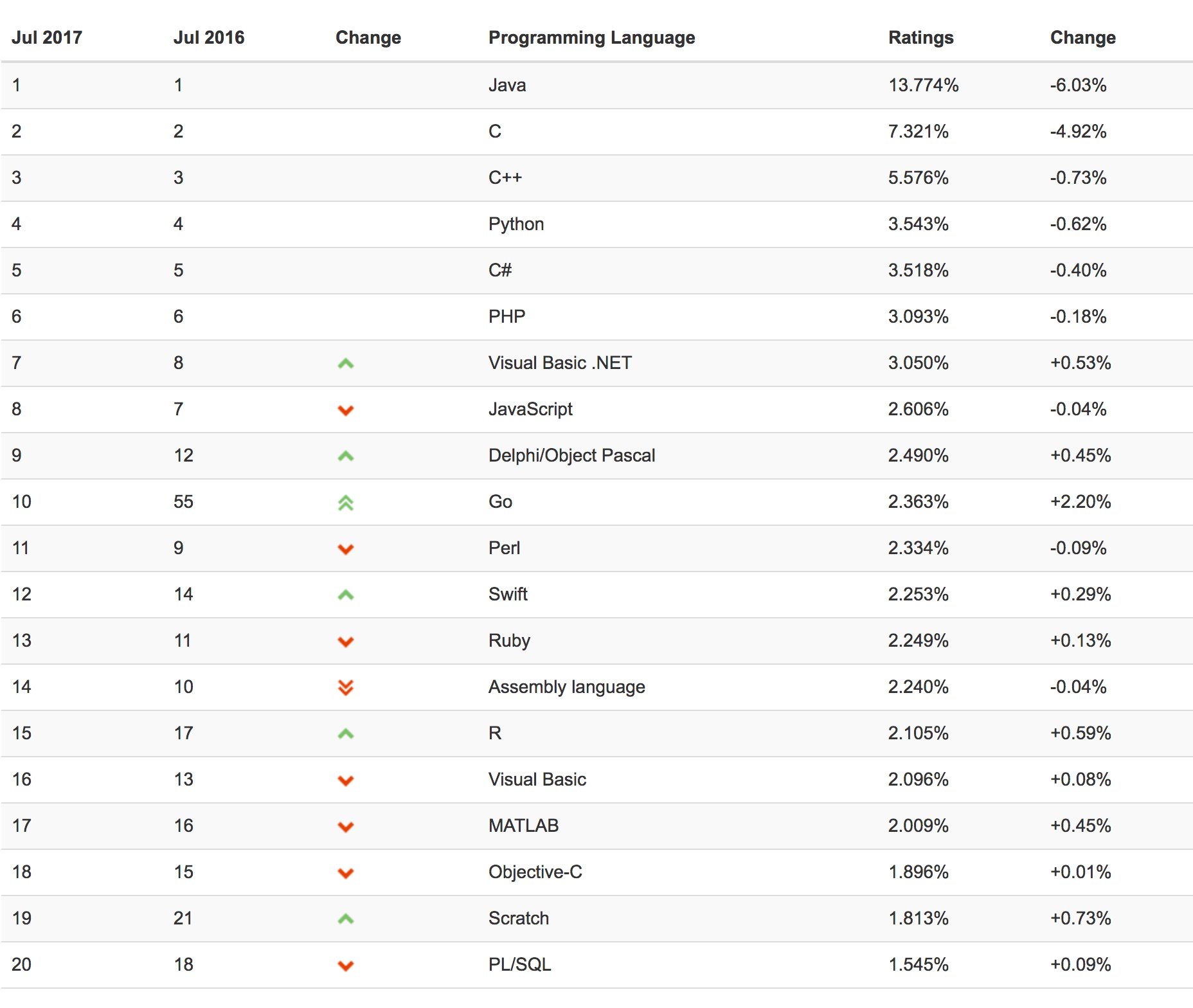
In July 2017, Go entered the top ten of the TIOBE language ranking for the first time. Today, let’s take a closer look at the execution process of Go compilation commands.
I. Understanding Go Environment Variables
1. GOROOT
The value of this environment variable is the current installation directory of the Go language.
2. GOPATH
The value of this environment variable is the set (meaning there can be many) of Go workspaces. A workspace is similar to a working directory. Different directories are separated by :.
A workspace is the directory where Go source files are placed. In general, Go source files need to be stored in a workspace.
A workspace usually contains three subdirectories. Manually create the following three directories: the src directory, the pkg directory, and the bin directory.
/home/halfrost/gorepo
├── bin
├── pkg
└── src
One additional point needs to be mentioned here: creating a new Go project in an IDE. After an IDE creates a new Go project, it will automatically run the go get command to fetch the corresponding base packages. During this process, it creates three directories: bin, pkg, and src. If you are not using an IDE, you need to create these three directories manually.
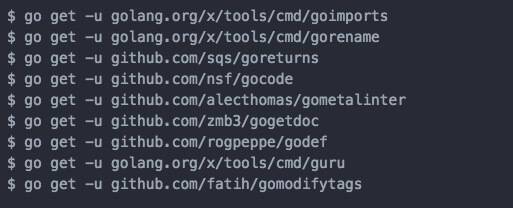
The image above shows some base packages that Atom’s go-plus plugin automatically fetches with go get when a new project is opened.
The bin directory stores executable files generated from Go command source files after they are installed with the go install command. (On macOS, these are Unix executable files; on Windows, they are exe files.)
Note: In two cases, the bin directory becomes meaningless.
- Once a valid GOBIN environment variable is set, the bin directory becomes meaningless.
- If GOPATH contains multiple workspace paths, the GOBIN environment variable must be set; otherwise, executable files for Go programs cannot be installed.
The pkg directory is used to store archive files (.a files) for code packages after they are installed with the go install command. The name of an archive file is the name of the code package. All archive files are stored under the platform-specific directory in this directory, namely under $GOPATH/pkg/$GOOS_$GOARCH, and are likewise organized by code package.
There are two hidden environment variables here: GOOS and GOARCH. We do not need to set these two environment variables; the system provides defaults. GOOS is the operating system type where Go is running, and GOARCH is the computing architecture where Go is running. The platform-specific directory is named $GOOS_$GOARCH. On macOS, this directory name is darwin_amd64.
The src directory organizes and stores Go source files in the form of code packages. Each code package corresponds one-to-one with a folder under the src directory. Each subdirectory is a code package.
There is one special case here: command source files do not necessarily have to be placed in the src folder.
Here we need to correct a misconception: “All Go code must be placed under the GOPATH directory” (this is wrong).
At this point, we need to discuss the classification of Go source files:
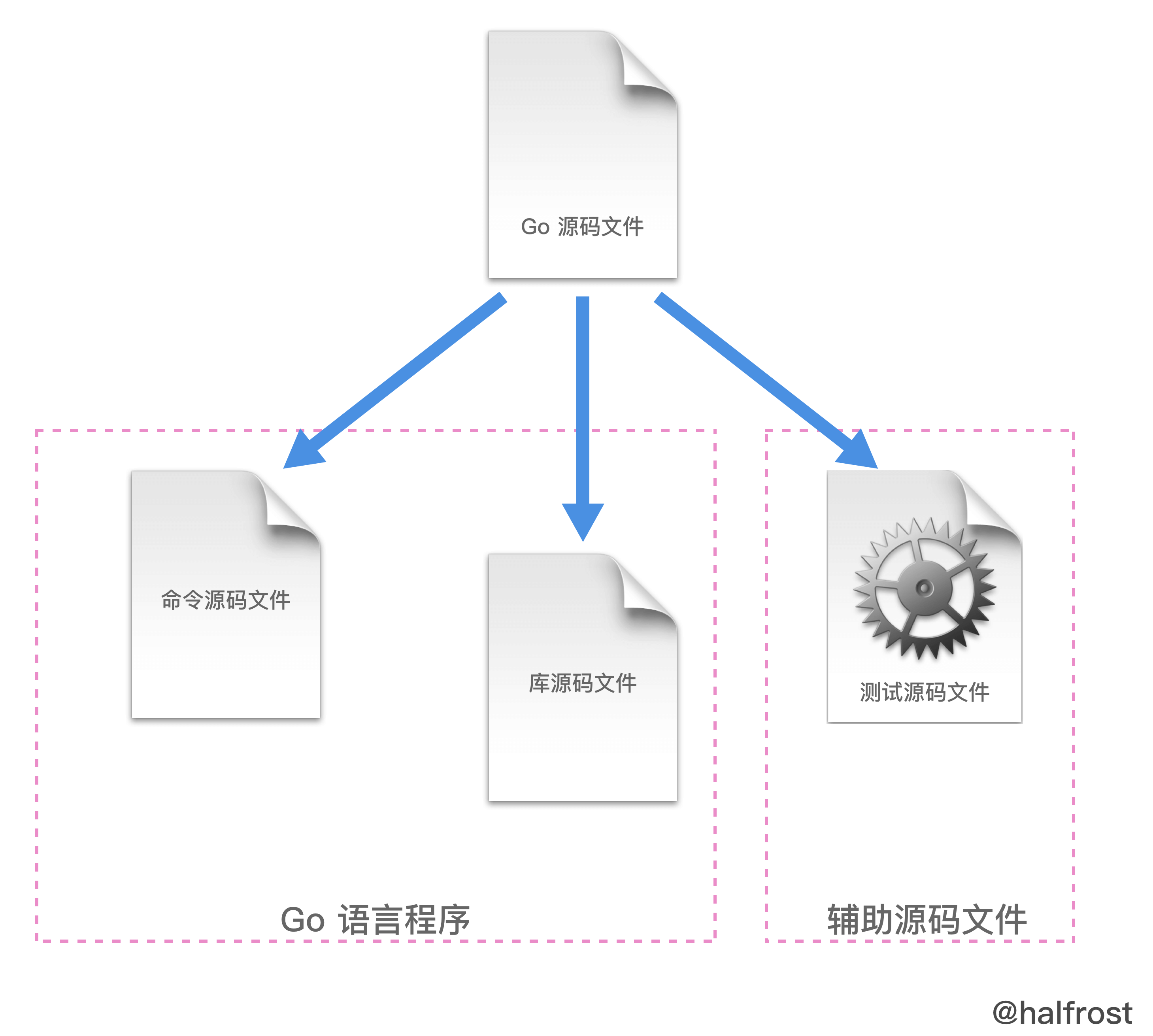
As shown above, they are divided into three categories:
(1) Command source files:
Files that declare themselves as belonging to the main code package and contain a main function with no parameter declarations and no result declarations.
After a command source file is installed, if GOPATH contains only one workspace, the corresponding executable file is stored under the bin folder of the current workspace; if there are multiple workspaces, it is installed into the directory pointed to by GOBIN.
Command source files are the entry point of a Go program.
It is also best not to put multiple command source files in the same code package. Although multiple command source files can be run separately with go run, they cannot be processed with go build or go install.
YDZ ~/LeetCode_Go/helloworld/src/me $  ls
helloworld.go  helloworldd.go
First, let’s clarify that the folder above contains two command source files, and both declare that they belong to the main package. The helloworld.go file prints hello world, while the helloworldd.go file prints worldd hello. Next, run go build and go install to see what happens.
YDZ ~/LeetCode_Go/helloworld/src/me $  go build

# _/Users/YDZ/LeetCode_Go/helloworld/src/me
./helloworldd.go:7: main redeclared in this block
	previous declaration at ./helloworld.go:50

YDZ ~/LeetCode_Go/helloworld/src/me $  go install

# _/Users/YDZ/LeetCode_Go/helloworld/src/me
./helloworldd.go:7: main redeclared in this block
	previous declaration at ./helloworld.go:50
This also proves that although multiple command source files can be run separately with go run, they cannot be processed by go build and go install.
Similarly, if command source files and library source files are mixed, the same problem occurs: library source files cannot be compiled and installed through conventional methods such as go build and go install. The specific example is similar to the one above, so the code is not repeated here.
Therefore, command source files should be placed in a separate code package.
(2) Library source files
Library source files are source files that do not have the two characteristics of command source files described above. They are ordinary source files that exist within a code package.
After a library source file is installed, the corresponding archive file (.a file) is stored under the platform-specific directory of pkg in the current workspace.
(3) Test source files
Code files whose names end with _test.go, and that must contain functions with the name prefix Test or Benchmark.
func TestXXX( t *testing.T) {

}
Functions whose names are prefixed with Test can accept only a *testing.T parameter; this type of test function is a functional test function.
func BenchmarkXXX( b *testing.B) {

}
Functions whose names use Benchmark as the prefix can only accept a *testing.B parameter. This type of test function is a benchmark function.
Now the answer is obvious:
Command source files can be run independently. You can run them directly with the go run command, or obtain the corresponding executable file via the go build or go install command. Therefore, command source files can be run from any directory on the machine.
For example:
When we practice algorithm problems on LeetCode, what we write is a program; this is a command source file. You can create a new Go file in any folder on your computer and start solving problems. After writing the code, you can run it and compare the output. If the answer is correct, you can submit the code.
However, the code in a company project cannot be handled this way; it can only be stored under the GOPATH directory. This is because a company project cannot consist only of command source files; it will certainly include library source files, and may even include test source files.
3.GOBIN
The value of this environment variable is the directory for the executable files of Go programs.
4.PATH
To conveniently use Go language commands and the executable files of Go programs, you need to add its value. The append operation still uses : as the separator.
export PATH=$PATH:$GOBIN
That’s an overview of the four important Go environment variables. There are also some other environment variables, which you can view with the go env command.
YDZ ~ $  go env
GOARCH="amd64"
GOBIN="/Users/YDZ/Ele_Project/clairstormeye/bin"
GOEXE=""
GOHOSTARCH="amd64"
GOHOSTOS="darwin"
GOOS="darwin"
GOPATH="/Users/YDZ/Ele_Project/clairstormeye"
GORACE=""
GOROOT="/usr/local/Cellar/go/1.8.3/libexec"
GOTOOLDIR="/usr/local/Cellar/go/1.8.3/libexec/pkg/tool/darwin_amd64"
GCCGO="gccgo"
CC="clang"
GOGCCFLAGS="-fPIC -m64 -pthread -fno-caret-diagnostics -Qunused-arguments -fmessage-length=0 -fdebug-prefix-map=/var/folders/66/dcf61ty92rgd_xftrsxgx5yr0000gn/T/go-build977187889=/tmp/go-build -gno-record-gcc-switches -fno-common"
CXX="clang++"
CGO_ENABLED="1"
PKG_CONFIG="pkg-config"
CGO_CFLAGS="-g -O2"
CGO_CPPFLAGS=""
CGO_CXXFLAGS="-g -O2"
CGO_FFLAGS="-g -O2"
CGO_LDFLAGS="-g -O2"
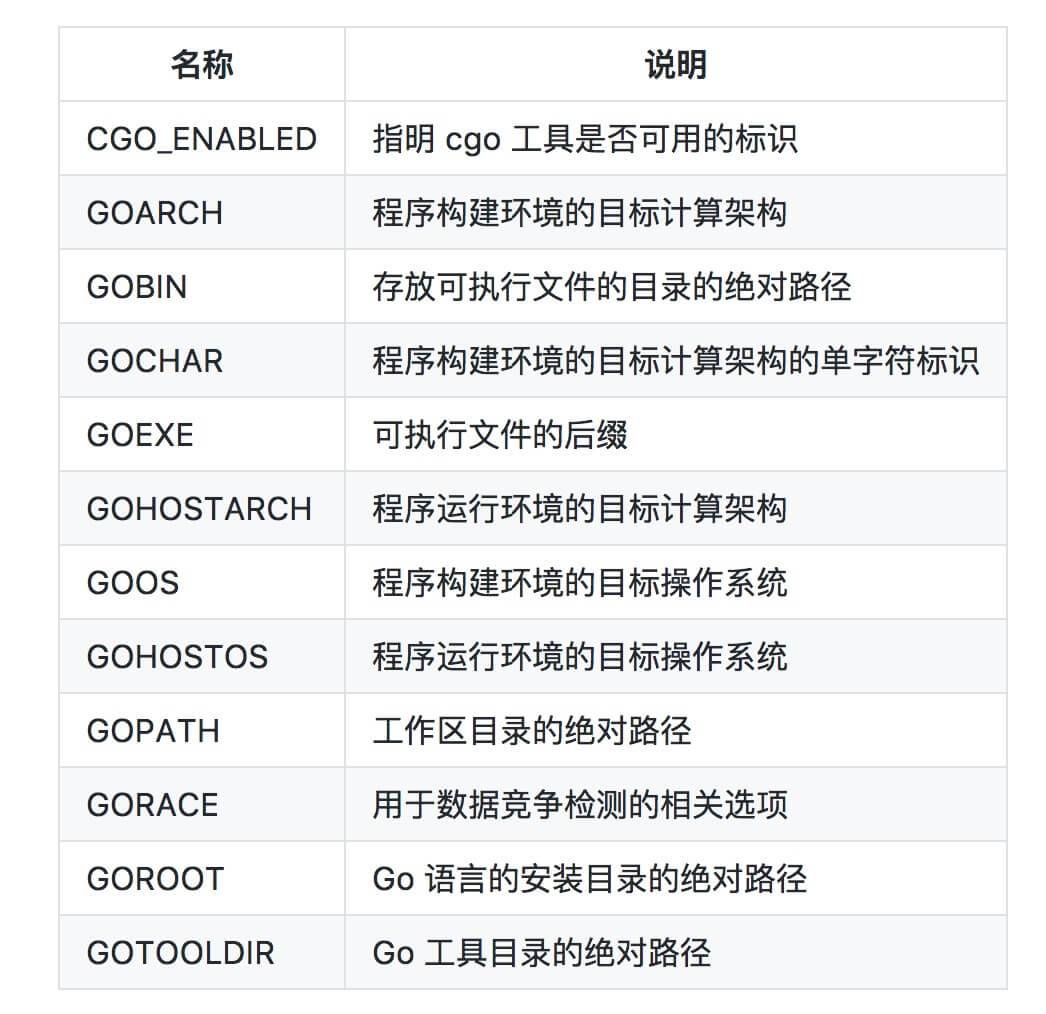
Before exploring Go’s compilation commands, one point needs to be clarified:
Go programs are organized through packages.
The line package (assuming package main in our example) tells us which package the current file belongs to, while the package name main tells us that it is an independently runnable package; after compilation, it produces an executable file. Apart from the main package, all other packages eventually generate *.a files (that is, package files) and are placed under $GOPATH/pkg/$GOOS_$GOARCH (on Mac, for example, this would be $GOPATH/pkg/darwin_amd64).
Go uses packages (similar to Python modules) to organize code. The main.main() function (which resides in the main package) is the entry point for every standalone runnable program.
Every independently runnable Go program must contain a
package main, and thismainpackage must contain an entry functionmain; this function has neither parameters nor return values.
II. First Look at Go’s Compilation Process
As of the latest Go version, 1.8.3, there are only the following 16 basic commands.
	build       compile packages and dependencies
	clean       remove object files
	doc         show documentation for package or symbol
	env         print Go environment information
	bug         start a bug report
	fix         run go tool fix on packages
	fmt         run gofmt on package sources
	generate    generate Go files by processing source
	get         download and install packages and dependencies
	install     compile and install packages and dependencies
	list        list packages
	run         compile and run Go program
	test        test packages
	tool        run specified go tool
	version     print Go version
	vet         run go tool vet on packages
The compilation-related commands are build, get, install, and run. Next, let’s look at what each of these four commands does.
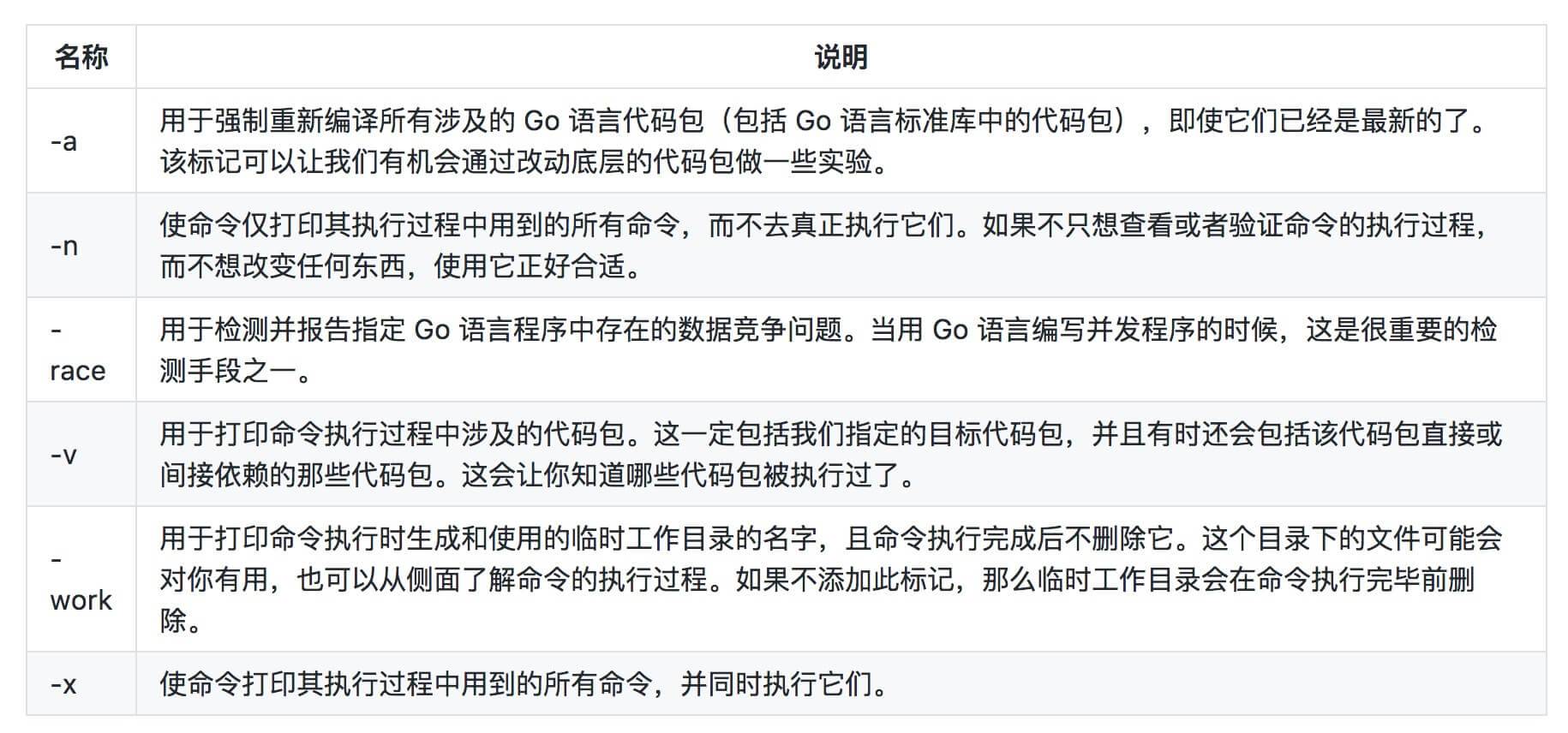
Before analyzing these four commands in detail, let’s first list the common command flags that apply to all of them:
1. go run
This command is specifically used to run command source files. Note that this command is not used to run all Go source files!
The go run command can only accept one command source file and zero or more library source files (which must all belong to the main package) as file arguments, and it cannot accept test source files. When executed, it checks the types of the source files. If the arguments contain more than one command source file or no command source file at all, the go run command will only print an error message and exit, without continuing execution.
So what exactly does this command do? Let’s analyze it:
YDZ ~/LeetCode_Go/helloworld/src/me $  go run -n helloworld.go

#

# command-line-arguments

#

mkdir -p $WORK/command-line-arguments/_obj/
mkdir -p $WORK/command-line-arguments/_obj/exe/
cd /Users/YDZ/LeetCode_Go/helloworld/src/me
/usr/local/Cellar/go/1.8.3/libexec/pkg/tool/darwin_amd64/compile -o $WORK/command-line-arguments.a -trimpath $WORK -p main -complete -buildid 2841ae50ca62b7a3671974e64d76e198a2155ee7 -D _/Users/YDZ/LeetCode_Go/helloworld/src/me -I $WORK -pack ./helloworld.go
cd .
/usr/local/Cellar/go/1.8.3/libexec/pkg/tool/darwin_amd64/link -o $WORK/command-line-arguments/_obj/exe/helloworld -L $WORK -w -extld=clang -buildmode=exe -buildid=2841ae50ca62b7a3671974e64d76e198a2155ee7 $WORK/command-line-arguments.a
$WORK/command-line-arguments/_obj/exe/helloworld
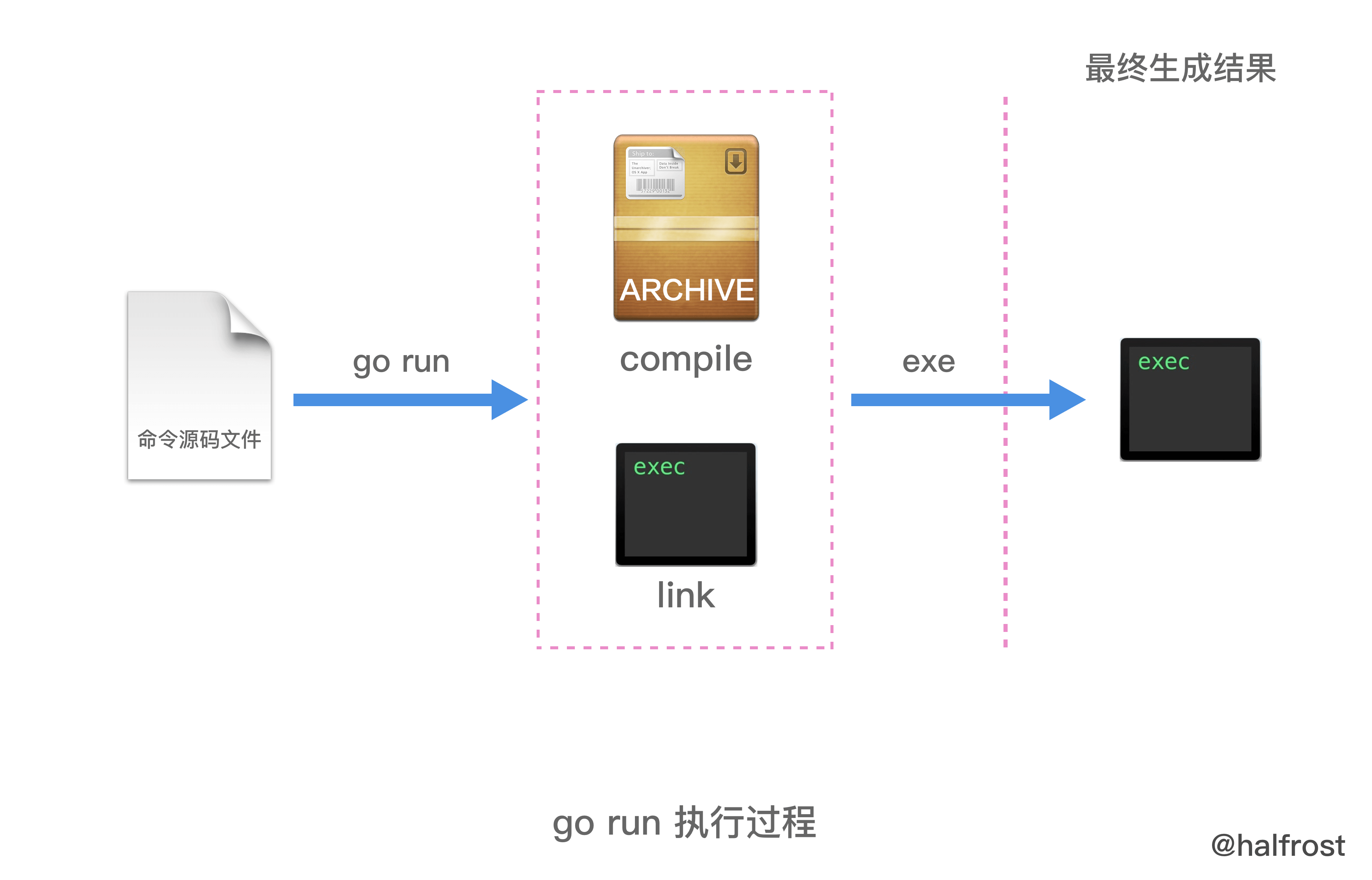
Here you can see that two temporary directories, _obj and exe, are created. The compile command is executed first, followed by link, generating the archive file .a and the final executable. The final executable is placed in the exe directory. The last step of the command is to execute the executable.
To summarize, as shown below:
For example, the generated temporary files can be viewed with go run -work. Suppose the current temporary directory generated is the following path:
/var/folders/66/dcf61ty92rgd_xftrsxgx5yr0000gn/T/go-build876472071
Print the directory structure:
├── command-line-arguments
│   └── _obj
│       └── exe
│           └── helloworld
└── command-line-arguments.a
As you can see, the final go run command generates two files: an archive file and an executable file. The archive file command-line-arguments is a temporary package name assigned by Go to the command source files. In the next few commands, the generated temporary package will all use this name.
When the go run command is executed a second time, if it detects that the imported packages have not changed, go run will not compile those imported packages again. Instead, it links them in statically.
go run -a
Adding the -a flag forces all code to be compiled. Even if the archive file .a already exists, it will be recompiled.
If the build is too slow, you can add -p n, which enables parallel compilation; n is the degree of parallelism. In general, n should be the number of logical CPUs.
2. go build
When a code package contains exactly one command source file, running the go build command in that directory generates an executable file with the same name as the directory.
// Suppose the current folder is named myGoRepo

YDZ:~/helloworld/src/myGoRepo $ ls
helloworld.go
YDZ:~/helloworld/src/myGoRepo $ go build
YDZ:~/helloworld/src/myGoRepo $ ls
helloworld.go  myGoRepo
This directly generates an executable file named after the current directory in the current directory (on macOS, it is a Unix executable file; on Windows, it is an .exe file).
Let’s first record the MD5 value of this executable file.
YDZ ~/helloworld/src/myGoRepo $  md5 /Users/YDZ/helloworld/src/myGoRepo/myGoRepo
MD5 (/Users/YDZ/helloworld/src/myGoRepo/myGoRepo) = 1f23f6efec752ed34b9bd22b5fa1ddce
However, in this case, if you use the go install command and there is only one workspace in GOPATH, the corresponding executable will be generated under the bin directory of the current workspace. If there are multiple workspaces under GOPATH, the corresponding executable will be generated under GOBIN.
Let’s continue from the go build operation we just performed.
YDZ:~/helloworld/src/myGoRepo $ ls
helloworld.go myGoRepo
YDZ:~/helloworld/src/myGoRepo $ go install
YDZ:~/helloworld/src/myGoRepo $ ls
helloworld.go
After running go install, you may find that the executable is gone! Where did it go? It has actually been moved to the bin directory (if there are multiple workspaces under GOPATH, it will be placed in the GOBIN directory).
YDZ:~/helloworld/bin $ ls
myGoRepo
Next, compare this file’s MD5 hash:
YDZ ~/helloworld/bin $  md5 /Users/YDZ/helloworld/bin/myGoRepo
MD5 (/Users/YDZ/helloworld/bin/myGoRepo) = 1f23f6efec752ed34b9bd22b5fa1ddce
It is exactly the same as the executable produced by the go build command. We can reasonably infer that the executable just produced by the go build command was moved into the bin directory (if there are multiple workspaces under GOPATH, it will be placed in the GOBIN directory).
So what exactly do go build and go install do?
We will come back to that question shortly. First, let’s talk about go build.
go build is used to compile the source files or code packages we specify, as well as their dependency packages. However, note that if it is used to compile non-command source files, that is, library source files, go build will not produce any output after it finishes. In this case, the go build command only checks the validity of the library source files. It performs a validation-oriented compilation and does not output any result files.
When go build compiles command source files, it generates an executable file in the directory where the command is executed. The example above also confirms this process.
If no directory path is appended after go build, it treats the current directory as the code package and compiles it. If an import path of a code package is provided as an argument after the go build command, then that code package and its dependencies will be compiled.
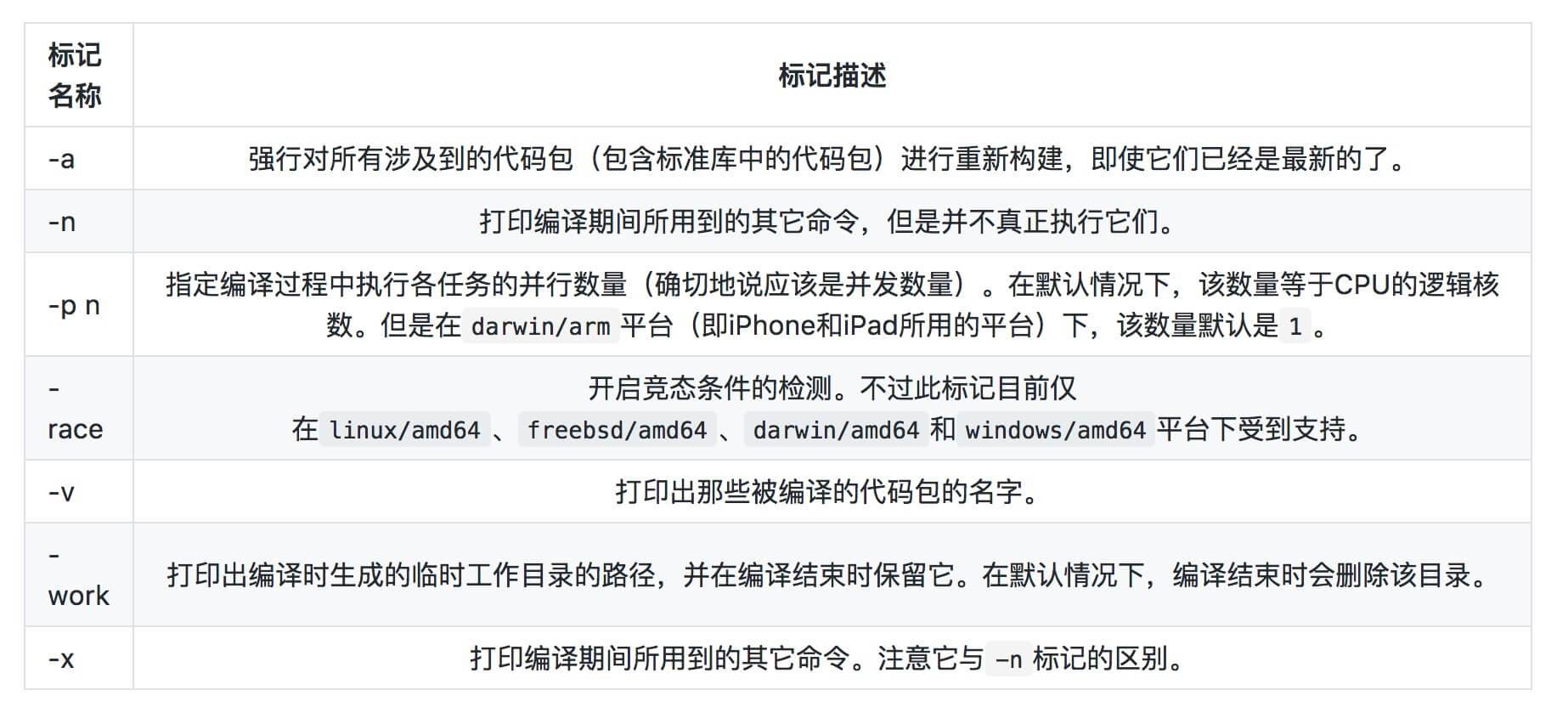
The -a flag of go run also works with go build. Adding -a to go build forces all involved code packages to be compiled. Without -a, only code packages whose archive files are not up to date will be compiled.
go build can use the -o flag to specify the name of the output file (in this example, the executable file). It is one of the most commonly used go build flags. However, note that when using the -o flag, you cannot compile multiple code packages at the same time.
The -i flag causes the go build command to install any code packages that the compilation target depends on and that have not yet been installed. Here, installation means producing the archive file corresponding to the code package and placing it into the appropriate subdirectory under the pkg subdirectory of the current workspace directory. By default, these code packages are not installed.
Some commonly used go build flags are as follows:
So what exactly does the go build command do? Let’s print the execution process step by step. First, let’s see what happens when go build is run on a command source file.
#

# command-line-arguments

#

mkdir -p $WORK/command-line-arguments/_obj/
mkdir -p $WORK/command-line-arguments/_obj/exe/
cd /Users/YDZ/MyGitHub/LeetCode_Go/helloworld/src/me
/usr/local/Cellar/go/1.8.3/libexec/pkg/tool/darwin_amd64/compile -o $WORK/command-line-arguments.a -trimpath $WORK -p main -complete -buildid 2841ae50ca62b7a3671974e64d76e198a2155ee7 -D _/Users/YDZ/MyGitHub/LeetCode_Go/helloworld/src/me -I $WORK -pack ./helloworld.go
cd .
/usr/local/Cellar/go/1.8.3/libexec/pkg/tool/darwin_amd64/link -o $WORK/command-line-arguments/_obj/exe/a.out -L $WORK -extld=clang -buildmode=exe -buildid=2841ae50ca62b7a3671974e64d76e198a2155ee7 $WORK/command-line-arguments.a
mv $WORK/command-line-arguments/_obj/exe/a.out helloworld
As you can see, the execution process is largely the same as go run. The only difference is the final step: go run executes the executable file, whereas the go build command moves the executable file into the current directory.
Print the tree structure of the generated temporary directory.
.
├── command-line-arguments
│   └── _obj
│       └── exe
└── command-line-arguments.a
Its structure is basically the same as the go run command. The only difference is that the executable is no longer in the exe folder; it has been moved to the folder where go build was executed.
Now let’s look at what happens after running go build on the library source files:
#

# _/Users/YDZ/Downloads/goc2p-master/src/pkgtool

#

mkdir -p $WORK/_/Users/YDZ/Downloads/goc2p-master/src/pkgtool/_obj/
mkdir -p $WORK/_/Users/YDZ/Downloads/goc2p-master/src/
cd /Users/YDZ/Downloads/goc2p-master/src/pkgtool
/usr/local/Cellar/go/1.8.3/libexec/pkg/tool/darwin_amd64/compile -o $WORK/_/Users/YDZ/Downloads/goc2p-master/src/pkgtool.a -trimpath $WORK -p _/Users/YDZ/Downloads/goc2p-master/src/pkgtool -complete -buildid cef542c3da6d3126cdae561b5f6e1470aff363ba -D _/Users/YDZ/Downloads/goc2p-master/src/pkgtool -I $WORK -pack ./envir.go ./fpath.go ./ipath.go ./pnode.go ./util.go
Here you can see that the go build command only compiled the library source files once and did nothing else.
Now let’s look at the tree structure of the generated temporary directory.
.
└── _
    └── Users
        └── YDZ
            └── Downloads
                └── goc2p-master
                    └── src
                        ├── pkgtool
                        │   └── _obj
                        └── pkgtool.a
You can see that the leading portion of its directory hierarchy is the relative path to the code package on the local machine. An archive file, the .a file, is then generated.
To summarize, as shown below:
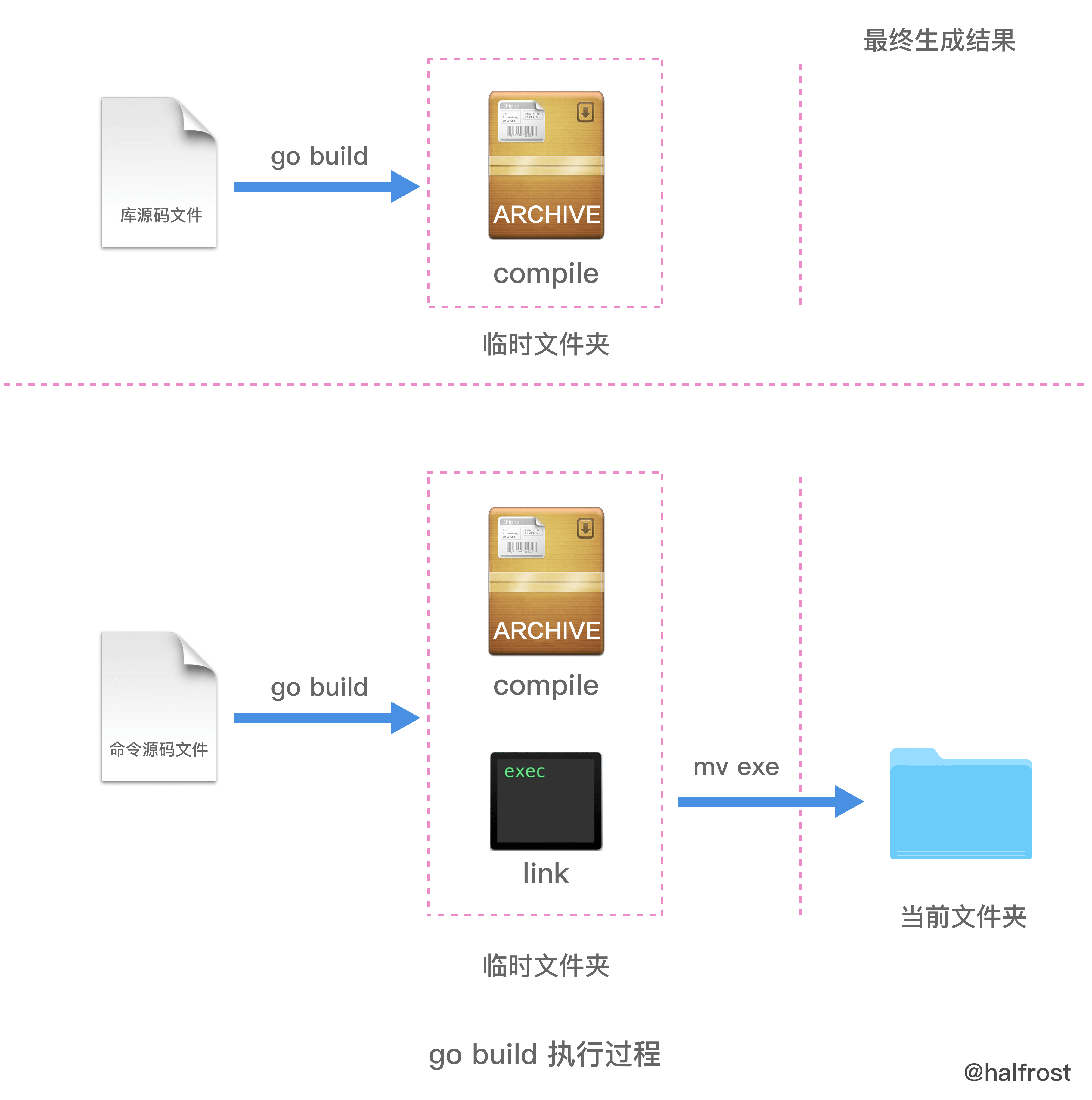
As for the difference between go build and go install, it will become clear after we analyze go install. Next, let’s continue with go install.
3. go install
The go install command is used to compile and install code packages or source files.
go install compiles and installs the specified code packages and their dependencies. If the dependencies of the specified code packages have not yet been compiled and installed, this command processes those dependencies first. As with the go build command, package arguments passed to go install should be provided in the form of import paths. In addition, most of the flags supported by go build can also be used with
go install. In fact, go install does only one thing more than go build: it installs the compiled result files into the specified directory.
Installing a code package generates an archive file (that is, a .a file) under the platform-specific directory in pkg within the current workspace.
Installing command source files generates an executable file in the bin directory of the current workspace (if there are multiple workspaces under GOPATH, it will be placed in the GOBIN directory).
Similarly, if no arguments are appended to the go install command, it treats the current directory as a code package and installs it. This is exactly the same as the go build command.
If the go install command is followed by a package import path as an argument, that package and its dependencies will all be installed.
If the go install command is followed by command source files and related library source files as arguments, only those files will be compiled and installed.
So what exactly does the go install command do? Let’s print the execution process step by step.
#

# command-line-arguments

#

mkdir -p $WORK/command-line-arguments/_obj/
mkdir -p $WORK/command-line-arguments/_obj/exe/
cd /Users/YDZ/MyGitHub/LeetCode_Go/helloworld/src/me
/usr/local/Cellar/go/1.8.3/libexec/pkg/tool/darwin_amd64/compile -o $WORK/command-line-arguments.a -trimpath $WORK -p main -complete -buildid 2841ae50ca62b7a3671974e64d76e198a2155ee7 -D _/Users/YDZ/MyGitHub/LeetCode_Go/helloworld/src/me -I $WORK -pack ./helloworld.go
cd .
/usr/local/Cellar/go/1.8.3/libexec/pkg/tool/darwin_amd64/link -o $WORK/command-line-arguments/_obj/exe/a.out -L $WORK -extld=clang -buildmode=exe -buildid=2841ae50ca62b7a3671974e64d76e198a2155ee7 $WORK/command-line-arguments.a
mkdir -p /Users/YDZ/Ele_Project/clairstormeye/bin/
mv $WORK/command-line-arguments/_obj/exe/a.out /Users/YDZ/Ele_Project/clairstormeye/bin/helloworld
The preceding steps are still exactly the same as for go run and go build; the only difference is in the final step. go install installs command source files into the bin directory of the current workspace (if there are multiple workspaces under GOPATH, they will be placed in the GOBIN directory). If they are library source files, they will be installed under the platform-specific directory in pkg within the current workspace.
Now let’s look at the structure of the temporary directory generated by go install:
.
├── command-line-arguments
│   └── _obj
│       └── exe
└── command-line-arguments.a
The structure is the same as when running the go build command, and the files ultimately generated are also moved into the corresponding target directories.
To summarize, as shown below:
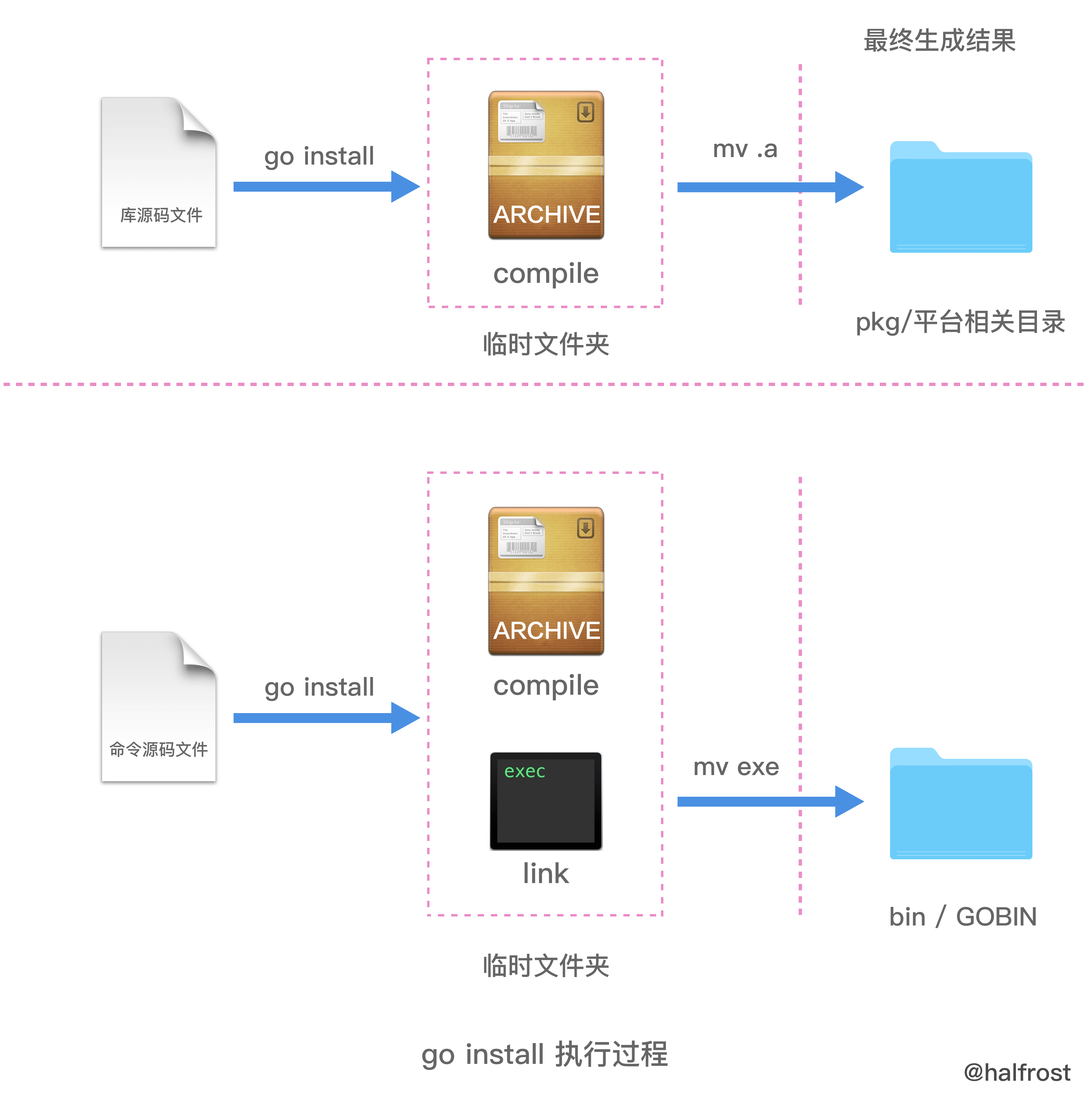
When installing multiple library source files, you may encounter the following issue:
hc@ubt:~/golang/goc2p/src/pkgtool$ go install envir.go fpath.go ipath.go pnode.go util.go
go install: no install location for .go files listed on command line (GOBIN not set)
Moreover, even after we set the environment variable GOBIN to the correct value, this error message will still appear. This is because only when installing command source files does the command use the value of the GOBIN environment variable as the output directory for the result file. When installing library source files, the variable inside the command that represents the output directory path for the result file is not assigned a value. In the end, the command finds that it is still an invalid empty value. Therefore, the command returns the same “no install location” error. This leads to a conclusion: we can only install library source files by installing their package, and cannot list and install them directly with the go install command. In addition, the go install command currently does not accept the -o flag to customize the output location of the result file. This also indirectly shows that
the go install command does not support installation operations for library source files.
4. go get
The go get command is used to download and install packages from remote code repositories, such as GitHub. Note that the go get command downloads the current package into the src directory of the first workspace in $GOPATH and installs it.
If you add the -d flag when running go get, the operation only downloads the package and does not install it. For example, some very special packages require special handling during installation, so we need to download them first; this is where the -d flag is used.
Another very useful flag is -u. With it, you can use the network to update existing packages and their dependencies. If you have already downloaded a package but that package has since been updated, you can use the -u flag to update the corresponding local package directly. If you do not add the -u flag, running go get on an existing package will appear to do nothing. Only when the -u flag is added will the command run git pull to fetch the latest version of the package, then download and install it.
The go get command also has a highly commendable feature: intelligent downloading. After it checks out or updates a package, it looks for a tag or branch corresponding to the version number of the locally installed Go toolchain. For example, if the installed Go version on the machine is 1.x, the go get command will look in the package’s remote repository for a tag or branch named “go1”. If the specified tag or branch is found, the local package version is switched to that tag or branch. If the specified tag or branch is not found, the local package version is switched to the latest version on the mainline.
Some commonly used go get flags are as follows:
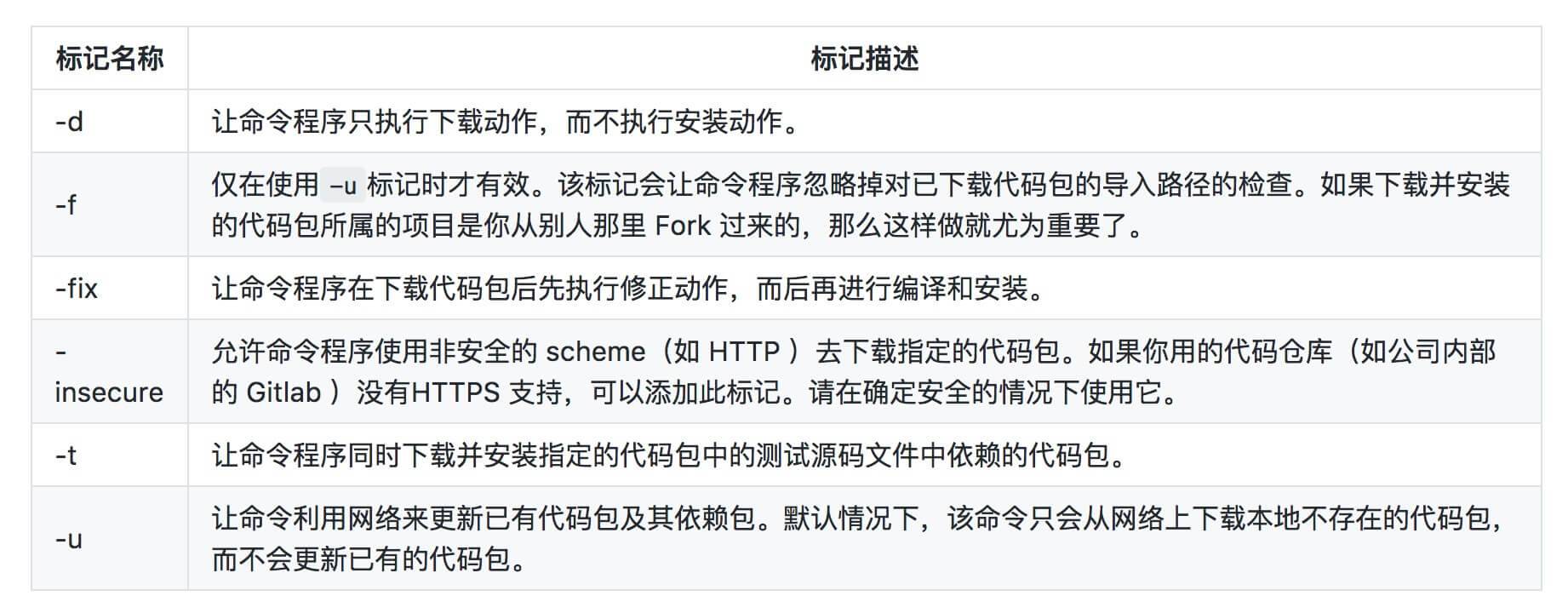
What exactly does the go get command do? Let’s print out the execution process step by step.
cd .
git clone https://github.com/go-errors/errors /Users/YDZ/Ele_Project/clairstormeye/src/github.com/go-errors/errors
cd /Users/YDZ/Ele_Project/clairstormeye/src/github.com/go-errors/errors
git submodule update --init --recursive
cd /Users/YDZ/Ele_Project/clairstormeye/src/github.com/go-errors/errors
git show-ref
cd /Users/YDZ/Ele_Project/clairstormeye/src/github.com/go-errors/errors
git submodule update --init --recursive
WORK=/var/folders/66/dcf61ty92rgd_xftrsxgx5yr0000gn/T/go-build124856678
mkdir -p $WORK/github.com/go-errors/errors/_obj/
mkdir -p $WORK/github.com/go-errors/
cd /Users/YDZ/Ele_Project/clairstormeye/src/github.com/go-errors/errors
/usr/local/Cellar/go/1.8.3/libexec/pkg/tool/darwin_amd64/compile -o $WORK/github.com/go-errors/errors.a -trimpath $WORK -p github.com/go-errors/errors -complete -buildid bb3526a8c1c21853f852838637d531b9fcd57d30 -D _/Users/YDZ/Ele_Project/clairstormeye/src/github.com/go-errors/errors -I $WORK -pack ./error.go ./parse_panic.go ./stackframe.go
mkdir -p /Users/YDZ/Ele_Project/clairstormeye/pkg/darwin_amd64/github.com/go-errors/
mv $WORK/github.com/go-errors/errors.a /Users/YDZ/Ele_Project/clairstormeye/pkg/darwin_amd64/github.com/go-errors/errors.a
Here it is very clear that after the go get command finishes, it invokes git clone to download the source code and compile it. In the end, the library source files are compiled into archive files and installed under the platform-specific directory in pkg.
To summarize, as shown below:
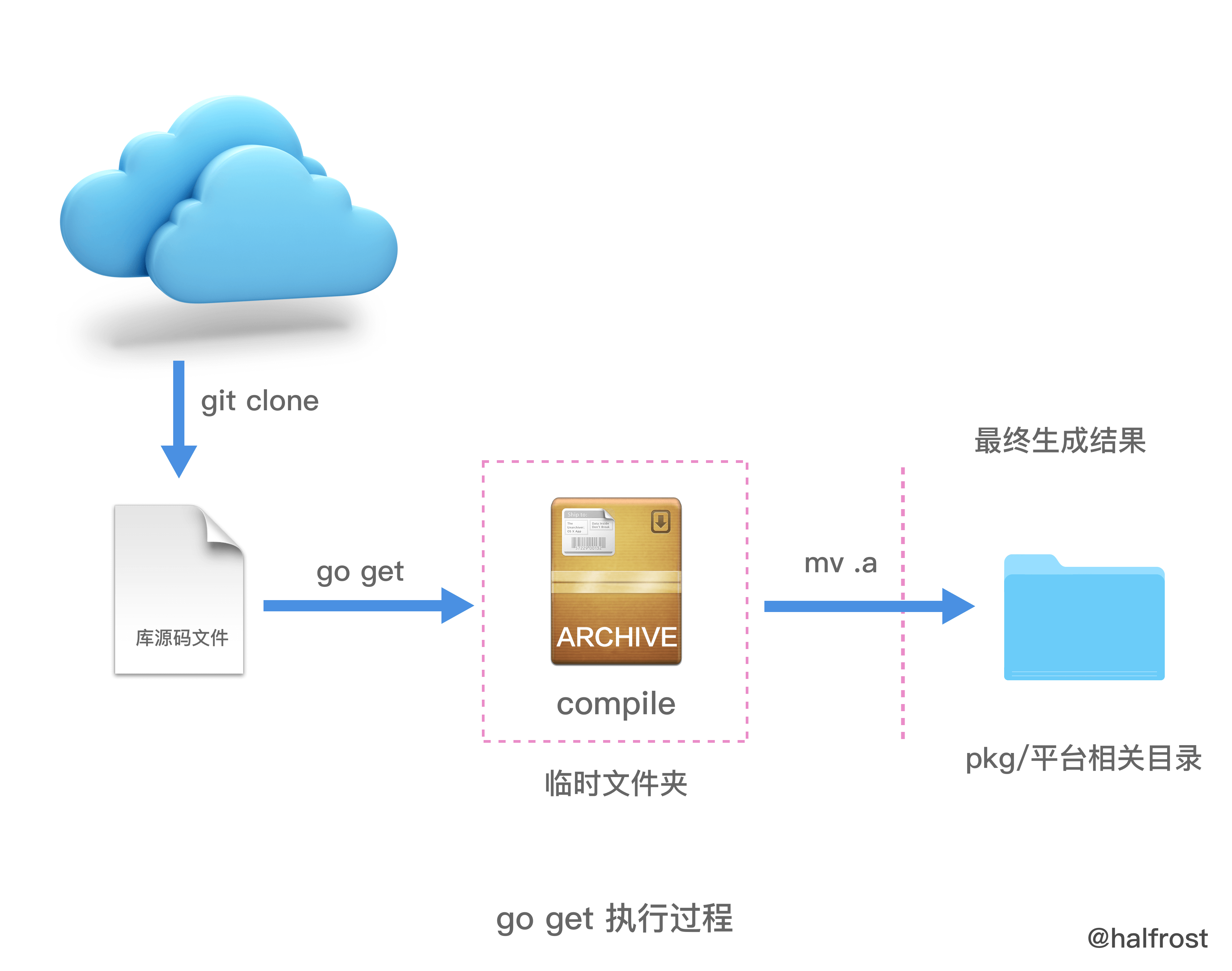
One additional note about workspaces:
In general, to separate our own code from third-party code, we set up two or more workspaces. Suppose we now have a workspace whose directory path is /home/hc/golang/lib, and it is the first directory path in the value of the GOPATH environment variable. Note that the paths included in the GOPATH environment variable must not overlap with the value of the GOROOT environment variable. Now, if we use the go get command to download and install code packages, those packages will all be installed in the workspace above. For the moment, let’s call this workspace the
Lib workspace.
If you use vendor to manage dependencies, the commonly used commands are:
- go get -u -x -a github.com/golang/geo/s2
- rm -rf Godeps vendor && make dep
III. Static Linking or Dynamic Linking?
When Go was first released, static linking was promoted as an advantage: deployment required only a single compiled executable, with nothing else attached. By packaging the runtime and dependency libraries directly inside the executable, deployment and release operations were simplified, with no need to install a runtime environment in advance or download numerous third-party libraries. However, recent versions have also added support for dynamic linking.
Ordinary go build and go install use static linking. We can verify this:
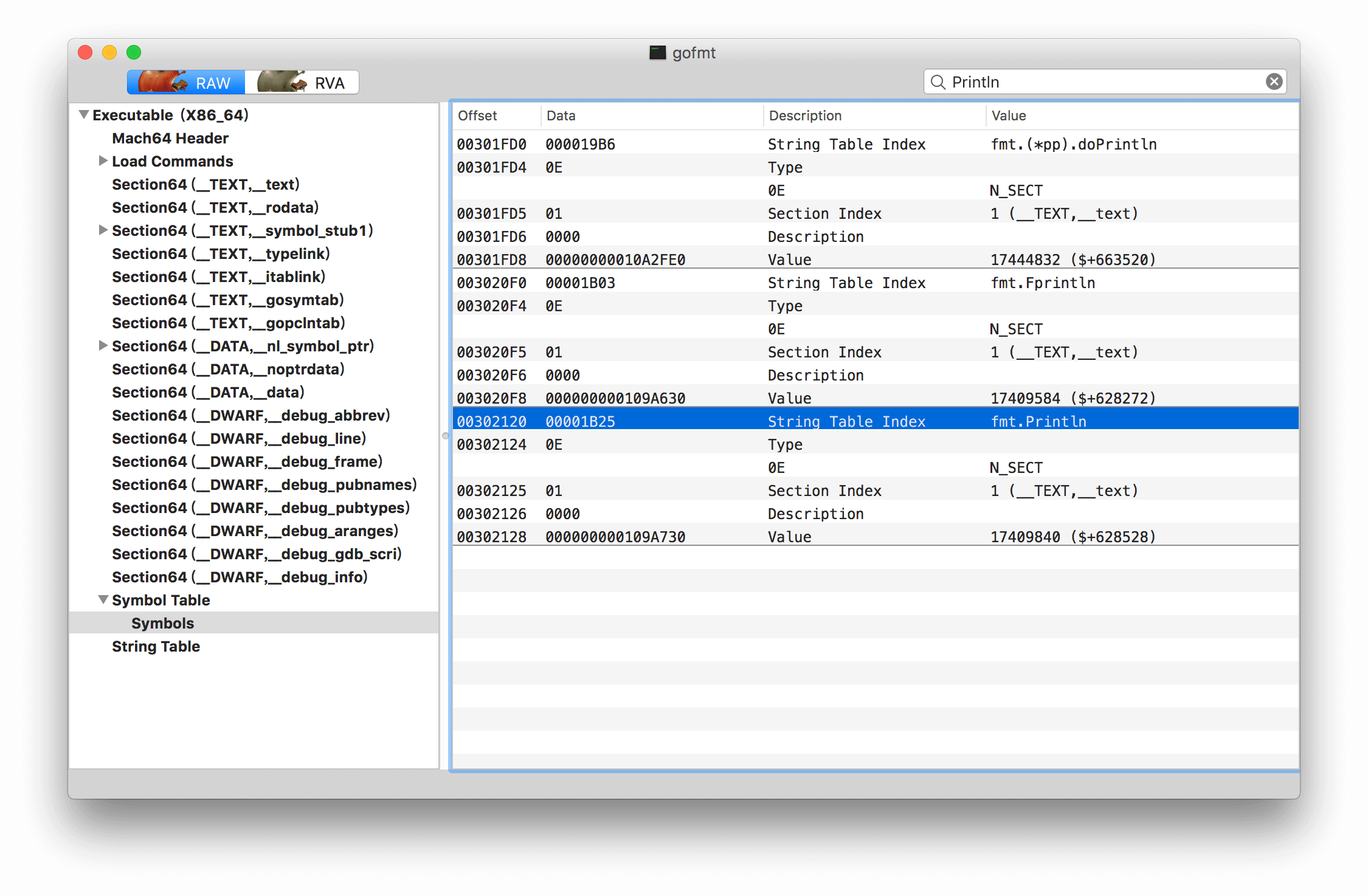
The image above shows the gofmt file opened with MachOView. You can see that the address of fmt.Println is fixed, so we can determine that it is statically linked.
How does the latest version of Go support dynamic linking?
Add the -buildmode parameter when running go build or go install.
The available buildmode options are:
archive: Build non-main packages into .a files. main packages are ignored. c-archive: Build the main package and all packages it imports into a C archive file. c-shared: Build the listed main packages, together with all packages they import, into C dynamic libraries. shared: Combine all listed non-main packages into a single dynamic library. exe: Build the listed main packages and everything they import into executable files. Packages not named main are ignored. By default, listed main packages are built into executable files, and listed non- main packages are built into .a files.
As for dynamic libraries, I have not practiced this yet, so I won’t go deeper here. After I have enough hands-on experience, I will write a separate article about dynamic linking in Go. The only point I want to make here is that Go no longer supports only static linking; it now supports dynamic linking as well!
Reference:
Go Command Tutorial
Go Concurrency Programming in Practice
GitHub Repo: Halfrost-Field
Follow: halfrost · GitHub
Source: https://halfrost.com/go_command/
