A Deep Dive into Go Slice Internals
A slice is a fundamental data structure in Go, used to manage collections of data. The design idea behind slices comes from the concept of dynamic arrays, enabling developers to more conveniently use a data structure that can grow and shrink automatically. However, a slice itself is not a dynamic array or an array pointer. Common slice operations include reslice, append, and copy. At the same time, slices also have excellent properties such as being indexable and iterable.
1. Slices and Arrays

How should you choose between slices and arrays? Let’s discuss this question in detail.
In Go, unlike C, where array variables are implicitly used as pointers, Go arrays are value types: assignment and function argument passing both copy the entire array data.
func main() {
	arrayA := [2]int{100, 200}
	var arrayB [2]int

	arrayB = arrayA

	fmt.Printf("arrayA : %p , %v\n", &arrayA, arrayA)
	fmt.Printf("arrayB : %p , %v\n", &arrayB, arrayB)

	testArray(arrayA)
}

func testArray(x [2]int) {
	fmt.Printf("func Array : %p , %v\n", &x, x)
}
Output:
arrayA : 0xc4200bebf0 , [100 200]
arrayB : 0xc4200bec00 , [100 200]
func Array : 0xc4200bec30 , [100 200]
As you can see, all three memory addresses are different, which confirms that array assignment and function argument passing in Go are both value copies. So what problem does this cause?
Imagine using arrays every time you pass arguments. The array would be copied each time. If the array size is 1 million, on a 64-bit machine this would cost roughly 8 million bytes, or 8 MB of memory. That would consume a large amount of memory. So some people think of using a pointer to the array when passing arguments to a function.
func main() {
	arrayA := []int{100, 200}
	testArrayPoint(&arrayA)   // 1.Pass array pointer
	arrayB := arrayA[:]
	testArrayPoint(&arrayB)   // 2.Pass slice
	fmt.Printf("arrayA : %p , %v\n", &arrayA, arrayA)
}

func testArrayPoint(x *[]int) {
	fmt.Printf("func Array : %p , %v\n", x, *x)
	(*x)[1] += 100
}
Printed result:
func Array : 0xc4200b0140 , [100 200]
func Array : 0xc4200b0180 , [100 300]
arrayA : 0xc4200b0140 , [100 400]
This also proves that the array pointer does achieve the effect we want. Even if an array with 1 billion elements is passed in, only 8 bytes of memory need to be allocated on the stack for the pointer. This uses memory more efficiently and performs better than before.
However, passing a pointer has a drawback. As you can see from the printed output, the pointer addresses in the first and third lines are the same. If the pointer to the original array changes, then the pointer inside the function will change along with it.
This is where the advantages of slices become apparent. Passing array parameters using slices can both save memory and properly handle shared memory. The second line of the printed output is the slice; the slice’s pointer is different from the pointer of the original array.
From this, we can draw the following conclusion:
Passing the first large array to a function consumes a lot of memory. Passing parameters as slices can avoid the issues above. Slices are passed by reference, so they do not require extra memory and are more efficient than using arrays.
However, there are still counterexamples.
package main

import "testing"

func array() [1024]int {
	var x [1024]int
	for i := 0; i < len(x); i++ {
		x[i] = i
	}
	return x
}

func slice() []int {
	x := make([]int, 1024)
	for i := 0; i < len(x); i++ {
		x[i] = i
	}
	return x
}

func BenchmarkArray(b *testing.B) {
	for i := 0; i < b.N; i++ {
		array()
	}
}

func BenchmarkSlice(b *testing.B) {
	for i := 0; i < b.N; i++ {
		slice()
	}
}
Let’s run a performance test and disable inlining and optimizations to observe heap memory allocation for slices.
go test -bench . -benchmem -gcflags "-N -l"
The output is rather “surprising”:
BenchmarkArray-4          500000              3637 ns/op               0 B/op          0 alloc s/op
BenchmarkSlice-4          300000              4055 ns/op            8192 B/op          1 alloc s/op
Here is an explanation of the results above. When testing Array, 4 cores were used, the loop count was 500000, the average execution time per iteration was 3637 ns, the total heap allocation per execution was 0, and the allocation count was also 0.
The slice result is slightly “worse”. It also used 4 cores, with a loop count of 300000 and an average execution time of 4055 ns per iteration. However, each execution allocated a total of 8192 bytes on the heap, with 1 allocation.
From this comparison, it is clear that it is not always appropriate to replace arrays with slices, because the underlying array of a slice may be allocated on the heap, and the cost of copying small arrays on the stack is not necessarily higher than the cost of make.
2. Slice Data Structure
A slice itself is not a dynamic array or an array pointer. Its internal data structure references the underlying array through a pointer, and uses related attributes to constrain read and write operations to a specified region. A slice itself is a read-only object; its working mechanism is similar to a wrapper around an array pointer.
A slice is a reference to a contiguous segment of an array, so it is a reference type (and is therefore more similar to an array type in C/C++, or a list type in Python). This segment can be the entire array, or a subset of items identified by start and end indexes. Note that the item identified by the end index is not included in the slice. A slice provides a dynamic window into an array.
The slice index of a given item may be smaller than the index of the same element in the associated array. Unlike arrays, the length of a slice can be modified at runtime, with a minimum of 0 and a maximum equal to the length of the associated array: a slice is a variable-length array.
The data structure of Slice is defined as follows:
type slice struct {
	array unsafe.Pointer
	len   int
	cap   int
}
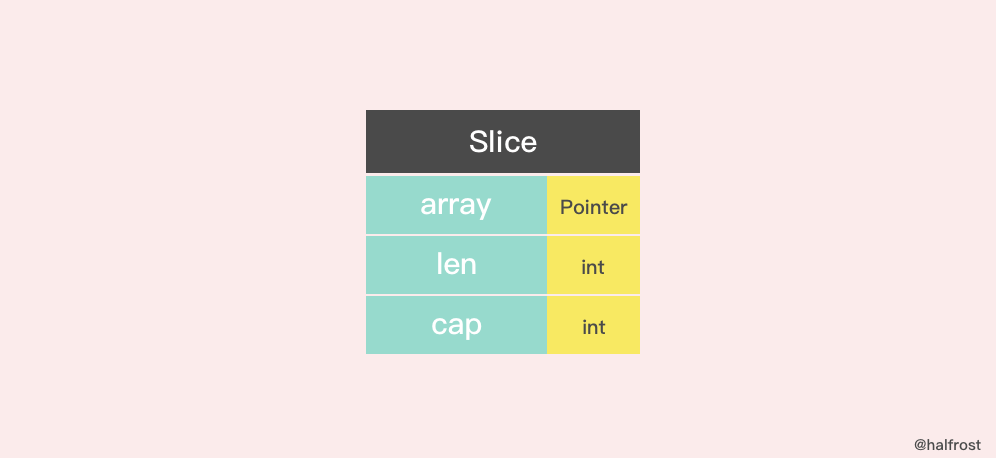
A slice’s structure consists of three parts: Pointer is a pointer to an array, len represents the current length of the slice, and cap is the current capacity of the slice. cap is always greater than or equal to len.
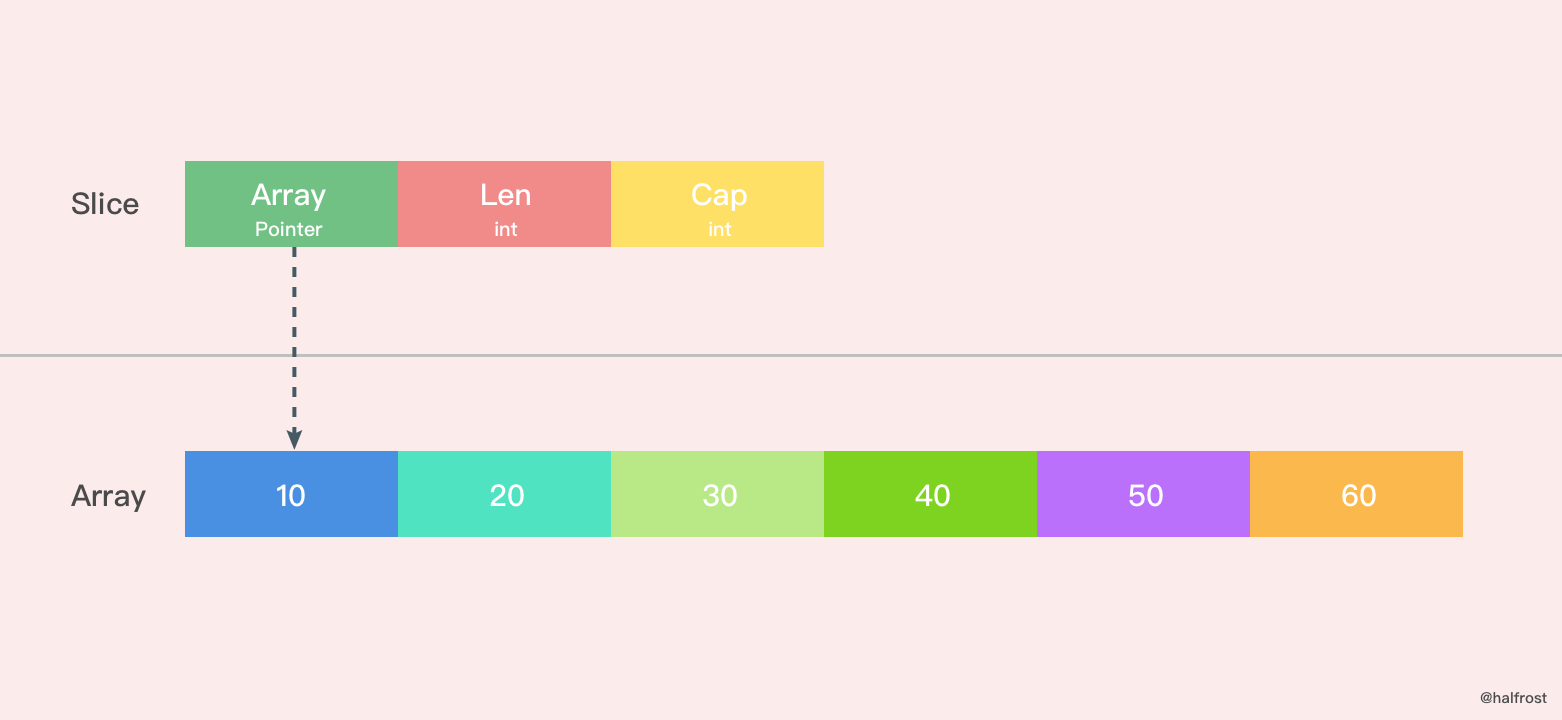
If you want to obtain a memory address from a slice, you can do it like this:
s := make([]byte, 200)
ptr := unsafe.Pointer(&s[0])
What about the other way around? Constructing a slice from a Go memory address.
var ptr unsafe.Pointer
var s1 = struct {
    addr uintptr
    len int
    cap int
}{ptr, length, length}
s := *(*[]byte)(unsafe.Pointer(&s1))
Construct a virtual struct and piece together the data structure of a slice.
Of course, there is an even more direct approach: Go’s reflection package provides a corresponding data structure, SliceHeader, which we can use to construct a slice.
var o []byte
sliceHeader := (*reflect.SliceHeader)((unsafe.Pointer(&o)))
sliceHeader.Cap = length
sliceHeader.Len = length
sliceHeader.Data = uintptr(ptr)
3. Creating Slices
The make function allows the array length to be specified dynamically at runtime, bypassing the restriction that array types must use compile-time constants.
There are two ways to create a slice: using make to create a slice, and creating an empty slice.
1. make and Slice Literals
func makeslice(et *_type, len, cap int) slice {
	// Get the maximum capacity of the slice based on its data type
	maxElements := maxSliceCap(et.size)
    // Check the slice length; it should be in the range [0,maxElements]
	if len < 0 || uintptr(len) > maxElements {
		panic(errorString("makeslice: len out of range"))
	}
    // Check the slice capacity; it should be in the range [len,maxElements]
	if cap < len || uintptr(cap) > maxElements {
		panic(errorString("makeslice: cap out of range"))
	}
    // Allocate memory based on the slice capacity
	p := mallocgc(et.size*uintptr(cap), et, true)
    // Return the starting address of the slice with allocated memory
	return slice{p, len, cap}
}
There’s also an int64 version:
func makeslice64(et *_type, len64, cap64 int64) slice {
	len := int(len64)
	if int64(len) != len64 {
		panic(errorString("makeslice: len out of range"))
	}

	cap := int(cap64)
	if int64(cap) != cap64 {
		panic(errorString("makeslice: cap out of range"))
	}

	return makeslice(et, len, cap)
}
The implementation principle is the same as the one above; it just adds the extra step of converting int64 to int.
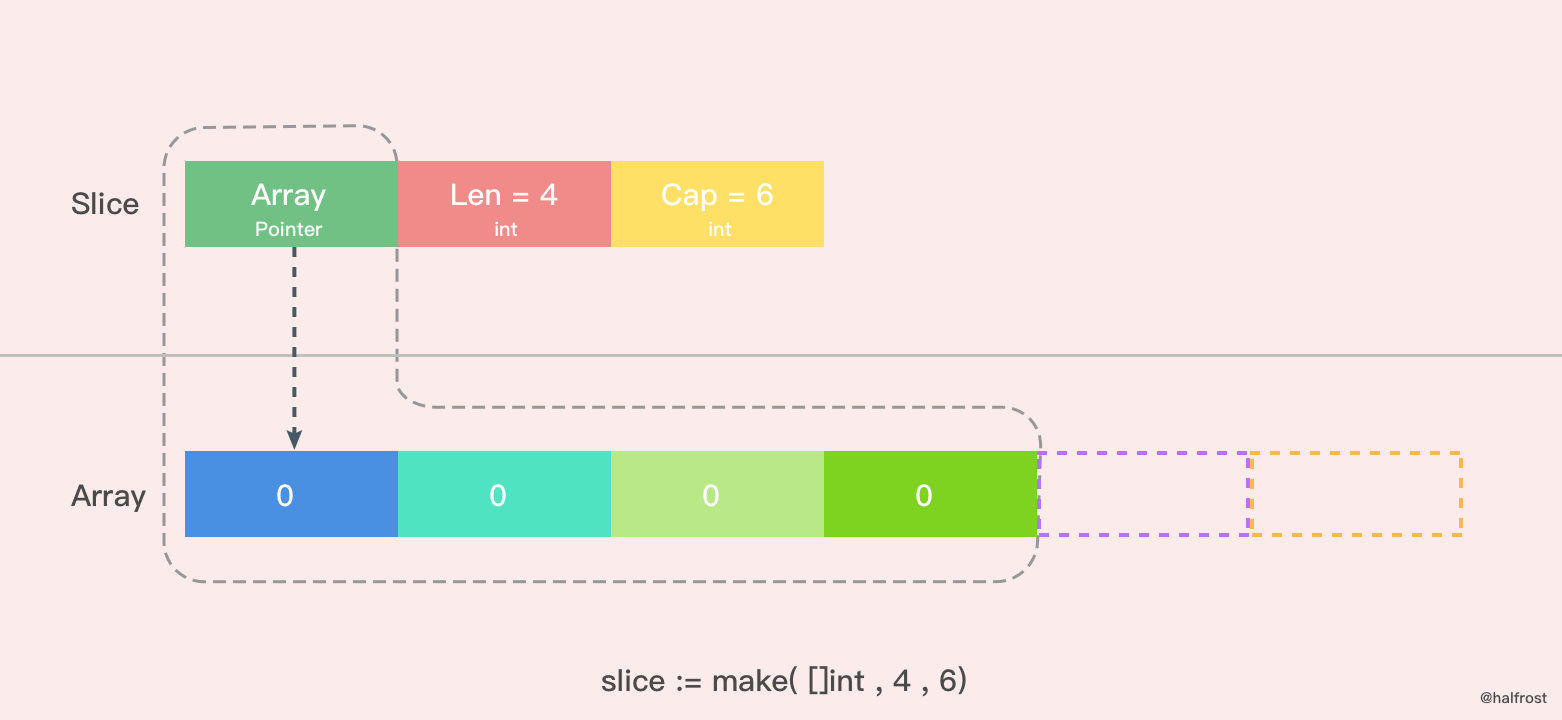
The figure above shows a slice created with the make function, where len = 4 and cap = 6. Memory space for 6 int values is allocated. Since len = 4, the last 2 elements are temporarily inaccessible, but the capacity is still there. At this point, every variable in the array is 0.
In addition to the make function, slices can also be created using literals.
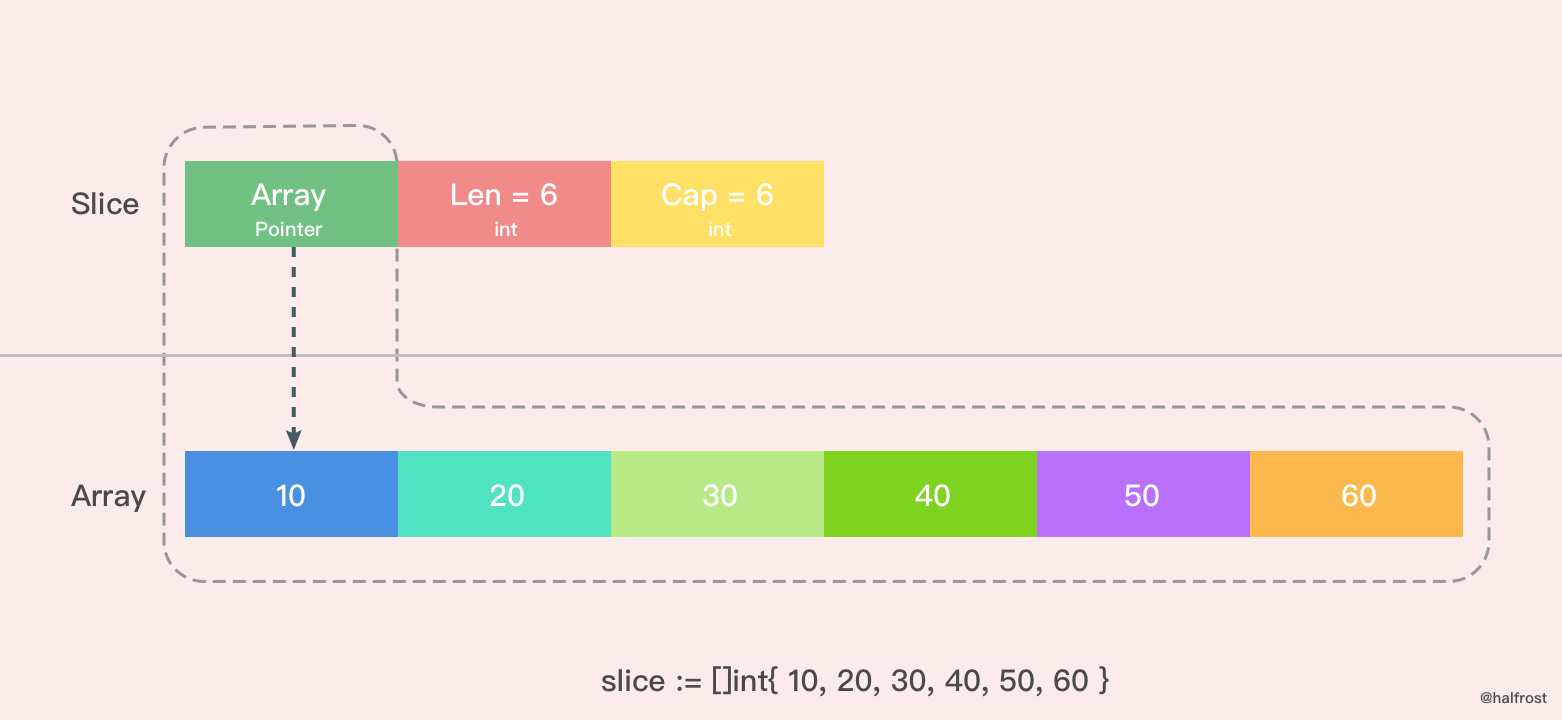
Here, a slice with len = 6 and cap = 6 is created using a literal. At this point, every element in the array has been initialized. Note that you should not write the array capacity inside [ ], because once you specify the number of elements, it becomes an array rather than a slice.
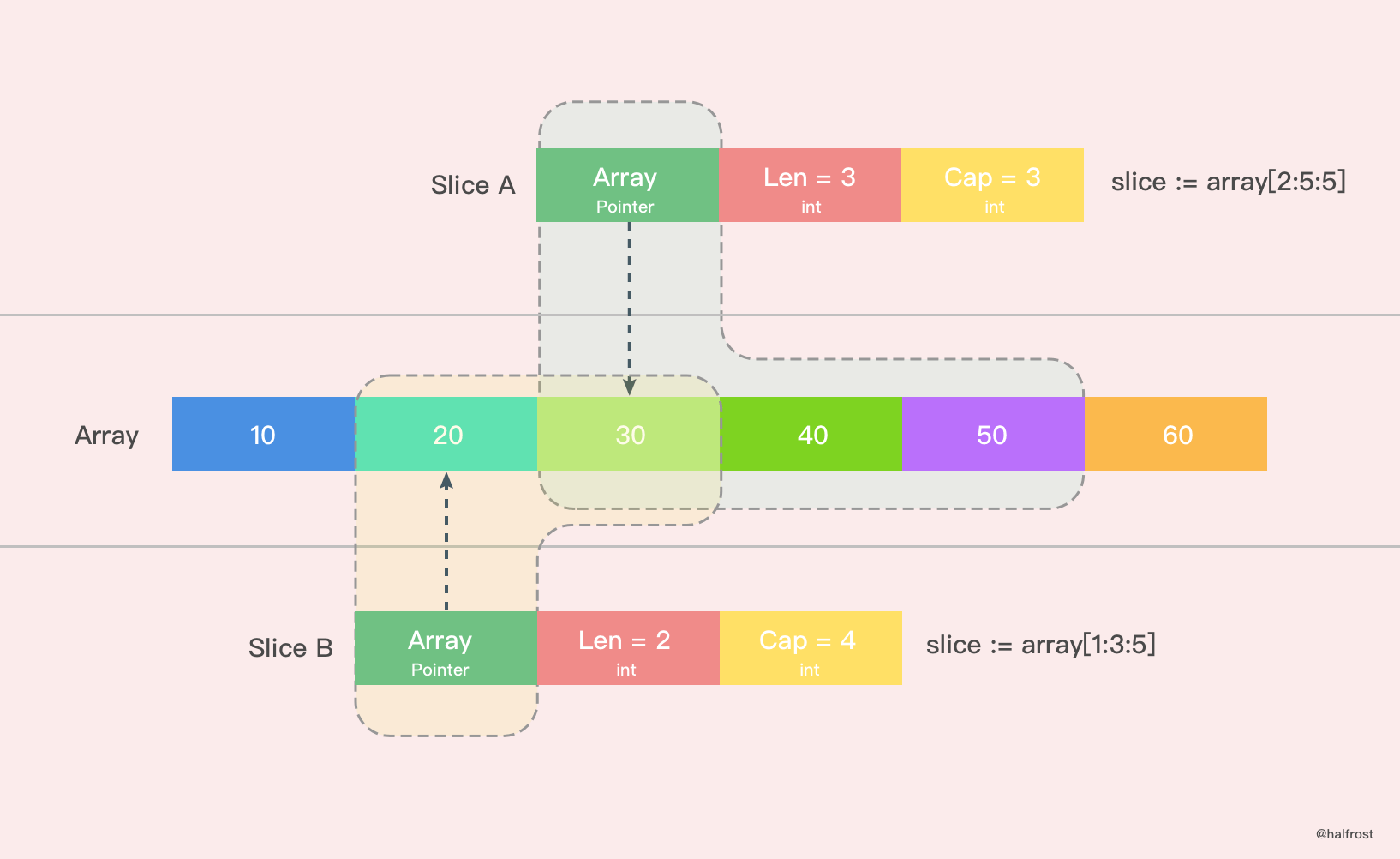
There is also a simpler way to create a slice using a literal, as shown above. In the figure, Slice A creates a slice with len = 3 and cap = 3. It slices from the second element of the original array (0 is the first) up to the fourth element (excluding the fifth). Similarly, Slice B creates a slice with len = 2 and cap = 4.
2. nil and Empty Slices
Nil slices and empty slices are also commonly used.
var slice []int
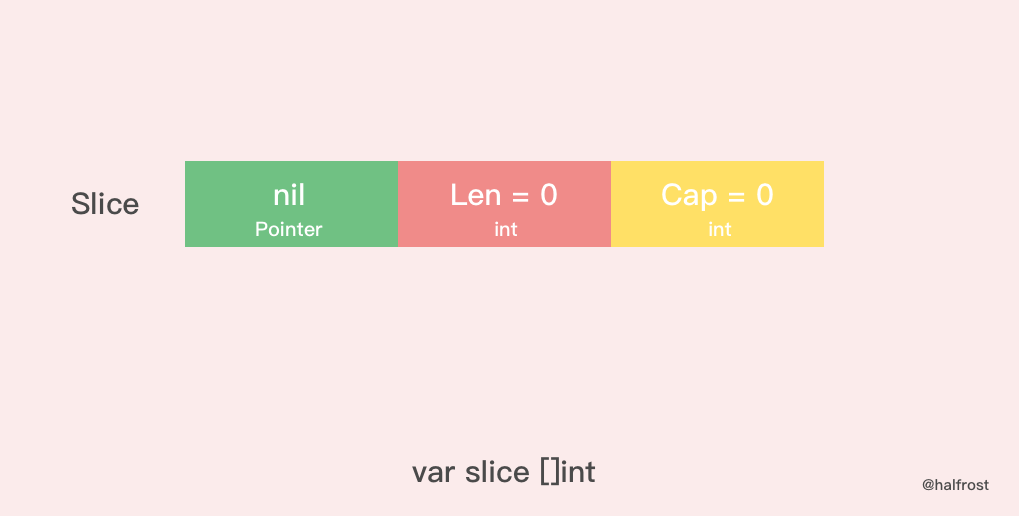
nil slices are used in many standard library and built-in functions. When describing a slice that does not exist, you need to use a nil slice. For example, when a function encounters an error, the slice it returns is a nil slice. The pointer of a nil slice points to nil.
Empty slices are generally used to represent an empty collection. For example, if a database query returns no results, it can return an empty slice.
silce := make( []int , 0 )
slice := []int{ }
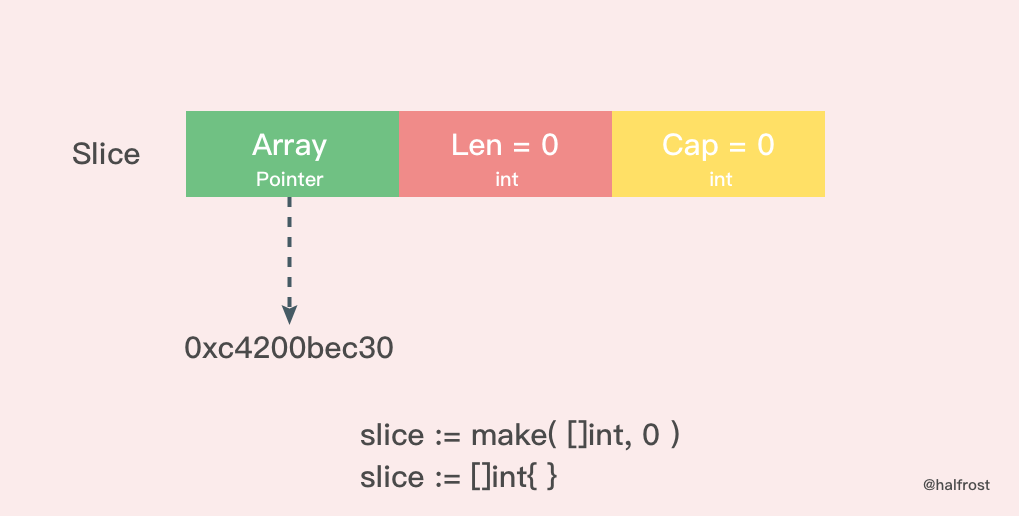
The difference between an empty slice and a nil slice is that the address an empty slice points to is not nil; it points to a memory address, but no memory has been allocated for it—that is, the underlying elements contain 0 elements.
One final point to note: whether you use a nil slice or an empty slice, calling the built-in functions append, len, and cap on it has the same effect.
IV. Slice Growth
When a slice’s capacity is full, it needs to grow. How does it grow, and what is the strategy?
func growslice(et *_type, old slice, cap int) slice {
	if raceenabled {
		callerpc := getcallerpc(unsafe.Pointer(&et))
		racereadrangepc(old.array, uintptr(old.len*int(et.size)), callerpc, funcPC(growslice))
	}
	if msanenabled {
		msanread(old.array, uintptr(old.len*int(et.size)))
	}

	if et.size == 0 {
		// If the newly requested capacity is smaller than the original capacity, this means shrinking, so panic directly.
		if cap < old.cap {
			panic(errorString("growslice: cap out of range"))
		}

		// If the current slice size is 0 and growth is still called, create and return a new slice with the new capacity.
		return slice{unsafe.Pointer(&zerobase), old.len, cap}
	}

    // This is the growth strategy
	newcap := old.cap
	doublecap := newcap + newcap
	if cap > doublecap {
		newcap = cap
	} else {
		if old.len < 1024 {
			newcap = doublecap
		} else {
			// Check 0 < newcap to detect overflow
			// and prevent an infinite loop.
			for 0 < newcap && newcap < cap {
				newcap += newcap / 4
			}
			// Set newcap to the requested cap when
			// the newcap calculation overflowed.
			if newcap <= 0 {
				newcap = cap
			}
		}
	}

	// Calculate the new slice's capacity and length.
	var lenmem, newlenmem, capmem uintptr
	const ptrSize = unsafe.Sizeof((*byte)(nil))
	switch et.size {
	case 1:
		lenmem = uintptr(old.len)
		newlenmem = uintptr(cap)
		capmem = roundupsize(uintptr(newcap))
		newcap = int(capmem)
	case ptrSize:
		lenmem = uintptr(old.len) * ptrSize
		newlenmem = uintptr(cap) * ptrSize
		capmem = roundupsize(uintptr(newcap) * ptrSize)
		newcap = int(capmem / ptrSize)
	default:
		lenmem = uintptr(old.len) * et.size
		newlenmem = uintptr(cap) * et.size
		capmem = roundupsize(uintptr(newcap) * et.size)
		newcap = int(capmem / et.size)
	}

	// Check for invalid values, ensuring capacity increases and does not exceed the maximum.
	if cap < old.cap || uintptr(newcap) > maxSliceCap(et.size) {
		panic(errorString("growslice: cap out of range"))
	}

	var p unsafe.Pointer
	if et.kind&kindNoPointers != 0 {
		// Continue expanding capacity after the old slice
		p = mallocgc(capmem, nil, false)
		// Copy lenmem bytes from old.array to address p
		memmove(p, old.array, lenmem)
		// First add newlenmem to p to get the address at the end of the new slice length, then zero the capmem-newlenmem bytes after it. This leaves space for later append() operations.
		memclrNoHeapPointers(add(p, newlenmem), capmem-newlenmem)
	} else {
		// Allocate a new array for the new slice
		// Allocate capmem bytes of memory and initialize it to zero
		p = mallocgc(capmem, et, true)
		if !writeBarrier.enabled {
			// If the write barrier cannot be enabled yet, only copy lenmem bytes from old.array to address p
			memmove(p, old.array, lenmem)
		} else {
			// Copy values from the old slice in a loop
			for i := uintptr(0); i < lenmem; i += et.size {
				typedmemmove(et, add(p, i), add(old.array, i))
			}
		}
	}
	// Return the final new slice, with capacity updated to the expanded capacity
	return slice{p, old.len, newcap}
}
The above is the implementation of capacity expansion. There are two main points to focus on: one is the strategy used during expansion, and the other is whether expansion allocates a completely new memory address or appends after the original address.
1. Expansion Strategy
First, let’s look at the expansion strategy.
func main() {
	slice := []int{10, 20, 30, 40}
	newSlice := append(slice, 50)
	fmt.Printf("Before slice = %v, Pointer = %p, len = %d, cap = %d\n", slice, &slice, len(slice), cap(slice))
	fmt.Printf("Before newSlice = %v, Pointer = %p, len = %d, cap = %d\n", newSlice, &newSlice, len(newSlice), cap(newSlice))
	newSlice[1] += 10
	fmt.Printf("After slice = %v, Pointer = %p, len = %d, cap = %d\n", slice, &slice, len(slice), cap(slice))
	fmt.Printf("After newSlice = %v, Pointer = %p, len = %d, cap = %d\n", newSlice, &newSlice, len(newSlice), cap(newSlice))
}
Output:
Before slice = [10 20 30 40], Pointer = 0xc4200b0140, len = 4, cap = 4
Before newSlice = [10 20 30 40 50], Pointer = 0xc4200b0180, len = 5, cap = 8
After slice = [10 20 30 40], Pointer = 0xc4200b0140, len = 4, cap = 4
After newSlice = [10 30 30 40 50], Pointer = 0xc4200b0180, len = 5, cap = 8
Represent the above process with a diagram.
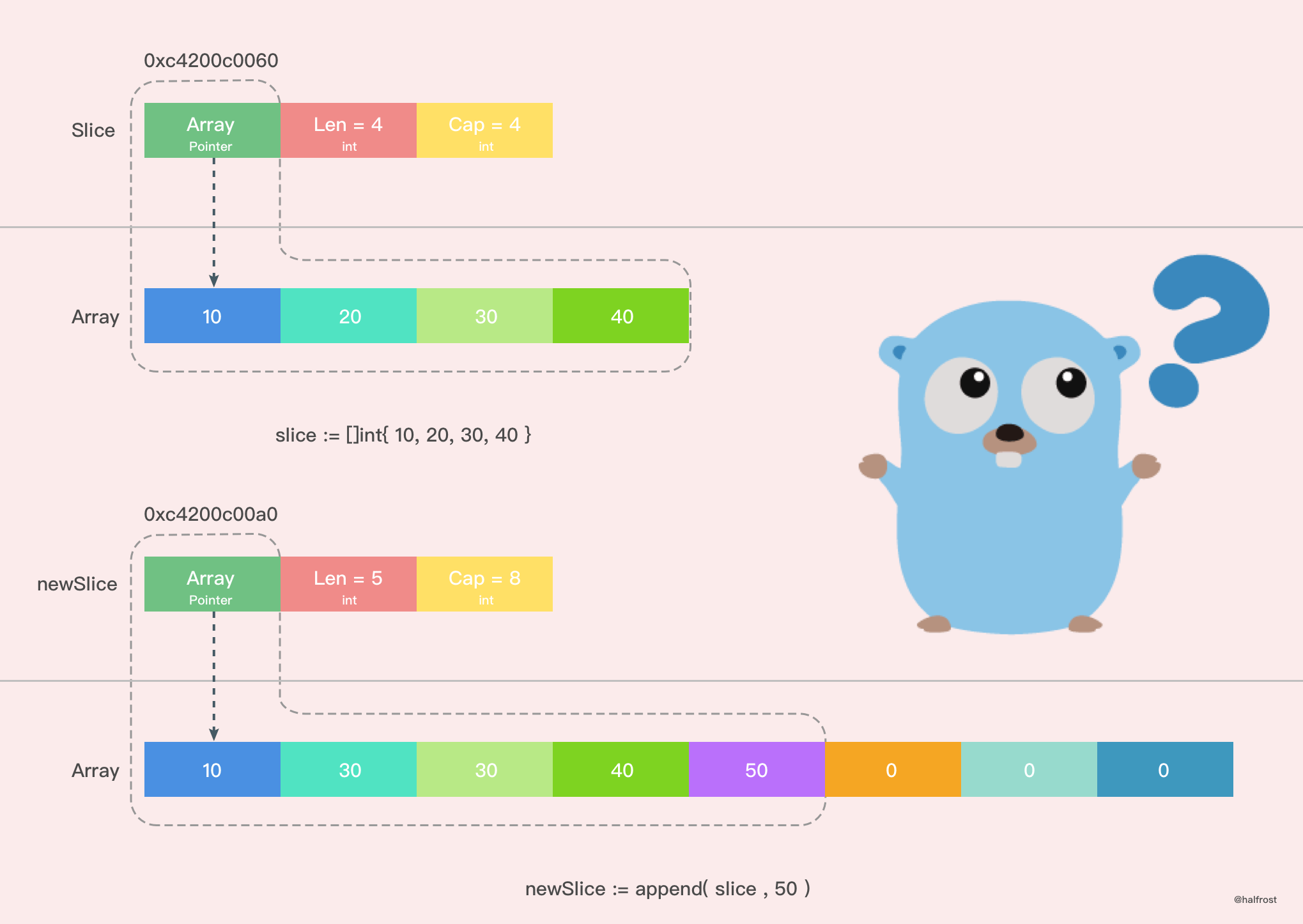
From the diagram, we can easily see that the new slice is already different from the previous slice: changing a value in the new slice does not affect the original array. The array pointed to by the new slice is an entirely new array. The cap has also changed. What exactly happened here?
Go’s slice growth strategy is as follows:
- First, check whether the newly requested capacity (
cap) is greater than twice the old capacity (old.cap). If so, the final capacity (newcap) is the newly requested capacity (cap). - Otherwise, check whether the length of the old slice is less than 1024. If so, the final capacity (
newcap) is twice the old capacity (old.cap), that is, (newcap=doublecap). - Otherwise, if the length of the old slice is greater than or equal to 1024, the final capacity (
newcap) starts from the old capacity (old.cap) and repeatedly increases by 1/4 of itself, that is, (newcap=old.cap,for {newcap += newcap/4}), until the final capacity (newcap) is greater than or equal to the newly requested capacity (cap), that is, (newcap >= cap). - If the computed final capacity (
cap) overflows, then the final capacity (cap) is the newly requested capacity (cap).
If the slice capacity is less than 1024 elements, then capacity doubles during growth. The example above also verifies this: the total capacity doubled from 4 to 8.
Once the number of elements exceeds 1024, the growth factor becomes 1.25, meaning each growth increases the previous capacity by one quarter.
Note: the increased capacity during growth is based on the original capacity, not on the length of the original array.
2. New Array or Old Array?
Let’s also discuss whether the array after growth must be a new one. Not necessarily; there are two cases.
Case 1:
func main() {
	array := [4]int{10, 20, 30, 40}
	slice := array[0:2]
	newSlice := append(slice, 50)
	fmt.Printf("Before slice = %v, Pointer = %p, len = %d, cap = %d\n", slice, &slice, len(slice), cap(slice))
	fmt.Printf("Before newSlice = %v, Pointer = %p, len = %d, cap = %d\n", newSlice, &newSlice, len(newSlice), cap(newSlice))
	newSlice[1] += 10
	fmt.Printf("After slice = %v, Pointer = %p, len = %d, cap = %d\n", slice, &slice, len(slice), cap(slice))
	fmt.Printf("After newSlice = %v, Pointer = %p, len = %d, cap = %d\n", newSlice, &newSlice, len(newSlice), cap(newSlice))
	fmt.Printf("After array = %v\n", array)
}
Print output:
Before slice = [10 20], Pointer = 0xc4200c0040, len = 2, cap = 4
Before newSlice = [10 20 50], Pointer = 0xc4200c0060, len = 3, cap = 4
After slice = [10 30], Pointer = 0xc4200c0040, len = 2, cap = 4
After newSlice = [10 30 50], Pointer = 0xc4200c0060, len = 3, cap = 4
After array = [10 30 50 40]
Represent the process above as a diagram, as shown below.
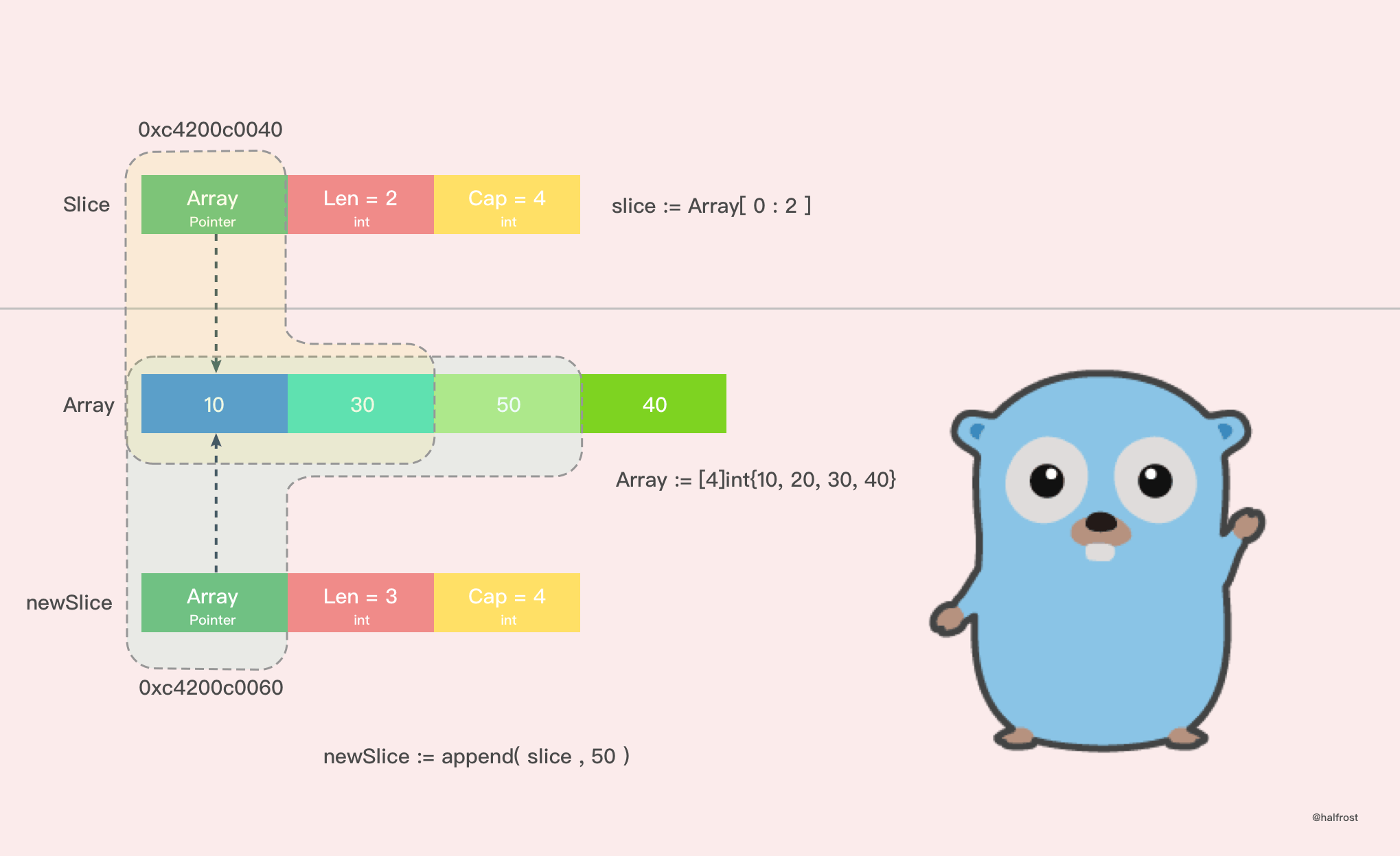
From the printed results, we can see that in this case, no new array is created after expansion. The array before and after expansion is the same one. As a result, when the new slice modifies a value, it also affects the old slice. In addition, the append() operation also changes the values in the original array. A single append() operation affects so many places; if there are multiple slices over the original array, all of those slices will be affected! This can easily introduce inexplicable bugs without you noticing.
In this case, because the original array still has capacity available for expansion, after the append() operation is executed, it operates directly on the original array. Therefore, the array after expansion still points to the original array.
This situation can also easily occur when creating a slice from a literal. When passing a value for the third parameter, cap, if the slice is created from a literal and cap is not equal to the total capacity of the underlying array, this situation will occur.
slice := array[1:2:3]
The situation above is extremely dangerous and highly prone to bugs.
When creating a slice with a literal, be very mindful of the value of cap to avoid bugs caused by sharing the underlying array.
Case 2:
Case 2 is actually the example used in the growth strategy section. In that example, a new slice was created because the original array had already reached its maximum capacity. When further growth was needed, Go by default first allocated a new memory region, copied the original values over, and then performed the append() operation. This situation does not affect the original array at all.
So it is recommended to avoid Case 1 as much as possible and prefer Case 2 to prevent bugs.
5. Copying Slices
There are two ways to copy slices.
func slicecopy(to, fm slice, width uintptr) int {
	// If either the source slice or the destination slice has length 0, no copy is needed; return directly
	if fm.len == 0 || to.len == 0 {
		return 0
	}
	// n records the length of the shorter of the source slice or destination slice
	n := fm.len
	if to.len < n {
		n = to.len
	}
	// If the input parameter width = 0, no copy is needed; return the length of the shorter slice
	if width == 0 {
		return n
	}
	// If race detection is enabled
	if raceenabled {
		callerpc := getcallerpc(unsafe.Pointer(&to))
		pc := funcPC(slicecopy)
		racewriterangepc(to.array, uintptr(n*int(width)), callerpc, pc)
		racereadrangepc(fm.array, uintptr(n*int(width)), callerpc, pc)
	}
	// If The memory sanitizer (msan) is enabled
	if msanenabled {
		msanwrite(to.array, uintptr(n*int(width)))
		msanread(fm.array, uintptr(n*int(width)))
	}

	size := uintptr(n) * width
	if size == 1 {
		// TODO: is this still worth it with new memmove impl?
		// If there is only one element, just convert the pointer directly
		*(*byte)(to.array) = *(*byte)(fm.array) // known to be a byte pointer
	} else {
		// If there is more than one element, copy size bytes from the address fm.array to the address to.array
		memmove(to.array, fm.array, size)
	}
	return n
}
In this method, the slicecopy method copies elements from the source slice value (i.e., the fm Slice) into the destination slice (i.e., the to Slice) and returns the number of elements copied. The two types used with copy must be the same. The final result of the slicecopy method depends on the shorter slice; once the shorter slice has been fully copied, the entire copy operation is complete.
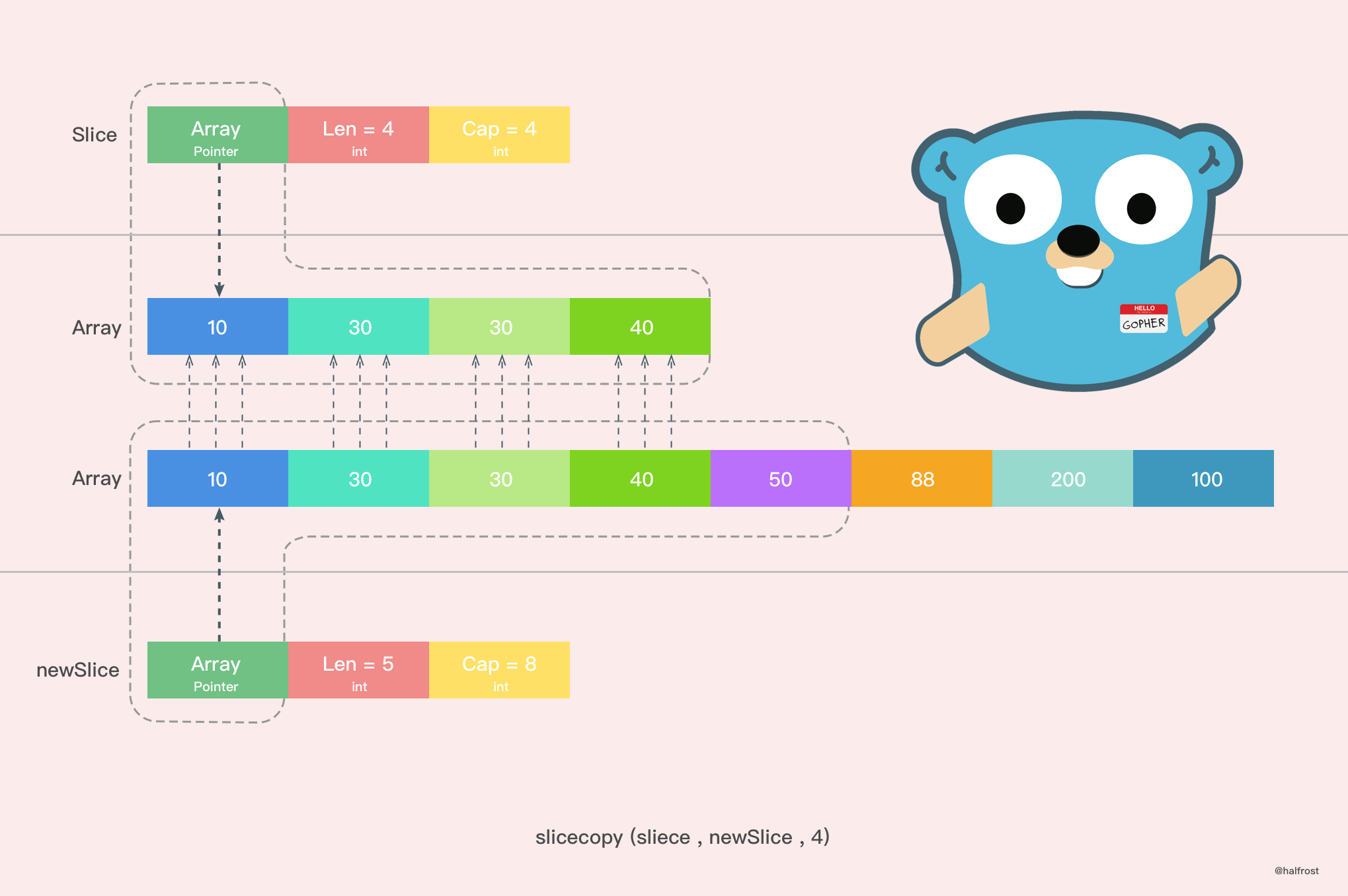
For example:
func main() {
	array := []int{10, 20, 30, 40}
	slice := make([]int, 6)
	n := copy(slice, array)
	fmt.Println(n,slice)
}
There is another copy method as well. Its principle is similar to the slicecopy method, so I won’t go into it again; the comments are included in the code.
func slicestringcopy(to []byte, fm string) int {
	// If either the source slice or target slice has length 0, no copy is needed; return directly
	if len(fm) == 0 || len(to) == 0 {
		return 0
	}
	// n records the length of the shorter of the source slice or target slice
	n := len(fm)
	if len(to) < n {
		n = len(to)
	}
	// If race detection is enabled
	if raceenabled {
		callerpc := getcallerpc(unsafe.Pointer(&to))
		pc := funcPC(slicestringcopy)
		racewriterangepc(unsafe.Pointer(&to[0]), uintptr(n), callerpc, pc)
	}
	// If The memory sanitizer (msan) is enabled
	if msanenabled {
		msanwrite(unsafe.Pointer(&to[0]), uintptr(n))
	}
	// Copy the string to the byte array
	memmove(unsafe.Pointer(&to[0]), stringStructOf(&fm).str, uintptr(n))
	return n
}
To give another example:
func main() {
	slice := make([]byte, 3)
	n := copy(slice, "abcdef")
	fmt.Println(n,slice)
}
Output:
3 [97,98,99]
Speaking of copying, there’s an issue with slices that you need to be aware of.
func main() {
	slice := []int{10, 20, 30, 40}
	for index, value := range slice {
		fmt.Printf("value = %d , value-addr = %x , slice-addr = %x\n", value, &value, &slice[index])
	}
}
Output:
value = 10 , value-addr = c4200aedf8 , slice-addr = c4200b0320
value = 20 , value-addr = c4200aedf8 , slice-addr = c4200b0328
value = 30 , value-addr = c4200aedf8 , slice-addr = c4200b0330
value = 40 , value-addr = c4200aedf8 , slice-addr = c4200b0338
From the result above, we can see that if we iterate over a slice using range, the Value we get is actually a copy of the value in the slice. Therefore, the address of Value remains unchanged every time it is printed.
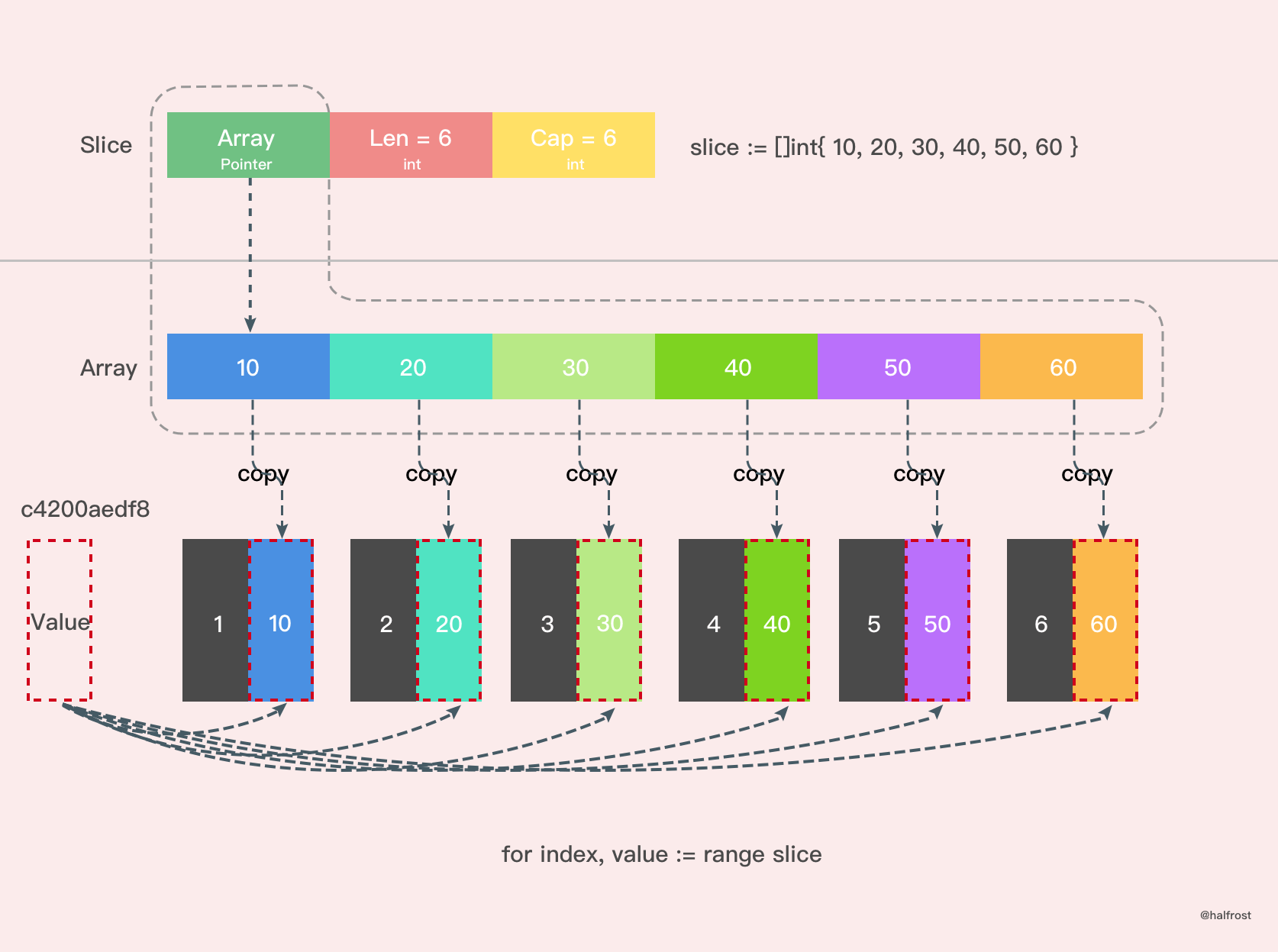
Because Value is a value copy rather than being passed by reference, modifying Value directly will not change the values in the original slice. You need to obtain the actual address via &slice[index].
Reference:
《Go in Action》
《Go Language Study Notes》
GitHub Repo: Halfrost-Field
Follow: halfrost · GitHub
Source: https://halfrost.com/go_slice/
