Frame Definitions in HTTP/2
The HTTP/2 specification defines many frame types, each identified by a unique 8-bit type code. Each frame type plays a different role in establishing and managing the overall connection or an individual stream.
The transmission of specific frame types can change the state of a connection. If endpoints cannot maintain a synchronized view of the connection state, successful communication within the connection cannot continue. Therefore, it is important that endpoints share an understanding of the state, and of how that state is affected when any given frame is used.
Connection: one TCP connection, containing one or more streams. All communication takes place over a single TCP connection, which can carry any number of bidirectional streams.
Stream: a bidirectional flow of communication, containing one or more Messages. Each stream has a unique identifier and optional priority information, and is used to carry bidirectional messages.
Message: corresponds to a request or response in HTTP/1.1, and contains one or more Frames.
Frame: the smallest unit of communication, storing content in a binary compressed format. Frames from different streams can be interleaved and then reassembled based on the stream identifier in each frame header.
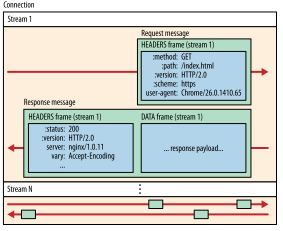
In HTTP/1.1, a message consists of a Start Line + header + body, whereas in HTTP/2, a message consists of a HEADER frame + several DATA frames, as shown below:
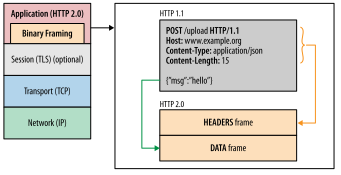
At the core of all HTTP/2 performance improvements is the new binary framing layer, which defines how HTTP messages are encapsulated and transmitted between client and server. The “layer” here refers to an optimized new encoding mechanism that sits between the socket interface and the higher-level HTTP API visible to applications: HTTP semantics (including verbs, methods, and headers) remain unchanged; what changes is how they are encoded during transmission. The HTTP/1.x protocol uses newlines as delimiters in plain text, while HTTP/2 splits all transmitted information into smaller messages and frames and encodes them in binary format.
As a result, for the client and server to understand each other, both must use the new binary encoding mechanism: an HTTP/1.x client cannot understand a server that only supports HTTP/2, and vice versa. That said, existing applications do not need to worry about these changes, because the client and server handle the necessary framing work for us.
1. DATA Frames
DATA frames (type = 0x0) are used to transmit arbitrary, variable-length sequences of octets associated with a stream. For example, one or more DATA frames are used to carry an HTTP request or response payload. DATA frames can also contain padding. Padding can be added to DATA frames to obscure the size of messages. Padding is a security feature; see Section 10.7 for details.
The DATA frame structure is as follows:
    +---------------+
    |Pad Length? (8)|
    +---------------+-----------------------------------------------+
    |                            Data (*)                         ...
    +---------------------------------------------------------------+
    |                           Padding (*)                       ...
    +---------------------------------------------------------------+
The DATA frame contains the following fields:
Pad Length:
An 8-bit field containing the length of the frame padding in octets. This field is conditional (as indicated by the “?” in the figure) and is present only when the PADDED flag is set.Data:
Application data. After subtracting the length of any other fields that are present, the size of the data is the remainder of the frame payload.Padding:
Padding octets, which have no application semantic value. When sent, padding octets must be set to zero. The receiver is not obligated to verify padding, but it MAY treat non-zero padding as a connection error of type PROTOCOL_ERROR (Section 5.4.1).
The DATA frame defines the following flag identifiers:
END_STREAM (0x1):
When this field is set, bit 0 indicates that this frame is the last frame the endpoint will send for the identified stream. Setting this flag causes the stream to enter the “half-closed” state or the “closed” state (Section 5.1).PADDED (0x8):
When this field is set, bit 3 indicates that the Pad Length field and any padding it describes are present.
A DATA frame must be associated with a stream. If a DATA frame whose stream identifier field is 0x0 is received, the receiver MUST respond with a connection error of type PROTOCOL_ERROR (Section 5.4.1).
DATA frames are subject to flow control and can only be sent when the stream is in the “open” or “half-closed (remote)” state. The entire DATA frame payload is included in flow control, including the Pad Length and Padding fields (if present). If a DATA frame is received for a stream that is not in the “open” or “half-closed (local)” state, the receiver MUST respond with a stream error of type STREAM_CLOSED (Section 5.4.2).
The total number of padding octets is determined by the value of the Pad Length field. If the length of the padding is equal to or greater than the length of the frame payload, the receiver MUST treat this as a connection error of type PROTOCOL_ERROR (Section 5.4.1).
Note: A frame can be increased in size by one octet by including a Pad Length field with a value of zero.
The data frame is relatively simple. Let’s capture some packets and look at its contents:
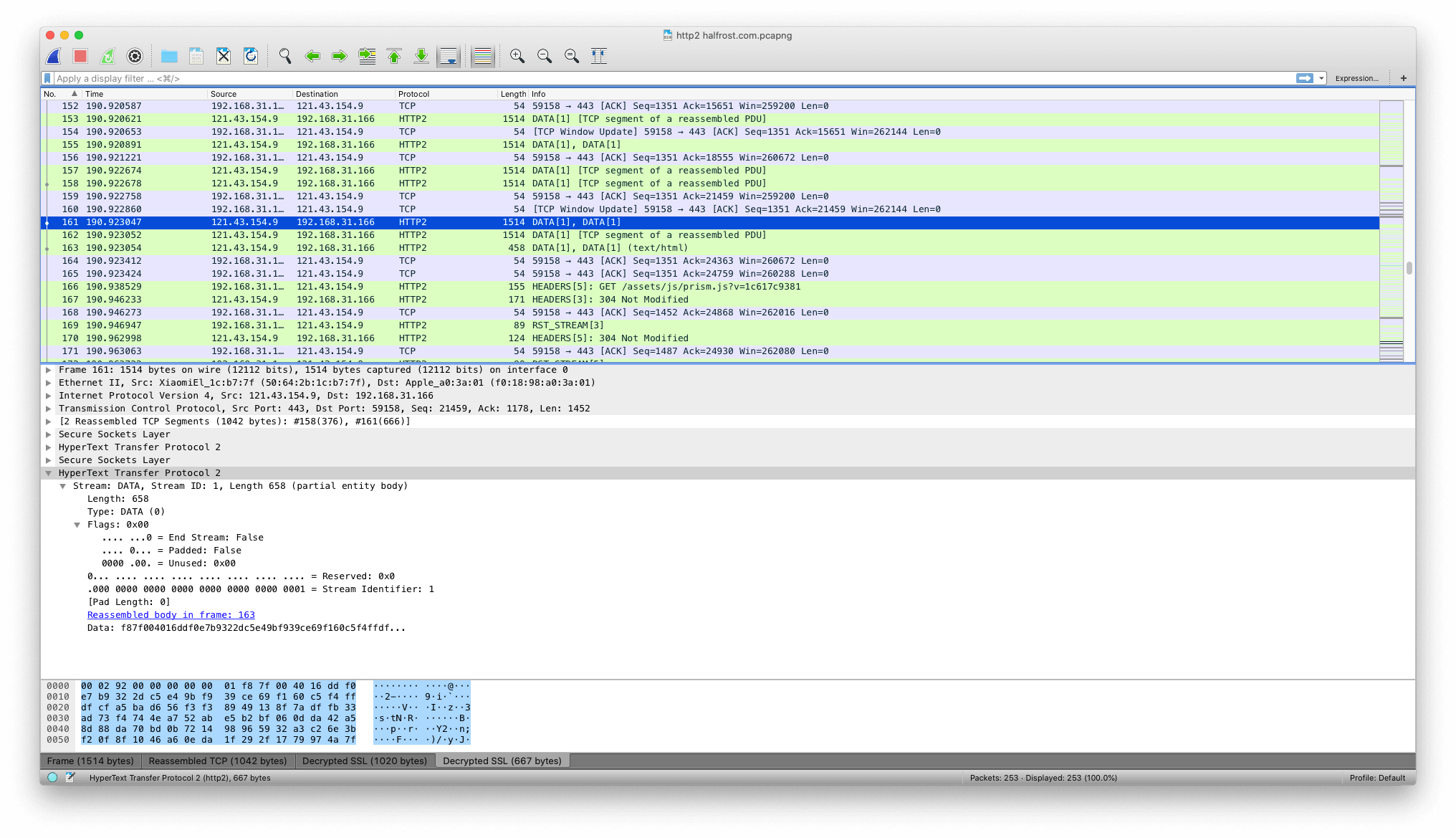
In the figure above, you can see two flag bits: END_STREAM and PADDED. END_STREAM is false. Since PADDED is false, there is no padding, so Pad Length is 0.
II. HEADERS Frame
The HEADERS frame (type = 0x1) is used to open a stream (Section 5.1); it also carries a header block fragment. A HEADERS frame can be sent on a stream in the “idle”, “reserved (local)”, “open”, or “half-closed (remote)” state. This frame is specifically used to transmit HTTP headers (equivalent to the start line + headers in HTTP/1.1).
    +---------------+
    |Pad Length? (8)|
    +-+-------------+-----------------------------------------------+
    |E|                 Stream Dependency? (31)                     |
    +-+-------------+-----------------------------------------------+
    |  Weight? (8)  |
    +-+-------------+-----------------------------------------------+
    |                   Header Block Fragment (*)                 ...
    +---------------------------------------------------------------+
    |                           Padding (*)                       ...
    +---------------------------------------------------------------+
HEADERS frames contain the following fields:
Pad Length:
An 8-bit field containing the length of the frame padding in octets. This field is present only when the PADDED flag is set.E:
A one-bit flag used to indicate that the stream dependency is exclusive (see Section 5.3). This field is present only when the PRIORITY flag is set.Stream Dependency:
The 31-bit stream identifier of the stream on which this stream depends (see Section 5.3). This field is present only when the PRIORITY flag is set.Weight:
An unsigned 8-bit integer indicating the stream’s priority weight (see Section 5.3). This value represents a weight between 1 and 256. This field is present only when the PRIORITY flag is set.Header Block Fragment:
A header block fragment (Section 4.3)Padding:
Padding octets.
HEADERS frames define the following flag identifiers:
- END_STREAM (0x1):
When this field is set, bit 0 indicates that the header block (Section 4.3) is the last frame the endpoint will send for the identified stream.
A HEADERS frame carries the END_STREAM flag, which indicates the end of a stream. However, a HEADERS frame with the END_STREAM flag set can be followed by CONTINUATION frames on the same stream. Logically, the CONTINUATION frames are part of the HEADERS frame.
- END_HEADERS (0x4):
When this flag is set, bit 2 indicates that the frame contains the entire header block (Section 4.3) and that no CONTINUATION frames follow.
A HEADERS frame without the END_HEADERS flag set MUST be followed by a CONTINUATION frame for the same stream. The receiver MUST treat receiving any other type of frame, or a frame on a different stream, as a connection error of type PROTOCOL_ERROR (Section 5.4.1).
PADDED (0x8):
When this flag is set, bit 3 indicates that the Pad Length field and any padding it describes are present.PRIORITY (0x20):
When this flag is set, bit 5 indicates that the Exclusive Flag (E), Stream Dependency, and Weight fields are present.
The payload of a HEADERS frame contains a header block fragment (Section 4.3). If a header block is larger than a single HEADERS frame, it continues in CONTINUATION frames (Section 6.10).
A HEADERS frame MUST be associated with a stream. If a HEADERS frame is received whose stream identifier field is 0x0, the receiver MUST respond with a connection error of type PROTOCOL_ERROR (Section 5.4.1). HEADERS frames change the connection state as described in Section 4.3.
HEADERS frames can include padding. The padding fields and flags are the same as those defined for DATA frames (Section 6.1). Padding that exceeds the remaining size of the header block fragment MUST be treated as a PROTOCOL_ERROR.
Priority information in a HEADERS frame is logically equivalent to a separate PRIORITY frame, but including priority information in HEADERS avoids the possibility of priority loss when a new stream is created. Priority fields in a HEADERS frame reprioritize the stream after the first HEADERS frame on that stream (Section 5.3.3).
Let’s capture an actual packet and look at what a HEADERS frame contains.
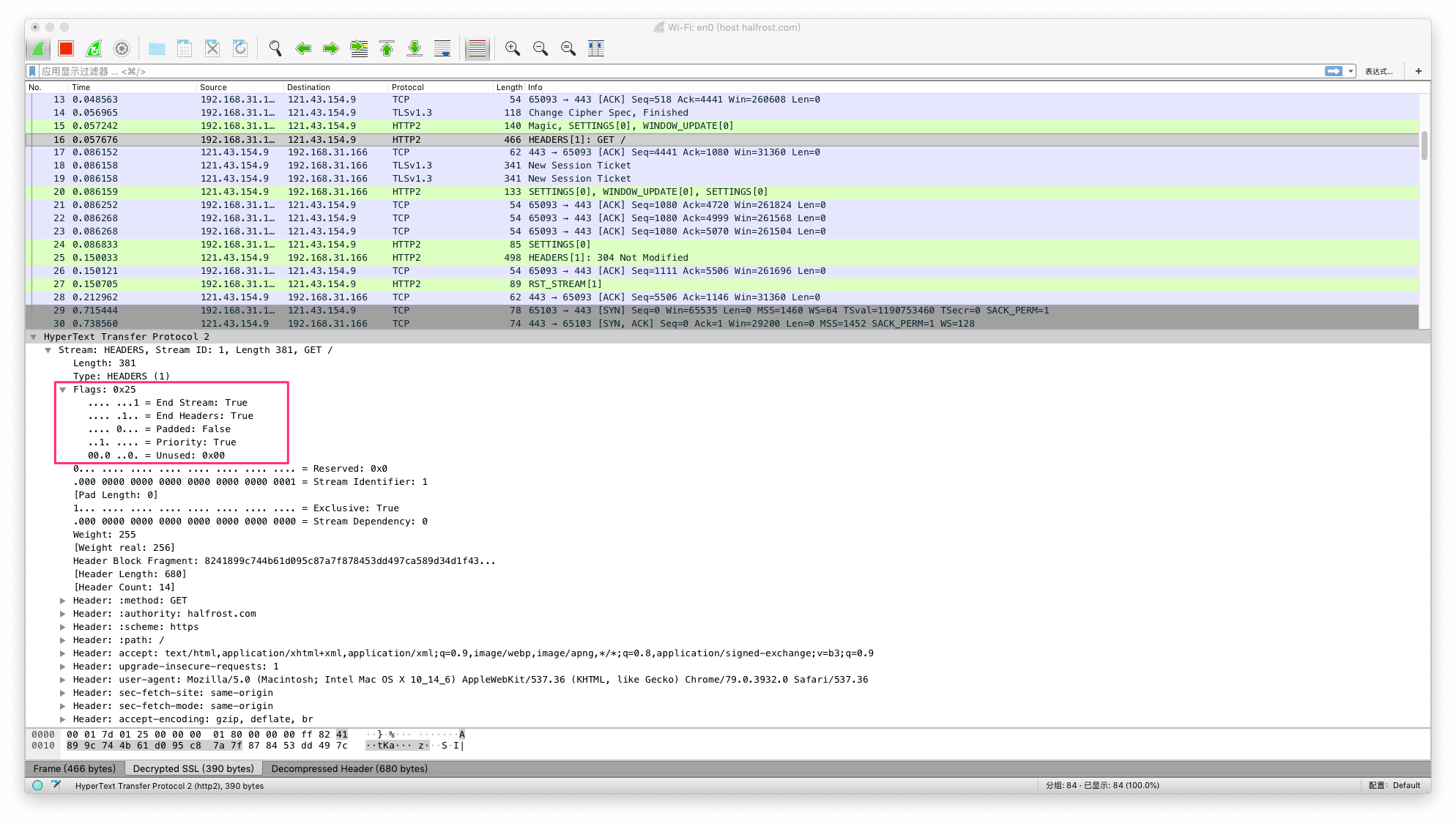
The flags include the END_STREAM, END_HEADERS, PADDED, and PRIORITY flags mentioned above. Looking at the other fields: because PADDED is set to false, there is no padding here. PRIORITY is set, so the one-bit flag E is present. Stream Dependency is 0, and Stream Identifier is 1. Weight is 255, and there is no Padding. The remaining portion is all Header Block Fragment, as shown below:
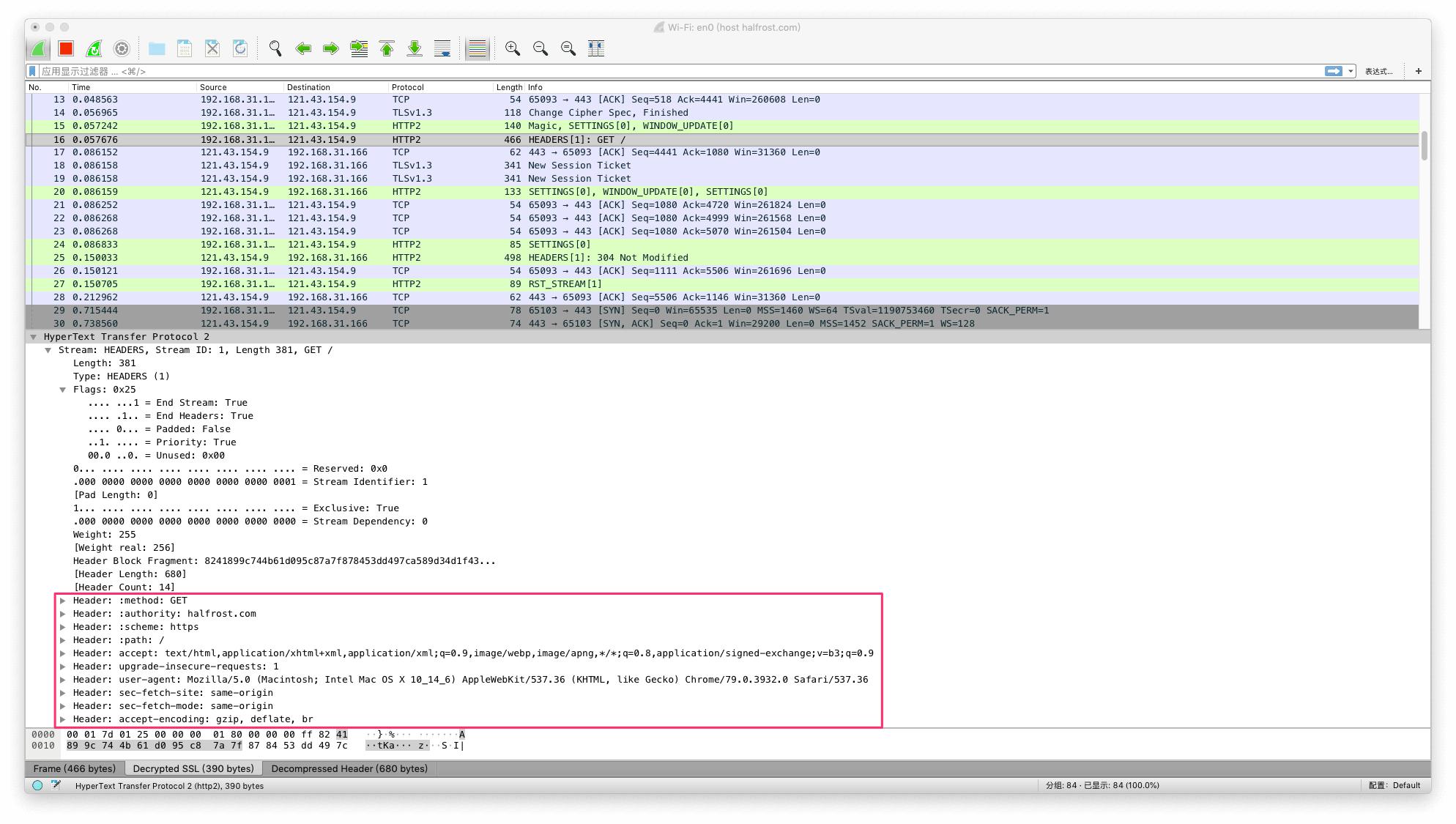
As shown in the figure, HTTP/2 changes some of the names of the header fields from HTTP/1.x. For example, HOST in HTTP/1.x corresponds to :authority: in HTTP/2. The request line in HTTP/1.x becomes :method:, :scheme:, and :path: in HTTP/2. Other fields, such as user-agent, have unchanged names, but their storage format has changed. These changes are covered in detail in the HPACK section.
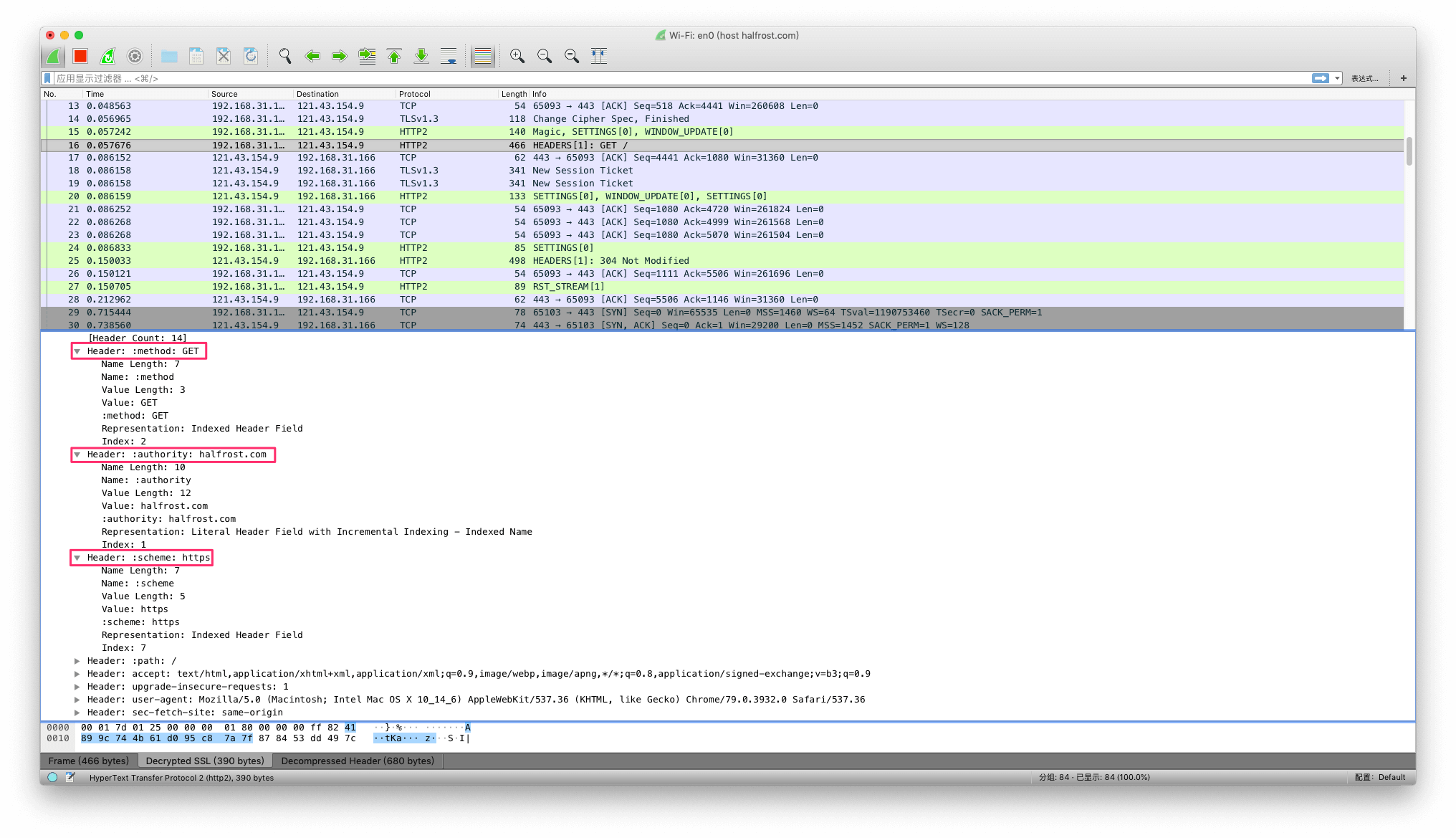
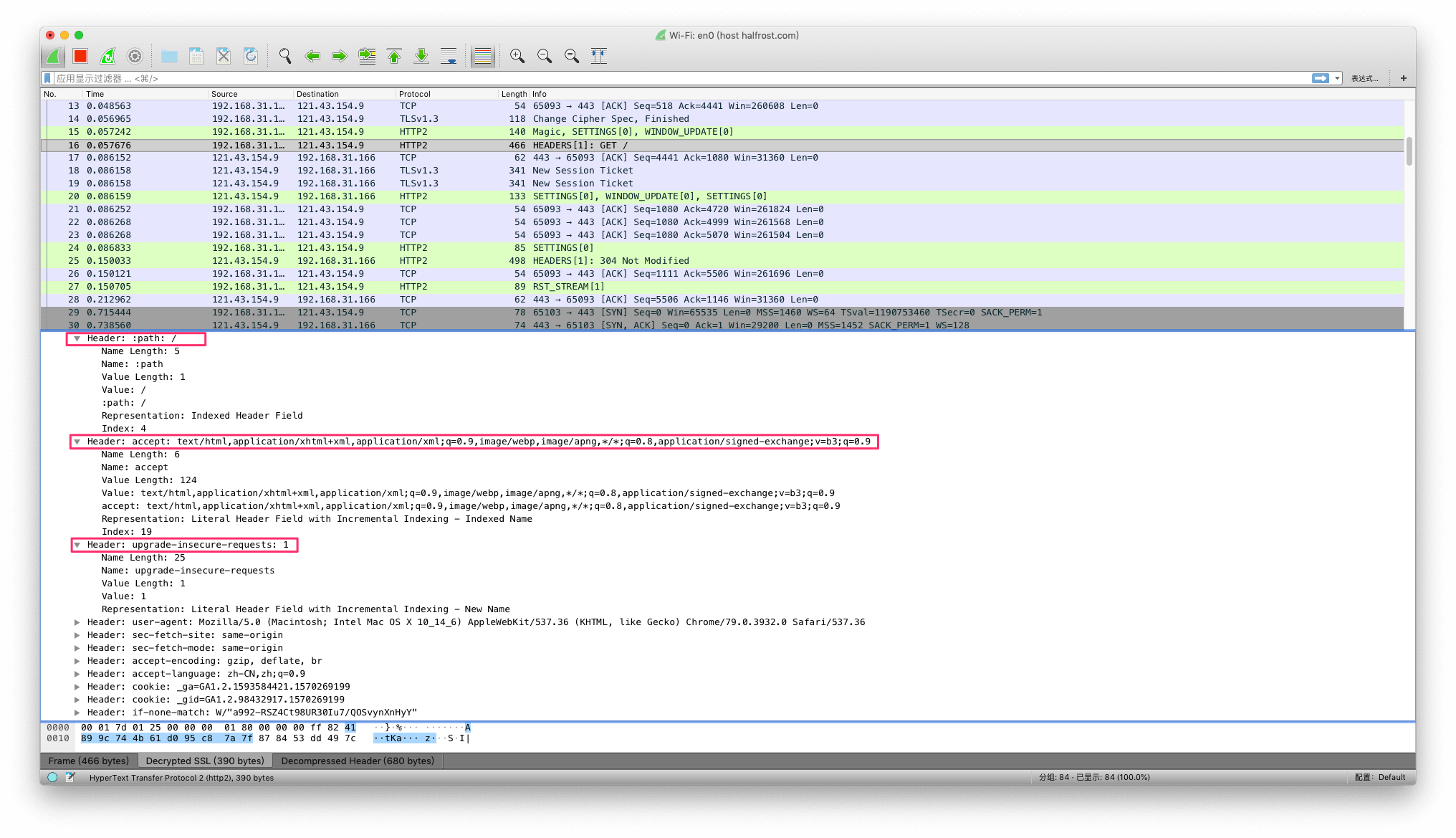
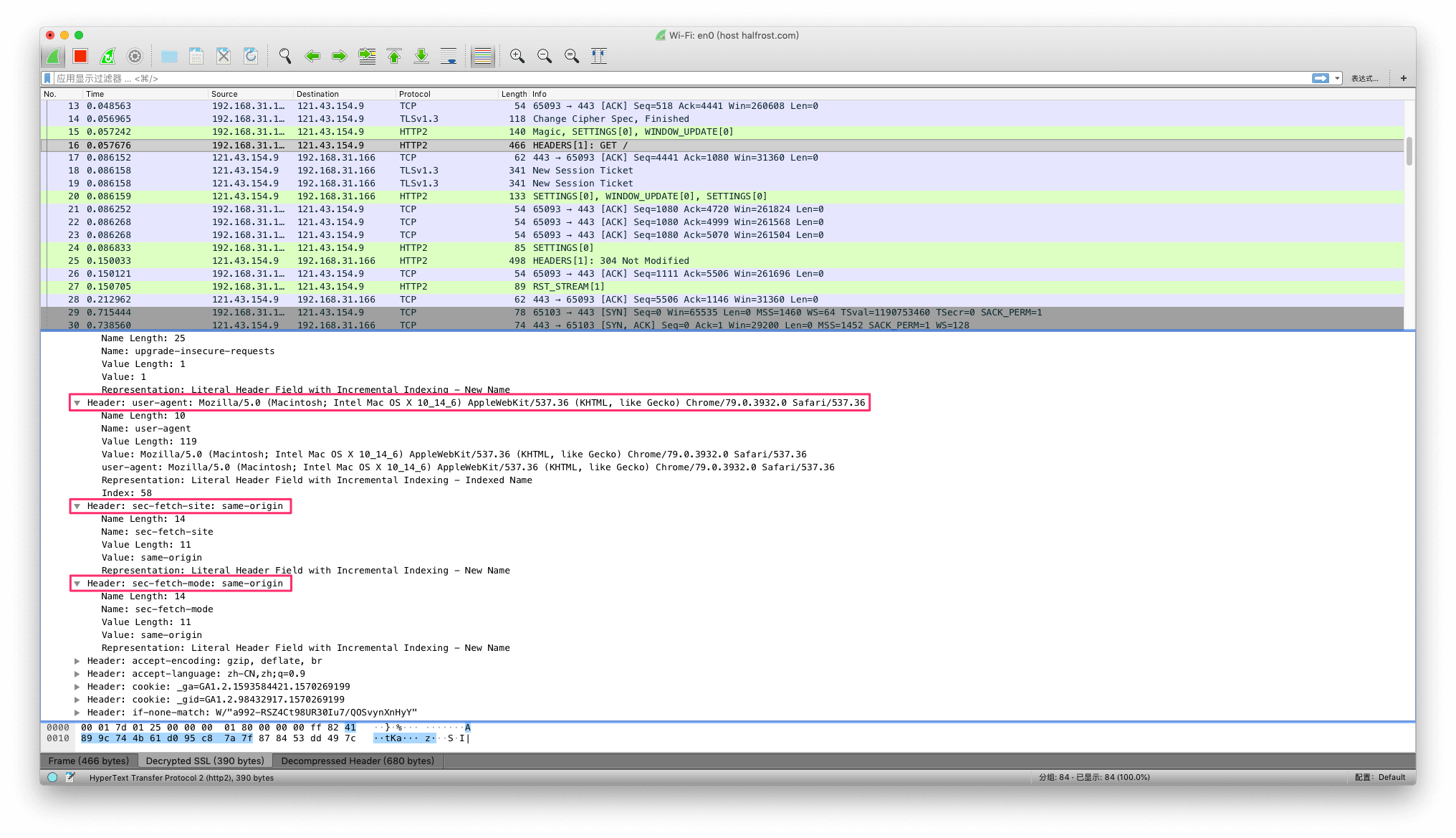
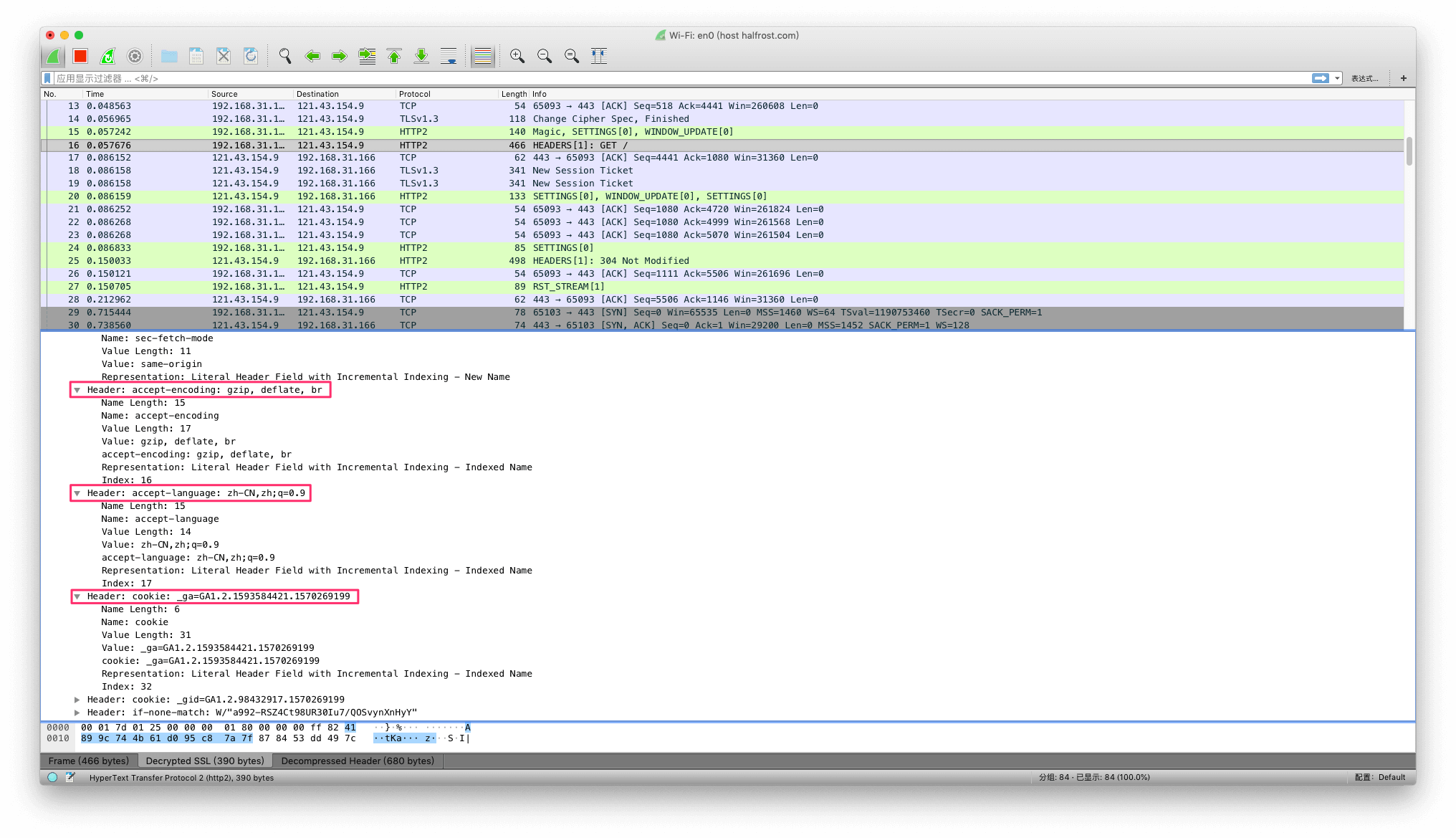
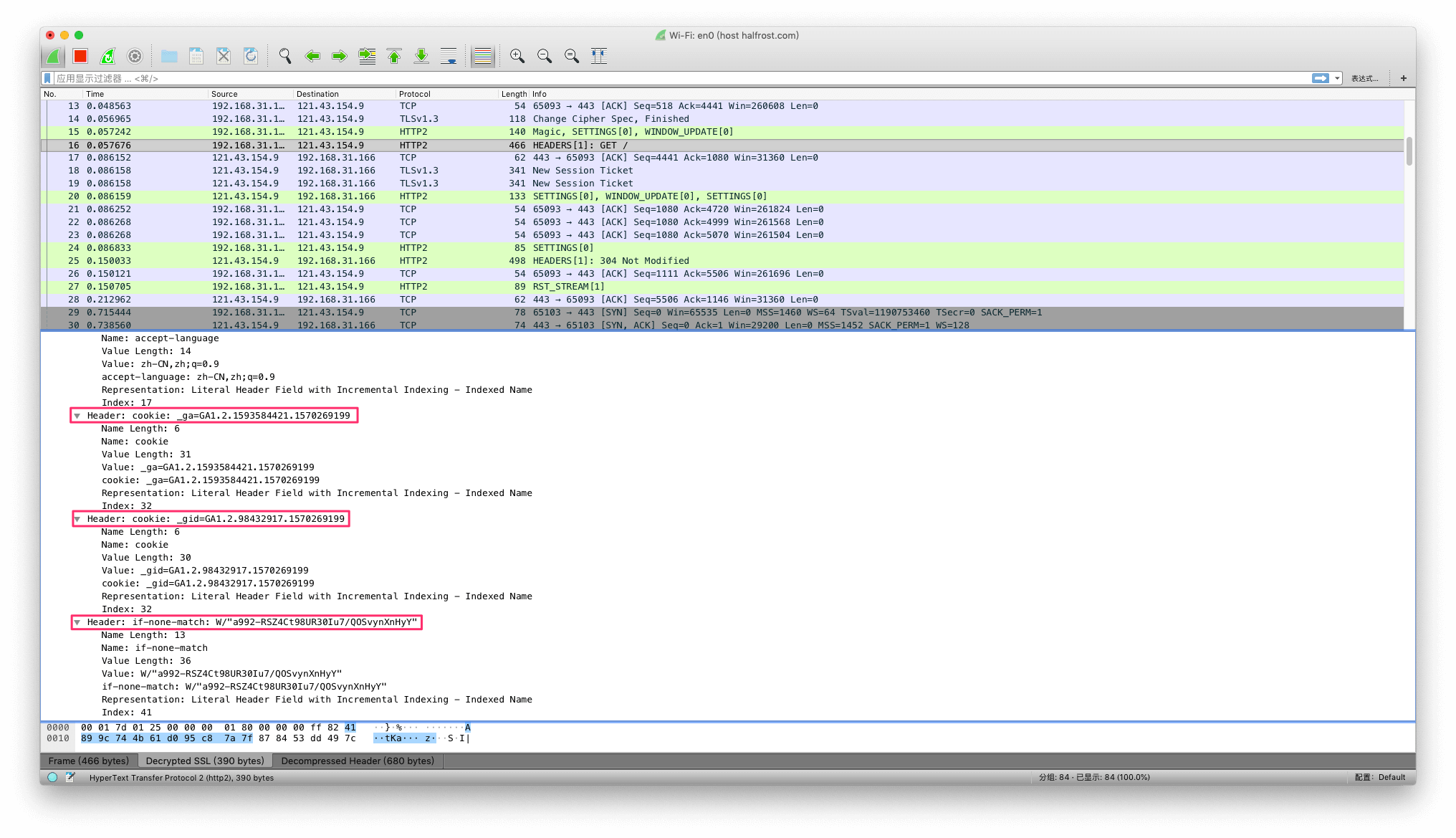
The five consecutive images above show how Header Block Fragments are stored in HTTP/2. From the header fields, you can see HTTP/2’s entirely new storage format and its higher compression ratio. For a more detailed analysis, see the HPACK deep dive.
The packet capture above is a HEADERS frame for a request. Here is another example for a response.
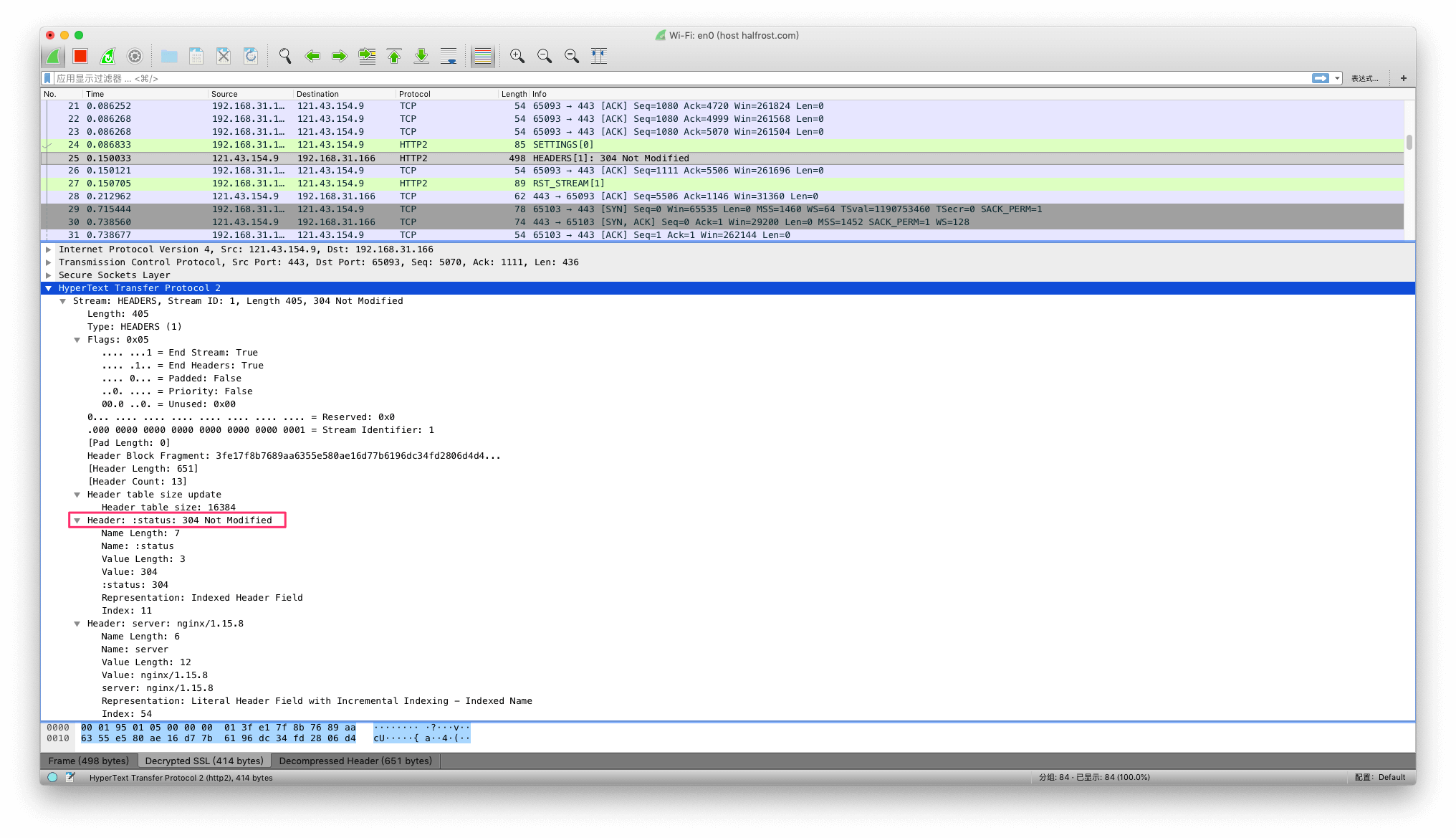
In the figure above, you can see that the status line in an HTTP/1.x response becomes :status: in HTTP/2, and the other HTTP/1.x header fields are correspondingly included in the HEADERS frame.
HEADERS frames often use the Weight field. For example, different files can have different perceived importance and therefore different weights:
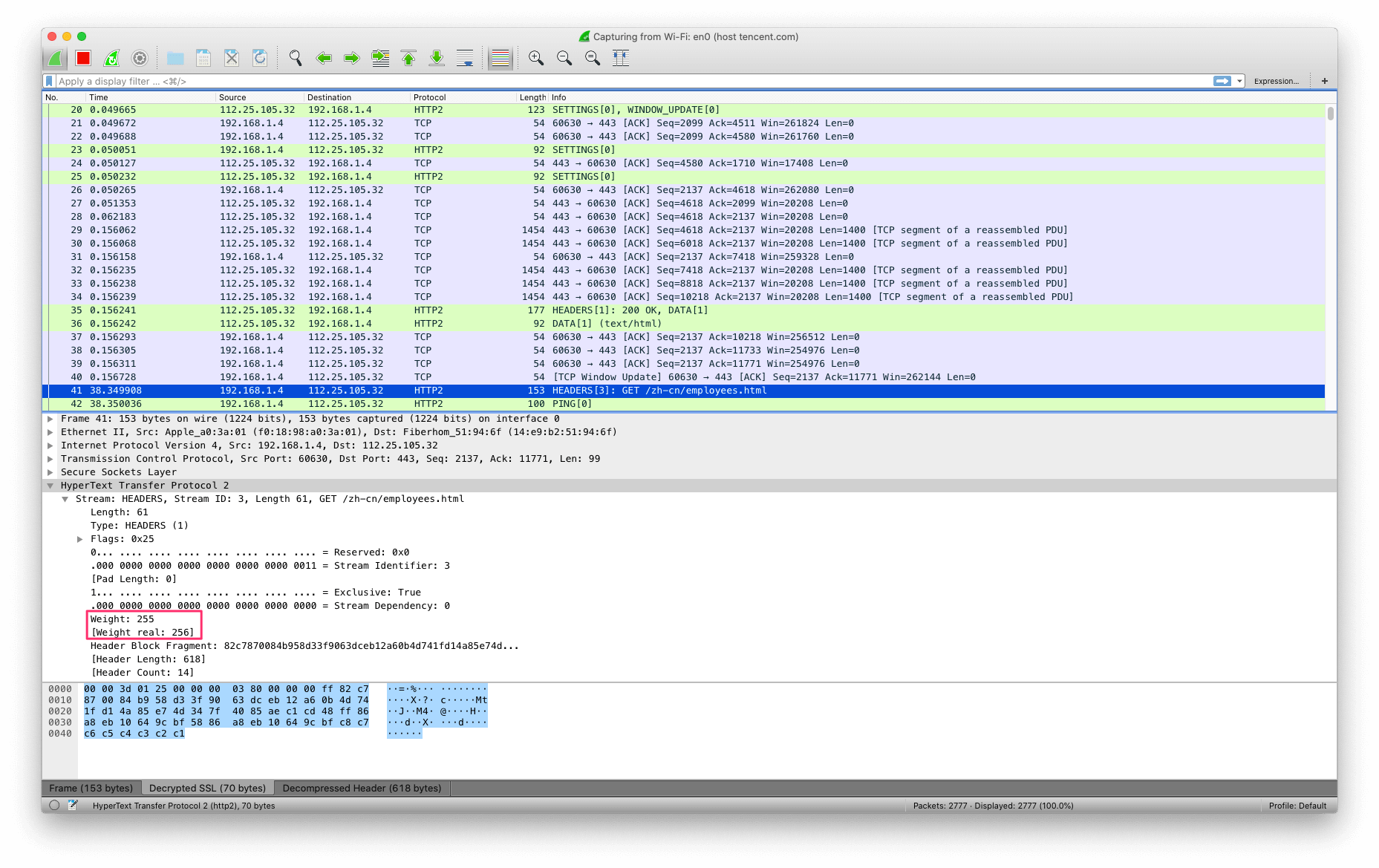
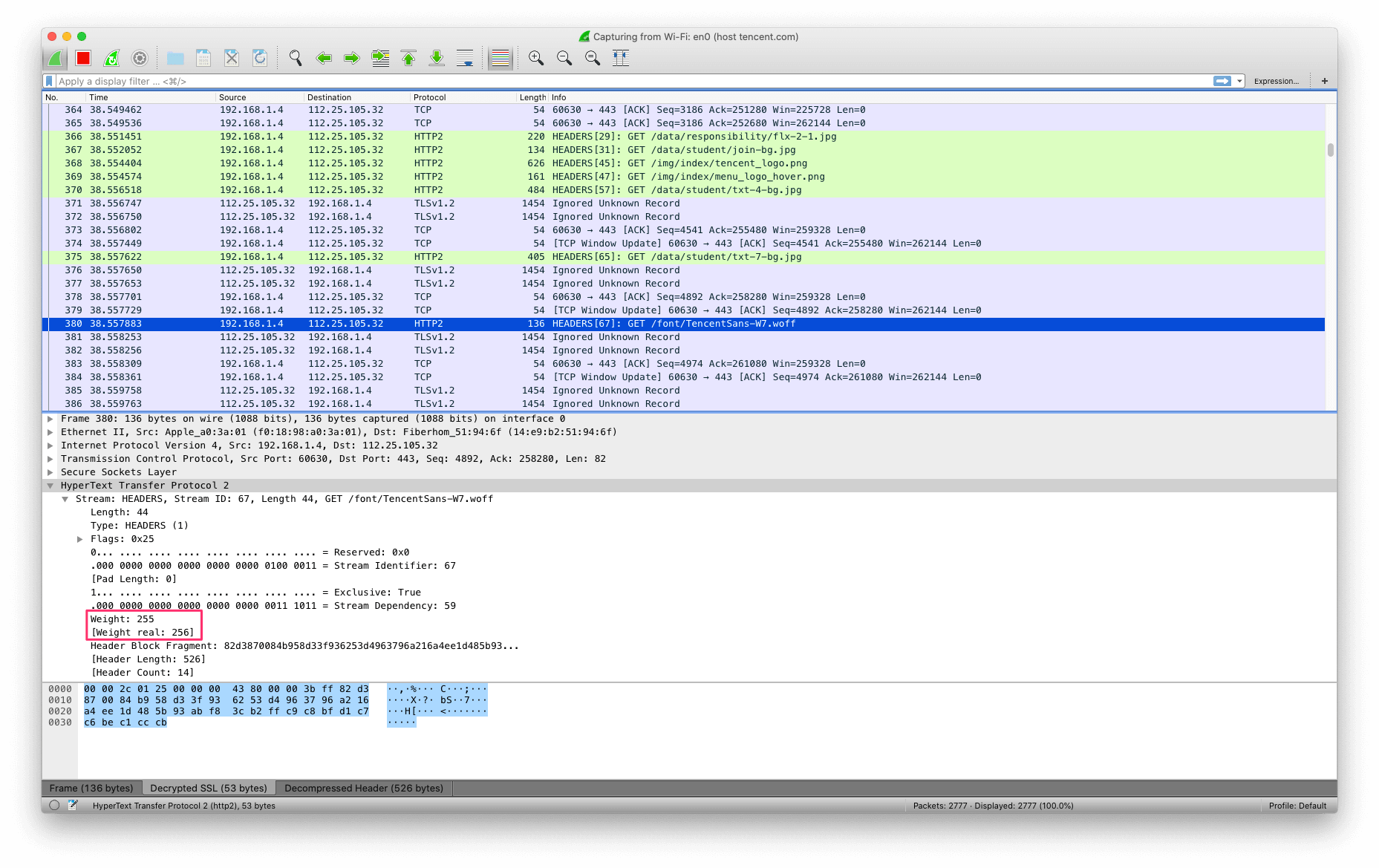
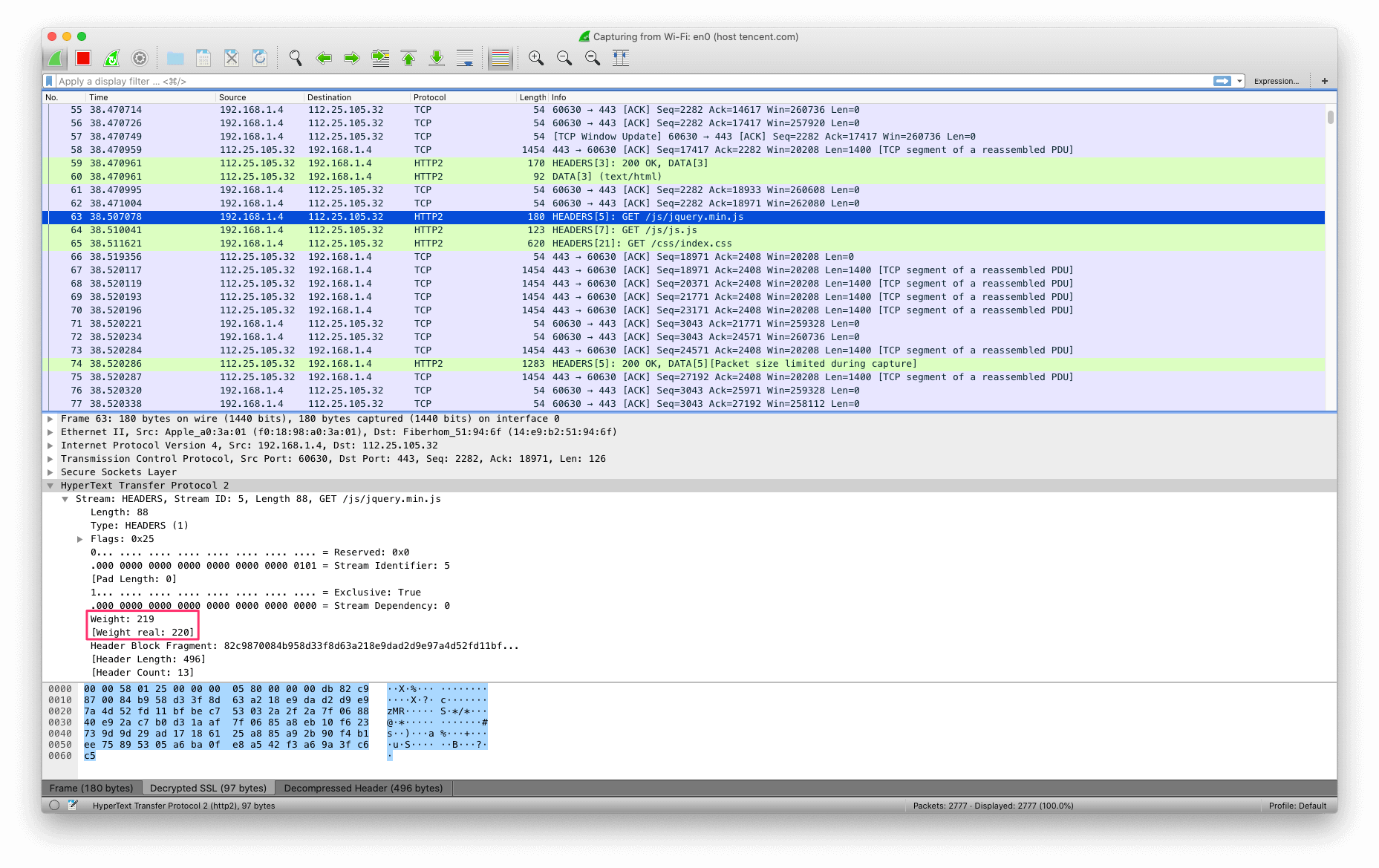
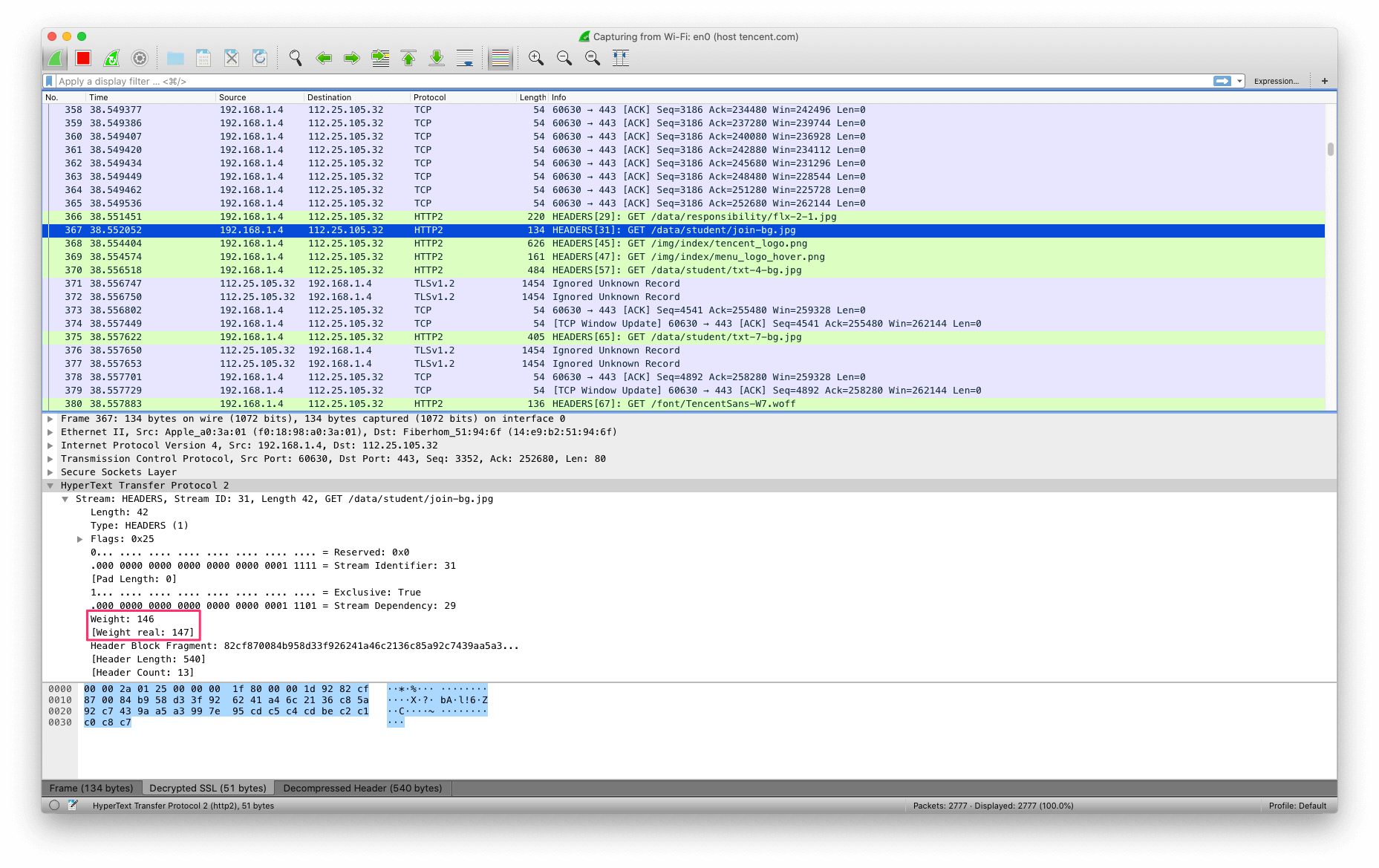
In the example shown above, the HTML file and WOFF font file have higher weights than the JS file and JPG image file. Files of the same type can also have different weights; for example, CSS files:
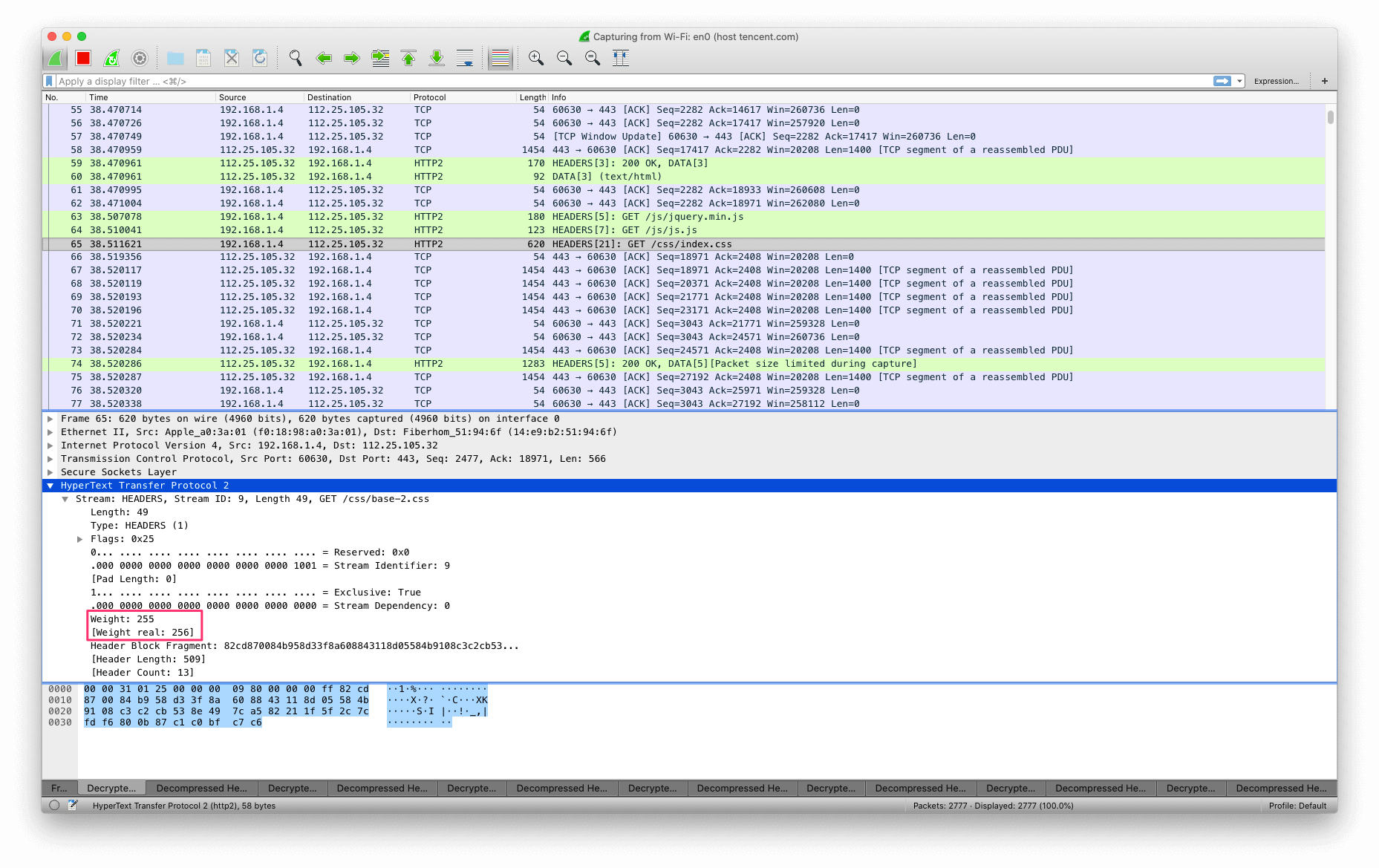
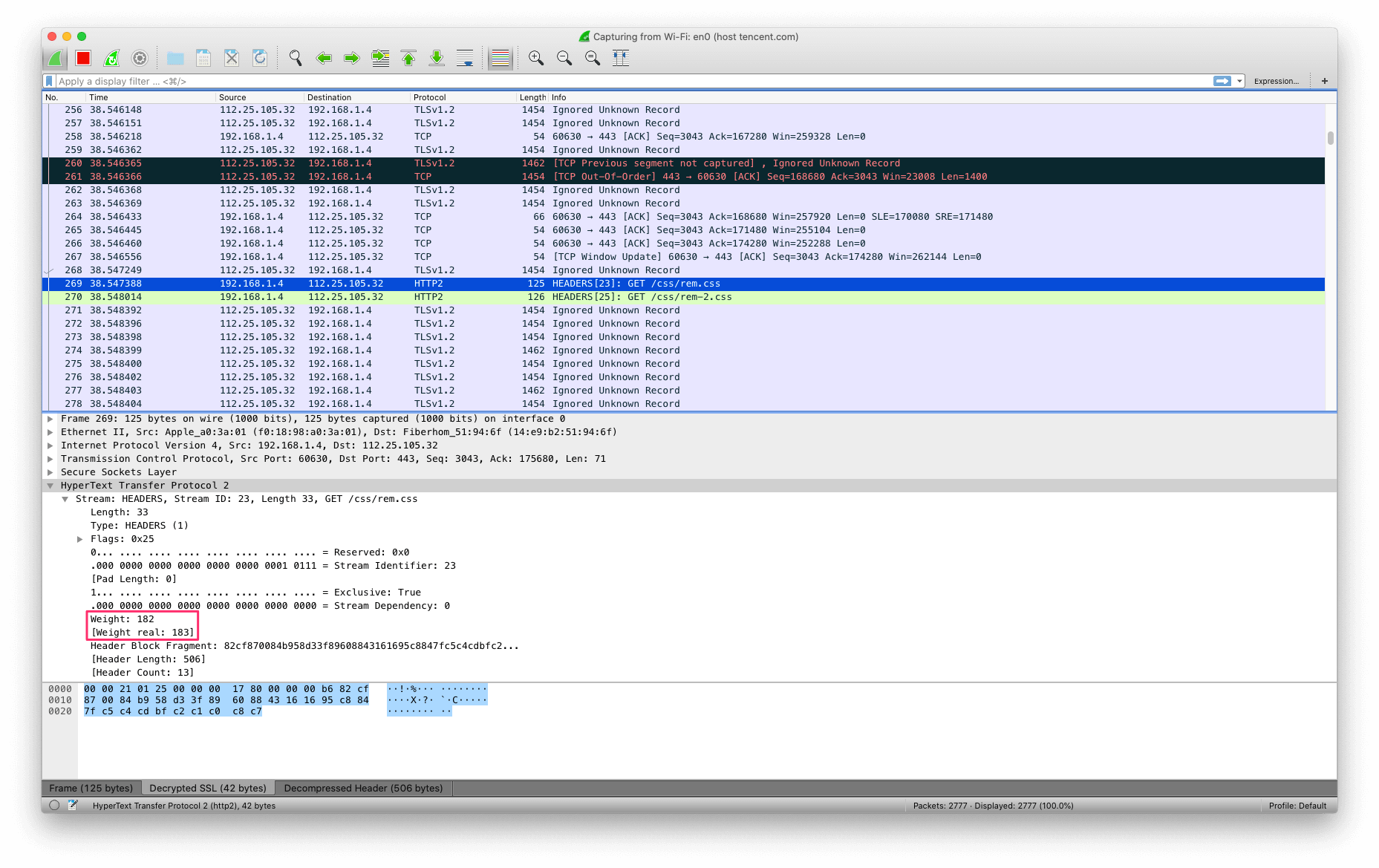
In the example shown above, even though both are CSS files, their weights differ.
III. PRIORITY Frame
The PRIORITY frame (type = 0x2) specifies the sender’s recommended priority for a stream (Section 5.3). It can be sent in any stream state, including idle or closed streams.
    +-+-------------------------------------------------------------+
    |E|                  Stream Dependency (31)                     |
    +-+-------------+-----------------------------------------------+
    |   Weight (8)  |
    +-+-------------+
The PRIORITY frame contains the following fields:
E:
A single-bit flag indicating that the stream dependency is exclusive (see Section 5.3).Stream Dependency:
The 31-bit stream identifier of the stream on which this stream depends (see Section 5.3).Weight:
An unsigned 8-bit integer indicating the priority weight of the stream (see Section 5.3). This value represents a weight from 1 to 256. The default weight is 16.
PRIORITY does not include any flag fields.
A PRIORITY frame always identifies a stream. If a PRIORITY frame with a stream identifier of 0x0 is received, the recipient MUST respond with a connection error of type PROTOCOL_ERROR (Section 5.4.1).
A PRIORITY frame can be sent on a stream in any state, but not between consecutive frames that contain a single header block (Section 4.3). Note that this frame might arrive while processing is in progress or after frame transmission has completed, which can cause it to have no effect on the identified stream. For a stream in the “half-closed (remote)” or “closed” state, this frame can only affect processing of the identified stream and the streams that depend on it; it does not affect frame transmission on that stream.
A PRIORITY frame can be sent for a stream in the “idle” or “closed” state. This allows a set of dependent streams to be reprioritized by changing the priority of an unused or closed parent stream. However, a priority frame sent on a closed stream risks being ignored by the peer, because the peer might already have discarded the priority state information for that stream.
A PRIORITY frame whose length does not exceed 5 octets MUST be treated as a stream error of type FRAME_SIZE_ERROR (Section 5.4.2)
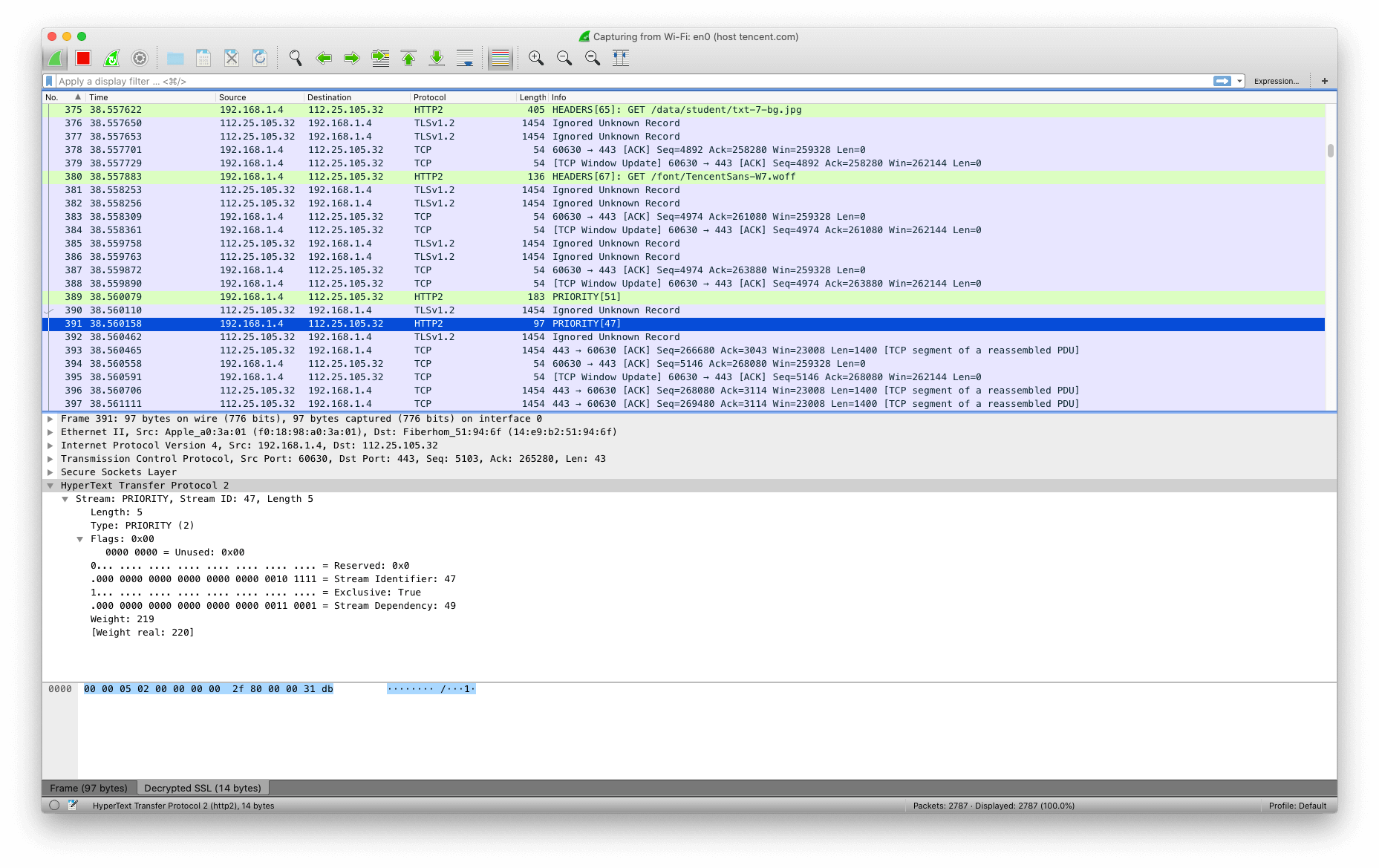
As shown in the packet capture screenshot above, the PRIORITY frame has Exclusive = true, indicating that the dependency of this stream is exclusive. Stream Dependency = 49, meaning it depends on stream 49. The Weight is 219.
IV. RST_STREAM Frame
In HTTP 1.X, a connection sends only one request at a time; if it needs to be aborted midway, the connection can simply be closed. In HTTP/2, however, multiple streams share the same connection. Closing the connection would affect other streams, which is why the RST_STREAM frame exists: it allows an incomplete stream to be aborted immediately.
The RST_STREAM frame (type = 0x3) allows a stream to be terminated immediately. RST_STREAM is sent to request cancellation of a stream or to indicate that an error has occurred.
    +---------------------------------------------------------------+
    |                        Error Code (32)                        |
    +---------------------------------------------------------------+
RST_STREAM frames contain an unsigned 32-bit integer that identifies the error code (Section 7). The error code indicates why the stream is being terminated.
RST_STREAM frames do not define any flags.
An RST_STREAM frame fully terminates the referenced stream and causes it to enter the “closed” state. After receiving an RST_STREAM on a stream, the receiver MUST NOT send additional frames for that stream, except for PRIORITY frames. However, after sending an RST_STREAM, the sending endpoint MUST be prepared to receive and process additional frames that might already have been sent by the peer on the stream before the RST_STREAM frame arrives.
An RST_STREAM frame MUST be associated with a stream. If an RST_STREAM frame with a stream identifier of 0x0 is received, the receiver MUST treat this as a connection error of type PROTOCOL_ERROR (Section 5.4.1).
An RST_STREAM frame MUST NOT be sent for a stream in the “idle” state. If an RST_STREAM frame identifying an idle stream is received, the receiver MUST treat this as a connection error of type PROTOCOL_ERROR (Section 5.4.1). An RST_STREAM frame with a length other than 4 octets MUST be treated as a connection error of type FRAME_SIZE_ERROR (Section 5.4.1).
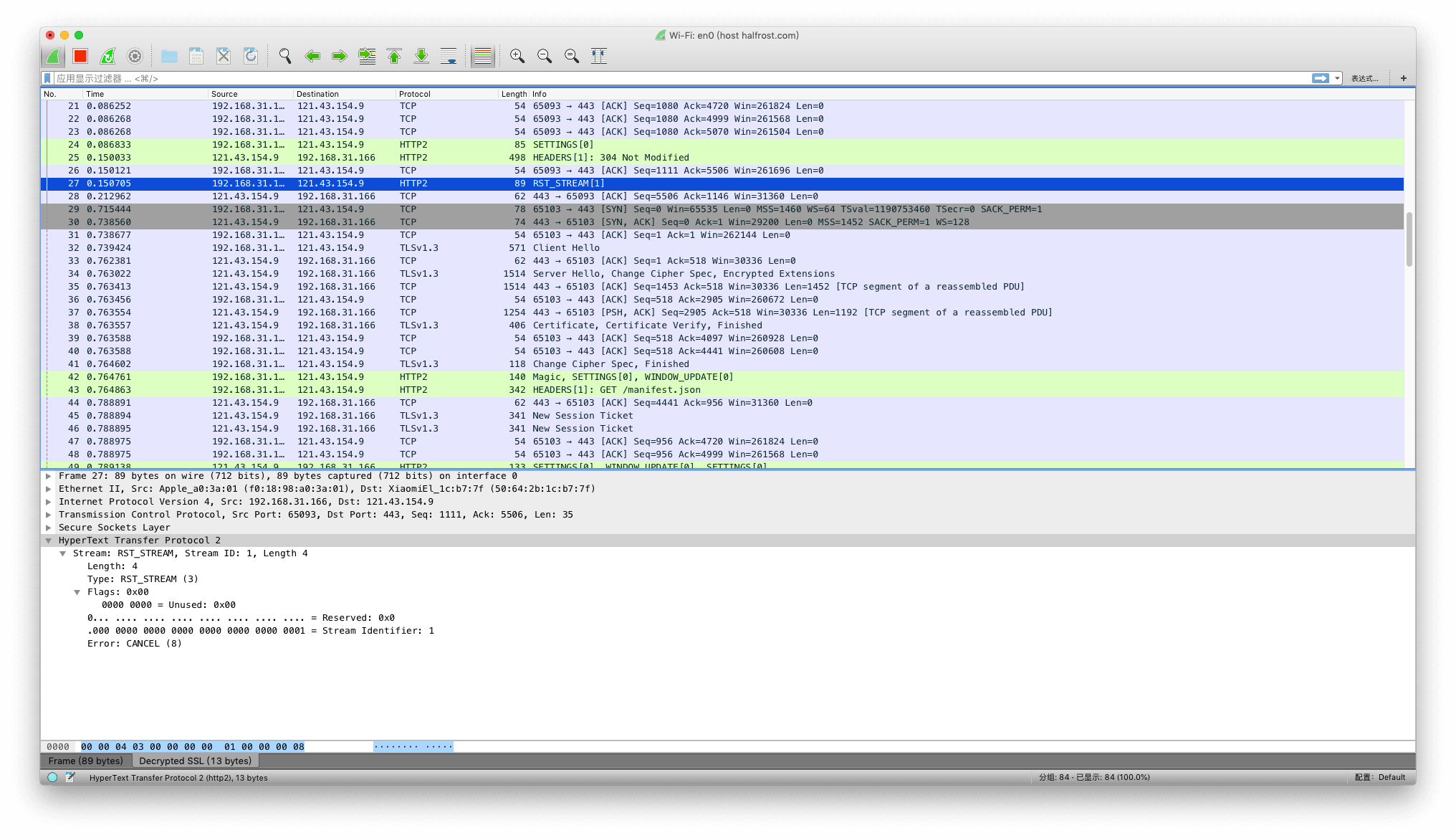
Because RST_STREAM frames have no flags, they are one of the simpler types among the ten frame types. The Error Code here is CANCEL (0x8).
V. SETTINGS Frame
The SETTINGS frame (type = 0x4) conveys configuration parameters that affect how endpoints communicate, such as preferences and constraints on peer behavior. SETTINGS frames are also used to acknowledge receipt of these parameters. Individually, SETTINGS parameters can also be referred to as “settings”.
SETTINGS parameters are not negotiated; they describe characteristics of the sending peer and are used by the receiving peer. The same parameter can be set differently for different peers. For example, a client might set a higher initial flow-control window, while a server might set a lower value to conserve resources.
SETTINGS frames MUST be sent by both endpoints at the start of a connection, and MAY be sent by either endpoint at any other time during the lifetime of the connection. Implementations MUST support all parameters defined by the HTTP/2 specification.
Each parameter in a SETTINGS frame replaces any existing value for that parameter. Parameters are processed in the order in which they appear, and the receiver of a SETTINGS frame does not need to maintain any state other than the current value of its parameters. Therefore, the value of a SETTINGS parameter is the last value seen by the receiver.
SETTINGS parameters are acknowledged by the receiving peer. To enable this, the SETTINGS frame defines the following flag:
- ACK (0x1):
When this field is set, bit 0 indicates that this frame acknowledges receipt and application of the peer’s SETTINGS frame. When this bit is set, the payload of the SETTINGS frame MUST be empty. Receipt of a SETTINGS frame with the ACK flag set and a length field value other than 0 MUST be treated as a connection error of type FRAME_SIZE_ERROR (Section 5.4.1). For more information, see Section 6.5.3 (“Settings Synchronization”).
SETTINGS frames always apply to the connection, not to an individual stream. The stream identifier of a SETTINGS frame MUST be zero (0x0). If an endpoint receives a SETTINGS frame whose stream identifier field is not 0x0, the endpoint MUST respond with a connection error of type PROTOCOL_ERROR (Section 5.4.1).
SETTINGS frames affect connection state. A malformed or incomplete SETTINGS frame MUST be treated as a connection error of type PROTOCOL_ERROR (Section 5.4.1).
A SETTINGS frame whose length is not a multiple of 6 octets MUST be treated as a connection error of type FRAME_SIZE_ERROR (Section 5.4.1).
1. SETTINGS Format
The payload of a SETTINGS frame consists of zero or more parameters, each consisting of an unsigned 16-bit setting identifier and an unsigned 32-bit value.
    +-------------------------------+
    |       Identifier (16)         |
    +-------------------------------+-------------------------------+
    |                        Value (32)                             |
    +---------------------------------------------------------------+
2. Defined SETTINGS Parameters
The following parameters are defined:
SETTINGS_HEADER_TABLE_SIZE(0x1):
Allows the sender to inform the remote endpoint, in octets, of the maximum size of the header compression table used to decode header blocks. The encoder can select any size equal to or less than this value by using signals specific to the header compression format within a header block (see COMPRESSION). The initial value is 4,096 octets.SETTINGS_ENABLE_PUSH(0x2):
This setting can be used to disable server push (Section 8.2). If an endpoint receives this parameter set to 0, it MUST NOT send PUSH_PROMISE frames. An endpoint that has both set this parameter to 0 and had it acknowledged MUST treat the receipt of a PUSH_PROMISE frame as a connection error of type PROTOCOL_ERROR (Section 5.4.1). The initial value is 1, indicating that server push is permitted. Any value other than 0 or 1 MUST be treated as a connection error of type PROTOCOL_ERROR (Section 5.4.1).SETTINGS_MAX_CONCURRENT_STREAMS(0x3):
Indicates the maximum number of concurrent streams that the sender will allow. This limit is directional: it applies to the number of streams that the sender permits the receiver to create. Initially, there is no limit for this value. It is recommended that this value be no smaller than 100, so as not to unnecessarily limit parallelism. A value of 0 for SETTINGS_MAX_CONCURRENT_STREAMS should not be treated by endpoints as a special value. A value of zero does prevent the creation of new streams; however, it also applies to any limit exhausted by active streams. Servers should set a zero value only for short-lived connections; if a server does not want to accept requests, closing the connection is more appropriate.
SETTINGS_MAX_CONCURRENT_STREAMS only counts streams in the open and half-closed states; it does not include streams in the reserved state used for push.
SETTINGS_INITIAL_WINDOW_SIZE(0x4):
Indicates the sender’s initial window size, in octets, for stream-level flow control. The initial value is 2^16-1 (65,535) octets. This setting affects the window size of all streams (see Section 6.9.2). Values greater than the maximum flow-control window size of 2^31-1 MUST be treated as a connection error of type FLOW_CONTROL_ERROR (Section 5.4.1).SETTINGS_MAX_FRAME_SIZE(0x5):
Indicates the size, in octets, of the largest frame payload that the sender is willing to receive. The initial value is 2^14 (16,384) octets. The value advertised by an endpoint MUST be between this initial value and the maximum allowed frame size (2^24-1, or 16,777,215 octets), inclusive. Values outside this range MUST be treated as a connection error of type PROTOCOL_ERROR (Section 5.4.1).SETTINGS_MAX_HEADER_LIST_SIZE(0x6):
This advisory setting informs the peer, in octets, of the maximum size of the header list that the sender is prepared to accept. The value is based on the uncompressed size of header fields, including the length in octets of each name and value plus an overhead of 32 octets for each header field. For any given request, a lower limit than the advertised value can be enforced. The initial value of this setting is unlimited.
A receiver that receives a SETTINGS frame with any unknown or unsupported identifier MUST ignore that setting.
3. Settings Synchronization
Most values in SETTINGS benefit from, or require, knowing when the peer has received and applied changed parameter values. To provide such a synchronization point, the receiver of a SETTINGS frame for which the ACK flag is not set MUST apply the updated parameters as soon as possible upon receipt.
Values in a SETTINGS frame MUST be processed in the order in which they appear, with no other frame processing required between values. Unsupported parameters MUST be ignored. Once all values have been processed, the receiver MUST immediately emit a SETTINGS frame with the ACK flag set. Upon receiving a SETTINGS frame with the ACK flag set, the sender of the changed parameters can consider those parameters to have taken effect.
If the sender of a SETTINGS frame does not receive an acknowledgment within a reasonable amount of time, it may issue a connection error of type SETTINGS_TIMEOUT (Section 5.4.1).
4. Example
For example, the payload of a SETTINGS frame can contain multiple parameters:
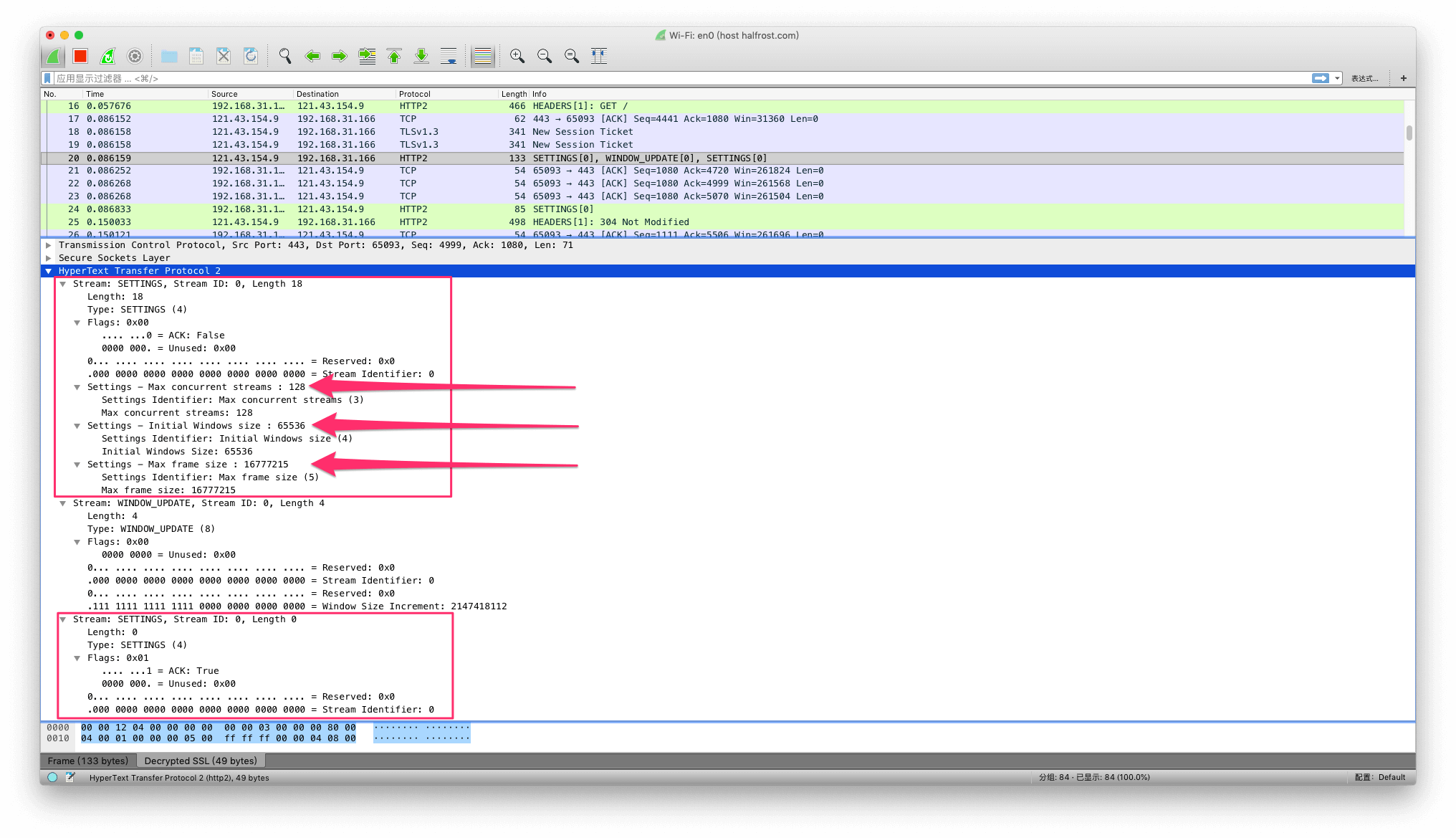
In the figure above, the upper SETTINGS frame has an ACK value of false, indicating that the frame is to be received and applied by the peer. This SETTINGS frame carries three parameters: SETTINGS_MAX_CONCURRENT_STREAMS(0x3) = 128, SETTINGS_INITIAL_WINDOW_SIZE(0x4) = 65536, and SETTINGS_MAX_FRAME_SIZE(0x5) = 16777215. The lower SETTINGS frame carries no parameters, and its ACK flag is true.
VI. PUSH_PROMISE Frame
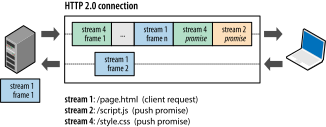
The PUSH_PROMISE frame (type = 0x5) is used to notify the peer in advance of a stream that the sender intends to initiate. A PUSH_PROMISE frame includes the unsigned 31-bit identifier of the stream that the endpoint plans to create, along with a set of headers that provide additional context for the stream. Section 8.2 describes the use of PUSH_PROMISE frames in detail. This frame is the frame that describes the request when the server pushes a resource.
    +---------------+
    |Pad Length? (8)|
    +-+-------------+-----------------------------------------------+
    |R|                  Promised Stream ID (31)                    |
    +-+-----------------------------+-------------------------------+
    |                   Header Block Fragment (*)                 ...
    +---------------------------------------------------------------+
    |                           Padding (*)                       ...
    +---------------------------------------------------------------+
The PUSH_PROMISE frame contains the following fields:
Pad Length:
An 8-bit field containing the length of the frame padding in octets. This field is present only when the PADDED flag is set.R:
A reserved bit.Promised Stream ID:
An unsigned 31-bit integer that identifies the stream reserved by the PUSH_PROMISE. The promised stream identifier MUST be a valid choice for the next stream sent by the sender (see “New Stream Identifier” in Section 5.1.1).Header Block Fragment:
A header block fragment containing request header fields (Section 4.3).Padding:
Padding octets.
The PUSH_PROMISE frame defines the following flag identifiers:
END_HEADERS (0x4):
When this field is set, bit 2 indicates that this frame contains an entire header block (Section 4.3) and is not followed by any CONTINUATION frames. A PUSH_PROMISE frame without the END_HEADERS flag set MUST be followed by a CONTINUATION frame on the same stream. A receiver MUST treat the receipt of any other type of frame, or a frame on a different stream, as a connection error of type PROTOCOL_ERROR (Section 5.4.1).PADDED (0x8):
When this field is set, bit 3 indicates that the Pad Length field is present, along with any padding it describes.
A PUSH_PROMISE frame MUST be sent only on a peer-initiated stream that is in the “open” or “half-closed (remote)” state. The stream identifier of the PUSH_PROMISE frame indicates the stream with which it is associated. If the stream identifier field specifies the value 0x0, the receiver MUST respond with a connection error of type PROTOCOL_ERROR (Section 5.4.1). Promised streams do not need to be used in the order in which they were promised. PUSH_PROMISE only reserves stream identifiers for later use.
If the peer’s SETTINGS_ENABLE_PUSH setting is set to 0, PUSH_PROMISE MUST NOT be sent. An endpoint that has set this setting and received an acknowledgment MUST treat receipt of a PUSH_PROMISE frame as a connection error of type PROTOCOL_ERROR (Section 5.4.1).
The receiver of a PUSH_PROMISE frame can choose to reject the promised stream by returning an RST_STREAM frame that references the promised stream identifier to the sender of the PUSH_PROMISE.
A PUSH_PROMISE frame modifies connection state in two ways. First, the included header block (Section 4.3) can modify the state maintained for header compression. Second, PUSH_PROMISE also reserves a stream for later use, causing the promised stream to enter the “reserved” state. The sender MUST NOT send a PUSH_PROMISE on a stream unless that stream is in the “open” or “half-closed (remote)” state; the sender MUST ensure that the promised stream is a valid choice for a new stream identifier (Section 5.1.1) (that is, the promised stream MUST be in the “idle” state).
Because PUSH_PROMISE reserves a stream, ignoring a PUSH_PROMISE frame can leave stream state indeterminate. A receiver MUST treat receipt of a PUSH_PROMISE on a stream that is neither “open” nor “half-closed (local)” as a connection error of type PROTOCOL_ERROR (Section 5.4.1). However, an endpoint that sends RST_STREAM on the associated stream MUST handle PUSH_PROMISE frames that might have been created before the RST_STREAM frame is received and processed.
A receiver MUST treat receipt of a PUSH_PROMISE frame that promises an illegal stream identifier (Section 5.1.1) as a connection error of type PROTOCOL_ERROR (Section 5.4.1). Note that an illegal stream identifier is the identifier of a stream that is not currently in the “idle” state.
A PUSH_PROMISE frame can include padding. The padding fields and flags are identical to those defined for DATA frames (Section 6.1).
The client sets stream IDs starting from 1; each time it opens a new stream, it increments the ID by 2, so it continues to use odd numbers. When the server opens the stream indicated in PUSH_PROMISE, it sets the stream ID starting from 2 and continues to use even numbers. This design avoids stream ID collisions between the client and server, and also makes it easy to determine which objects were pushed by the server. 0 is a reserved number used for connection-control messages and cannot be used to create a new stream.
Here is an example of a PUSH_PROMISE frame:
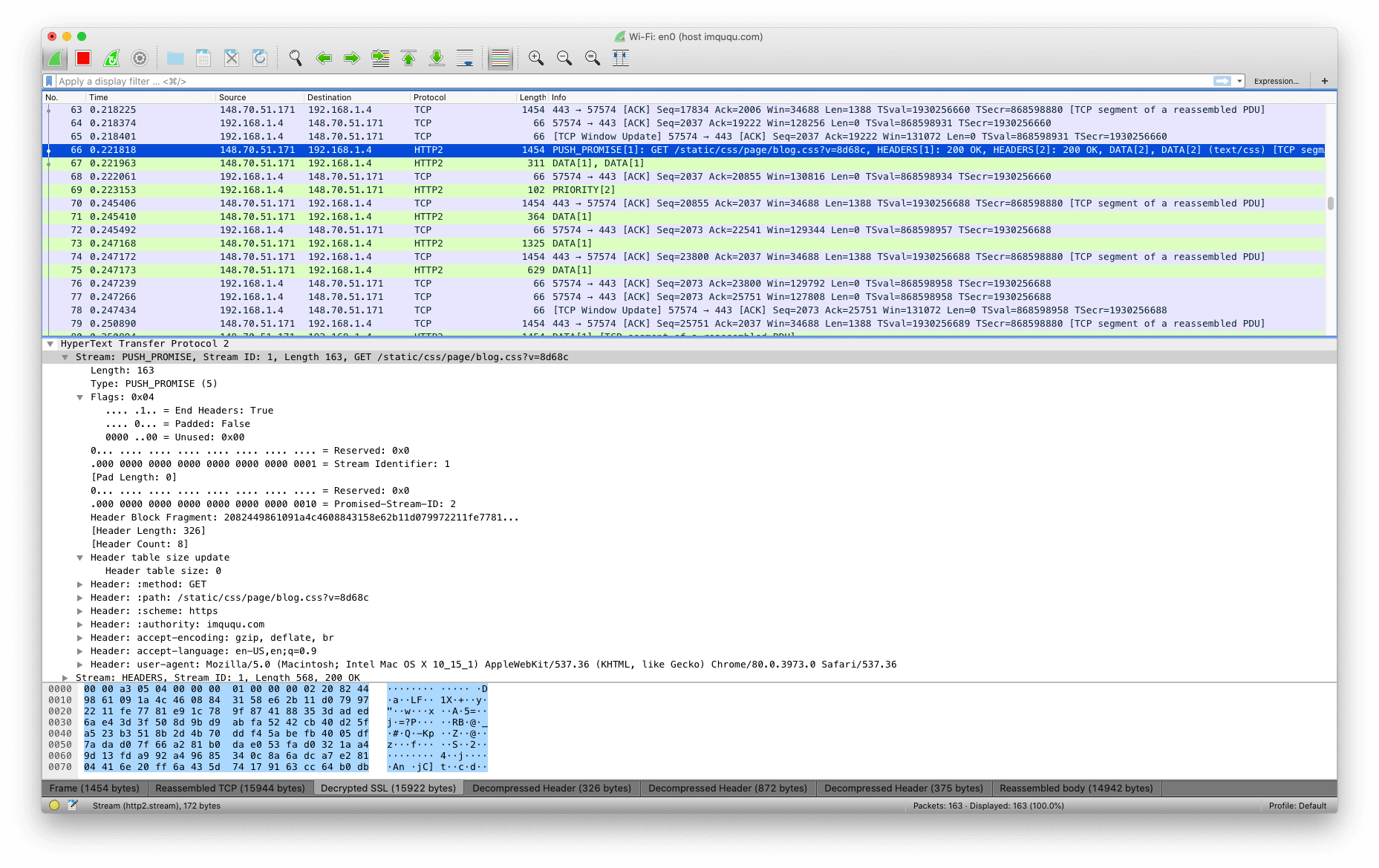
In the example above, Promised Stream ID = 2, starting with an even number. END_HEADERS is true, and the reserved R bit is 0. padded is false, so pad length is also 0, followed immediately by the Header Block Fragment.
VII. PING Frame
The PING frame (type = 0x6) is a mechanism used to measure the minimum round-trip time from the sender and to determine whether an idle connection is still functional. A PING frame can be sent from any endpoint. It can be used as a heartbeat check, while also providing RTT round-trip time measurement.
    +---------------------------------------------------------------+
    |                                                               |
    |                      Opaque Data (64)                         |
    |                                                               |
    +---------------------------------------------------------------+
Aside from the frame header, a PING frame MUST contain 8 octets of opaque data in its payload. The sender can include any value it chooses and use those octets in any manner.
A receiver that receives a PING frame that does not contain the ACK flag MUST send a PING frame in response, with the ACK flag set and with the same payload. PING responses SHOULD be given priority over any other frame.
The PING frame defines the following flag:
- ACK (0x1):
When this field is set, bit 0 indicates that the PING frame is a PING response. An endpoint MUST set this flag in a PING response. An endpoint MUST NOT respond to a PING frame that contains this flag.
PING frames are not associated with any individual stream. If a PING frame is received with a stream identifier field value other than 0x0, the receiver MUST respond with a connection error of type PROTOCOL_ERROR (Section 5.4.1). A PING frame received with a length field value other than 8 MUST be treated as a connection error of type FRAME_SIZE_ERROR (Section 5.4.1).
Here is an example of an HTTP/2 PING frame:
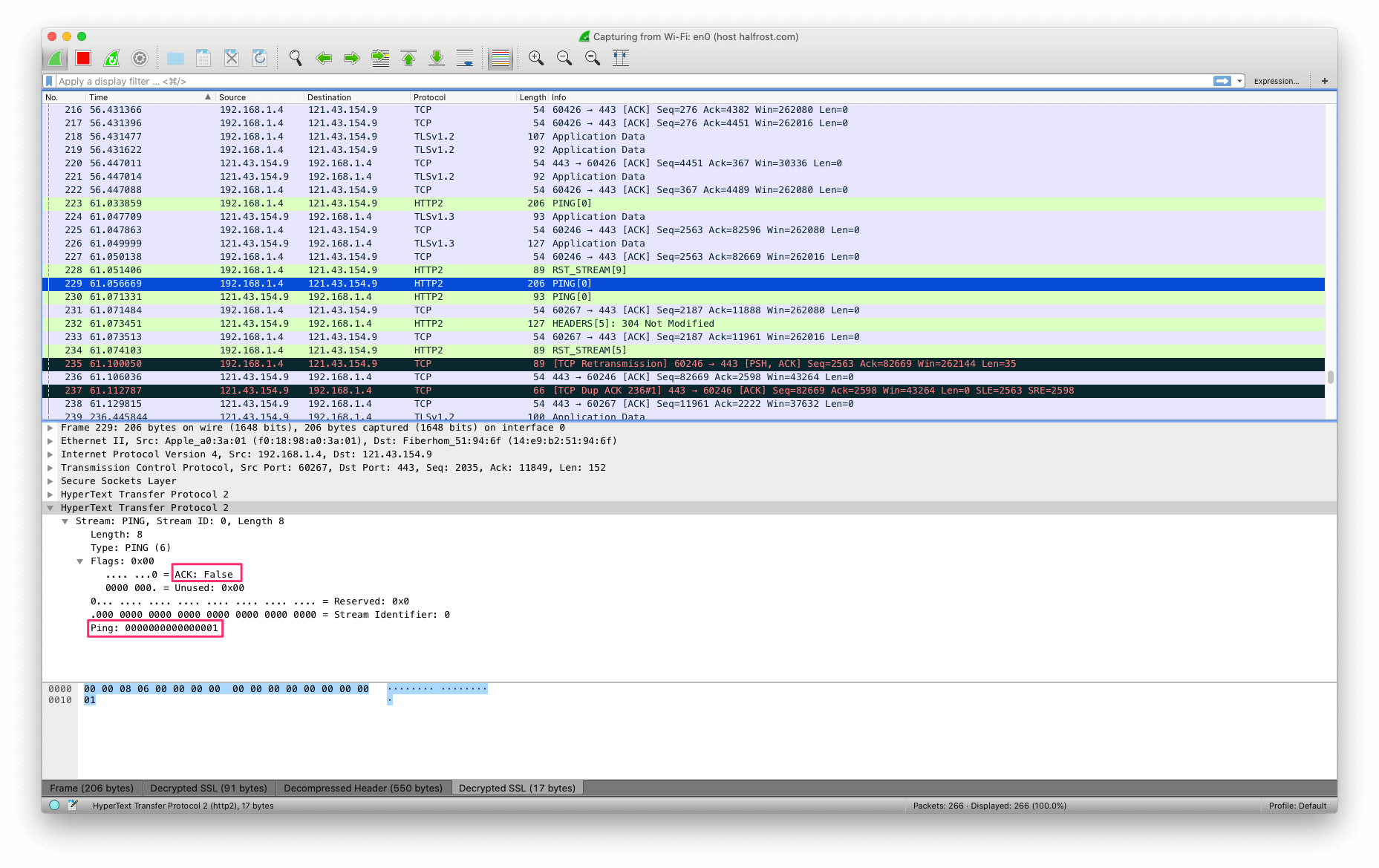
The ACK flag in the ping is false.
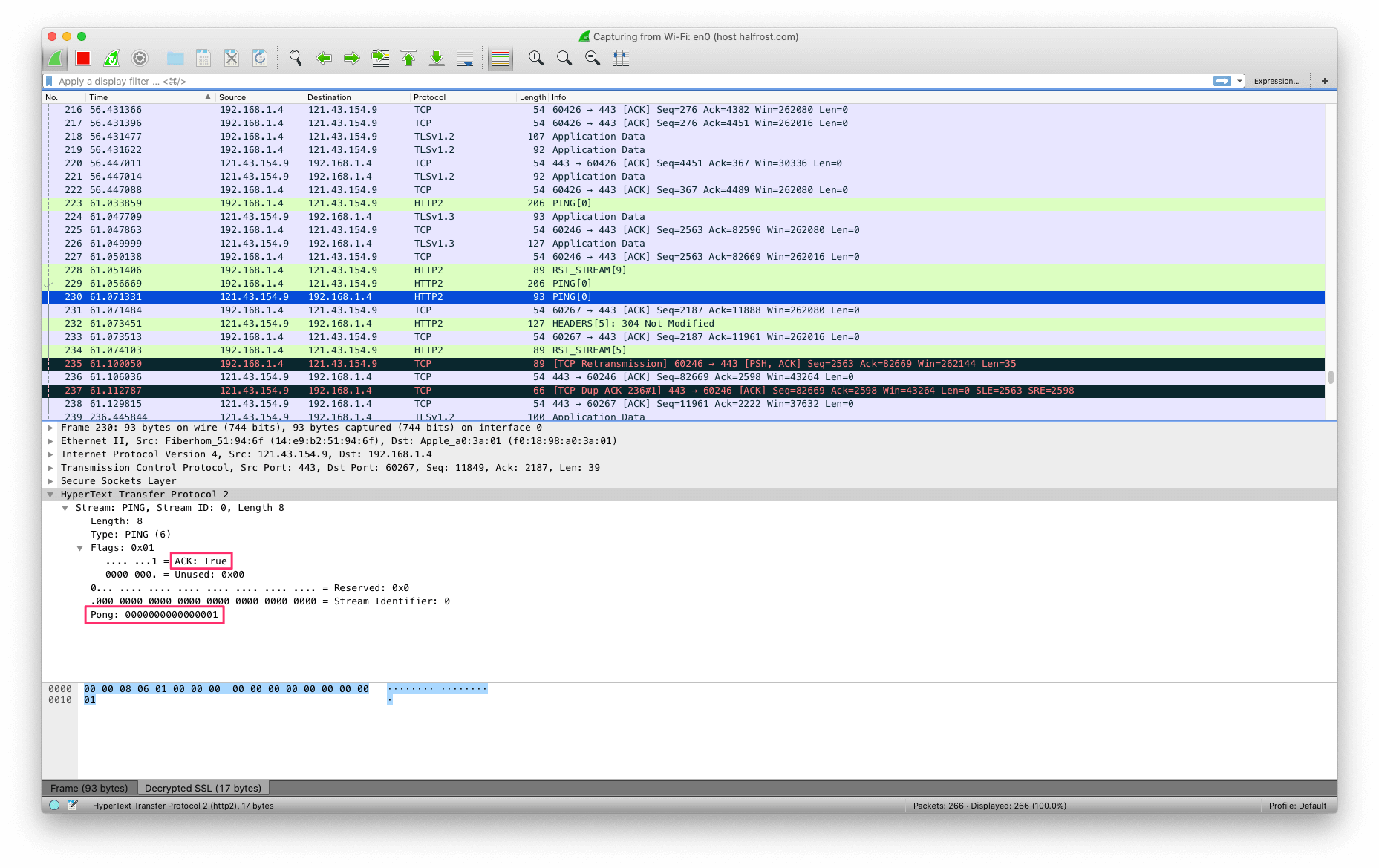
The ACK flag in the pong is true.
VIII. GOAWAY Frame
The GOAWAY frame (type = 0x7) is used to initiate connection shutdown or signal a serious error. GOAWAY allows an endpoint to gracefully stop accepting new streams while still completing the processing of previously established streams. This enables administrative operations such as server maintenance. The GOAWAY frame is used to gracefully terminate a connection or report an error.
There is an inherent race condition between an endpoint starting a new stream and the remote peer sending a GOAWAY frame. To handle this situation, GOAWAY includes the last stream identifier in this connection that has already been, or might be, processed by the sending endpoint. For example, if a server sends a GOAWAY frame, the identified stream is the highest-numbered stream initiated by the client. Once a GOAWAY frame has been sent, the sender will ignore frames sent on streams initiated by the receiver if those streams have identifiers greater than the included last stream identifier. Although a new connection can be established for new streams, the receiver of a GOAWAY frame MUST NOT open additional streams on this connection.
If the receiver of a GOAWAY has already sent data on streams with stream identifiers greater than the stream identifier indicated in the GOAWAY frame, those streams have not been processed or will not be processed. The receiver of the GOAWAY frame can treat those streams as though they were never created, allowing them to be retried later on a new connection.
An endpoint SHOULD always send a GOAWAY frame before closing a connection so that the remote peer can know whether streams have been partially processed or not processed at all. For example, if an HTTP client sends a POST while the server is closing the connection, and the server does not send a GOAWAY frame indicating which streams it might have processed, the client cannot know whether the server started processing that POST request.
An endpoint might choose to close a connection without sending a GOAWAY frame to a misbehaving peer. A GOAWAY frame might not close the connection immediately; the receiver of a GOAWAY frame stops using that connection and SHOULD send a GOAWAY frame before terminating the connection.
    +-+-------------------------------------------------------------+
    |R|                  Last-Stream-ID (31)                        |
    +-+-------------------------------------------------------------+
    |                      Error Code (32)                          |
    +---------------------------------------------------------------+
    |                  Additional Debug Data (*)                    |
    +---------------------------------------------------------------+
The GOAWAY frame does not define any flag bits:
The GOAWAY frame applies to the connection, not to a specific stream. An endpoint MUST treat a GOAWAY frame with a stream identifier other than 0x0 as a connection error of type PROTOCOL_ERROR (Section 5.4.1).
The last stream identifier in a GOAWAY frame contains the highest-numbered stream identifier for which the sender of the GOAWAY frame might have taken some action, or might not yet have taken action. All streams with identifiers less than or equal to this specified identifier might have been processed in some way. If no streams were processed, the last stream identifier is set to 0.
Note: In this case, “processed” means that some data from the stream has been passed to a higher layer of software and might have been processed in some way.
If a connection terminates without a GOAWAY frame, the last stream identifier is effectively the highest valid stream identifier. For streams with lower or equal-numbered identifiers that were not fully closed before the connection was closed, requests, transactions, or any protocol activity cannot be retried, except for idempotent operations such as HTTP GET, PUT, or DELETE. Any protocol activity using higher-numbered streams can be safely retried on a new connection.
Activity on streams numbered lower than or equal to the last stream identifier might still complete successfully. The sender of a GOAWAY frame can gracefully shut down a connection by sending a GOAWAY frame and keeping the connection in the “open” state until all in-progress streams have finished processing.
If circumstances change, an endpoint can send multiple GOAWAY frames. For example, an endpoint that sends a GOAWAY with NO_ERROR during a graceful shutdown might later encounter a situation that requires the connection to be terminated immediately. The last stream identifier from the final GOAWAY frame indicates which streams have been successfully processed. Endpoints MUST NOT increase the value they send in the last stream identifier, because the peer might already have retried the unprocessed requests on another connection.
When a server closes a connection, clients that cannot retry requests will lose all requests in transit. This is especially true for intermediaries that might not use HTTP/2 to serve clients. A server attempting to gracefully shut down a connection should send an initial GOAWAY frame with the last stream identifier set to 2^31-1 and an error code of NO_ERROR. This signals to the client that shutdown is imminent and prevents further requests from being initiated. After allowing enough time for any in-transit streams to be created (at least one round-trip time), the server can send another GOAWAY frame with an updated last stream identifier. This ensures the connection is fully shut down without losing requests.
After sending a GOAWAY frame, the sender can discard frames for streams whose stream identifiers are greater than the final stream identifier. However, frames that change connection state cannot be completely ignored. For example, HEADERS, PUSH_PROMISE, and CONTINUATION frames must be processed at least minimally to ensure that the state maintained for header compression remains consistent (see Section 4.3); similarly, DATA frames must be counted against the connection-level flow-control window. Failing to process these frames can cause flow-control or header-compression state to become desynchronized.
The GOAWAY frame also contains a 32-bit error code (Section 7) that indicates the reason for closing the connection. An endpoint can append opaque data to the payload of any GOAWAY frame. Additional debug data is intended only for diagnostic purposes and carries no semantic value. Debug information might contain security- or privacy-sensitive data. Debug data that is logged or otherwise persisted must have sufficient safeguards to prevent unauthorized access.
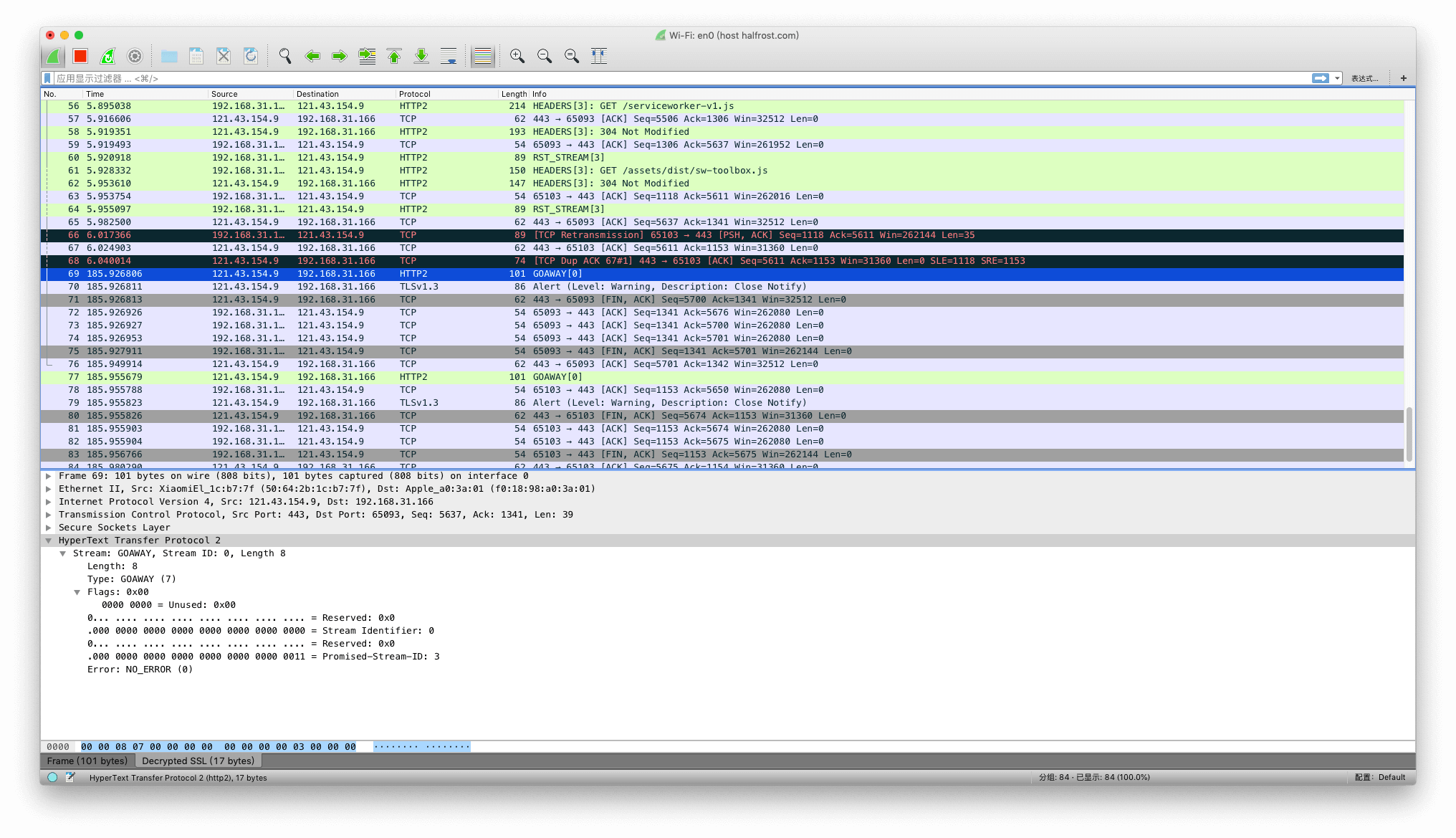
The GOAWAY frame is also relatively simple. R is a reserved flag bit. The Stream ID of this frame is 0, indicating that it is about to close the connection. The promised stream identifier must be a valid choice for the next stream sent by the sender, and the promised-stream-ID is 3. The Error Code here is NO_ERROR (0x0).
9. WINDOW_UPDATE Frame
The WINDOW_UPDATE frame (type = 0x8) is used to implement flow control; for an overview, see Section 5.2.
Flow control operates at two levels: on each individual stream and on the overall connection.
All types of flow control are hop-by-hop, that is, only between two endpoints. Intermediaries do not forward WINDOW_UPDATE frames between dependent connections. However, any receiver-side limits on data transmission can indirectly cause flow-control information to propagate back to the original sender.
Flow control applies only to the two endpoints that directly establish the TCP connection. If the peer is a proxy server, the proxy server does not need to forward WINDOW_UPDATE frames upstream. However, if the receiver shrinks the flow-control window, that effect will eventually be propagated back to the original sender.
Flow control applies only to frames identified as being subject to flow control. Among the frame types defined in HTTP/2, this includes only DATA frames. Frames exempt from flow control must be accepted and processed unless the receiver cannot allocate resources to process the frame. If the receiver cannot accept the frame, it can respond with a stream error (Section 5.4.2) or a connection error (Section 5.4.1) of type FLOW_CONTROL_ERROR.
    +-+-------------------------------------------------------------+
    |R|              Window Size Increment (31)                     |
    +-+-------------------------------------------------------------+
The WINDOW_UPDATE frame’s payload is a reserved bit plus an unsigned 31-bit integer indicating the number of octets, in addition to the existing flow-control window, that the sender can send. The legal range for the flow-control window increment is 1 to 2^31-1 (2,147,483,647) octets.
WINDOW_UPDATE frames define no flags. A WINDOW_UPDATE frame can be specific to a stream or to the entire connection. In the former case, the frame’s stream identifier indicates the affected stream; in the latter, the value “0” indicates that the entire connection is affected by this frame.
A receiver MUST treat the receipt of a WINDOW_UPDATE frame with a flow-control window increment of 0 as a stream error of type PROTOCOL_ERROR (Section 5.4.2); an error on the connection flow-control window MUST be treated as a connection error (Section 5.4.1).
A WINDOW_UPDATE can be sent by a peer that has already sent a frame with the END_STREAM flag. This means the receiver can receive a WINDOW_UPDATE frame on a “half-closed (remote)” or “closed” stream. The receiver MUST NOT treat this as an error (see Section 5.1).
A receiver that receives a flow-controlled frame MUST always account for its impact on the connection flow-control window, unless the receiver treats it as a connection error (Section 5.4.1). This is necessary even if the frame is in error. Because the sender has counted this frame against the flow-control window, if the receiver does not do the same, the sender’s and receiver’s flow-control state will diverge. A WINDOW_UPDATE frame whose length is not 4 octets MUST be treated as a connection error of type FRAME_SIZE_ERROR (Section 5.4.1).
1. The Flow-Control Window
Flow control in HTTP/2 is implemented by each sender maintaining a window for each stream. The flow-control window is a simple integer value indicating how many octets of data the sender is permitted to transmit; therefore, its size reflects the receiver’s buffering capacity.
Flow-control windows apply both to streams and to the connection. A sender MUST NOT send a flow-controlled frame with a length that exceeds the available space in either flow-control window advertised by the receiver. If there is no available space in either flow-control window, a zero-length frame with the END_STREAM flag set can be sent (that is, an empty DATA frame). The 9-octet frame header is not counted in flow-control calculations. After sending a flow-controlled frame, the sender reduces the available space in both windows by the length of the transmitted frame.
The receiver of a frame sends WINDOW_UPDATE frames when it consumes data and frees up space in the flow-control window. Separate WINDOW_UPDATE frames are sent for stream-level and connection-level flow-control windows. A sender that receives a WINDOW_UPDATE frame updates the corresponding window by the amount specified in the frame.
A sender should prevent a flow-control window from exceeding 2^31-1 octets. If a sender receives a WINDOW_UPDATE that causes a flow-control window to exceed this maximum value, it MUST terminate the stream or connection as appropriate. For a stream, the sender sends RST_STREAM with the error code FLOW_CONTROL_ERROR; for a connection, it sends a GOAWAY frame with the error code FLOW_CONTROL_ERROR.
Flow-controlled frames from the sender and WINDOW_UPDATE frames from the receiver are completely asynchronous with respect to each other. This property allows the receiver to proactively update the window size maintained by the sender to prevent streams from stalling.
2. Initial Flow-Control Window Size
When an HTTP/2 connection is first established, new streams are created with an initial flow-control window size of 65,535 octets. The connection flow-control window is also 65,535 octets. Either endpoint can adjust the initial window size for new streams by including a value for SETTINGS_INITIAL_WINDOW_SIZE in the SETTINGS frame that forms part of the connection preface. The connection flow-control window can be changed only by using WINDOW_UPDATE frames.
Before receiving a SETTINGS frame that sets a value for SETTINGS_INITIAL_WINDOW_SIZE, an endpoint can use only the default initial window size when sending flow-controlled frames. Similarly, the connection flow-control window is set to the default initial window size until a WINDOW_UPDATE frame is received.
In addition to changing the flow-control windows of streams that have not yet become active, a SETTINGS frame can also change the initial flow-control window size for streams with active flow-control windows (that is, streams in the “open” or “half-closed (remote)” state). When the value of SETTINGS_INITIAL_WINDOW_SIZE changes, the receiver MUST adjust the size of all flow-control windows it maintains by the difference between the new value and the old value.
A change to SETTINGS_INITIAL_WINDOW_SIZE can cause the available space in a flow-control window to become negative. The sender MUST track the negative flow-control window and MUST NOT send new flow-controlled frames until it receives WINDOW_UPDATE frames that make the flow-control window positive. For example, if the client sends 60 KB immediately after establishing the connection and the server sets the initial window size to 16 KB, then upon receiving the SETTINGS frame, the client recalculates the available flow-control window as -44 KB. The client retains the negative flow-control window until WINDOW_UPDATE frames restore the window to a positive value, after which the client can resume sending.
SETTINGS frames cannot change the connection flow-control window.
An endpoint MUST treat the condition where processing a change to SETTINGS_INITIAL_WINDOW_SIZE causes any flow-control window to exceed the maximum size as a connection error of type FLOW_CONTROL_ERROR (Section 5.4.1).
3. Reducing the Stream Window Size
A receiver that wishes to use a flow-control window smaller than the current size can send a new SETTINGS frame. However, the receiver MUST be prepared to receive data that exceeds this window size, because the sender might send data beyond the lower limit before processing the SETTINGS frame.
After sending a SETTINGS frame that reduces the initial flow-control window size, the receiver can continue processing streams that exceed the flow-control limit. Allowing streams to continue prevents the receiver from immediately reducing the space it has reserved for flow-control windows. Because WINDOW_UPDATE frames are required to allow the sender to continue sending, progress on these streams will also stall. The receiver can also send an RST_STREAM with the error code FLOW_CONTROL_ERROR for affected streams.
4. For Example
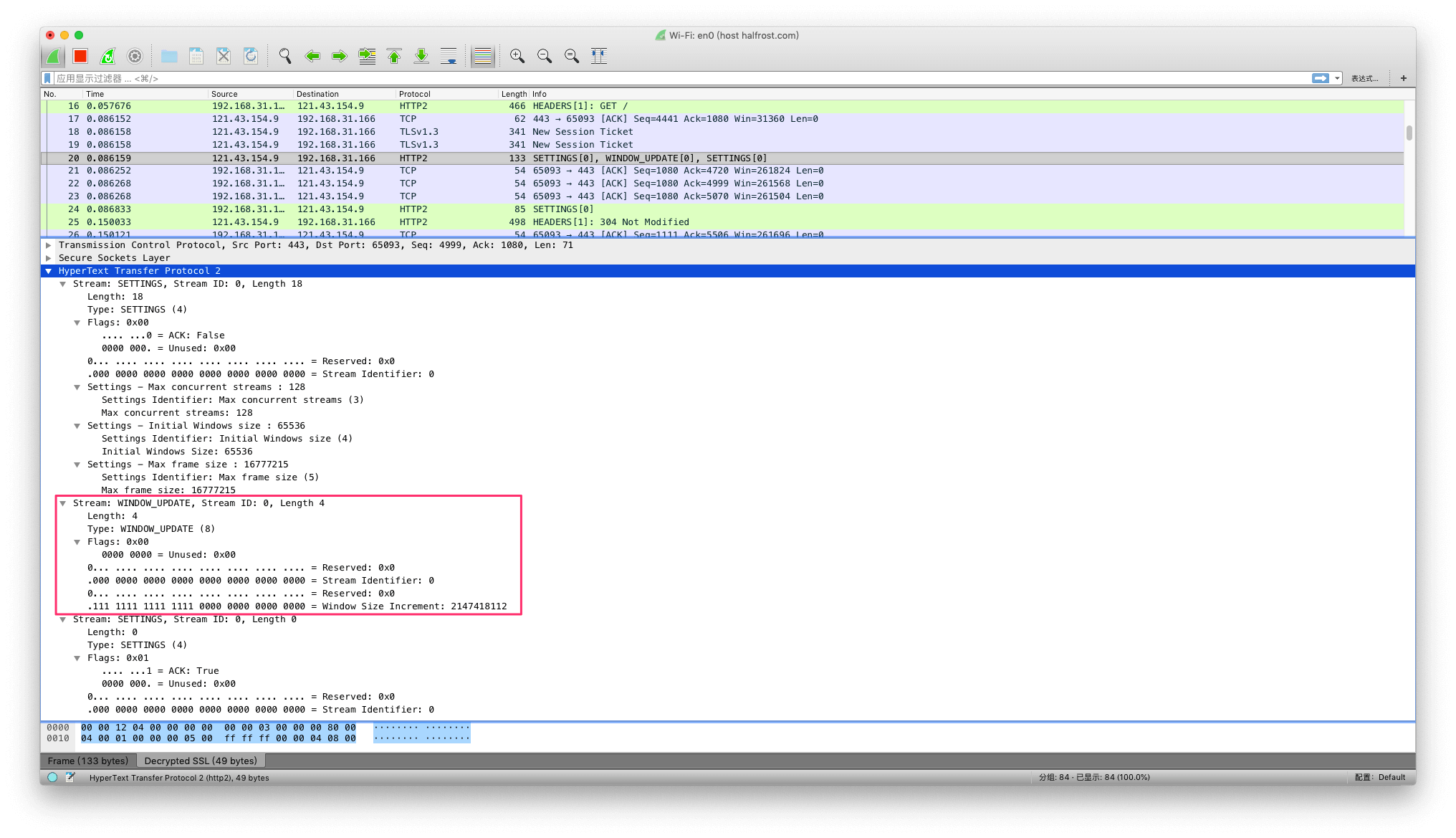
In the packet capture shown above, the WINDOW_UPDATE frame’s R bit is 0, and the Window Size Increment is 2147418112.
10. CONTINUATION Frame
The CONTINUATION frame (type = 0x9) is used to continue a sequence of header block fragments (Section 4.3). Any number of CONTINUATION frames can be sent, as long as the preceding frame is on the same stream and is a HEADERS, PUSH_PROMISE, or CONTINUATION frame without the END_HEADERS flag set. This frame is specifically used as a continuation frame when transmitting large HTTP headers.
    +---------------------------------------------------------------+
    |                   Header Block Fragment (*)                 ...
    +---------------------------------------------------------------+
CONTINUATION frame payloads contain a header block fragment (Section 4.3).
The following flag is defined for CONTINUATION frames:
- END_HEADERS (0x4):
When this field is set, bit 2 indicates that this frame ends a header block (Section 4.3). If the END_HEADERS bit is not set, this frame MUST be followed by another CONTINUATION frame. A receiver MUST treat the receipt of any other type of frame, or a frame on a different stream, as a connection error of type PROTOCOL_ERROR (Section 5.4.1).
CONTINUATION frames change the connection state defined in (Section 4.3). A CONTINUATION frame MUST be associated with a stream. If a CONTINUATION frame is received whose stream identifier field is 0x0, the receiver MUST respond with a connection error of type PROTOCOL_ERROR (Section 5.4.1).
A CONTINUATION frame MUST be preceded by a HEADERS, PUSH_PROMISE, or CONTINUATION frame that does not have the END_HEADERS flag set. A receiver that observes a violation of this rule MUST respond with a connection error of type PROTOCOL_ERROR (Section 5.4.1).
A CONTINUATION frame can be thought of as a special HEADERAS frame. So why design this new frame type instead of directly using HEADERAS frames? If HEADERAS frames were reused, then the payloads of subsequent HEADERAS frames would need special handling before they could be concatenated with the previous ones. Would the frame headers need to be repeated? What should happen if there were inconsistencies between frames? The protocol designers considered these to be ambiguous issues that could cause trouble in the future, so the working group decided to add an explicit frame type to avoid implementation confusion.
Because HEADERAS frames and CONTINUATION frames must be ordered, using CONTINUATION frames can undermine or reduce the benefits of multiplexing. CONTINUATION frames are a tool for addressing an important scenario (large headers), but they should be used only when necessary.
11. Error Codes
Error codes are 32-bit fields used in RST_STREAM and GOAWAY frames to indicate the reason for a stream or connection error. Error codes share a common code space. Some error codes apply only to streams or to the entire connection and have no defined semantics in other contexts.
The following error codes are defined:
NO_ERROR (0x0):
The associated condition is not the result of an error. For example, GOAWAY might include this code to indicate a graceful connection shutdown.PROTOCOL_ERROR (0x1):
The endpoint detected a nonspecific protocol error. This error is used when a more specific error code is not available.INTERNAL_ERROR (0x2):
The endpoint encountered an unexpected internal error.FLOW_CONTROL_ERROR (0x3):
The endpoint detected that its peer violated the flow-control protocol.SETTINGS_TIMEOUT (0x4):
The endpoint sent a SETTINGS frame but did not receive a response in time. See Section 6.5.3 (“Settings Synchronization”).STREAM_CLOSED (0x5):
The endpoint received a frame after the stream was half-closed. The stream was already in a half-closed state and no longer accepting frames, but another frame was received.FRAME_SIZE_ERROR (0x6):
The endpoint received a frame with an invalid size.REFUSED_STREAM (0x7):
The endpoint refused the stream before performing any application processing (for details, see Section 8.1.4).CANCEL (0x8):
The endpoint uses this to indicate that the stream is no longer needed.COMPRESSION_ERROR (0x9):
The endpoint is unable to maintain the header compression context for the connection.CONNECT_ERROR (0xa):
The connection established in response to a CONNECT request (Section 8.3) was reset or abnormally closed.ENHANCE_YOUR_CALM (0xb):
The endpoint detected that its peer is exhibiting behavior that might be generating excessive load. It is a reminder for the peer to “calm down.”INADEQUATE_SECURITY (0xc):
The underlying transport has properties that do not meet minimum security requirements (see Section 9.2).HTTP_1_1_REQUIRED (0xd):
The endpoint requires HTTP/1.1 instead of HTTP/2.
Unknown or unsupported error codes MUST NOT trigger any special behavior. Implementations can treat these as equivalent to INTERNAL_ERROR.
Reference:
GitHub Repo: Halfrost-Field
Follow: halfrost · GitHub
Source: /http2-http-frames-definitions/
