A Step-by-Step Guide to Migrating from Core Data to Realm
Preface
After reading the title of this article, some of you may still not know what Realm is, so let me briefly introduce this new database. It claims to be a replacement for SQLite and Core Data. Realm has the following advantages:
Easy to use Realm is not an object-relational mapping database built on SQLite. It uses its own persistence engine and was built for simplicity and speed. Users say they can get started with Realm in minutes, build an app in hours, and save at least several weeks of development time on each app.
Fast Realm is faster than other Object Relational Mapping databases, and even faster than native SQLite, thanks to its zero-copy design. See how iOS users and Android users describe how fast it is on Twitter.
Cross-platform Realm supports iOS and OS X (Objective‑C & Swift) and Android. By using the same model, you can share Realm files across platforms—Java, Swift, and Objective-C—and use the same business logic on all platforms.
Excellent features Realm supports advanced features such as encryption, graph queries, and easy migrations. Realm’s API is very well suited for building highly responsive applications, and Realm provides convenient components that make it easy to build complex user interfaces.
Trusted Realm has already been adopted by banks, healthcare providers, complex enterprise apps, and products such as Starbucks.
Community-driven Realm is the fourth most-starred database on GitHub, behind only Java and Cocoa repos. Beyond the core engineering work, the Realm community has already built hundreds of app plugins and components.
Support You can get official answers quickly from the Realm company to build and support your database. The Realm team answers all kinds of questions on GitHub, StackOverflow, and Twitter.
Here are three more surprising performance comparison charts.
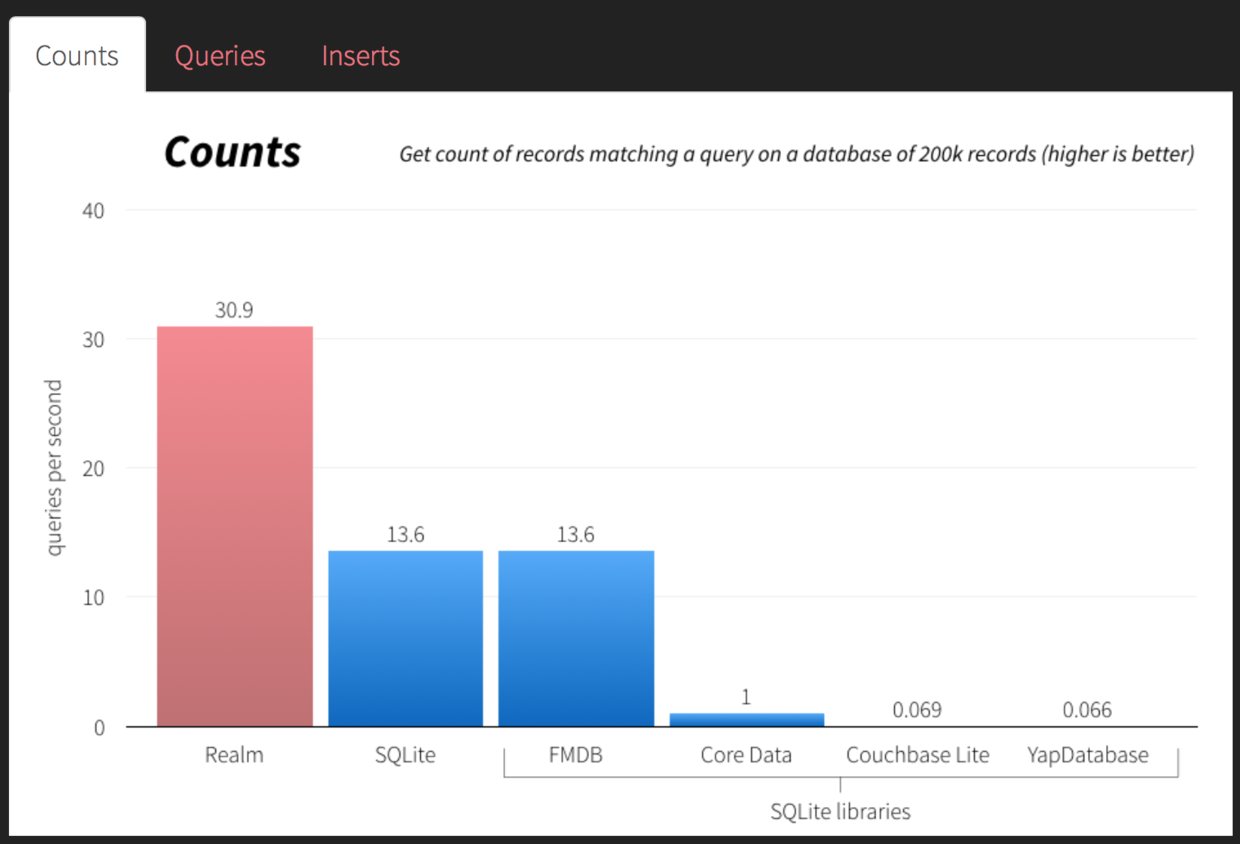
The chart above shows how many times per second a query followed by a count can be performed over 200,000 records. Realm can perform 30.9 query-and-count operations per second. SQLite manages only 13.6 query-and-count operations per second, while Core Data manages a pitiful 1.
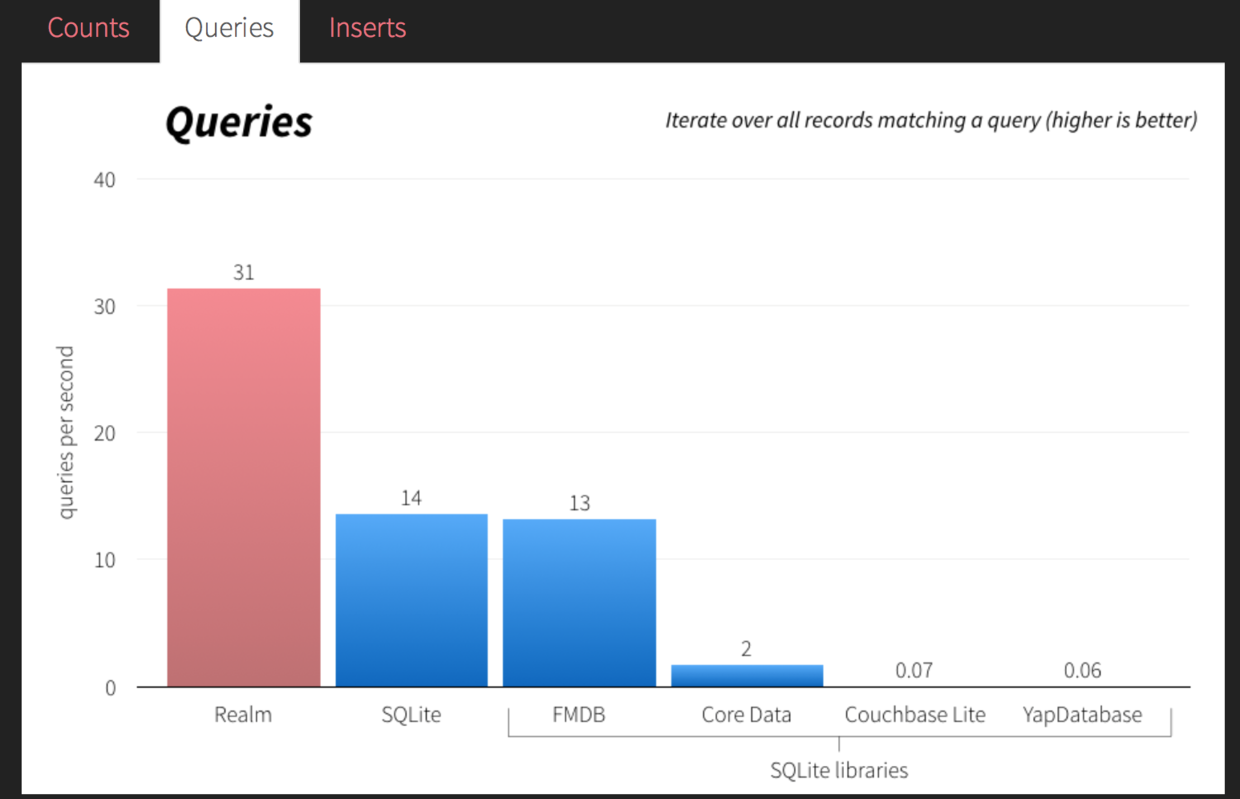
For a traversal query over 200,000 records, the data is similar to the previous count result: Realm can traverse 200,000 records 31 times per second, while Core Data can perform only two queries. SQLite manages only 14.
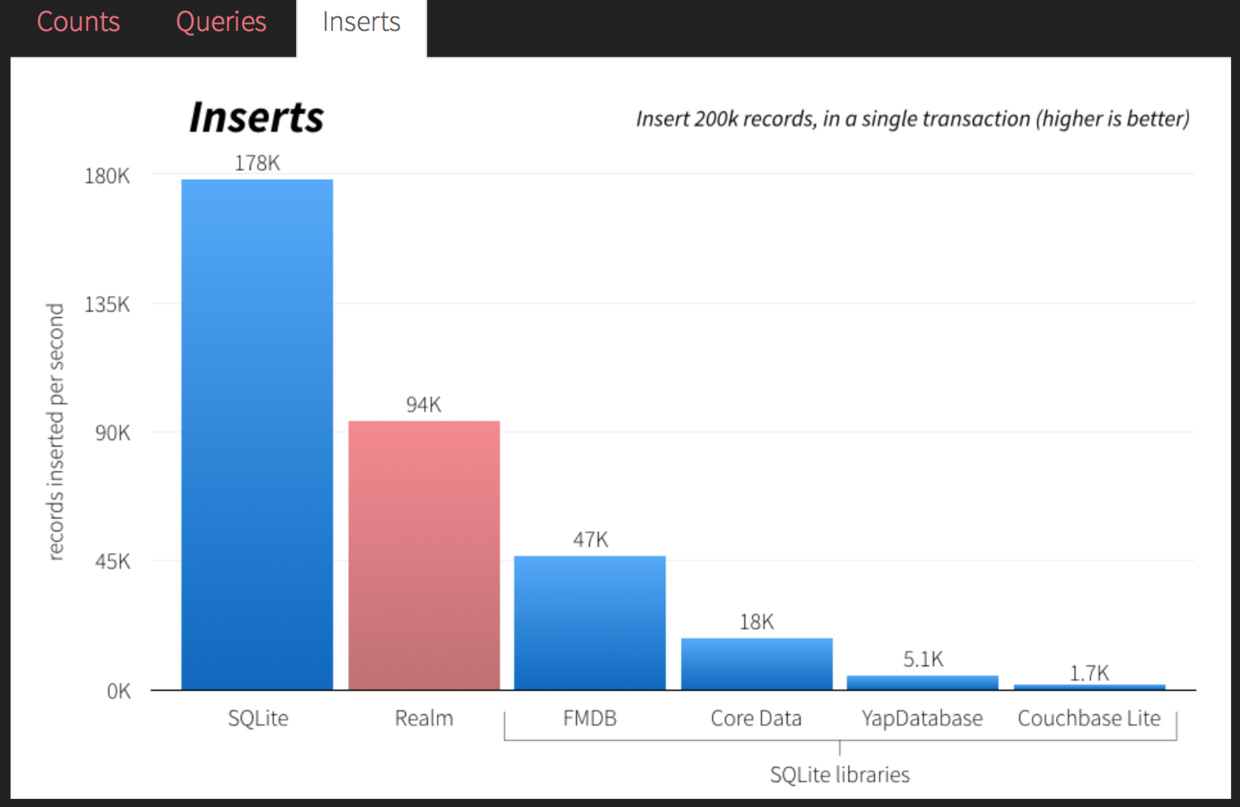
This compares the number of records inserted per second in a single transaction. Realm can insert 94,000 records per second. In this comparison, pure SQLite performs best, inserting 178,000 records per second. However, FMDB, which wraps SQLite, achieves roughly half of Realm’s result, at 47,000, while Core Data is even lower, at a pitiful 18,000.
From the three charts above, you can see Realm’s excellent characteristics. Now let’s start using Realm. The first step is to replace the local database with Realm.
Below is a step-by-step tutorial I translated. Let’s quickly follow the tutorial and migrate from Core Data to Realm.
Original Article
Translation
Migrating an app that uses the Core Data framework as its database storage layer to Realm is indeed very easy. If you already have an app using Core Data and are considering switching to Realm, this step-by-step tutorial is for you!
Many developers have Core Data deeply integrated into their user interfaces—sometimes with thousands of lines of code—and at that point many people will tell you that converting from Core Data to Realm may take hours. Both Core Data and Realm treat your data as objects, so migration is usually a very straightforward process: refactoring your existing Core Data code to use the Realm API is simple.
After the migration, you’ll be excited by the ease of use, speed, and stability that Realm brings to your app.
1. Remove the Core Data Framework
First, if your app is currently using Core Data, you need to identify which code contains Core Data-related logic. That code needs to be refactored. Fortunately, there is a manual way to do this: you can manually search through the entire codebase for the relevant code, then delete every statement that imports the Core Data header.
#import <CoreData/CoreData.h>
Or
@import CoreData;
Once you delete it this way, every line that uses Core Data will produce a compilation error. From there, resolving those compilation errors is only a matter of time.
2. Remove the Core Data Setup Code
In Core Data, changes to model objects are made through a managed object context object. Managed object context objects are created by a persistent store coordinator object, and both are created by a managed object model object.
In other words, before you start thinking about reading or writing data with Core Data, you typically need to set up the dependent objects somewhere in your app and expose some Core Data methods for your app logic to use. Whether in your application delegate, in a global singleton, or directly inline, these places will often contain a significant amount of potential Core Data setup code.
When you are ready to migrate to Realm, all of this code can be deleted.
In Realm, all setup is already completed the first time you create a Realm object. Of course, you can also configure it manually—for example, specifying where on disk the Realm data file is stored—and all of this can be selected at runtime.
RLMRealm *defaultRealm = [RLMRealm defaultRealm];
or
let realm = Realm()
Feels good, right?
3. Migrate model files
In Core Data, the classes you actually work with are defined as subclasses of NSManagedObject. The interfaces for these objects are very standard: primitive types (such as NSInteger and CGFloat) cannot be used directly; they must be abstracted as NSNumber objects.
@interface Dog : NSManagedObject

@property (nonatomic, copy) NSString *name;
@property (nonatomic, strong) NSNumber *age;
@property (nonatomic, strong) NSDate *birthdate;

@end

@implementation Dog

@dynamic name;
@dynamic age;
@dynamic birthdate;

@end
Converting these managed object subclasses to Realm is very straightforward:
@interface Dog : RLMObject

@property NSString *uuid;
@property NSString *name;
@property NSInteger age;
@property NSDate *birthdate;

@end

@implementation Dog

+ (NSString *)primaryKey
{
    return @"uuid";
}

+ (NSDictionary *)defaultPropertyValues
{
    return @{ @"uuid" : [[NSUUID UUID] UUIDString],
              @"name" : @"",
              @"birthdate" : [NSDate date]};
}

@end
or
class Dog: Object {
    dynamic var uuid = NSUUID().UUIDString
    dynamic var name = ""
    dynamic var age = 0
    dynamic var birthdate = NSDate().date

    override static func primaryKey() -> String? {
        return "uuid"
    }
}
Done! How simple is that?
Looking at these implementations, there are still a few Realm details worth noting.
For people using Realm for the first time, there is no need to specify property attributes; Realm manages them internally. As a result, the header files for these classes all look very concise. In addition, Realm supports simple data types such as NSInteger and CGFloat, so all NSNumber usage can be safely removed.
On the other hand, there are a few additional notes about declaring Realm models.
Core Data objects are uniquely identified through an internal NSManagedObjectID property, while Realm leaves this to the developer. In the example above, we added an extra property named uuid, then used it as the unique identifier for this class by calling the [RLMObject primaryKey] method. Of course, if your objects do not need a unique identifier at all, you can skip all of this.
During write operations (which do not take long!), Realm cannot handle nil object properties. The reason is that, in the [RLMObject defaultPropertyValues] class method, a set of default values is defined for each object property when each object is initially created. Of course, this is only temporary, and we are happy to tell you that in upcoming updates, we will support nil properties on Realm objects.
4. Migrating Write Operations
If you cannot save your data, this certainly is not a persistence solution! Creating a new Core Data object and then simply modifying it requires the following code:
//Create a new Dog
Dog *newDog = [NSEntityDescription insertNewObjectForEntityForName:@"Dog" inManagedObjectContext:myContext];
newDog.name = @"McGruff";

//Save the new Dog object to disk
NSError *saveError = nil;
[newDog.managedObjectContext save:&saveError];

//Rename the Dog
newDog.name = @"Pluto";
[newDog.managedObjectContext save:&saveError];
By comparison, Realm’s save operation is slightly different, but modifying the code above within the same scope still follows a similar pattern.
//Create the dog object
Dog *newDog = [[Dog alloc] init];
newDog.name = @"McGruff";

//Save the new Dog object to disk (Using a block for the transaction)
RLMRealm *defaultRealm = [RLMRealm defaultRealm];
[defaultRealm transactionWithBlock:^{
    [defaultRealm addObject:newDog];
}];

//Rename the dog (Using open/close methods for the transaction)
[defaultRealm beginWriteTransaction];
newDog.name = @"Pluto";
[defaultRealm commitWriteTransaction];
or
//Create the dog object
let mydog = Dog()
myDog.name = "McGruff"

//Save the new Dog object to disk (Using a block for the transaction)
Realm().write {
    realm.add(myDog)
}

//Rename the dog (Using open/close methods for the transaction)
Realm().beginWrite()
myDog.name = "Pluto"
Realm().commitWrite()
Done! Our data has been saved!
The obvious difference is that in Realm, once an object is added to a Realm object, it becomes immutable. To modify its properties later, the Realm object must be saved within a write transaction. This immutable model ensures data consistency when object data is read and written across different threads.
Core Data’s implementation can indeed modify properties and then call the save method. Compared with Realm’s implementation, these are only minor differences.
5. Migrating Queries
On the other hand, if you can’t retrieve and query your data, it certainly isn’t a persistent solution!
In Core Data’s basic implementation, it uses the concept of fetch requests to retrieve data from disk. A fetch request object is created as a separate instantiated object and includes additional filtering parameters and sort criteria.
NSManagedObjectContext *context = self.managedObjectContext;

//A fetch request to get all dogs younger than 5 years old, in alphabetical order
NSEntityDescription *entity = [NSEntityDescription
                               entityForName:@"Dog" inManagedObjectContext:context];

NSPredicate *predicate = [NSPredicate predicateWithFormat:@"age < 5"];

NSSortDescriptor *sortDescriptor = [[NSSortDescriptor alloc] initWithKey:@"name" ascending:YES];

NSFetchRequest *request = [[NSFetchRequest alloc] init];
request.entity = entity;
request.predicate = predicate;
request.sortDescriptors = @[sortDescriptor];

NSError *error;
NSArray *dogs = [moc executeFetchRequest:request error:&error];
While this is indeed quite nice, it requires writing a lot of code! Some smart developers have created libraries to make writing this code easier, such as MagicalRecord.
In comparison, after using Realm, the equivalent code for these queries is as follows:
RLMResults *dogs = [[Dog objectsWhere:@"age < 5"] sortedResultsUsingProperty:@"name" ascending:YES];
or
var dogs = Realm().objects(Dog).filter("age < 5").sorted("name")
Called two methods on a single line. Compare that with nearly 10 lines of code in Core Data.
Of course, the result of the same operation is the same (RLMResults and NSArray are broadly similar). When migrating to Realm, because these queries are all fairly independent, only a very small amount of the logic around the queries needs to be refactored.
6. Migrating User Data
Once all of your code has been migrated to Realm, there is still one major question: how do you migrate all of the data that already exists on users’ devices from Core Data to Realm?
Clearly, this is a very complex issue. It depends on your app’s functionality and on the user’s environment. The solution for handling this situation may be different every time.
At the moment, we have seen two scenarios:
Once you migrate to Realm, you can re-import the Core Data framework into your app, use native
NSManagedObjectobjects to fetch your users’ Core Data data, and then manually pass that data to Realm. You can leave this migration code in the app permanently, or remove it after a sufficiently long period of time.If the user data is not irreplaceable—for example, if it is simple cached information that can be regenerated from user data on disk—then you can simply delete the Core Data data directly, and the next time the user opens the app, everything starts from scratch. Of course, this requires very careful consideration; otherwise, it can create a very poor user experience for many people.
Ultimately, the decision should favor the user. Ideally, you should not leave Core Data still linked into your app, but the outcome depends on your situation. Good luck!
Further Discussion
Although there are no truly critical steps in porting an application to Realm, there are some additional situations you should be aware of:
Concurrency
If you perform some relatively heavy operations on a background thread, you may find that you need to pass Realm objects between threads. Core Data allows you to pass managed objects between threads (although doing so is not a best practice), but in Realm, passing objects between threads is strictly prohibited, and any attempt to do so will throw a serious exception.
That said, the following cases are straightforward:
dispatch_async(dispatch_get_global_queue(DISPATCH_QUEUE_PRIORITY_LOW, 0), ^{
    //Rename the dog in a background queue
    [[RLMRealm defaultRealm] transactionWithBlock:^{
        dog.name = @"Peanut Wigglebutt";
    }];

    //Print the dog's name on the main queue
    NSString *uuid = dog.uuid;
    dispatch_async(dispatch_get_main_queue(), ^{
        Dog *localDog = [Dog objectForPrimaryKey:uuid];
        NSLog(@"Dog's name is %@", localDog.name);
    });
});
or
dispatch_async(queue) {
    //Rename the dog in a background queue
    Realm().write {
        dog.name = "Peanut Wigglebutt"
    }

    //Print the dog's name on the main queue
    let uuid = dog.uuid
    dispatch_async(dispatch_get_main_queue()) {
        let localDog = Realm().objectForPrimaryKey(Dog, uuid)
        println("Dog's name is \\(localDog.name)")
    }
}
Although Realm objects cannot be passed between threads, copies of Realm properties can be passed across threads. Given that Realm retrieves objects from disk very quickly, simply re-fetching the same object from the store on a new thread incurs only a small performance cost. In this example, we take a copy of the object’s primary key, pass it from a background queue to the main queue, and then use it to re-fetch the object in the context of the main thread.
The Equivalent of NSFetchedResultsController
Despite all of Core Data’s drawbacks, perhaps the strongest reason to use Core Data is NSFetchedResultsController—a class that can detect changes in the data store and automatically reflect those changes in the UI.
At the time of writing, Realm does not yet have a similar mechanism. Although it can register a block that is executed when the data source changes, this “brute force” approach is not UI-friendly for most interfaces. For now, if your UI code depends heavily on Realm, this may be a deal-breaker for you.
Realm’s Cocoa engineers are currently developing a notification system that will allow us to register for notifications when certain object properties are changed, so we can receive those changes. These features will arrive in future updates of Realm for Swift and Objective‑C.
In the meantime, if the existing notification block API still does not meet your needs, but you need to be notified when a specific property changes, we recommend using the excellent third-party library RBQFetchedResultsController, which can emulate the functionality described above. Alternatively, you can achieve the same effect by adding setter methods to your objects and broadcasting a notification when a setter is called.
Conclusion
Both Core Data and Realm present data through model objects. Because of this similarity, migrating from Core Data to Realm can be very fast, straightforward, and surprisingly satisfying. Although it may seem intimidating at first, in practice it mostly comes down to converting each Core Data method call into its Realm equivalent, and then writing a helper class to migrate user data. These steps are also quite simple.
If you have run into difficulties using Core Data in your app and need a simpler solution, we strongly recommend that you try Realm and see whether it works for you. If it does, please let us know!
Thanks for reading. Now go build an amazing app with Realm! You can reach us on StackOverflow, GitHub, or Twitter.
