iOS Hybrid Framework —— PhoneGap
####Preface
A Hybrid App (hybrid mobile application) is an app that sits between a web app and a native app, combining the advantage of a Native App’s rich user interaction experience with the cross-platform development advantage of a Web App.
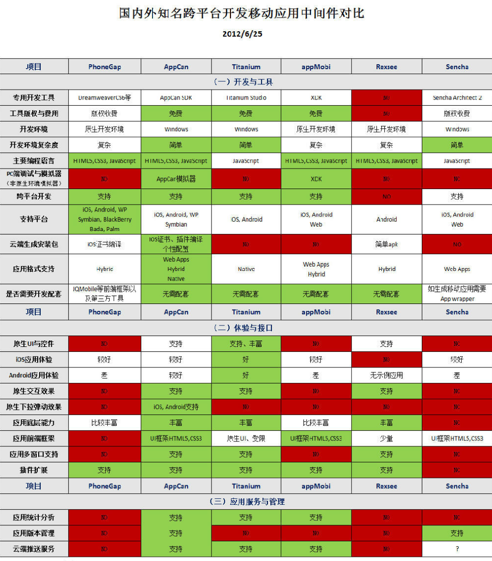
Based on how web languages and programming languages are combined, Hybrid Apps are usually categorized into three types: multi-View hybrid, single-View hybrid, and Web-centric. The three types are compared below:

Today I’ll talk about PhoneGap, one of the more well-known Hybrid frameworks in the Web-centric category.
####I. Cordova When talking about PhoneGap, you have to talk about Cordova.

Cordova is a library that enables JS and native code (including Android’s Java, iOS’s Objective-C, and so on) to communicate with each other. It also provides a series of plugin classes, such as plugin classes that allow JS to operate on a local database directly.
Cordova’s design concept is to render web pages through a Web control inside an app, allowing Web developers to use familiar languages and tools to develop apps.
To enable web pages to meet more app-level functional requirements, Cordova provides a Plugin mechanism that allows web pages to attach and invoke functional modules developed using Native development technologies.
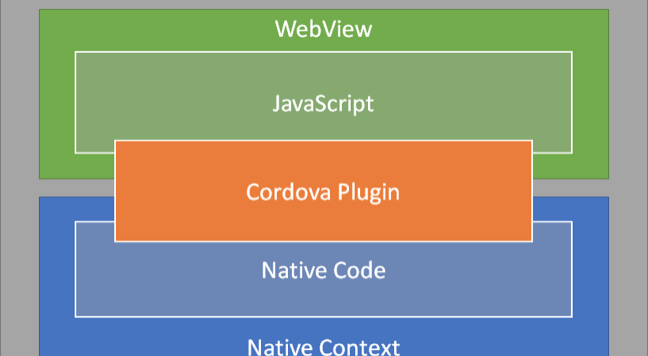
Cordova’s layer in the system should look like this:
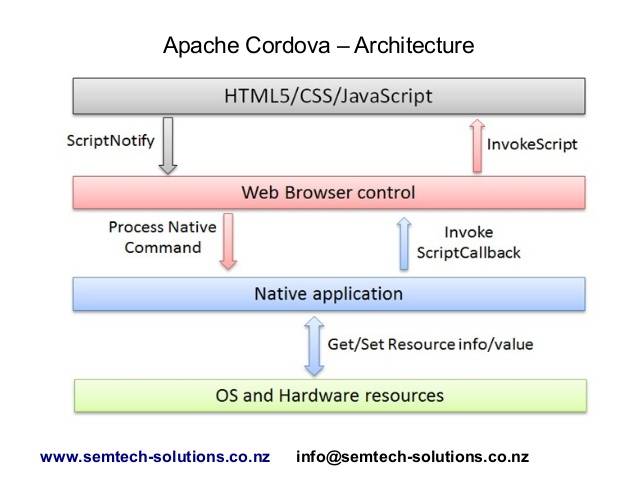
Cordova’s hierarchy looks like the diagram below:
Cordova can also be combined with Angular to become ngCordova.
Cordova + Angular = ngCordova

####II. Communication Between JS and Objective-C JS uses two approaches to communicate with Objective-C. One is to initiate requests using XMLHttpRequest; the other is to set the src attribute of a transparent iframe.
What I’ll mainly discuss next is the second approach: the iframe bridge.
On the JS side, you create a transparent iframe and set the iframe’s src to a custom protocol. When the iframe’s src changes, UIWebView first calls back its delegate’s webView:shouldStartLoadWithRequest:navigationType: method.
That still sounds fairly abstract, so let’s look at an actual code snippet.
In cordova.js, it is implemented like this:
function iOSExec() {
    ...
    if (!isInContextOfEvalJs && commandQueue.length == 1)  {
        // If XMLHttpRequest is supported, use the XMLHttpRequest approach
        if (bridgeMode != jsToNativeModes.IFRAME_NAV) {
            // This prevents sending an XHR when there is already one being sent.
            // This should happen only in rare circumstances (refer to unit tests).
            if (execXhr && execXhr.readyState != 4) {
                execXhr = null;
            }
            // Re-using the XHR improves exec() performance by about 10%.
            execXhr = execXhr || new XMLHttpRequest();
            // Changing this to a GET will make the XHR reach the URIProtocol on 4.2.
            // For some reason it still doesn't work though...
            // Add a timestamp to the query param to prevent caching.
            execXhr.open('HEAD', "/!gap_exec?" + (+new Date()), true);
            if (!vcHeaderValue) {
                vcHeaderValue = /.*\((.*)\)/.exec(navigator.userAgent)[1];
            }
            execXhr.setRequestHeader('vc', vcHeaderValue);
            execXhr.setRequestHeader('rc', ++requestCount);
            if (shouldBundleCommandJson()) {
                // Set the request data
                execXhr.setRequestHeader('cmds', iOSExec.nativeFetchMessages());
            }
            // Send the request
            execXhr.send(null);
        } else {
            // If XMLHttpRequest is not supported, use a transparent iframe approach and set the iframe's src attribute
            execIframe = execIframe || createExecIframe();
            execIframe.src = "gap://ready";
        }
    }
    ...
}
On the iOS side, the corresponding response handler needs to be implemented in the WebView.
// Callback method before UIWebView loads a URL; return YES to start loading this URL, return NO to ignore it
- (BOOL)webView:(UIWebView*)theWebView
              shouldStartLoadWithRequest:(NSURLRequest*)request
              navigationType:(UIWebViewNavigationType)navigationType
{
    NSURL* url = [request URL];

    /*
     * Execute any commands queued with cordova.exec() on the JS side.
     * The part of the URL after gap:// is irrelevant.
     */
    // Check whether it is a Cordova request, for the execIframe.src = "gap://ready" line in the JS code
    if ([[url scheme] isEqualToString:@"gap"]) {
        // Get the request data, then analyze and process it
        [_commandQueue fetchCommandsFromJs];
        return NO;
    }
    ...
}
This completes communication between JS and OC.
####III. Objective-C and JS Communication
First, OC obtains the request data from JS
- (void)fetchCommandsFromJs
{
    // Grab all the queued commands from the JS side.
    NSString* queuedCommandsJSON = [_viewController.webView
                                    stringByEvaluatingJavaScriptFromString:
                                    @"cordova.require('cordova/exec').nativeFetchMessages()"];

    [self enqueCommandBatch:queuedCommandsJSON];
    if ([queuedCommandsJSON length] > 0) {
        CDV_EXEC_LOG(@"Exec: Retrieved new exec messages by request.");
    }
}
Then OC handles the request passed from JS
OC then returns the processing result to JS
NSString *ret = [((HFNativeFunction*)strongSelf.actionDict[funcName]) doCall:argArr];
        NSString *js = [NSString stringWithFormat:@"if(typeof %@ == 'string') { paf.nativeInvocationObject=%@;} else {   paf.nativeInvocationObject=JSON.stringify(%@);} ", ret, ret, ret];
        DLog(@"\n\njs call fun=%@ ret=%@\n\n", funcName, ret);
        [self.webView stringByEvaluatingJavaScriptFromString: js];
####IV. Cordova - How JS Works
Format of request methods on the Cordova JS side:
// successCallback : success callback method
// failCallback    : failure callback method
// server          : name of the service to request
// action          : specific operation of the service to request
// actionArgs      : parameters for the requested operation
cordova.exec(successCallback, failCallback, service, action, actionArgs);
The five parameters passed in are not sent directly to the native code. The Cordova JS side performs the following processing:
It generates a unique identifier called callbackId for each request: this parameter must be passed to the Objective-C side. After Objective-C finishes processing, it returns the callbackId together with the processing result to the JS side.
It uses callbackId as the key and {success:successCallback, fail:failCallback} as the value, storing this key-value pair in a dictionary on the JS side. The successCallback and failCallback parameters do not need to be passed to the Objective-C side. When Objective-C returns the result with the callbackId, the JS side can use the callbackId to find the corresponding callback method.
For each JS request, the data ultimately sent to Objective-C includes: callbackId, service, action, actionArgs.
JS Request Handling
function iOSExec() {
    ...
    // Generate a unique callbackId identifier, and save it with the success and failure callbacks on the JS side
    // Register the callbacks and add the callbackId to the positional
    // arguments if given.
    if (successCallback || failCallback) {
        callbackId = service + cordova.callbackId++;
        cordova.callbacks[callbackId] =
        {success:successCallback, fail:failCallback};
    }

    actionArgs = massageArgsJsToNative(actionArgs);

    // Save callbackId, service, action, and actionArgs to commandQueue
    // These four parameters are the data ultimately sent to native code
    var command = [callbackId, service, action, actionArgs];
    commandQueue.push(JSON.stringify(command));
    ...
}

// Get the request data, including callbackId, service, action, and actionArgs
iOSExec.nativeFetchMessages = function() {
    // Each entry in commandQueue is a JSON string already.
    if (!commandQueue.length) {
        return '';
    }
    var json = '[' + commandQueue.join(',') + ']';
    commandQueue.length = 0;
    return json;
};
V. Cordova - How OC Works
After Native OC obtains the callbackId, service, action, and actionArgs, it performs the following processing:
Finds the corresponding plugin class based on the service parameter
Finds the corresponding handler method in the plugin class based on the action parameter, and passes actionArgs to the handler method as part of the request parameters
After processing is complete, returns the processing result and callbackId to the JS side. After the JS side receives them, it finds the callback method based on the callbackId and passes the processing result to the callback method
Objective-C returns the result to the JS side
- (void)sendPluginResult:(CDVPluginResult*)result callbackId:(NSString*)callbackId
{
    CDV_EXEC_LOG(@"Exec(%@): Sending result. Status=%@", callbackId, result.status);
    // This occurs when there is are no win/fail callbacks for the call.
    if ([@"INVALID" isEqualToString : callbackId]) {
        return;
    }
    int status = [result.status intValue];
    BOOL keepCallback = [result.keepCallback boolValue];
    NSString* argumentsAsJSON = [result argumentsAsJSON];

    // Return the request result and callbackId to the JS side by calling a JS method
    NSString* js = [NSString stringWithFormat:
                    @"cordova.require('cordova/exec').nativeCallback('%@',%d,%@,%d)",
                    callbackId, status, argumentsAsJSON, keepCallback];

    [self evalJsHelper:js];
}
A concrete example:
- Convert the received JSON into a Command
// Execute the commands one-at-a-time.
     NSArray* jsonEntry = [commandBatch dequeue];
     if ([commandBatch count] == 0) {
                  [_queue removeObjectAtIndex:0];
      }
     HFCDVInvokedUrlCommand* command = [HFCDVInvokedUrlCommand commandFromJson:jsonEntry];
     HF_CDV_EXEC_LOG(@"Exec(%@): Calling %@.%@", command.callbackId, command.className, command.methodName);
2.OC Execution
- (BOOL)execute:(HFCDVInvokedUrlCommand*)command
{
    if ((command.className == nil) || (command.methodName == nil)) {
        DLog(@"ERROR: Classname and/or methodName not found for command.");
        return NO;
    }

    if ([command.className isEqualToString:@"DeviceReadyDummyClass"] &&
        [command.methodName isEqualToString:@"deviceReady"]) {
        [[NSNotificationCenter defaultCenter]postNotificationName:k_NOTIF_DEVICE_READY object:_viewController];
        return YES;
    }

    // Fetch an instance of this class
    HFCDVPlugin* obj = [_viewController.commandDelegate getCommandInstance:command.className];

    if (!([obj isKindOfClass:[HFCDVPlugin class]])) {
        DLog(@"ERROR: Plugin '%@' not found, or is not a HFCDVPlugin. Check your plugin mapping in config.xml.", command.className);
        return NO;
    }
    BOOL retVal = YES;
    double started = [[NSDate date] timeIntervalSince1970] * 1000.0;
    // Find the proper selector to call.
    NSString* methodName = [NSString stringWithFormat:@"%@:", command.methodName];
    SEL normalSelector = NSSelectorFromString(methodName);
    if ([obj respondsToSelector:normalSelector]) {
        // [obj performSelector:normalSelector withObject:command];
        ((void (*)(id, SEL, id))objc_msgSend)(obj, normalSelector, command);
    } else {
        // There's no method to call, so throw an error.
        DLog(@"ERROR: Method '%@' not defined in Plugin '%@'", methodName, command.className);
        retVal = NO;
    }
    double elapsed = [[NSDate date] timeIntervalSince1970] * 1000.0 - started;
    if (elapsed > 10) {
        DLog(@"THREAD WARNING: ['%@'] took '%f' ms. Plugin should use a background thread.", command.className, elapsed);
    }
    return retVal;
}
VI. Callback Method
The JS side obtains the data and invokes the callback based on callbackId.
// Based on callbackId and the success flag, find the callback method and pass the result to it
callbackFromNative: function(callbackId, success, status, args, keepCallback) {
    var callback = cordova.callbacks[callbackId];
    if (callback) {
        if (success && status == cordova.callbackStatus.OK) {
            callback.success && callback.success.apply(null, args);
        } else if (!success) {
            callback.fail && callback.fail.apply(null, args);
        }

        // Clear callback if not expecting any more results
        if (!keepCallback) {
            delete cordova.callbacks[callbackId];
        }
    }
}
GitHub Repo:Halfrost-Field
Follow: halfrost · GitHub
