How are IM apps like WeChat and QQ built? — A look at Websocket
####Preface My history with WebSocket: I first heard about it from my professor in a computer networking class during my sophomore year, but I did not actually use it until my first job after graduation. Recently, after changing jobs and joining a company whose app includes IM social chat functionality, I feel I can now share some of my views on WebSocket/Socket. If you want to build an IM chat app, you have to understand the principles behind WebSocket and Socket. Let me walk you through them one by one.
####Table of Contents
- 1.WebSocket use cases
- 2.How WebSocket came about
- 3.Discussing the principles of the WebSocket protocol
- 4.Differences and relationship between WebSocket and Socket
- 5.Open-source WebSocket and Socket frameworks on iOS
- 6.How to implement the WebSocket protocol on iOS
#####I.WebSocket use cases
1.Social chat
The most famous examples are WeChat, QQ, and other social chat apps of this kind. These chat apps are characterized by low latency and high immediacy. Immediacy is the most demanding requirement here. If there is an urgent matter and you are notified through IM software, assuming the network environment is good, but the message still cannot be delivered to your client immediately, and you only receive it after the urgent matter is already over, then the software has definitely failed.
2.Bullet comments
Speaking of this, everyone will immediately think of AcFun and Bilibili. Indeed, bullet comments have always been one of their distinguishing features. Moreover, for a video, the bullet comments may very well be the essence. Sending bullet comments requires real-time display, and just like chat, it requires immediacy.
3.Multiplayer games
4.Collaborative editing
Nowadays, many open-source projects are collaboratively developed by developers distributed all over the world. In such cases, version control systems such as Git and SVN are used to merge conflicts. But if there is a document that supports real-time online collaborative editing by multiple people, then something like WebSocket comes into play. It can ensure that all editors are editing the same document. At that point, version control systems such as Git and SVN are not needed, because in the collaborative editing interface, you can see in real time what others are editing, and who is modifying which paragraphs and text.
5.Real-time stock and fund quotes
The financial world changes in an instant—almost every millisecond. If the chosen network architecture cannot meet real-time requirements, it can cause huge losses for customers. If a stock starts to plunge a few milliseconds ago but the data is not refreshed until a few seconds later, users may already have lost a large amount of money within that one second.
6.Live sports updates
There are many sports fans and enthusiasts around the world. Of course, when people follow their favorite sports events, real-time match updates are what they care about the most. The best experience for this kind of news is to use WebSocket to achieve real-time updates!
7.Video conferencing/chat
Video conferencing cannot replace meeting people in person, but it can bring people scattered across the globe together in front of their computers for a meeting. It not only saves the time everyone would spend traveling to gather in one place and the hassle of deciding on a meeting location, but also makes it possible to hold meetings anytime and anywhere, as long as there is a network connection.
8.Location-based applications
More and more developers are using the GPS capabilities of mobile devices to implement their location-based web applications. If you continuously record a user’s location, for example by running an app to record a movement track, you can collect more fine-grained data.
9.Online education
Online education has also developed rapidly in recent years. It has many advantages: it removes venue constraints and enables the resources of excellent teachers to be reasonably distributed to students across the country who want to learn. WebSocket is a good choice here: it can support video chat, instant messaging, and collaboration with others to discuss problems online…
10.Smart home
This was also the great IoT smart home company I joined right after graduation. Considering that the status of smart devices at home must be displayed in real time on the mobile app client, WebSocket was unquestionably chosen.
11.Summary
Looking at the scenarios I listed above, they all have one thing in common: high real-time requirements!
#####II.How WebSocket came about 1.The initial polling stage
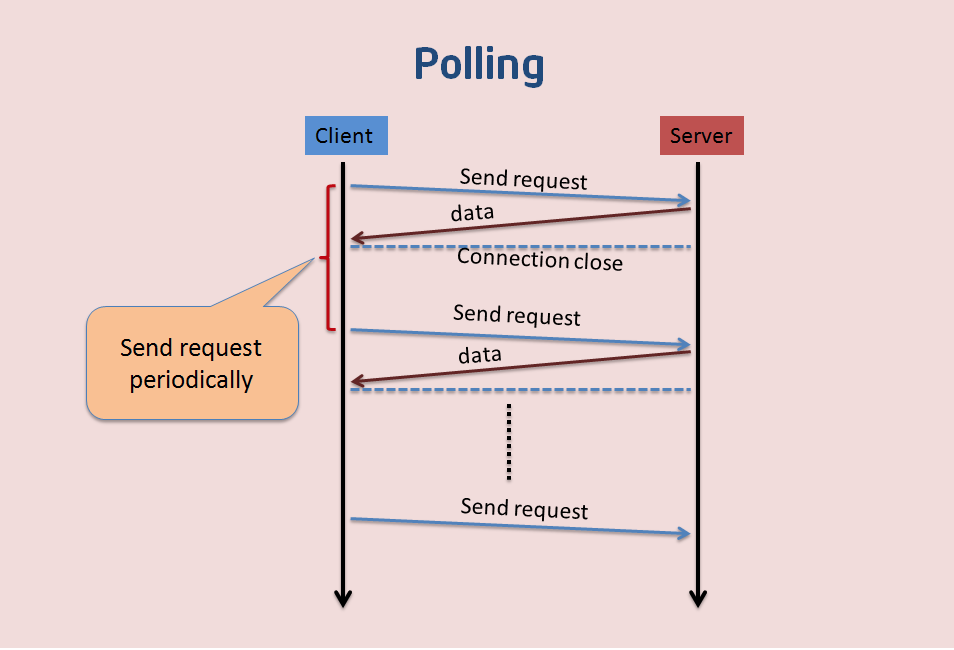
This approach is not suitable for obtaining real-time information. The client and the server keep connecting, and the client asks at regular intervals. The client polls to check whether there are new messages. This approach results in many connections: one for receiving and one for sending. In addition, every request carries an HTTP Header, which consumes a lot of traffic and also CPU resources.
2.The improved long polling stage
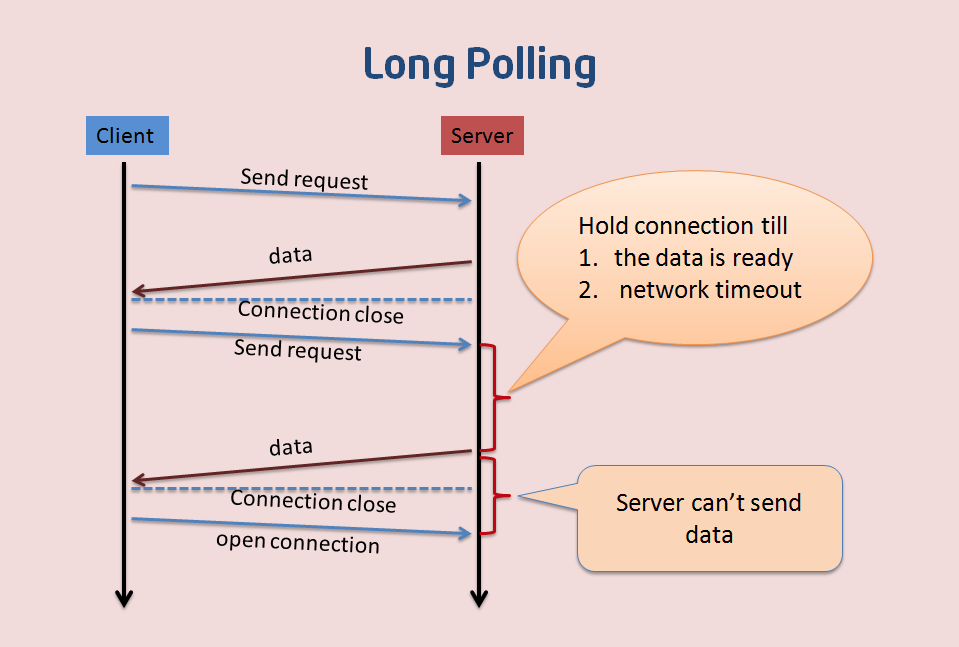
Long polling is an improved version of polling. After the client sends an HTTP request to the server, the server checks whether there are new messages. If there are none, it keeps waiting. Only when a new message arrives does it return a response to the client. To some extent, this reduces issues such as network bandwidth and CPU utilization. However, this approach still has a drawback: for example, suppose the server-side data updates very quickly. After the server sends one data packet to the client, it must wait for the client’s next Get request before it can deliver the second updated data packet to the client. In that case, the fastest time for the client to display real-time data is 2×RTT (round-trip time). Moreover, under network congestion, this delay is unacceptable to users, such as in stock market quotes. In addition, because the header data of an HTTP packet is often quite large (usually more than 400 bytes), while the data actually needed by the server is very small (sometimes only around 10 bytes), periodically transmitting such packets over the network is inevitably a waste of network bandwidth.
3.The birth of WebSocket
What was urgently needed was support for bidirectional communication between client and server, while avoiding protocol headers as large as HTTP Headers. And so WebSocket was born!
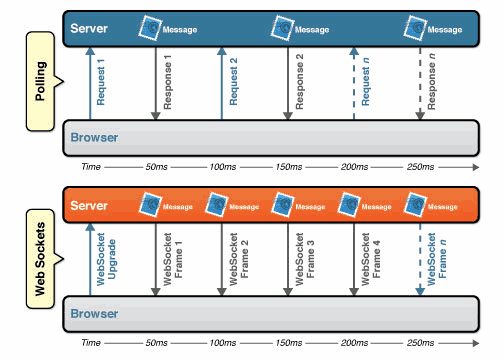
The image above shows the difference between WebSocket and Polling. As you can see, with Polling, the client sends many Requests, while in the diagram below there is only one Upgrade, which is very concise and efficient. As for the comparison of overhead, see the image below.
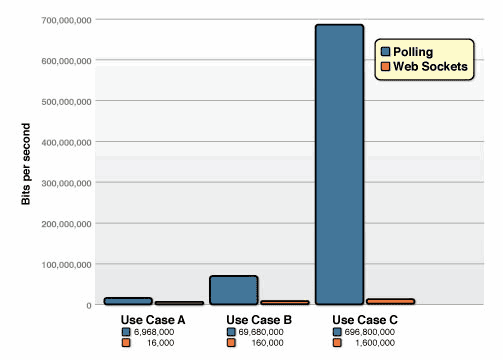
In the image above, let’s first look at the blue bar chart, which represents the traffic consumed by Polling. In this test, the overhead of HTTP request and response header information totaled 871 bytes. Of course, different requests in different tests have different header overhead. This test uses requests with 871 bytes of overhead.
**Use case A:**1,000 clients polling every second: Network throughput is (871 x 1,000) = 871,000 bytes = 6,968,000 bits per second (6.6 Mbps)
Use case B: 10,000 clients polling every second: Network throughput is (871 x 10,000) = 8,710,000 bytes = 69,680,000 bits per second (66 Mbps)
**Use case C:**100,000 clients polling every 1 second: Network throughput is (871 x 100,000) = 87,100,000 bytes = 696,800,000 bits per second (665 Mbps)
By contrast, a WebSocket Frame has just two bytes of overhead instead of 871, using only 2 bytes to replace the 871 bytes required by polling!
**Use case A:**1,000 clients receive 1 message per second: Network throughput is (2 x 1,000) = 2,000 bytes = 16,000 bits per second (0.015 Mbps)
**Use case B:**10,000 clients receive 1 message per second: Network throughput is (2 x 10,000) = 20,000 bytes = 160,000 bits per second (0.153 Mbps)
**Use case C:**100,000 clients receive 1 message per second: Network throughput is (2 x 100,000) = 200,000 bytes = 1,600,000 bits per second (1.526 Mbps)
With the same number of client polls per second, when the frequency reaches as high as 100,000/s, Polling consumes 665 Mbps, while WebSocket only consumes 1.526 Mbps—nearly 435 times less!!
#####III.Discussing the principles of the WebSocket protocol WebSocket is an application-layer protocol at layer 7. It must rely on the HTTP protocol to perform a handshake . After the handshake succeeds, data is transmitted directly over the TCP channel and is no longer related to HTTP.
WebSocket data is transmitted in the form of frames. For example, a single message may be split into several frames and transmitted in order. This has several benefits:
1 Large data transfers can be transmitted in fragments, without having to worry that the length indicator is insufficient due to the data size. 2 Like HTTP chunking, data can be generated and transmitted at the same time, improving transmission efficiency.
 0                   1                   2                   3
 0 1 2 3 4 5 6 7 8 9 0 1 2 3 4 5 6 7 8 9 0 1 2 3 4 5 6 7 8 9 0 1
 +-+-+-+-+-------+-+-------------+-------------------------------+
 |F|R|R|R| opcode|M| Payload len |    Extended payload length    |
 |I|S|S|S|  (4)  |A|     (7)     |             (16/64)           |
 |N|V|V|V|       |S|             |   (if payload len==126/127)   |
 | |1|2|3|       |K|             |                               |
 +-+-+-+-+-------+-+-------------+ - - - - - - - - - - - - - - - +
 |     Extended payload length continued, if payload len == 127  |
 + - - - - - - - - - - - - - - - +-------------------------------+
 |                               |Masking-key, if MASK set to 1  |
 +-------------------------------+-------------------------------+
 | Masking-key (continued)       |          Payload Data         |
 +-------------------------------- - - - - - - - - - - - - - - - +
 :                     Payload Data continued ...                :
 + - - - - - - - - - - - - - - - - - - - - - - - - - - - - - - - +
 |                     Payload Data continued ...                |
 +---------------------------------------------------------------+


    FIN      1bit Indicates the final frame of the message, flag, i.e. marker
    RSV 1-3  1bit each reserved for future use, default all 0
    Opcode   4bit frame type, detailed later
    Mask     1bit mask, whether to encrypt data, must be set to 1 by default (this is annoying)
    Payload  7bit data length
    Masking-key      1 or 4 bit mask
    Payload data     (x + y) bytes data
    Extension data   x bytes  extension data
    Application data y bytes  application data
For the specific specification, please refer to the detailed definition in the official RFC 6455 document. There is also a translated version here.
#####IV. Differences and Relationship Between WebSocket and Socket
First,
Socket is not actually a protocol. It operates at the session layer of the OSI model (Layer 5) and exists as an abstraction layer to make it easier to use lower-level protocols directly, typically TCP or UDP. Socket is an encapsulation of the TCP/IP protocol suite. Socket itself is not a protocol, but a calling interface (API).
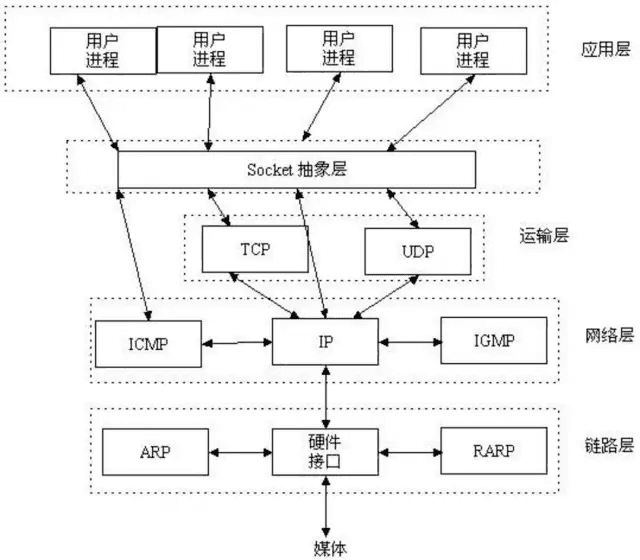
Socket is also commonly referred to as a “socket”. It is used to describe an IP address and port, and acts as the handle for a communication link. Two programs on a network exchange data through a bidirectional communication connection; one end of this bidirectional link is called a Socket. A Socket is uniquely identified by an IP address and a port number. Applications typically use a “socket” to issue requests to the network or respond to network requests.
During Socket communication, the server listens on a certain port for connection requests. The client sends a connection request to the server, and after receiving the request, the server sends an acceptance message back to the client. In this way, a connection is established. The client and server can then send messages to each other and communicate until the connection is closed by both sides.
Therefore, both WebSocket-based and Socket-based approaches can be used to build IM/social chat apps.
#####V. What Open-Source WebSocket and Socket Frameworks Are Available on iOS Open-source Socket frameworks include: CocoaAsyncSocket, socketio/socket.io-client-swift Open-source WebSocket frameworks include: facebook/SocketRocket, tidwall/SwiftWebSocket
#####VI. How to Implement the WebSocket Protocol on iOS
Talk is cheap. Show me the code. ——Linus Torvalds
Today, let’s take a look at how facebook/SocketRocket implements it.
First, here are some member variables defined by SRWebSocket.
@property (nonatomic, weak) id <SRWebSocketDelegate> delegate;
/**
 A dispatch queue for scheduling the delegate calls. The queue doesn't need be a serial queue.

 If `nil` and `delegateOperationQueue` is `nil`, the socket uses main queue for performing all delegate method calls.
 */
@property (nonatomic, strong) dispatch_queue_t delegateDispatchQueue;
/**
 An operation queue for scheduling the delegate calls.

 If `nil` and `delegateOperationQueue` is `nil`, the socket uses main queue for performing all delegate method calls.
 */
@property (nonatomic, strong) NSOperationQueue *delegateOperationQueue;
@property (nonatomic, readonly) SRReadyState readyState;
@property (nonatomic, readonly, retain) NSURL *url;
@property (nonatomic, readonly) CFHTTPMessageRef receivedHTTPHeaders;
// Optional array of cookies (NSHTTPCookie objects) to apply to the connections
@property (nonatomic, copy) NSArray<NSHTTPCookie *> *requestCookies;

// This returns the negotiated protocol.
// It will be nil until after the handshake completes.
@property (nonatomic, readonly, copy) NSString *protocol;
The following are some methods of SRWebSocket.
// Protocols should be an array of strings that turn into Sec-WebSocket-Protocol.
- (instancetype)initWithURLRequest:(NSURLRequest *)request;
- (instancetype)initWithURLRequest:(NSURLRequest *)request protocols:(NSArray<NSString *> *)protocols;
- (instancetype)initWithURLRequest:(NSURLRequest *)request protocols:(NSArray<NSString *> *)protocols allowsUntrustedSSLCertificates:(BOOL)allowsUntrustedSSLCertificates;

// Some helper constructors.
- (instancetype)initWithURL:(NSURL *)url;
- (instancetype)initWithURL:(NSURL *)url protocols:(NSArray<NSString *> *)protocols;
- (instancetype)initWithURL:(NSURL *)url protocols:(NSArray<NSString *> *)protocols allowsUntrustedSSLCertificates:(BOOL)allowsUntrustedSSLCertificates;

// By default, it will schedule itself on +[NSRunLoop SR_networkRunLoop] using defaultModes.
- (void)scheduleInRunLoop:(NSRunLoop *)aRunLoop forMode:(NSString *)mode;
- (void)unscheduleFromRunLoop:(NSRunLoop *)aRunLoop forMode:(NSString *)mode;

// SRWebSockets are intended for one-time-use only.  Open should be called once and only once.
- (void)open;
- (void)close;
- (void)closeWithCode:(NSInteger)code reason:(NSString *)reason;

///--------------------------------------

#pragma mark Send
///--------------------------------------

// Below are 4 send methods
/**
 Send a UTF-8 string or binary data to the server.

 @param message UTF-8 String or Data to send.

 @deprecated Please use `sendString:` or `sendData` instead.
 */
- (void)send:(id)message __attribute__((deprecated("Please use `sendString:` or `sendData` instead.")));
- (void)sendString:(NSString *)string;
- (void)sendData:(NSData *)data;
- (void)sendPing:(NSData *)data;

@end
Proxy methods corresponding to the five states
///--------------------------------------

#pragma mark - SRWebSocketDelegate
///--------------------------------------
@protocol SRWebSocketDelegate <NSObject>

- (void)webSocket:(SRWebSocket *)webSocket didReceiveMessage:(id)message;

@optional
- (void)webSocketDidOpen:(SRWebSocket *)webSocket;
- (void)webSocket:(SRWebSocket *)webSocket didFailWithError:(NSError *)error;
- (void)webSocket:(SRWebSocket *)webSocket didCloseWithCode:(NSInteger)code reason:(NSString *)reason wasClean:(BOOL)wasClean;
- (void)webSocket:(SRWebSocket *)webSocket didReceivePong:(NSData *)pongPayload;

// Return YES to convert messages sent as Text to an NSString. Return NO to skip NSData -> NSString conversion for Text messages. Defaults to YES.
- (BOOL)webSocketShouldConvertTextFrameToString:(SRWebSocket *)webSocket;
@end
The didReceiveMessage method is required; it is used to receive messages.
The following four did methods correspond to delegate methods for the Open, Fail, Close, and ReceivePong states, respectively.
That’s all for the methods above. Now let’s look at how to write the actual code.
First, initialize the WebSocket connection. Note that there must be one, and at most one, ws:// or wss:// connection here; this is specified by the WebSocket protocol.
    self.ws = [[SRWebSocket alloc] initWithURLRequest:[NSURLRequest requestWithURL:[NSURL URLWithString:[NSString stringWithFormat:@"%@://%@:%zd/ws", serverProto, serverIP, serverPort]]]];
    self.ws.delegate = delegate;
    [self.ws open];
Send a Message
[self.ws send:message];
Receiving Messages and Three Other Delegate Methods
// This is the delegate method for receiving messages. It receives data returned by the server; data handling and storage should be done here.
- (void)webSocket:(SRWebSocket *)webSocket didReceiveMessage:(id)message
{
    NSDictionary *data = [NetworkUtils decodeData:message];
    if (!data)
        return;
}

// This is the delegate method called right after the WebSocket opens. Like WeChat showing "Connecting" while connecting; once connected, it stops showing it, so the method to hide it should be written here.
- (void)webSocketDidOpen:(SRWebSocket *)webSocket
{
    // Open = silent ping
    [self.ws receivedPing];
}

// This is the delegate method for closing the WebSocket.
- (void)webSocket:(SRWebSocket *)webSocket didCloseWithCode:(NSInteger)code reason:(NSString *)reason wasClean:(BOOL)wasClean
{
    [self failedConnection:NSLS(Disconnected)];
}

// This is the method called when the WebSocket connection fails; reconnection logic is usually written here.
- (void)webSocket:(SRWebSocket *)webSocket didFailWithError:(NSError *)error
{
    [self failedConnection:NSLS(Disconnected)];
}
Finally
That’s everything I wanted to share about WebSocket. If there are any mistakes in this article, feedback is welcome! For apps that don’t have a user base as large as WeChat or QQ, WebSocket should generally be sufficient for implementing IM/social chat. Once the user base reaches the hundreds-of-millions scale, there are probably many more optimizations needed, including various performance optimizations.
Finally, the implementation approaches used by WeChat and QQ may not be as simple as just using WebSocket and Socket. Perhaps they have developed their own solution that can support such a massive user base and large-scale data, with optimizations across the board. If any experts who work on WeChat or QQ happen to read this article, feel free to leave a comment about how you implemented it, and share your experience with us so we can all learn together. Thanks in advance for your guidance!
