Unraveling the Mystery of this & that
When beginners start learning JavaScript, they are bound to run into many pitfalls around this. The essence of these problems is that the this pointer does not point to what they expected. I also hit many of these pitfalls while learning, so I wrote this article to record my own “pitfall” journey.
1. Where Is this?
In the previous article, “Starting from JavaScript Scope”, we learned that an Execution Context has a property called this. This this is exactly the this we are talking about. this is directly related to the type of executable code in the context. The value of this is determined when entering the execution context, and remains unchanged throughout the lifetime of that execution context.
So what value does this actually take? The value of this is dynamic: it is determined when the function is actually invoked and executed, not when the function is defined. This is because the value of this is part of the execution context environment. Every time a function is called, a new execution context environment is created.
Therefore, the role of this is to indicate the object in whose context the execution context was triggered. This is exactly where things get confusing: for the same function, when it is called in different contexts, the value of this may be different. In other words, the value of this is the caller of the function call expression—that is, the way the function is invoked.
2. Who Exactly Do this and that Refer To?
So far, I have encountered the following 14 cases. I plan to list them one by one, and if I come across more cases in the future, I will continue to add them.
Since this is determined by the execution context, we can classify it according to the types of execution contexts into three categories:
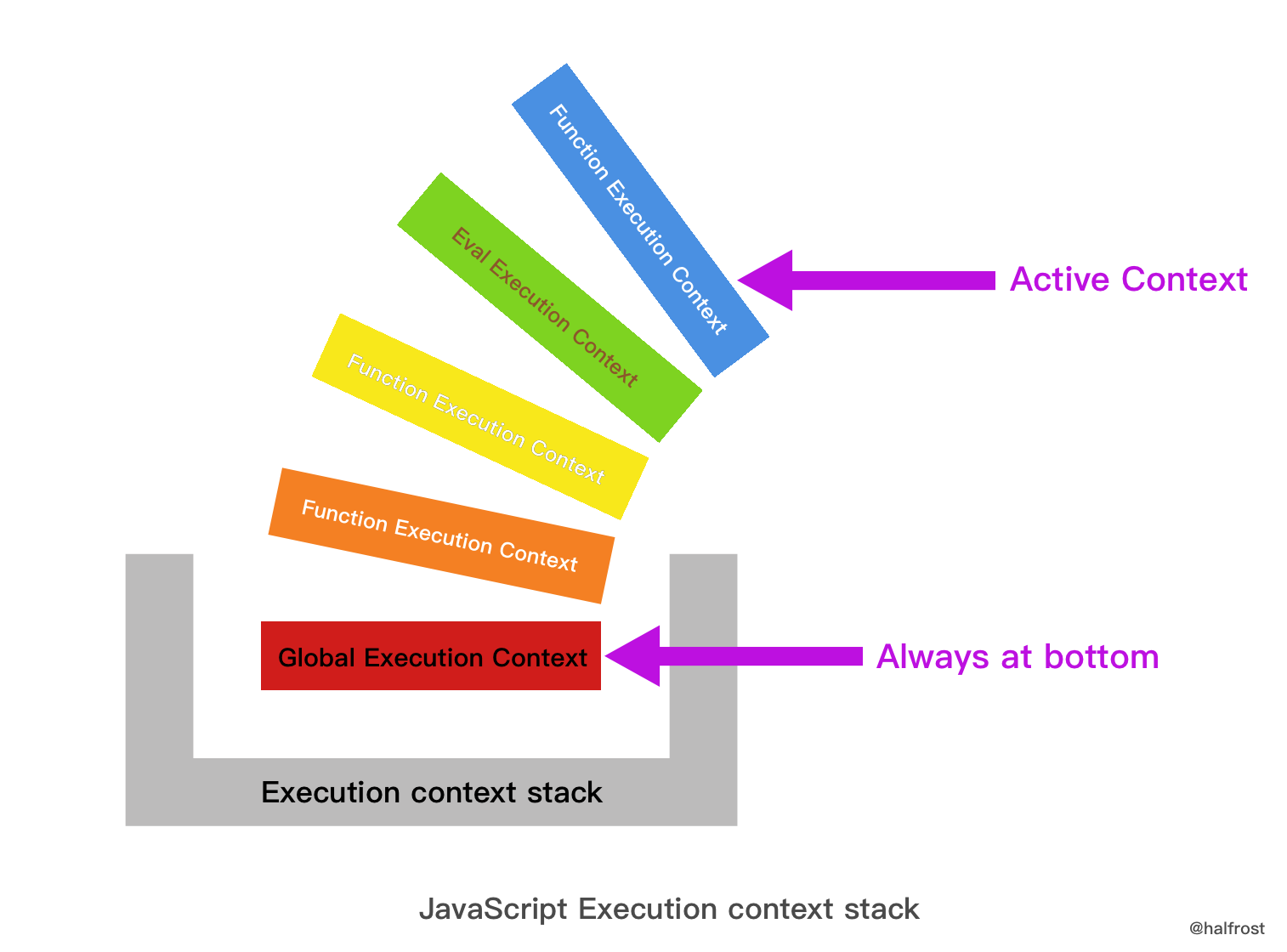
Next, we will discuss, across these three categories—Global Execution Context, Function Execution Context, and Eval Execution Context—what this actually refers to.
(1). Global Execution Context
1. Function Calls in Non-strict Mode
This is the most common way to use a function. It is a global call, so this represents the global object, Global.
var name = 'halfrost';
function test() {
    console.log(this); // window
    console.log(this.name); // halfrost
}
test();
In the global context (Global Context), this is always the global object; in the browser, that is the window object.
2. Function Calls in Strict Mode
Strict mode was introduced by ECMAScript 5.1 to restrict some exceptional JavaScript behaviors and provide better security and more robust error checking. To use strict mode, simply place 'use strict' at the top of the function body. This changes this in the execution context to undefined. As a result, the execution context is no longer the global object, which is exactly the opposite of non-strict mode.
In strict mode, the situation is not as simple as just being undefined; strict-mode code may be mixed with non-strict-mode code.
First, consider the strict-mode case:
'use strict';
function test() {
  console.log(this); //undefined
};
test();
The situation above is relatively easy to understand; there is another case that also occurs in strict mode:
    function execute() {
      'use strict'; // Enable strict mode
      function test() {
        // Inner functions are also in strict mode
        console.log(this); // undefined
      }
      // Call test() in strict mode
      // this is undefined in test()
      test(); // undefined
    }
    execute();
If strict mode is enabled in the outer scope, then functions declared inside the execution scope inherit strict mode.
Next, let’s look at cases where strict mode and non-strict mode are mixed.
    function nonStrict() {
      // Non-strict mode
      console.log(this); // window
    }
    function strict() {
      'use strict';
      // Strict mode
      console.log(this); // undefined
    }
This case is relatively straightforward: just handle each mode separately.
(II). Function Execution Context
3. Function Invocation
When a function is invoked in the normal way, the value of this is set to the global object (the window object in browsers).
The behavior in strict mode and non-strict mode is consistent with the global execution context described above: strict mode corresponds to undefined, and non-strict mode corresponds to window, so I won’t repeat the details here.
4. Method Invoked as an Object Property
var person = {
    name: "halfrost",
    func: function () {
        console.log(this + ":" + this.name);
    }
};

person.func(); // halfrost
In this example, this refers to the function’s caller, person, so it outputs person.name.
Of course, if the function’s caller is a global object, then the value of this here will change.
var name = "YDZ";
var person = {
    name: "halfrost",
    func: function () {
        console.log(this + ":" + this.name);
    }
};

temp = person.func;
temp(); // YDZ
In the example above, because the function is assigned to another variable and is not invoked as a property of person, the value of this is window.
The phenomenon above can be described as “losing the this object when extracting a method from a class.” Here is another example of this phenomenon:
var counter = {
      count: 0,
      inc: function() {
          this.count ++;
      }
}


var func = counter.inc;
func();
counter.count;   // Outputs 0; you'll find the func function doesn't work at all
Here, although we extracted the counter.inc function, the this inside the function became the global object, so the result of executing the func() function is window.count++. However, window.count does not exist at all, and its value is undefined. Performing an operation on undefined can only produce NaN.
Let’s verify this by printing the global count:
count // Output is NaN
So how should we handle this situation? What if we simply want to extract a useful method for other classes to use? The correct approach in this case is to use the bind function.
var func2 = counter.inc.bind(counter);
func2();
counter.count; // Output is 1; the function worked!
5. Calling a Constructor
A constructor is a function used to create an object with new. Strictly speaking, any function can be used with new to create an object, but some functions are defined for that purpose, while others are not. Also note that, by convention, a constructor function’s name starts with an uppercase letter. For example: Object, Array, Function, and so on.
function person() {
    this.name = "halfrost";
    this.age = 18;
    console.log(this);
}

var ydz = new person();  // person {name: "halfrost", age: 18}
console.log(ydz.name, ydz.age); // halfrost 18
If a constructor is being called, this actually points to the object created with new.
If it is not being called as a constructor, the situation is somewhat different:
function person() {
    this.name = "halfrost";
    this.age = 18;
    console.log(this);
}

person(); // Window {stop: function, open: function, alert: function, confirm: function, prompt: function…}
If it is not called as a constructor, it becomes a regular function call, in which case this is window.
If prototype is also defined inside the constructor, what will this point to?
function person() {
    this.name = "halfrost";
    this.age = 18;
    console.log(this);
}

person.prototype.getName = function() {
    console.log(this.name); // person {name: "halfrost", age: 18} "halfrost"
}

var ydz = new person();  // person {name: "halfrost", age: 18}
ydz.getName();
In the person.prototype.getName function, this points to the ydz object. Therefore, you can use this.name to get the value of ydz.name.
In fact, this is not limited to a constructor’s prototype; even across the entire prototype chain, this always represents the value of the current object.
6. Invoking Inner Functions / Anonymous Functions
If an object property is a method, and that method defines inner functions and anonymous functions, what does this refer to in those cases?
var context = "global";

var test = {
    context: "inside",
    method: function () {
        console.log(this + ":" +this.context);

        function f() {
            var context = "function";
            console.log(this + ":" +this.context);
        };
        f();

        (function(){
            var context = "function";
            console.log(this + ":" +this.context);
        })();
    }
};

test.method();

// [object Object]:object
// [object Window]:global
// [object Window]:global
As the output shows, this inside both the inner function and the anonymous function points to the outer window.
7. Invoking via call() / apply() / bind()
this itself is immutable, but JavaScript provides three functions—call() / apply() / bind()—to set the value of this when invoking a function.
The prototypes of these three functions are as follows:
// Sets obj1 as the value of this inside fun() and calls fun() passing elements of argsArray as its arguments.
fun.apply(obj1 [, argsArray])

// Sets obj1 as the value of this inside fun() and calls fun() passing arg1, arg2, arg3, ... as its arguments.
fun.call(obj1 [, arg1 [, arg2 [,arg3 [, ...]]]])

// Returns the reference to the function fun with this inside fun() bound to obj1 and parameters of fun bound to the parameters specified arg1, arg2, arg3, ....
fun.bind(obj1 [, arg1 [, arg2 [,arg3 [, ...]]]])
In these three functions, this corresponds to the first parameter.
    var rabbit = { name: 'White Rabbit' };
    function concatName(string) {
      console.log(this === rabbit); // => true
      return string + this.name;
    }
    // Indirect call
    concatName.call(rabbit, 'Hello ');  // => 'Hello White Rabbit'
    concatName.apply(rabbit, ['Bye ']); // => 'Bye White Rabbit'
apply() and call() can forcibly change the current object used when a function is executed, making this point to another object. The difference between apply() and call() is that apply() takes an array as its argument, while call() takes a list of arguments.
Both apply() and call() execute the function immediately, whereas bind() returns a new function. It allows you to create a function with this preset and call it later.
    function multiply(number) {
      'use strict';
      return this * number;
    }
    // Create a bound function, bind the context to 2
    var double = multiply.bind(2);
    // Invoke indirectly
    double(3);  // => 6
    double(10); // => 20
The bind() function essentially makes the originally bound function share the same code and scope, while giving it a different execution context at runtime.
The bind() function creates a permanent context chain that cannot be modified. Even if a bound function is invoked with call() or apply() and passed a different context, its previously attached context will not change; rebinding it will have no effect either.
Only when invoked as a constructor can a bound function change its context, but this is not a particularly recommended practice.
    function getThis() {
      'use strict';
      return this;
    }
    var one = getThis.bind(1);
    // Bound function call
    one(); // => 1
    // Using .apply() and .call() with a bound function
    one.call(2);  // => 1
    one.apply(2); // => 1
    // Rebinding
    one.bind(2)(); // => 1
    // Calling a bound function as a constructor
    new one(); // => Object
Only when calling new one() can the context of the bound function be changed; with other types of calls, this always points to 1.
8. this in setTimeout and setInterval
Professional JavaScript for Web Developers states: “Code executed by a timeout needs to call the setTimeout method of the window object.” When setTimeout/setInterval executes, this points to the window object by default, unless the binding of this is changed manually.
var name = 'halfrost';
function Person(){
    this.name = 'YDZ';
    this.sayName=function(){
    	console.log(this); // window
        console.log(this.name); // halfrost
        };
    setTimeout(this.sayName, 10);
    }
var person=new Person();
In the example above, if you want to change what this points to, you can use apply/call, etc., or use that to save this.
It is worth noting that: the callback function in setTimeout points to window even in strict mode, not undefined!
'use strict';
function test() {
  console.log(this);  //window
}
setTimeout(test, 0);
Because if the callback function passed to setTimeout does not have an explicitly specified this, an implicit operation is performed that injects the global context, regardless of whether it is in strict mode or non-strict mode.
9. DOM event
When a function is used as an event handler, this is set to the page element that triggered the event.
var body = document.getElementsByTagName("body")[0];
body.addEventListener("click", function(){
    console.log(this);
});
// <body>…</body>
10. Invoking in an in-line manner
When code is executed through an in-line handler, this likewise points to the page element that owns the handler.
Look at the following code:
document.write('<button onclick="console.log(this)">Show this</button>');
// <button onclick="console.log(this)">Show this</button>
document.write('<button onclick="(function(){console.log(this);})()">Show this</button>');
// window
In the first line of code, as described above for the in-line handler, this will point to the “button” element. However, the anonymous function in the second line of code is a context-less function, so this will be set to window by default.
We have already introduced the bind function earlier, so the following modification can change the behavior of the second line of code in the example above:
document.write('<button onclick="((function(){console.log(this);}).bind(this))()">Show this</button>');
// <button onclick="((function(){console.log(this);}).bind(this))()">Show this</button>
11. this & that
Nested functions are common in JavaScript because functions can be passed as arguments and created at the appropriate time via function expressions. This can lead to some issues: if a method contains a regular function, and you want to access the former from inside the latter, the method’s this will be shadowed by the regular function’s this, as in the following example:
var person = {
       name: 'halfrost',
       friends: [ 'AA', 'BB'],
       loop: function() {
            'use strict';
             this.friends.forEach(
                 function(friend) {   // (1)
                    console.log(this.name + ' knows ' + friend);   // (2)
                 }
          );
      }
};
In the example above, suppose the function at (1) wants to access the this inside the loop method on line (2). How should it do that?
Calling the loop method directly will not work; you will see the following error.
person.loop();
// Uncaught TypeError: Cannot read property 'name' of undefined
Because the function at (1) has its own this, there is no way to call the outer this from inside it. So what can we do?
There are three solutions:
(1) that = this
We can save a copy of the outer this. Typically, variable names such as that, self, or me are used to temporarily store this.
var person = {
       name: 'halfrost',
       friends: [ 'AA', 'BB'],
       loop: function() {
            'use strict';
             var that = this;
             this.friends.forEach(
                 function(friend) {   // (1)
                    console.log(that.name + ' knows ' + friend);   // (2)
                 }
          );
      }
};

person.loop();

// halfrost knows AA
// halfrost knows BB
This will correctly output the desired answer.
(2) bind()
With the help of the bind() function, you can directly bind a fixed value to the callback function’s this, that is, the function’s this:
var person = {
       name: 'halfrost',
       friends: [ 'AA', 'BB'],
       loop: function() {
            'use strict';
             var that = this;
             this.friends.forEach(
                 function(friend) {   // (1)
                    console.log(this.name + ' knows ' + friend);   // (2)
                 }.bind(this)
          );
      }
};

person.loop();

// halfrost knows AA
// halfrost knows BB
(3) The thisValue of forEach()
This approach is specific to forEach(), because this method provides a second argument for the callback function. We can use that argument to provide this for us:
var person = {
       name: 'halfrost',
       friends: [ 'AA', 'BB'],
       loop: function() {
            'use strict';
             var that = this;
             this.friends.forEach(
                 function(friend) {   // (1)
                    console.log(this.name + ' knows ' + friend);   // (2)
                 }, this );
      }
};

person.loop();

// halfrost knows AA
// halfrost knows BB
12. Arrow Functions
Arrow functions are a new feature introduced in ES6.
    var numbers = [1, 2];
    (function() {
      var get = () => {
        console.log(this === numbers); // => true
        return this;
      };
      console.log(this === numbers); // => true
      get(); // => [1, 2]
      // Arrow functions with .apply() and .call()
      get.call([0]);  // => [1, 2]
      get.apply([0]); // => [1, 2]
      // Bind
      get.bind([0])(); // => [1, 2]
    }).call(numbers);
From the examples above, we can see that:
The
thisobject inside an arrow function is the object from the scope where it is defined, not the object from the scope where it is used.An arrow function cannot be used as a constructor, and therefore cannot be used with the
newoperator. Otherwise, it will throw the errorTypeError: get is not a constructor.The fact that
thisis fixed is not because arrow functions have an internal mechanism for bindingthis. The actual reason is that arrow functions do not have their ownthisat all, so thethisinside them is thethisof the enclosing code block. Precisely because they do not have their ownthis, they also cannot be used as constructors.Arrow functions also cannot use the
argumentsobject, because theargumentsobject does not exist inside an arrow function body. If you need to use it, you can use rest parameters instead. Similarly,superandnew.targetalso do not exist inside arrow functions. Therefore, the three variablesarguments,super, andnew.targetdo not exist inside arrow functions.The
yieldcommand also cannot be used inside an arrow function, so arrow functions cannot be used as Generator functions.Since arrow functions do not have their own
this, naturally you cannot use methods such ascall(),apply(), orbind()to change whatthispoints to.
13. Function Binding
Although ES6 introduced arrow functions, which can bind the this object and greatly reduce the need for explicit this binding (call, apply, bind), arrow functions have the four drawbacks mentioned above (they cannot be used as constructors, cannot use the arguments object, cannot use the yield command, and cannot use call, apply, or bind). Therefore, ES7 proposed the function bind operator as a replacement for calls to call, apply, and bind.
The function bind operator is a pair of adjacent colons (::). The left side of the double colon is an object, and the right side is a function. This operator automatically binds the object on the left as the context (that is, the this object) to the function on the right.
foo::bar  // equivalent to bar.bind(foo)

foo::bar(...arguments) // equivalent to bar.apply(foo,arguments)
(3). Eval Execution Context
14. Eval Function
The Eval function is somewhat special: this points to the object of the current scope.
var name = 'halfrost';
var person = {
    name: 'YDZ',
    getName: function(){
        eval("console.log(this.name)");
    }
}
person.getName();  // YDZ

var getName=person.getName;
getName();  // halfrost
The result here is the same as the result of calling the method as a property of an object.
Summary
To determine the this binding of a function at runtime, you need to find the function’s direct call site. Once you’ve found it, you can apply the following four rules in order to determine the object that this is bound to.
- Is the function called with new (new binding)? If so, this is bound to the newly created object. var bar = new foo()
- Is the function called via call or apply (explicit binding), or via hard binding? If so, this is bound to the specified object. var bar = foo.call(obj2)
- Is the function called as part of a context object (implicit binding)? If so, this is bound to that context object. var bar = obj1.foo()
- If none of the above applies, default binding is used. In strict mode, this is bound to undefined; otherwise, it is bound to the global object. var bar = foo()
Arrow functions in ES6 do not use the four standard binding rules. Instead, they determine this based on the current lexical scope. More specifically, an arrow function inherits the this binding of the enclosing function call, regardless of what this is bound to. This is essentially the same as the self = this mechanism used in pre-ES6 code.
Reference:
《ECMAScript 6 Primer》
《Professional JavaScript for Web Developers》
The Mystery of JavaScript This (Translation)
《You Don’t Know JS (Vol. 1)》
GitHub Repo: Halfrost-Field
Follow: halfrost · GitHub
