A JavaScript Newbie’s Pitfall Diary
Quotation
In May 1995, the great Eich wrote the first version of the scripting language in just 10 days. JavaScript’s first code name was Mocha, a name coined by Marc Andreesen. Due to trademark issues, and because many products were already using the Live prefix, Netscape’s marketing department renamed it LiveScript. At the end of November 1995, Navigator 2.0B3 was released, including a prototype of the language; compared with earlier versions, this version did not introduce any major changes. In early December 1995, as the Java language was gaining momentum, Sun licensed the Java trademark to Netscape. The language was renamed again, becoming the final name—JavaScript. Later, in January 1997, after standardization, it became what is now ECMAScript.
Over the past year or two, JS has also been used more and more on the client side. I recently spent some time with JS, and as a frontend beginner, I’m recording my recent learning experience of “stepping on landmines” along the way.
I. Primitive Values and Objects
In JavaScript, values are divided into only two categories:
- Primitive values: BOOL, Number, String, null, undefined.
- Objects: each object has a unique identity and is strictly equal ( = = = ) only to itself.
null and undefined have no properties—not even a toString( ) method.
false, 0, NaN, undefined, null, ' ' are all false.
The typeof operator can distinguish between primitive values and objects, and detect the type of a primitive value. The instanceof operator can detect whether an object is an instance of a specific constructor or a subclass of it.
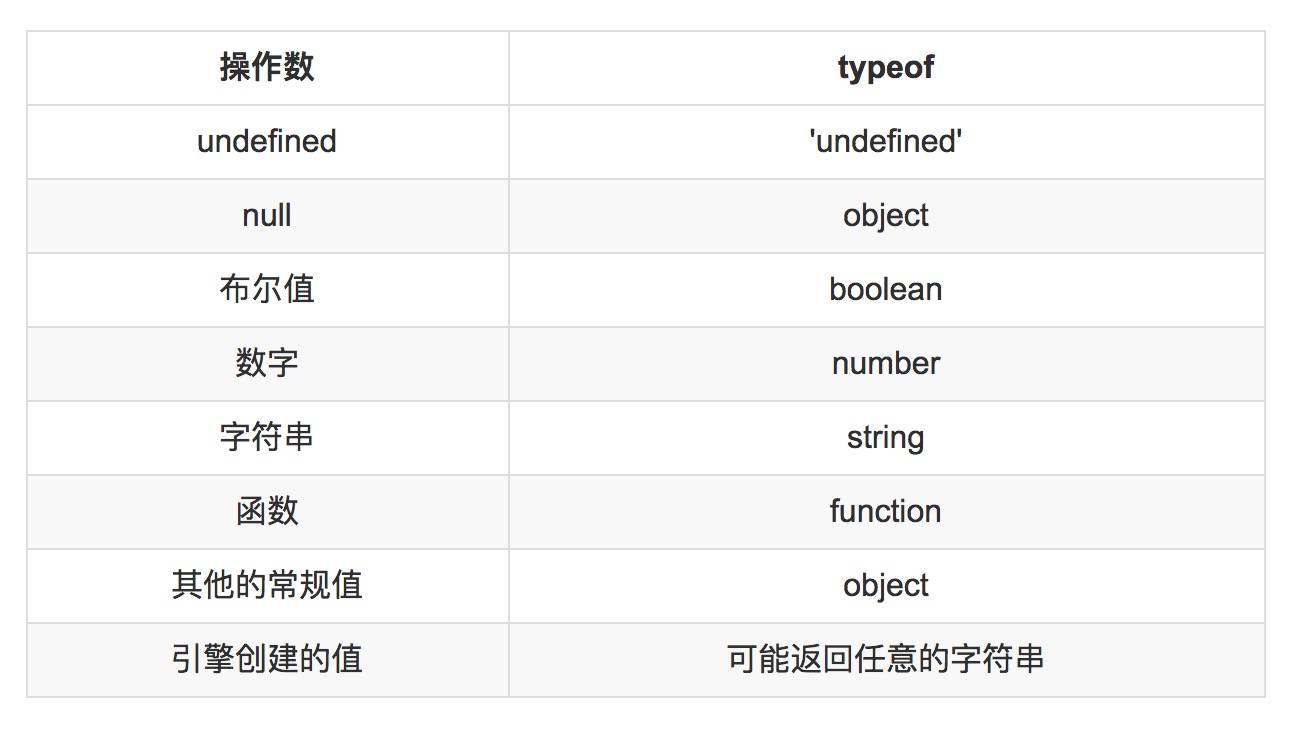
Reference types: objects, arrays, functions
All remaining types are value types
null returns object. This is an unfixable bug: fixing it would break the existing code ecosystem. But this does not mean that null is an object.
This is because, in the first-generation JavaScript engine, JavaScript values were represented as 32-bit words. The lowest 3 bits served as a tag indicating whether the value was an object, integer, floating-point number, or Boolean. The tag for objects was 000. To represent null, the engine used the machine-language NULL pointer, whose bits were all 0. And typeof checks the tag bits of the value, which is why it thinks null is an object.
So to determine whether a value is an object, you should use the following condition:
function isObject (value) {
  return ( value !== null
    && (typeof value === 'object'
    || typeof value === 'function'));
}
null is the topmost element of the prototype chain.
Object.getPrototypeOf(Object.prototype)

< null
You can check for undefined and null using strict equality:
if(x === null) {
  // Check whether it is null
}

if (x === undefined) {
  // Check whether it is undefined
}

if (x === void 0 ) {
  // Check whether it is undefined, void 0 === undefined
}

if (x != null ) {
 // Check that x is neither undefined nor null
 // This is equivalent to if (x !== undefined && x !== null )
}
Among primitive values, there is one special case: although NaN is a primitive value, it is not equal to itself.
NaN === NaN
<false
The primitive value constructors Boolean, Number, and String can convert primitive values into objects, and can also convert objects into primitive values.
// Convert a primitive value to an object
var object = new String('abc')


// Convert an object to a primitive value
String(123)
<'123'
However, when converting an object to a primitive value, there is one thing to note: if the conversion is performed using the valueOf() function, everything is converted correctly.
new Boolean(true).valueOf()
<true
However, when using a constructor to convert a wrapper object to a primitive value, BOOL values cannot be converted correctly.
Boolean(new Boolean(false))
<true
Constructors can only correctly extract numbers and strings from wrapper objects.
II. Bugs Caused by Loose Equality
In JavaScript, there are two ways to determine whether two values are equal.
- Strict equality (===) and strict inequality (!==) require the values being compared to be of the same type.
- Loose equality (==) and loose inequality (!=) first attempt to convert values of different types, and then compare them using strict equality.
Loose equality can lead to some bugs:
undefined == null // undefined and null are loosely equal
<true

2 == true  // Don't mistakenly think this is true
<false

1 == true
<true

0 == false
<true

' ' == false // An empty string equals false, but not all non-empty strings equal true
<true

'1' == true
<true

'2' == true
<false

'abc' == true // NaN === 1
<false
Regarding strict equality and loose equality, someone on GitHub summarized them in a pretty good chart, so I’m sharing it here. The GitHub repository is here.
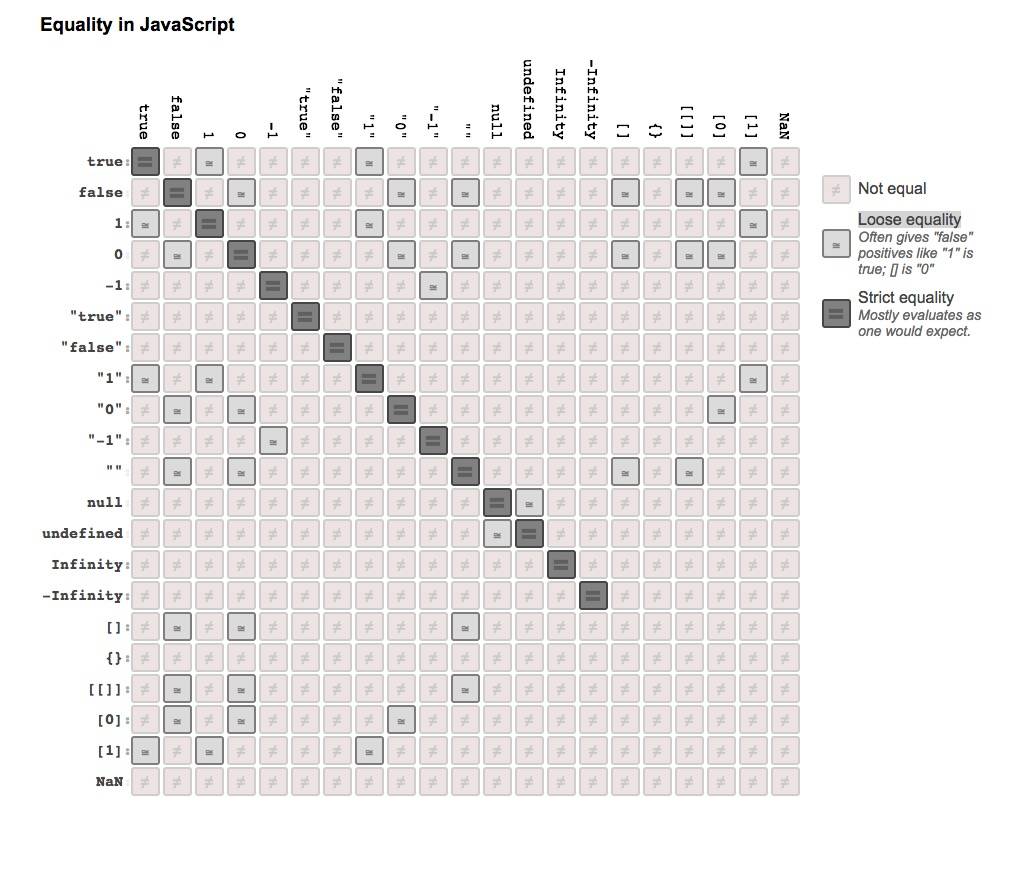
Here is an even more complete table, in color. The original source is here.
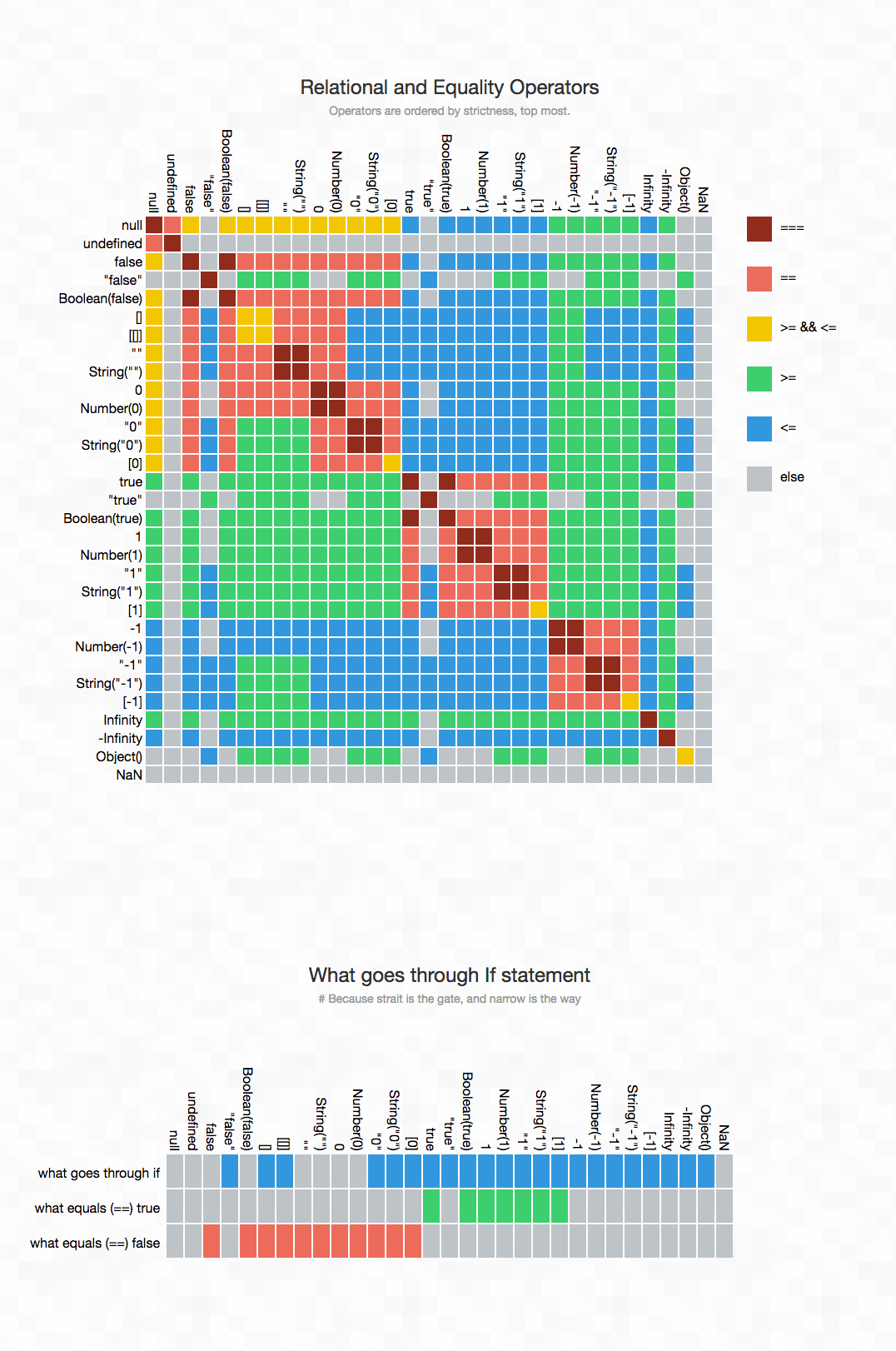
Interview question: When should you use = = =, and when should you use = =?
if ( obj.a = = null ) {
// The check above is equivalent to obj.a = = = null || obj.a = = = undefined
// This shorthand style is the recommended way to write it in jQuery
}Except for the case above where = = is used, use = = = everywhere else.
However, when conversion is performed with Boolean( ), the situation is different:
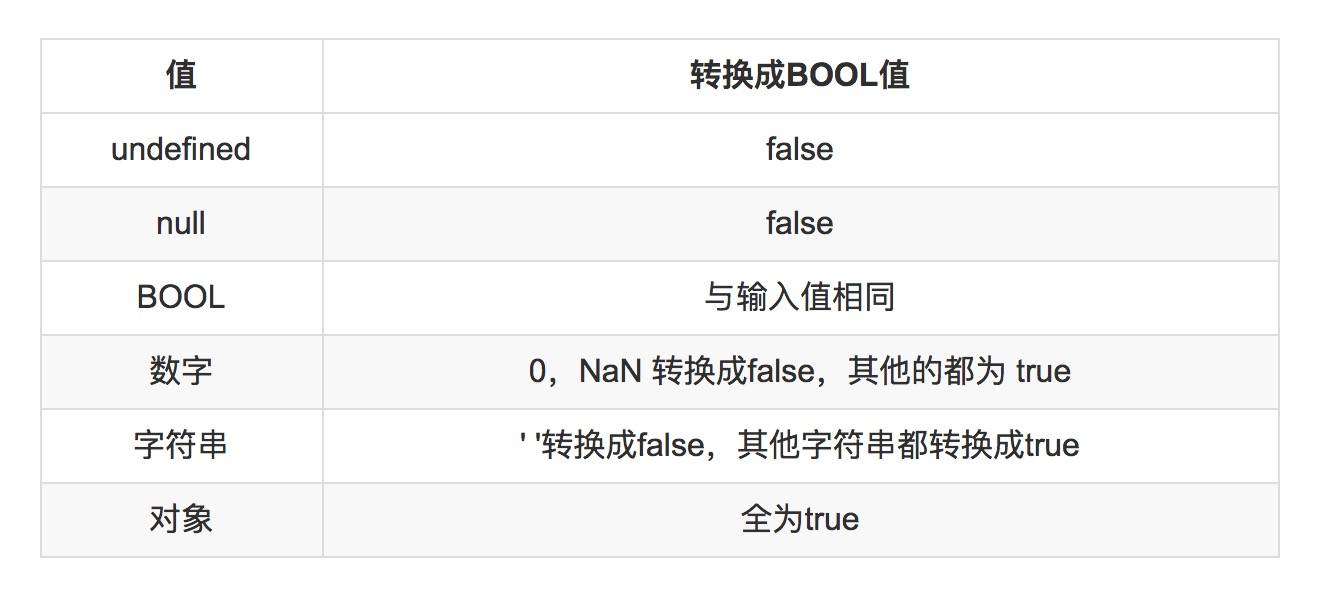
Why are objects always true here?
In ECMAScript 1, it was specified that conversion through object configuration was not supported (for example, a toBoolean() method). The reason is that the boolean operators || and && preserve the value of their operands. Therefore, if these operators are used in a chain, the truthiness of the same value may be checked multiple times. Such checks are not expensive for primitive types, but for objects, allowing configurable boolean conversion would be very costly. So starting from ECMAScript 1, objects are always true, avoiding those conversion costs.
III. Number
All numbers in JavaScript have only one type and are treated as floating-point numbers. Internally, JavaScript performs optimizations to distinguish between floating-point arrays and integers. JavaScript numbers are double-precision (64-bit), based on the IEEE 754 standard.
Since all numbers are floating-point numbers, precision issues arise here. Do you still remember the robot comic that was circulating online some time ago?

Precision issues can lead to some interesting behavior.
0.1 + 0.2 ;  // 0.300000000000004

( 0.1 + 0.2 ) + 0.3;    // 0.6000000000001
0.1 + ( 0.2 + 0.3 );    // 0.6

(0.8+0.7+0.6+0.5) / 4   // 0.65
(0.6+0.7+0.8+0.5) / 4   // 0.6499999999999999
Changing even a single position or adding a pair of parentheses can affect precision. To avoid this issue, it’s still recommended to convert to integers.
( 8 + 7 + 6 + 5) / 4 / 10 ;  // 0.65
( 6 + 8 + 5 + 7) / 4 / 10 ;  // 0.65
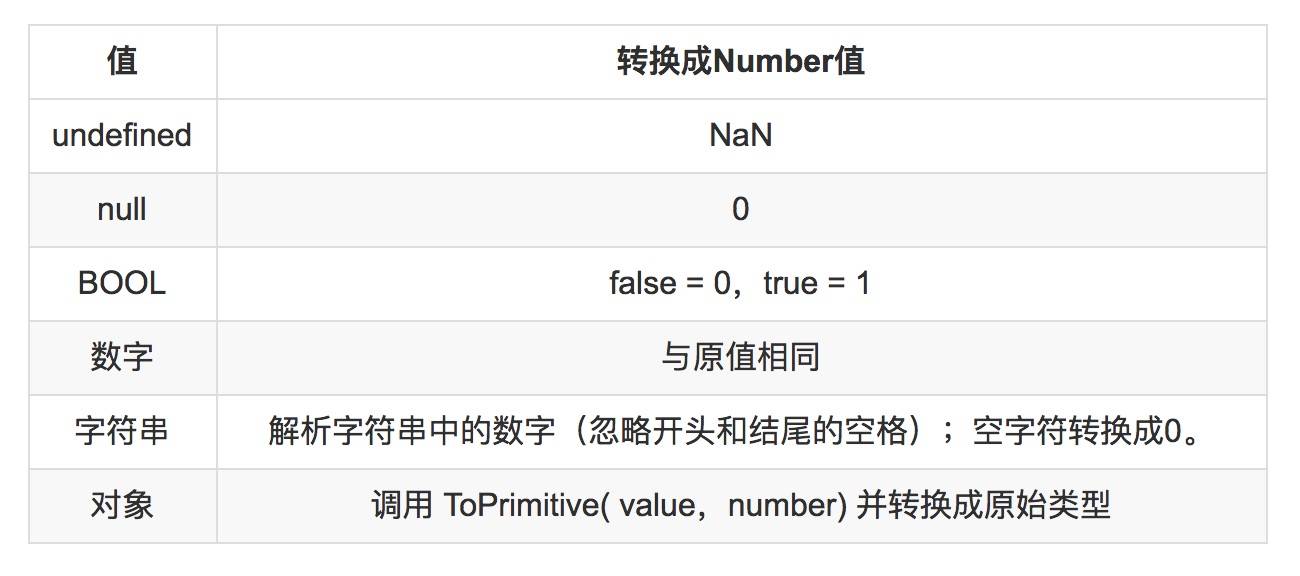
There are four special numeric values:
- Two error values: NaN and Infinity
- Two zeros: one +0 and one -0. 0 can carry a positive or negative sign because the sign and the numeric value are stored separately.
typeof NaN
<"number"
(Rant: NaN stands for “not a number”, yet it is a number)
NaN is the only value in JS that is not strictly equal to itself:
NaN === NaN
<false
Therefore, you cannot use Array.prototype.indexOf to find NaN (because the array indexOf method uses strict equality for comparison).
[ NaN ].indexOf( NaN )
<-1
There are two correct ways:
The first:
function realIsNaN( value ){
  return typeof value === 'number' && isNaN(value);
}
The reason the case above needs a type check is that a string is first converted to a number; if the conversion fails, the result is NaN. Therefore, it is equal to NaN.
isNaN( 'halfrost' )
<true
The second method leverages the definition in the IEEE 754 standard: any comparison involving NaN, including comparing it with itself, is unordered.
function realIsNaN( value ){
  return value !== value ;
}
Another erroneous value, Infinity, represents infinity, or is caused by division by 0.
You can check it directly with loose equality == or strict equality ===.
However, the isFinite() function is not specifically for checking Infinity. It is used to determine whether a value is not an erroneous value (here meaning it is neither NaN nor Infinity, excluding these two erroneous values).
In ES6, two functions were introduced specifically for checking Infinity and NaN: Number.isFinite() and Number.isNaN(). It is recommended to use these two functions for such checks going forward.
Integers in JS have a safe range, between (-2^53, 2^53). So if a number exceeds the range of a 64-bit unsigned integer, it can only be stored as a string.
When using parseInt() to convert it to a number, errors can occur, so the result is unreliable:
parseInt(1000000000000000000000000000.99999999999999999,10)
<1
parseInt( str , redix? ) first converts the first argument to a string:
String(1000000000000000000000000000.99999999999999999)
<"1e+27"
parseInt does not treat e as part of an integer, so parsing stops after e, and the final output is 1.
In JS, the % remainder operator is not the modulo operation we usually think of.
-9%7
<-2
The remainder operator returns a result with the same sign as the first operand. The modulo operation has the same sign as the second operand.
So a common pitfall is that the usual way we check whether a number is odd or even can produce incorrect results:
function isOdd( value ){
  return value % 2 === 1;
}

console.log(-3);  // false
console.log(-2);  // false
The right way to do it is:
function isOdd( value ){
  return Math.abs( value % 2 ) === 1;
}

console.log(-3);  // true
console.log(-2);  // false
IV. String
String comparison operators cannot compare diacritics and accent marks.
'ä' < 'b'
<false

'á' < 'b'
<false
V. Array
You cannot create an array using a single number.
new Array(2)  // A single number here represents the length of the array
<[ , , ]

new Array(2,3,4)
<[2,3,4]
Deleting an element creates an empty slot, but it does not change the array’s length.
var array = [1,2,3,4]
array.length
<4
delete array[1]

array
<[1, ,3,4]
array.length
<4
So the deletion here isn’t quite consistent with the deletion we discussed earlier; the correct approach is to use splice.
var array = [1,2,3,4,56,7,8,9]
array.splice(1,3)
array
<[1, 56, 7, 8, 9]
array.length
<5
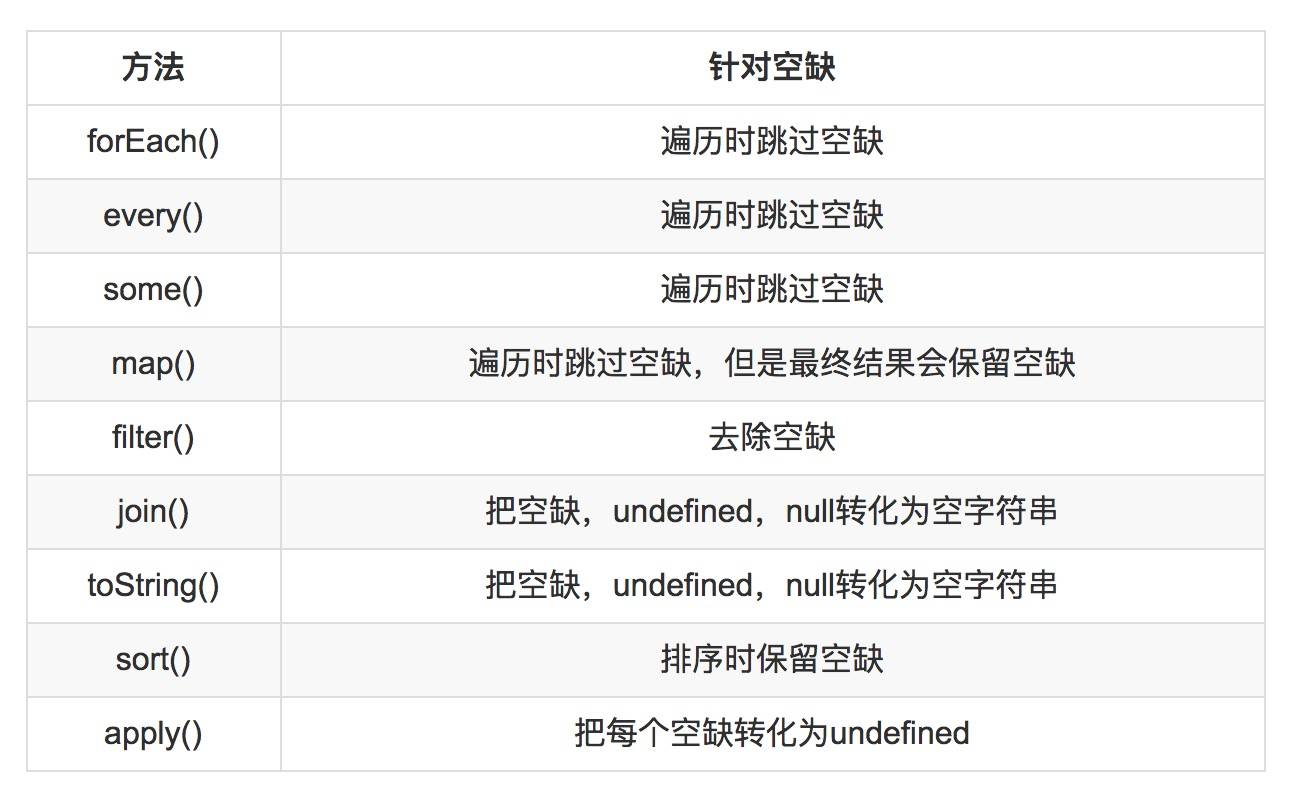
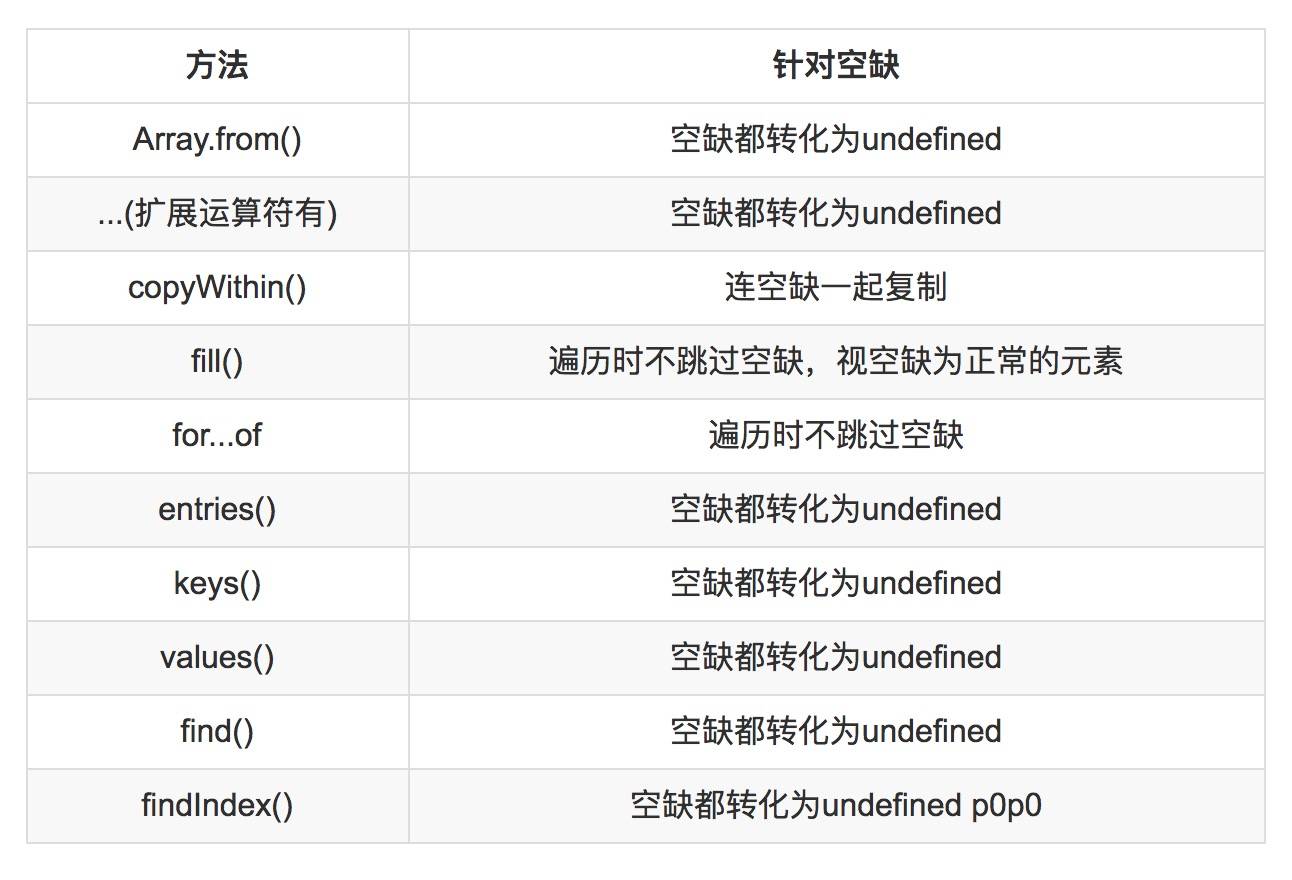
For holes in arrays, different iteration methods behave differently.
In ES5:
In ES6: the spec states that holes are not skipped during iteration; they are all converted to undefined.
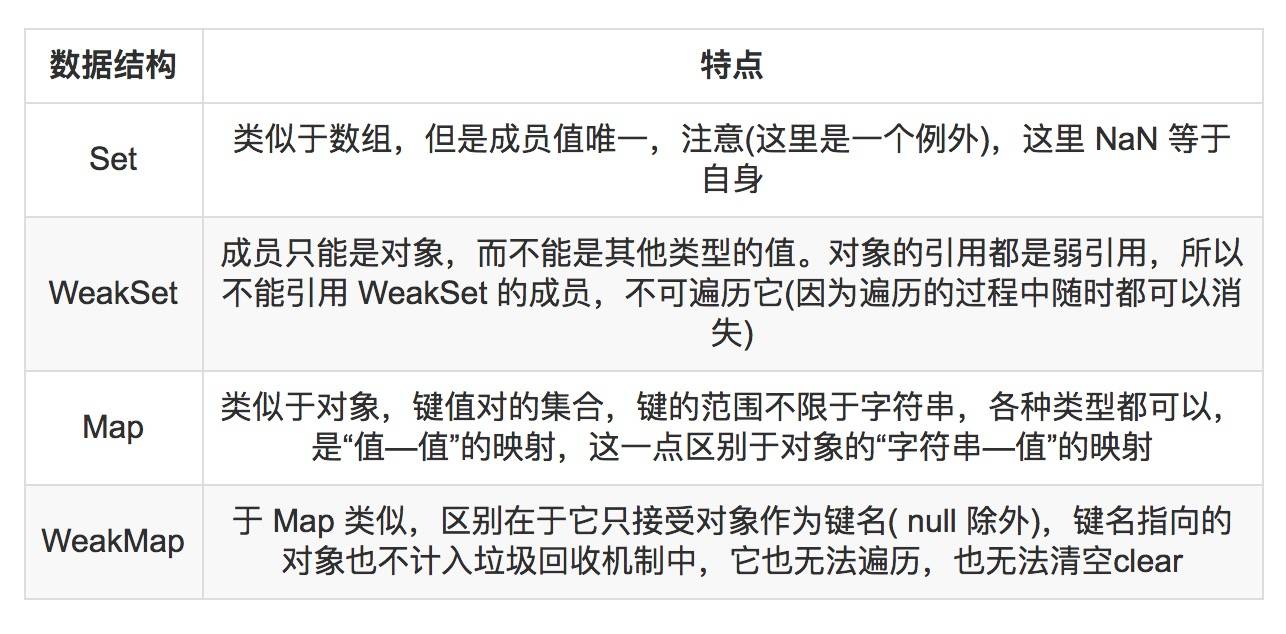
VI. Set, Map, WeakSet, WeakMap
VII. Loops
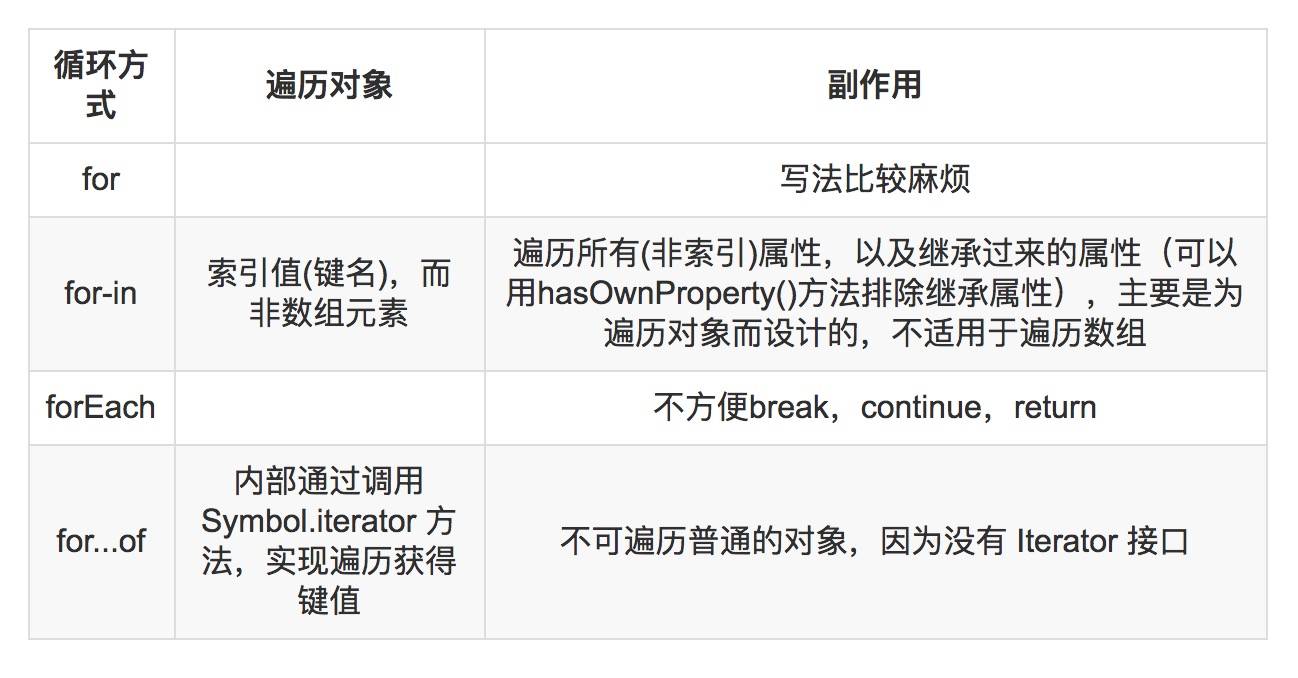
First, a pitfall with for-in:
var scores = [ 11,22,33,44,55,66,77 ];
var total = 0;
for (var score in scores) {
  total += score;
}

var mean = total / scores.length;

mean;
Most people, on seeing this problem, would start calculating: sum the values, then divide by 7. But that would be wrong for this problem. What if the elements in the array were made more complex:
var scores = [ 1242351,252352,32143,452354,51455,66125,74217 ];
In fact, the answer here has nothing to do with the values of the elements in the array. As long as the array has 7 elements, the final answer is always 17636.571428571428.
The reason is that for-in iterates over the array indices, so total = ‘00123456’, and then this string is divided by 7.
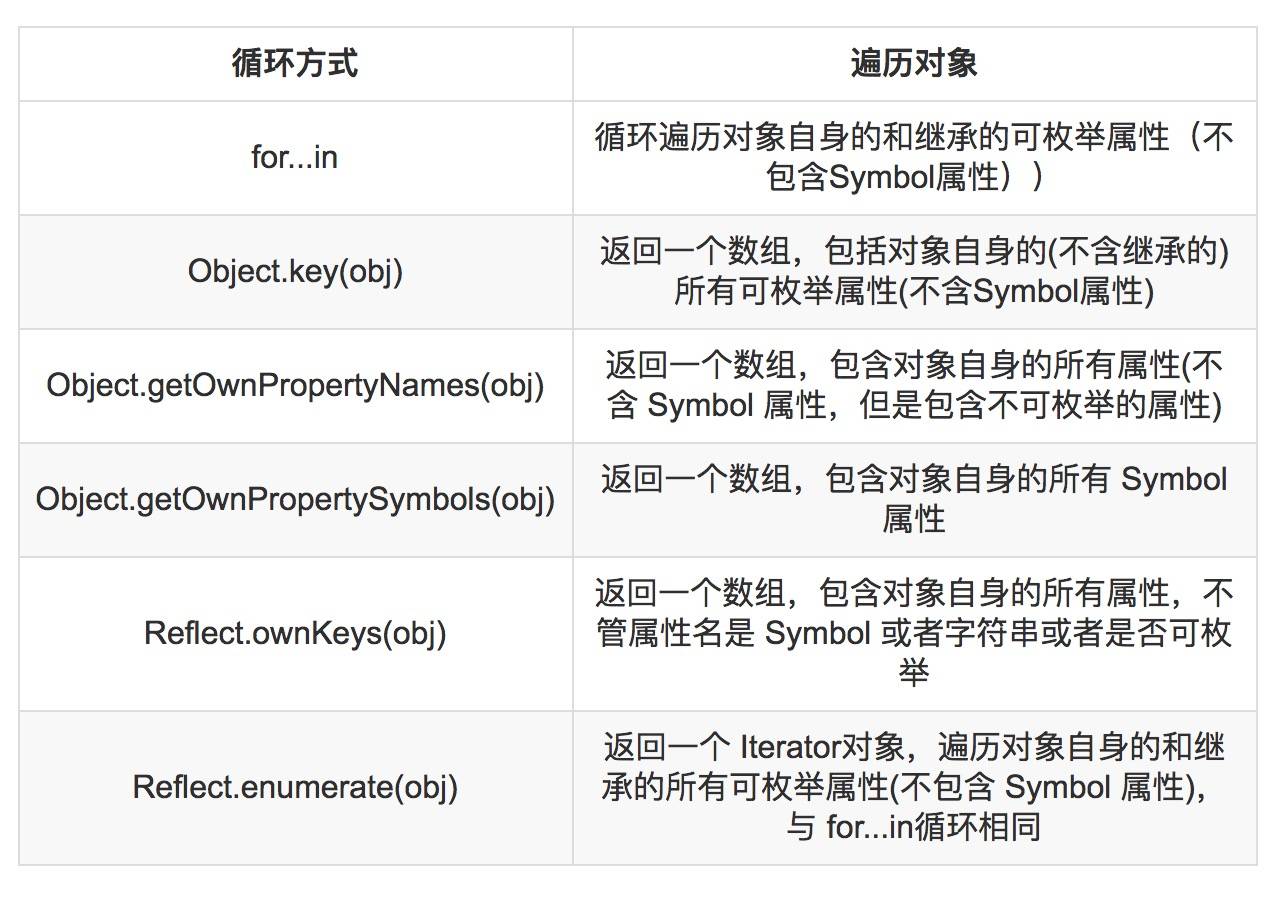
There are 6 ways to iterate over an object’s properties in ES6:
8. Bugs Caused by Implicit Conversion / Coercion
var formData = { width : '100'};

var w = formData.width;
var outer = w + 20;

console.log( outer === 120 ); // false;
console.log( outer === '10020'); // true
9. Operator Overloading
JavaScript does not allow operators, including the equality operator, to be overloaded or customized.
10. Hoisting of Function Declarations and Variable Declarations
Let’s start with an example of function hoisting.
function foo() {
  bar();
  function bar() {
    ……
  }
}
var variables are also hoisted. However, once a function is assigned to a variable, the effect of hoisting disappears.
function foo() {
  bar(); // error!
  var bar = function () {
    ……
  }
}
The function above therefore has no hoisting effect.
Function declarations are fully hoisted, whereas variable declarations are only partially hoisted. Only the variable declaration is hoisted; the assignment itself is not.
JavaScript supports lexical scoping, which means that, with very few exceptions, a reference to the variable foo is bound to the nearest scope in which foo is declared. ES5 does not support block scope; the scope of a variable definition is not the nearest enclosing statement or block, but the function that contains it. All variable declarations are hoisted: declarations are moved to the beginning of the function, while assignments still occur at their original locations.
function foo() {
  var x = -10;
  if ( x < 0) {
    var tmp = -x;
    ……
 }
 console.log(tmp);  // 10
}
Here tmp has the effect of variable hoisting.
Another example:
foo = 2;
var foo;
console.log( foo );
The example above still outputs 2, not undefined.
After being compiled by the compiler, it actually becomes something like this:
var foo;
foo = 2;
console.log( foo );
The variable declaration has been moved earlier, while the assignment remains in its original place. To make this easier to understand, here is another example:
console.log( a );
var a = 2;
The code above will be compiled into something like this:
var foo;
console.log( foo );
foo = 2;
Therefore, the output is undefined.
If both a variable and a function are hoisted, function hoisting has higher priority.
foo(); // 1
var foo;
function foo() {
    console.log( 1 );
}
foo = function() {
    console.log( 2 );
};
After the above is compiled, it becomes the following:
function foo() {
   console.log( 1 );
}
foo(); // 1
foo = function() {
   console.log( 2 );
};
The final output is 1, not 2. This shows that function hoisting takes precedence over variable hoisting.
To avoid variable hoisting, ES6 introduced the let and const keywords. Variables declared with these two keywords are not subject to usable variable hoisting. The principle is that within a code block, before a variable is declared with the let command, that variable is unavailable. This region is called the “temporal dead zone” (TDZ). With the TDZ, as soon as execution enters this region, the variable you want to use already exists—the variable has still been “hoisted”—but it cannot be accessed. It can only be accessed and used once execution reaches the line where the variable is declared.
This ES6 behavior also brought block scope to JS. (In ES5, there were only global scope and function scope.) As a result, immediately invoked function expressions (IIFEs) are no longer necessary.
11. arguments Is Not an Array
arguments is not an array; it is only array-like. It has a length property, and you can access its elements with square brackets. You cannot remove its elements, nor can you call array methods on it.
Do not use the arguments variable inside a function body; use the rest operator ( … ) instead. The rest operator explicitly indicates which parameters you want to collect, and while arguments is only array-like, the rest operator provides a real array.
Here is an example of using arguments as an array:
function callMethod(obj,method) {
  var shift = [].shift;
  shift.call(arguments);
  shift.call(arguments);
  return obj[method].apply(obj,arguments);
}

var obj = {
  add:function(x,y) { return x + y ;}
};

callMethod(obj,"add",18,38);
The code above fails immediately with an error:
Uncaught TypeError: Cannot read property 'apply' of undefined
    at callMethod (<anonymous>:5:21)
    at <anonymous>:12:1
The reason for the error is that arguments is not a copy of the function parameters; all named parameters are aliases for the corresponding indices in the arguments object. Therefore, after elements are removed from the arguments object via the shift method, obj is still an alias for arguments[0], and method is still an alias for arguments[1]. It looks like obj[add] is being called, but in reality it is calling 17[25].
There is another issue when using an arguments reference.
function values() {
  var i = 0 , n = arguments.length;
  return {
      hasNext: function() {
        return i < n;
      },
      next: function() {
        if (i >= n) {
            throw new Error("end of iteration");
        }
        return arguments[i++];
      }
  }
}

var it = values(1,24,53,253,26,326,);
it.next();   // undefined
it.next();   // undefined
it.next();   // undefined
The code above attempts to construct an iterator to traverse the elements of the arguments object. The reason it outputs undefined is that a new arguments variable is implicitly bound inside every function body. Each iterator next method has its own arguments variable, so when it.next is executed, its arguments are no longer the arguments from the values function.
The fix is simple: declare a local variable that next can reference.
function values() {
  var i = 0 , n = arguments.length,a = arguments;
  return {
      hasNext: function() {
        return i < n;
      },
      next: function() {
        if (i >= n) {
            throw new Error("end of iteration");
        }
        return a[i++];
      }
  }
}

var it = values(1,24,53,253,26,326,);
it.next();   // 1
it.next();   // 24
it.next();   // 53
12. IIFE Introduces a New Scope
In ES5, IIFEs were used to work around JavaScript’s lack of block scope, but in ES6 this is no longer necessary.
13. The Issue with this in Functions
Nested functions cannot access the method’s this variable.
var halfrost = {
    name:'halfrost',
    friends: [ 'haha' , 'hehe' ],
    sayHiToFriends: function() {
      'use strict';
      this.friends.forEach(function (friend) {
          // 'this' is undefined here
          console.log(this.name + 'say hi to' + friend);
      });
    }
}

halfrost.sayHiToFriends()
At this point, a TypeError: Cannot read property 'name' of undefined will occur.
There are two ways to solve this problem:
First: store this in a variable.
sayHiToFriends: function() {
  'use strict';
  var that = this;
  this.friends.forEach(function (friend) {
      console.log(that.name + 'say hi to' + friend);
  });
}
Second: Use the bind() function
Use bind() to bind a fixed value to the callback function’s this, i.e., the function’s this.
sayHiToFriends: function() {
  'use strict';
  this.friends.forEach(function (friend) {
      console.log(this.name + 'say hi to' + friend);
  }.bind(this));
}
Third: use the second argument of forEach to specify a value for this.
sayHiToFriends: function() {
  'use strict';
  this.friends.forEach(function (friend) {
      console.log(this.name + 'say hi to' + friend);
  }, this);
}
In ES6, it is recommended to use arrow functions wherever possible.
For simple, single-line, non-reusable functions, arrow functions are recommended. If the function body is complex and spans many lines, you should still use the traditional syntax.
The this object inside an arrow function is the object at definition time, not at call time; there is a “binding” relationship here.
This “binding” mechanism is not introduced by arrow functions themselves. Rather, arrow functions simply do not have their own this, so the this inside them is the this of the outer code block. Because of this characteristic, arrow functions cannot be used in the following situations:
- They cannot be used as constructors, and you cannot use the
newoperator with them, because they do not havethis; otherwise, an error will be thrown. - You cannot use the
argumentobject, because it does not exist inside the function body. If you really need it, use rest parameters instead. You also cannot usesuperornew.target. - You cannot use the
yieldkeyword, so they cannot be used as Generator functions. - You cannot use methods such as
call(),apply(), andbind()to change the binding ofthis.
14. Asynchrony
There are several approaches to asynchronous programming:
- Callback functions
- Event listeners
- Publish/subscribe
- Promise objects
- Async / Await
(This diary may remain perpetually unfinished…)
