Protobuf: An Efficient Data Compression Encoding Method
I. What Are Protocol Buffers?
Protocol Buffers is a language-neutral, platform-neutral, extensible format for serializing data. It can be used for communication protocols, data storage, and more.
Protocol Buffers is flexible and efficient when it comes to serializing data. Compared with XML, Protocol Buffers is smaller, faster, and simpler. Once you have defined the data structure you want to process, you can use the Protocol Buffers code generation tools to generate the corresponding code. You can even update the data structure without redeploying the program. You only need to describe the data structure once with Protobuf, and then you can easily read and write your structured data using a variety of different languages or from a variety of different data streams.
Protocol Buffers is well suited for data storage or as an RPC data exchange format. It is a language-neutral, platform-neutral, extensible serialization format for structured data that can be used in areas such as communication protocols and data storage.
II. Why Were Protocol Buffers Invented?

You might think that Google invented Protocol Buffers to solve serialization performance problems, but that is not actually the real reason.
Protocol Buffers was first used by Google to solve the request/response protocol for index servers. Before Protocol Buffers, Google already had a request/response format for manually handling the marshaling and unmarshaling of requests/responses. It could also support multiple protocol versions, but the code was rather ugly:
 if (version == 3) {
   ...
 } else if (version > 4) {
   if (version == 5) {
     ...
   }
   ...
 }
If the formatting protocol is extremely explicit, it can make a new protocol very complex. Developers must ensure that every server between the request initiator and the actual server handling the request can understand the new protocol before they can flip the switch and start using it.
This is exactly the kind of backward-compatibility and old/new protocol compatibility problem that every server-side developer has encountered.
Protocol Buffers was created to solve these problems. Protocol Buffers was expected to provide the following two characteristics:
- New fields can be introduced easily, and intermediate servers that do not need to inspect the data can simply parse and forward it without understanding every field.
- The data format is more self-describing and can be processed in various languages (C++, Java, and so on).
This version of Protocol Buffers still required developers to hand-write parsing code.
However, as systems gradually developed and evolved, Protocol Buffers gained more capabilities:
- Automatically generated serialization and deserialization code eliminates the need for manual parsing. (Google provides official code-generation tools, and most language platforms have support.)
- In addition to being used for RPC (remote procedure call) requests, people began using Protocol Buffers as a convenient self-describing format for persistently stored data (for example, in Bigtable).
- A server’s RPC interface can be declared as part of the protocol, and then the protocol compiler can generate base classes that users override with the actual implementation of the server interface.
Protocol Buffers is now Google’s common language for data. At the time of writing, Google’s codebase defines 48,162 different message types across 12,183 .proto files. They are used both in RPC systems and for persistently storing data in various storage systems.
Summary:
Protocol Buffers was originally created to solve compatibility problems between old and new server-side protocols (higher and lower versions). Its name is also quite fitting: “protocol buffers.” Only later did it gradually evolve into a mechanism for transmitting data.
Origin of the name Protocol Buffers:
Why the name “Protocol Buffers”?
The name originates from the early days of the format, before we had the protocol buffer compiler to generate classes for us. At the time, there was a class called ProtocolBuffer which actually acted as a buffer for an individual method. Users would add tag/value pairs to this buffer individually by calling methods like AddValue(tag, value). The raw bytes were stored in a buffer which could then be written out once the message had been constructed.Since that time, the “buffers” part of the name has lost its meaning, but it is still the name we use. Today, people usually use the term “protocol message” to refer to a message in an abstract sense, “protocol buffer” to refer to a serialized copy of a message, and “protocol message object” to refer to an in-memory object representing the parsed message.
The name originates from the early days of the format, before we had the protocol buffer compiler to generate classes for us. At the time, there was a class called ProtocolBuffer, which actually acted as a buffer for an individual method. Users could add tag/value pairs to this buffer one by one by calling methods such as AddValue(tag,value). The raw bytes were stored in a buffer, which could then be written out once the message had been constructed.
Since then, the “buffers” part of the name has lost its meaning, but it is still the name we use. Today, people usually use the term “protocol message” to refer to a message in the abstract sense, “protocol buffer” to refer to a serialized copy of a message, and “protocol message object” to refer to the in-memory object representing the parsed message.
III. Defining messages in proto3

The latest version of Protocol Buffers is currently proto3, which differs somewhat from the older proto2 version. The APIs of these two versions are not fully compatible.
The names proto2 and proto3 may seem a bit confusing. That is because when we first open-sourced Protocol Buffers, it was actually already Google’s second version, so it was called proto2. This is also why our open-source version numbers started at v2. The initial version was called proto1 and had been developed at Google starting in early 2001.
In proto, all structured data is called a message.
message helloworld
{
   required int32     id = 1;  // ID
   required string    str = 2;  // str
   optional int32     opt = 3;  //optional field
}
The lines above define a message, helloworld. This message has three members: id, of type int32, and str, of type string. opt is an optional member, meaning the message may omit this member.
Next, we’ll cover a few points in proto3 that require attention.
syntax = "proto3";

message SearchRequest {
  string query = 1;
  int32 page_number = 2;
  int32 result_per_page = 3;
}
If the first line does not declare syntax = "proto3";, proto2 is used for parsing by default.
1. Assigning Field Numbers
Every field in each message definition has a unique number. These field numbers are used to identify fields in the binary format of the message and should not be changed once the message type is in use. Note that field numbers in the range 1 through 15 take one byte to encode, including both the field number and the field type (for the specific reason, see the section How Protocol Buffer Encoding Works). Field numbers in the range 16 through 2047 take two bytes. Therefore, you should reserve numbers 1 through 15 for very frequently occurring message elements. Remember to leave some room for frequently occurring elements that may be added in the future.
The smallest field number you can specify is 1, and the largest is 2^29^-1, or 536,870,911. You also cannot use the numbers 19000 through 19999 (FieldDescriptor::kFirstReservedNumber through FieldDescriptor::kLastReservedNumber), because they are reserved for the Protocol Buffers implementation.
If you use one of these reserved numbers in a .proto file, the Protocol Buffers compiler will report an error.
Similarly, you cannot use certain field numbers previously reserved by Protocol Buffers. What reserved fields are is explained in detail in the next section.
2. Reserved Fields
If you update a message type by completely removing a field or commenting it out, future users may reuse that field number when making their own updates to the type. If an old version of the .proto file is loaded later, this can cause serious problems on the server, such as data corruption, privacy bugs, and so on. One way to ensure this does not happen is to specify the field numbers (or names, which can also cause issues with JSON serialization) of deleted fields as reserved. If any future user attempts to use these field identifiers, the Protocol Buffers compiler will report an error.
message Foo {
  reserved 2, 15, 9 to 11;
  reserved "foo", "bar";
}
Note: You cannot mix field names and field numbers in the same reserved statement. If needed, write them separately as shown in the example above.
3. Default Field Rules
- Field names must not be duplicated; they must be unique.
repeatedfields: within a message, any number can be repeated any number of times (including 0), and the order of these repeated values is preserved.
In proto3, repeated fields of purely numeric types use packed encoding by default when encoded (for the specific reason, see the section Protocol Buffer Encoding Principles).
4. Scalar Type Mappings Across Languages
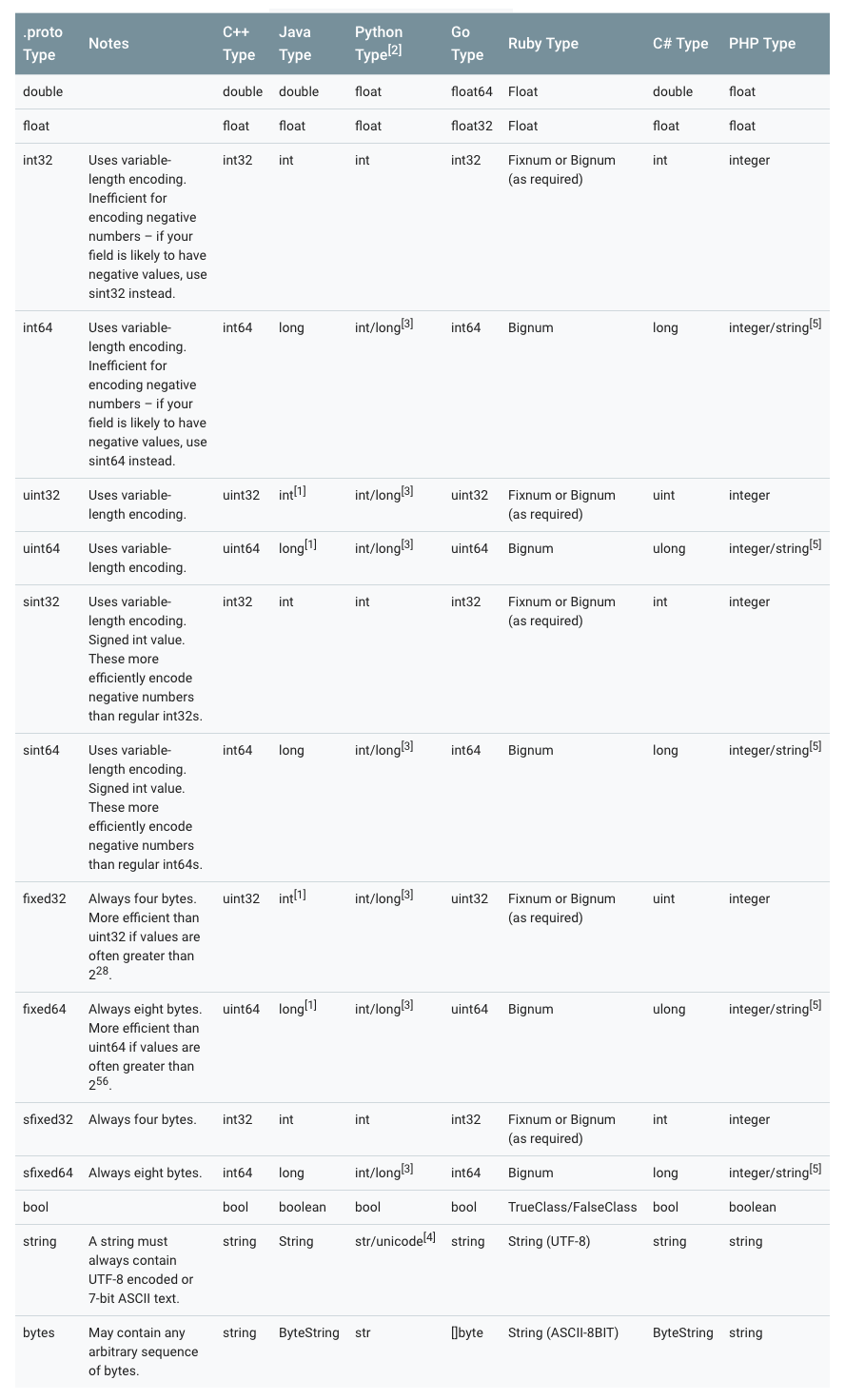
Notes:
- [1] In Java, unsigned 32-bit and 64-bit integers use the corresponding signed representations, with the most significant bit storing the sign bit.
- [2] In all cases, type checking is performed when assigning a value to a field to ensure the value is valid.
- [3] 64-bit or unsigned 32-bit integers are always represented as
longwhen decoded, but may beintif anintwas used when setting the field. In all cases, the value must conform to the type represented at assignment time. See [2]. - [4] Python strings are represented as
unicodewhen decoded, but may bestrif an ASCII string is provided (this string may change). - [5]
Integeris used on 64-bit machines, andstringis used on 32-bit machines.
5. Enums
Enum types can be embedded in a message.
message SearchRequest {
  string query = 1;
  int32 page_number = 2;
  int32 result_per_page = 3;
  enum Corpus {
    UNIVERSAL = 0;
    WEB = 1;
    IMAGES = 2;
    LOCAL = 3;
    NEWS = 4;
    PRODUCTS = 5;
    VIDEO = 6;
  }
  Corpus corpus = 4;
}
One thing to keep in mind with enum types is that they must always have a 0 value.
- The enum value 0 serves as the zero value; when no value is assigned, it will be the zero value.
- This is for compatibility with proto2. In proto2, the zero value must be the first value.
In addition, during deserialization, enum values that cannot be recognized are retained in the messaage. This is because how a message is represented after deserialization is language-dependent. In languages that support open enum types with values outside the specified symbol range, such as C++ and Go, unknown enum values are simply stored as their underlying integer representation. In languages with closed enum types, such as Java, an enum value is used to identify unrecognized values, and special accessors can access the underlying integer.
In other cases, if the message is serialized, the unrecognized value is still serialized along with the message.
5. Reserved Values in Enums
If you update an enum type by completely removing an enum entry or commenting it out, future users may reuse its numeric value when making their own updates to that type. If an old version of the .proto file is loaded later, this can cause serious issues on the server, such as data corruption, privacy bugs, and so on. One way to ensure this does not happen is to specify the numeric values (or names, which can also cause JSON serialization issues) of deleted entries as reserved. If any future user attempts to use these field identifiers, the Protocol Buffers compiler will report an error. You can use the max keyword to specify that your reserved numeric range extends up to the maximum possible value.
enum Foo {
  reserved 2, 15, 9 to 11, 40 to max;
  reserved "FOO", "BAR";
}
Note that field names and field numbers cannot be mixed in the same reserved statement. If needed, write it as shown in the example above.
6. Nesting Is Allowed
Protocol Buffers allow message definitions to be nested and combined into more complex messages.
message SearchResponse {
  repeated Result results = 1;
}

message Result {
  string url = 1;
  string title = 2;
  repeated string snippets = 3;
}
In the example above, Result is nested within SearchResponse.
More examples:
message SearchResponse {
  message Result {
    string url = 1;
    string title = 2;
    repeated string snippets = 3;
  }
  repeated Result results = 1;
}

message SomeOtherMessage {
  SearchResponse.Result result = 1;
}
message Outer {                  // Level 0
  message MiddleAA {  // Level 1
    message Inner {   // Level 2
      int64 ival = 1;
      bool  booly = 2;
    }
  }
  message MiddleBB {  // Level 1
    message Inner {   // Level 2
      int32 ival = 1;
      bool  booly = 2;
    }
  }
}
7. Enum Incompatibility
You can import proto2 message types and use them in proto3 messages, and vice versa. However, proto2 enums cannot be used directly in proto3 syntax (though it is allowed if the imported proto2 messages use them).
8. Updating a message
If you later find that a previously defined message needs additional fields, this is where Protocol Buffers shows its strength: you do not need to change the existing code. However, the following 10 rules must be satisfied:
- Do not change the data structure of existing fields.
- If you add new fields, any messages serialized by code using the “old” message format can still be parsed by newly generated code. You should keep the default values of these elements in mind so that the new code can interoperate correctly with messages generated by the old code. Likewise, messages created by new code can be parsed by old code: old binaries will simply ignore the new fields during parsing. (For the specific reason, see the section on Unknown Fields.)
- As long as the field number is no longer used in the updated message type, the field can be deleted. You may need to rename the field, perhaps by adding the prefix “OBSOLETE_”, or mark it as a reserved field number with
reserved, so that future.protousers do not accidentally reuse that number. - int32, uint32, int64, uint64, and bool are all compatible. This means you can change a field from one of these types to another without breaking forward or backward compatibility. If a number is parsed from the wire that does not fit the corresponding type, the result is the same as converting that number to that type in C++ (for example, if a 64-bit number is read as int32, it will be truncated to 32 bits).
- sint32 and sint64 are compatible with each other, but not with other integer types.
- string and bytes are compatible as long as the bytes are valid UTF-8.
- An embedded message is compatible with bytes if the bytes contain the encoded version of the message.
- fixed32 is compatible with sfixed32, and fixed64 is compatible with sfixed64.
- enum, in array terms, is compatible with int32, uint32, int64, and uint64 (note that values will be truncated if they do not fit). However, note that client code may treat them differently when a message is deserialized: for example, unrecognized proto3 enum values are retained in the message, but how they are represented when the message is deserialized is language-dependent. (This is language-related, as mentioned above.) Int fields always retain only their values.
- Changing a single value to a new member is safe and binary-compatible. If you are sure that no code sets more than one field at a time, moving multiple fields into a new field may be safe. Moving any field into an existing field is unsafe. (Note the distinction between fields and values: field is field, value is value.)
9. Unknown Fields
Unknown fields are protocol buffers serialized data representing fields that the parser does not recognize. For example, when an old binary parses new data sent by a new binary, these new fields become unknown fields in the old binary.
Proto3 implementations can successfully parse messages with unknown fields; however, an implementation may or may not support preserving those unknown fields. You should not rely on unknown fields being preserved or discarded. For most Google protocol buffers implementations, unknown fields in proto3 cannot be accessed through the corresponding proto runtime, and they are discarded and forgotten during deserialization. This differs from proto2 behavior, where unknown fields are always preserved with the message and serialized along with it.
10. Map Type
The repeated type can be used to represent arrays, while the Map type can be used to represent dictionaries.
map<key_type, value_type> map_field = N;

map<string, Project> projects = 3;
key_type can be any int or string type (any scalar type; see the scalar type mapping table above, but excluding float, double, and bytes).
Enum values also cannot be used as keys.
key_type can be any type other than map.
Pay special attention to the following:
- map cannot be modified with repeated.
- The iteration order of arrays and maps is undefined, so you cannot rely on your map being in any particular order.
- When generating text format for
.proto, maps are sorted by key. Numeric keys are sorted numerically. - When parsing or merging from an array, if there are duplicate keys, the last key encountered is used (overwrite semantics). When parsing a map from text format, parsing may fail if there are duplicate keys.
Although Protocol Buffer does not support arrays of map types, you can work around this by using the following approach to implement an array of maps:
message MapFieldEntry {
  key_type key = 1;
  value_type value = 2;
}

repeated MapFieldEntry map_field = N;
The above writing style is completely equivalent to an array of maps, so repeated cleverly satisfies the requirement for an array of maps.
11. JSON Mapping
Proto3 supports canonical encoding in JSON, making it easier to share data between systems. The encoding is described by type in the table below.
If a value is missing from JSON-encoded data, or its value is empty, it is interpreted as the appropriate default value when parsed into a protocol buffer. If a field has the default value in a protocol buffer, by default it is omitted from the JSON-encoded data to save space. A concrete Mapping implementation may provide an option to determine whether fields with default values should be emitted in JSON-encoded output.
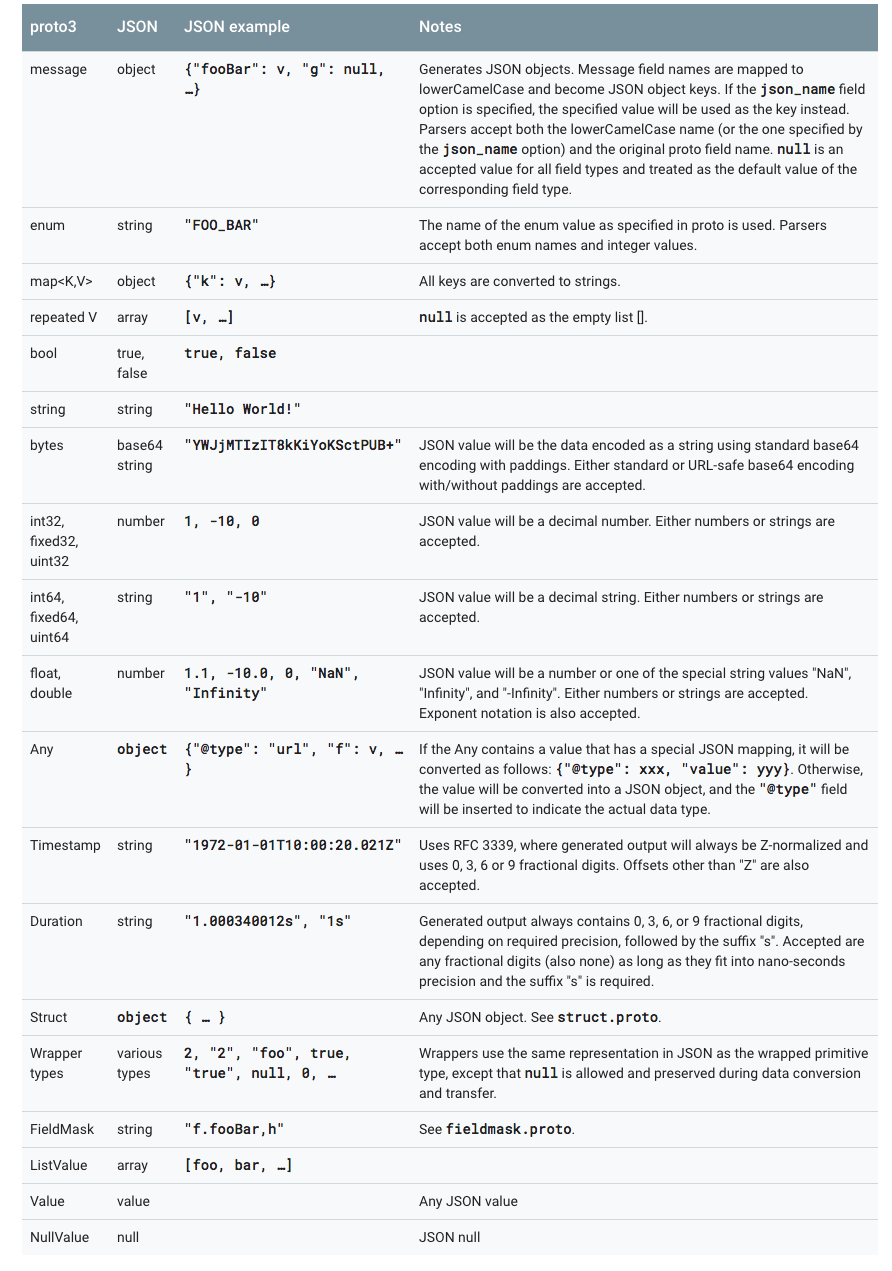
Proto3’s JSON implementation provides the following four options:
- Emit fields with default values: By default, fields with default values are omitted from proto3 JSON output. An implementation may provide an option to override this behavior and output fields with their default values.
- Ignore unknown fields: By default, a Proto3 JSON parser should reject unknown fields, but it may provide an option to ignore unknown fields during parsing.
- Use proto field names instead of lowerCamelCase names: By default, the proto3 JSON printer converts field names to lowerCamelCase and uses them as JSON names. An implementation may provide an option to use the original field names as JSON names. A Proto3 JSON parser must accept both the converted lowerCamelCase names and the original field names.
- Emit enum values as numbers instead of strings: By default, the names of enum values are used in JSON output. An option may be provided to use the numeric values of enum values instead.
4. Defining Services in proto3
If you want to use your message types with an RPC (Remote Procedure Call) system, you can define RPC service interfaces in a .proto file, and the protocol buffer compiler will generate service interface code and stubs in the selected language. For example, if you define an RPC service whose input parameter is SearchRequest and whose return value is SearchResponse, you can define it in your .proto file as follows:
service SearchService {
  rpc Search (SearchRequest) returns (SearchResponse);
}
The most straightforward RPC system to use with protocol buffers is gRPC: Google’s language- and platform-neutral open source RPC system. gRPC works very well with protocol buffers and lets you generate RPC-related code directly from .proto files by using a special protocol buffer compiler plugin.
If you don’t want to use gRPC, you can also use protocol buffers in your own RPC implementation. You can find more information about this in the Proto2 Language Guide.
There are also several ongoing third-party projects developing RPC implementations for Protocol Buffers.
V. Protocol Buffer Naming Conventions
Messages use CamelCase. Message names start with an uppercase letter. Field names use snake_case.
message SongServerRequest {
  required string song_name = 1;
}
Enum types use camel case and start with an uppercase letter. Each enum value is written in all uppercase and named using underscores as separators.
enum Foo {
  FIRST_VALUE = 0;
  SECOND_VALUE = 1;
}
Each enum value ends with a semicolon, not a comma.
Service names and method names both use CamelCase, with an initial uppercase letter.
service FooService {
  rpc GetSomething(FooRequest) returns (FooResponse);
}
VI. Protocol Buffer Encoding Principles
Before discussing the encoding principles of Protocol Buffer, we must first talk about Varints encoding.
Base 128 Varints Encoding
A Varint is a compact way to represent numbers. It uses one or more bytes to represent a number; smaller values use fewer bytes. This reduces the number of bytes needed to represent numbers.
In a Varint, each byte except the last has its most significant bit (msb) set. This bit indicates that more bytes follow. The lower 7 bits of each byte are used to store the two’s-complement binary representation of the number in 7-bit groups, with the least significant group first.
If fewer than 1 byte is needed, the most significant bit is set to 0. In the example below, 1 can be represented with a single byte, so msb is 0.
0000 0001
If multiple bytes are needed for the representation, the MSB should be set to 1. For example, for 300, if represented as a Varint:
1010 1100 0000 0010
If you interpret it as a normal binary number, it represents 88068 (65536 + 16384 + 4096 + 2048 + 4).
So how does Varint encode it?
The code below shows how to compute the Varint encoding for int32.
char* EncodeVarint32(char* dst, uint32_t v) {
  // Operate on characters as unsigneds
  unsigned char* ptr = reinterpret_cast<unsigned char*>(dst);
  static const int B = 128;
  if (v < (1<<7)) {
    *(ptr++) = v;
  } else if (v < (1<<14)) {
    *(ptr++) = v | B;
    *(ptr++) = v>>7;
  } else if (v < (1<<21)) {
    *(ptr++) = v | B;
    *(ptr++) = (v>>7) | B;
    *(ptr++) = v>>14;
  } else if (v < (1<<28)) {
    *(ptr++) = v | B;
    *(ptr++) = (v>>7) | B;
    *(ptr++) = (v>>14) | B;
    *(ptr++) = v>>21;
  } else {
    *(ptr++) = v | B;
    *(ptr++) = (v>>7) | B;
    *(ptr++) = (v>>14) | B;
    *(ptr++) = (v>>21) | B;
    *(ptr++) = v>>28;
  }
  return reinterpret_cast<char*>(ptr);
}
300 = 100101100
Since 300 exceeds 7 bits (in a Varint, only 7 bits of a byte can be used to represent the number; the most significant bit, msb, is used to indicate whether more bytes follow), 300 needs to be represented using 2 bytes.
Varint encoding, using 300 as an example:
if (v < (1<<14)) {
    *(ptr++) = v | B;
    *(ptr++) = v>>7;
}

1. 100101100 | 10000000 = 1 1010 1100
2. 110101100 extract the last 7 bits = 010 1100
3. 100101100 >> 7 = 10 = 0000 0010
4. 1010 1100 0000 0010 (final Varint result)
The Varint decoding algorithm should work like this: (in practice, it is just the reverse of encoding)
- If there are multiple bytes, first remove the MSB from each byte (via a logical OR operation), leaving only 7 bits in each byte.
- Reverse the entire result. There are at most 5 bytes. If the order is 1-2-3-4-5, after reversal it becomes 5-4-3-2-1. The order of the binary bits within each byte does not change; what changes is the relative position of the bytes.
The decoding process calls the GetVarint32Ptr function. If the value spans more than one byte, it calls GetVarint32PtrFallback to handle it.
inline const char* GetVarint32Ptr(const char* p,
                                  const char* limit,
                                  uint32_t* value) {
  if (p < limit) {
    uint32_t result = *(reinterpret_cast<const unsigned char*>(p));
    if ((result & 128) == 0) {
      *value = result;
      return p + 1;
    }
  }
  return GetVarint32PtrFallback(p, limit, value);
}

const char* GetVarint32PtrFallback(const char* p,
                                   const char* limit,
                                   uint32_t* value) {
  uint32_t result = 0;
  for (uint32_t shift = 0; shift <= 28 && p < limit; shift += 7) {
    uint32_t byte = *(reinterpret_cast<const unsigned char*>(p));
    p++;
    if (byte & 128) {
      // More bytes are present
      result |= ((byte & 127) << shift);
    } else {
      result |= (byte << shift);
      *value = result;
      return reinterpret_cast<const char*>(p);
    }
  }
  return NULL;
}
At this point, readers should be familiar with the Varint processing flow. The Varint32 algorithm was listed above; the 64-bit version works the same way, except that the code is no longer written with 10 branches—it would be too ugly. (32-bit uses 5 bytes, while 64-bit uses 10 bytes.)
Implementation of 64-bit Varint encoding:
char* EncodeVarint64(char* dst, uint64_t v) {
  static const int B = 128;
  unsigned char* ptr = reinterpret_cast<unsigned char*>(dst);
  while (v >= B) {
    *(ptr++) = (v & (B-1)) | B;
    v >>= 7;
  }
  *(ptr++) = static_cast<unsigned char>(v);
  return reinterpret_cast<char*>(ptr);
}
The underlying idea is the same; it’s just implemented with a loop.
64-bit Varint decoding implementation:
const char* GetVarint64Ptr(const char* p, const char* limit, uint64_t* value) {
  uint64_t result = 0;
  for (uint32_t shift = 0; shift <= 63 && p < limit; shift += 7) {
    uint64_t byte = *(reinterpret_cast<const unsigned char*>(p));
    p++;
    if (byte & 128) {
      // More bytes are present
      result |= ((byte & 127) << shift);
    } else {
      result |= (byte << shift);
      *value = result;
      return reinterpret_cast<const char*>(p);
    }
  }
  return NULL;
}
At this point, some readers may ask: Isn’t Varint meant to make ints more compact? The value 300 could originally be represented with 2 bytes, and it is still 2 bytes now—so how is that compact? The space used has not changed, has it?!
Varint is indeed a compact way to represent numbers. It uses one or more bytes to represent a number; the smaller the value, the fewer bytes it uses. This can reduce the number of bytes needed to represent numeric values. For example, an int32 value typically requires 4 bytes. But with Varint, a very small int32 value can be represented with 1 byte. Of course, everything has trade-offs: with Varint encoding, large numbers may require 5 bytes. Statistically speaking, the numbers in messages are usually not all large values, so in most cases, using Varint allows numeric information to be represented with fewer bytes.
If 300 were represented as an int32, it would require 4 bytes. With Varint, it only requires 2 bytes. That cuts the size in half!
1. Message Structure Encoding
In protocol buffers, a message is a series of key-value pairs. The binary version of a message uses only the field number (field's number and wire_type) as the key. The name and declared type of each field can only be determined on the decoding side by referring to the message type definition, that is, the .proto file. This is also why people often say protocol buffers are somewhat safer than JSON or XML: without the data structure description in the .proto file, the data cannot be interpreted as normal structured data after it is obtained.
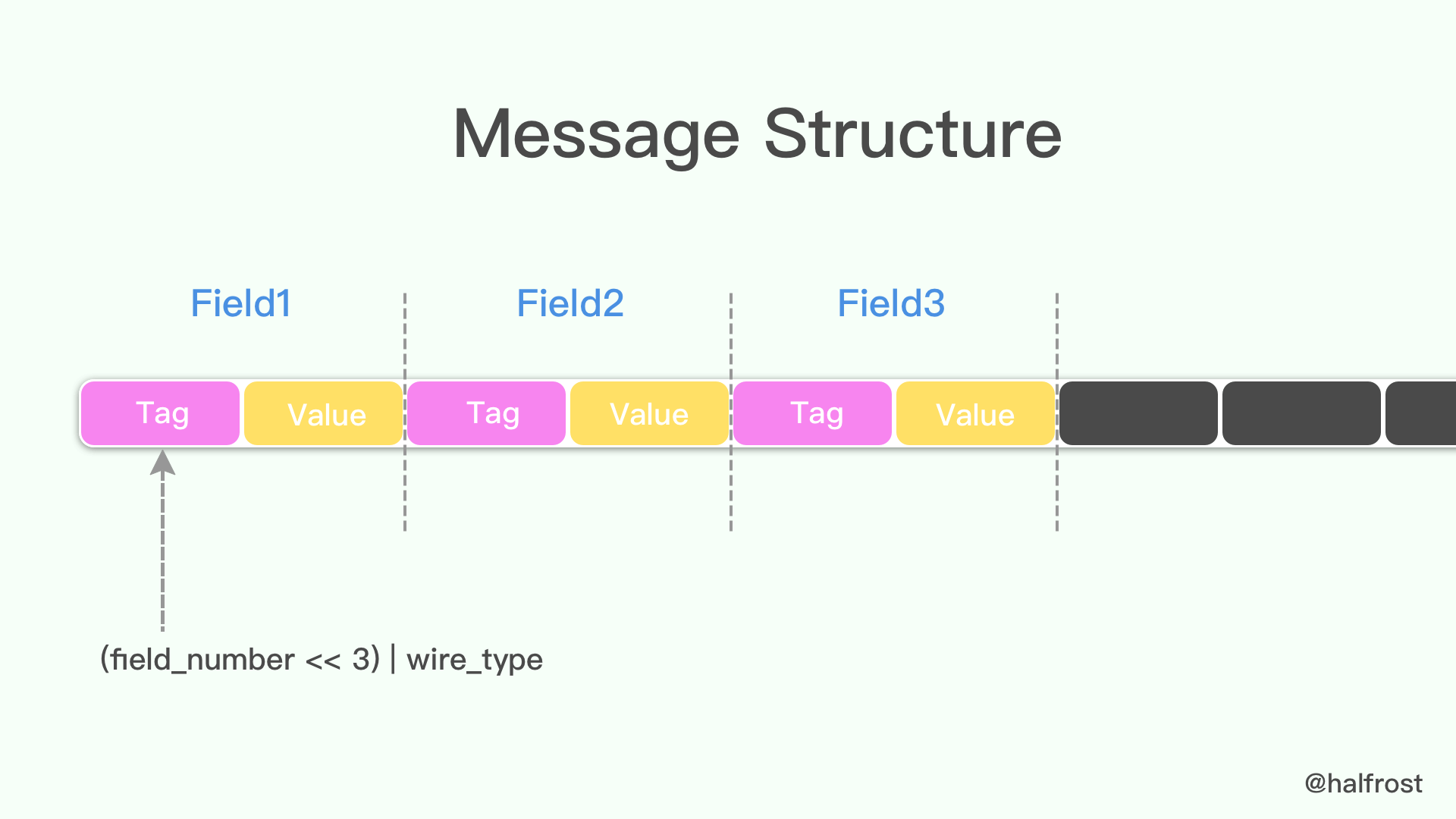
Because the tag-value form is used, if an optional field exists, it is present in this message buffer; if it does not exist, it will not appear here. This can also be considered a way of reducing the size of the message.
When a message is encoded, keys and values are concatenated into a byte stream. When a message is decoded, the parser must be able to skip fields it does not recognize. This allows new fields to be added to a message without breaking older programs that do not know about them. This is what is known as “backward” compatibility.
To achieve this, the “key” of each pair in the linear wire-format message is actually composed of two values: one is the field number from the .proto file, plus just enough information to determine the length of the next value. In most language implementations, this key is called a tag.
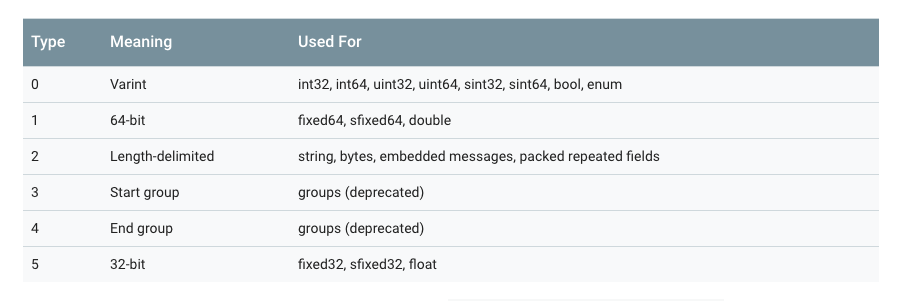
Note that in the figure above, 3 and 4 have been deprecated, so the current possible values of wire_type are only 0, 1, 2, and 5.
The key is computed as (field_number << 3) | wire_type. In other words, the last 3 bits of the key represent the wire_type.
For example, message field numbers generally start from 1, so the corresponding tags may look like this:
000 1000
The last 3 bits indicate the type of the value. Here they are 000, i.e., 0, which represents a varint value. Shifting right by 3 bits gives 0001, which represents the field number. That is enough for tag examples; next, let’s look at an example of a value, again using varint:
96 01 = 1001 0110  0000 0001
       → 000 0001  ++  001 0110 (drop the msb and reverse the groups of 7 bits)
       → 10010110
       → 128 + 16 + 4 + 2 = 150
So the data represented by 96 01 is 150.
message Test1 {
  required int32 a = 1;
}
If there is a message structure like the one above, and the value 150 is stored, the binary representation shown in Protocol Buffer should be 08 96 01.
As an additional note, for type, pay attention to the case where type = 2. In the tag, in addition to the field number and wire_type, a length must also be included to determine which segment the value should be extracted from. (For the specific reason, see the section Protocol Buffer strings.)
2. Signed Integers Encoding
From the table above, we can see that wire_type = 0 includes unsigned varints, but what if it is an unsigned number?
A negative number is generally represented as a very large integer, because computers define the sign bit of a negative number as the most significant bit of the number. If Varint is used to represent a negative number, it will always require 10 bytes.
Why do both 32-bit and 64-bit negative numbers require 10 bytes?
inline void CodedOutputStream::WriteVarint32SignExtended(int32 value) {
 WriteVarint64(static_cast<uint64>(value));
}
Because this is how it is specified in the source code. All 32-bit signed integers are converted to 64-bit unsigned integers for processing. As for why the source code specifies it this way, my guess is that it may be to avoid the possibility of overflow when converting 32-bit negative numbers. (Just a guess.)
To address this, Google Protocol Buffer defines the sint32 type, which uses ZigZag encoding. It maps all integers to unsigned integers, and then encodes them using varint encoding. In this way, integers with small absolute values will also have small varint-encoded values.
The ZigZag mapping function is:
Zigzag(n) = (n << 1) ^ (n >> 31), when n is sint32

Zigzag(n) = (n << 1) ^ (n >> 63), when n is sint64
Using this method, -1 will be encoded as 1, 1 will be encoded as 2, and -2 will be encoded as 3, as shown in the table below:
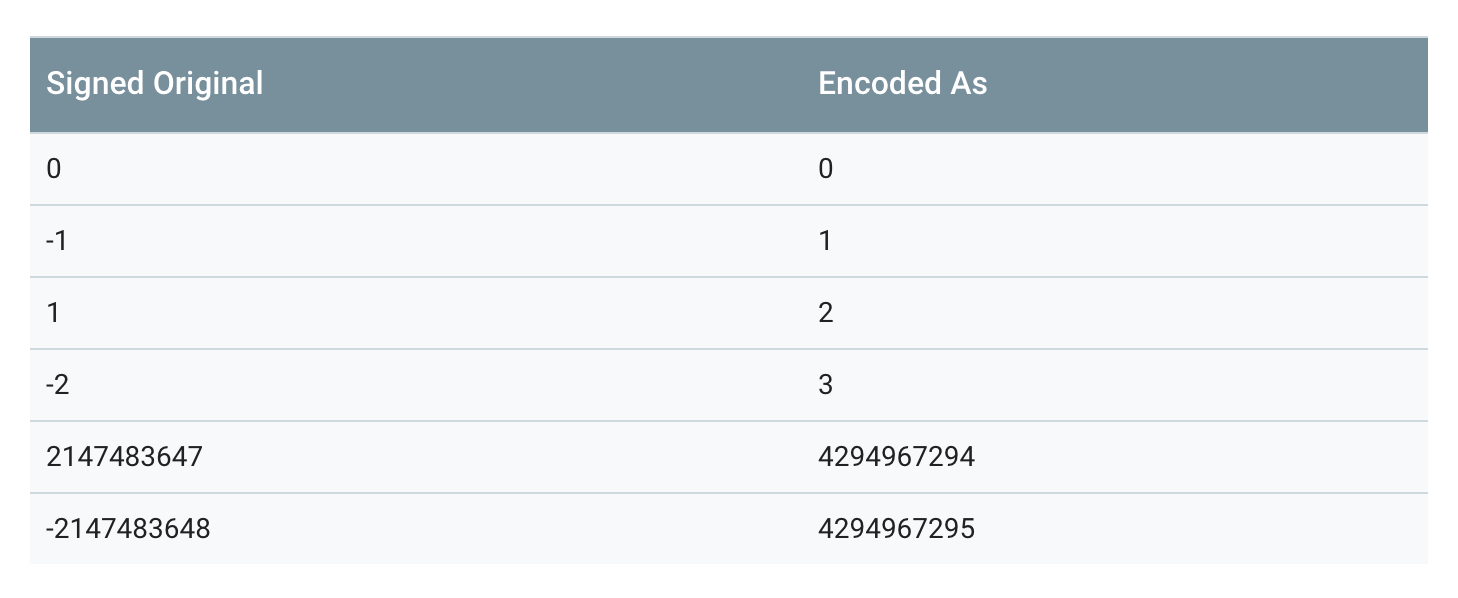
Note that the second conversion, the (n >> 31) part, is an arithmetic conversion. In other words, the result of the shift is either all 0s (if n is positive) or all 1s (if n is negative).
When sint32 or sint64 is parsed, its value is decoded back into the original signed version.
3. Non-varint Numbers
Non-varint numbers are relatively straightforward. double and fixed64 have a wire_type of 1, which tells the parser during parsing that this type of data only needs a 64-bit data block. Similarly, float and fixed32 have a wire_type of 5, requiring a 32-bit data block. In both cases, the high-order bits come later and the low-order bits come first.
The reason Protocol Buffer compression does not reach the theoretical limit is precisely here: it does not compress floating-point types such as float and double.
4. Strings
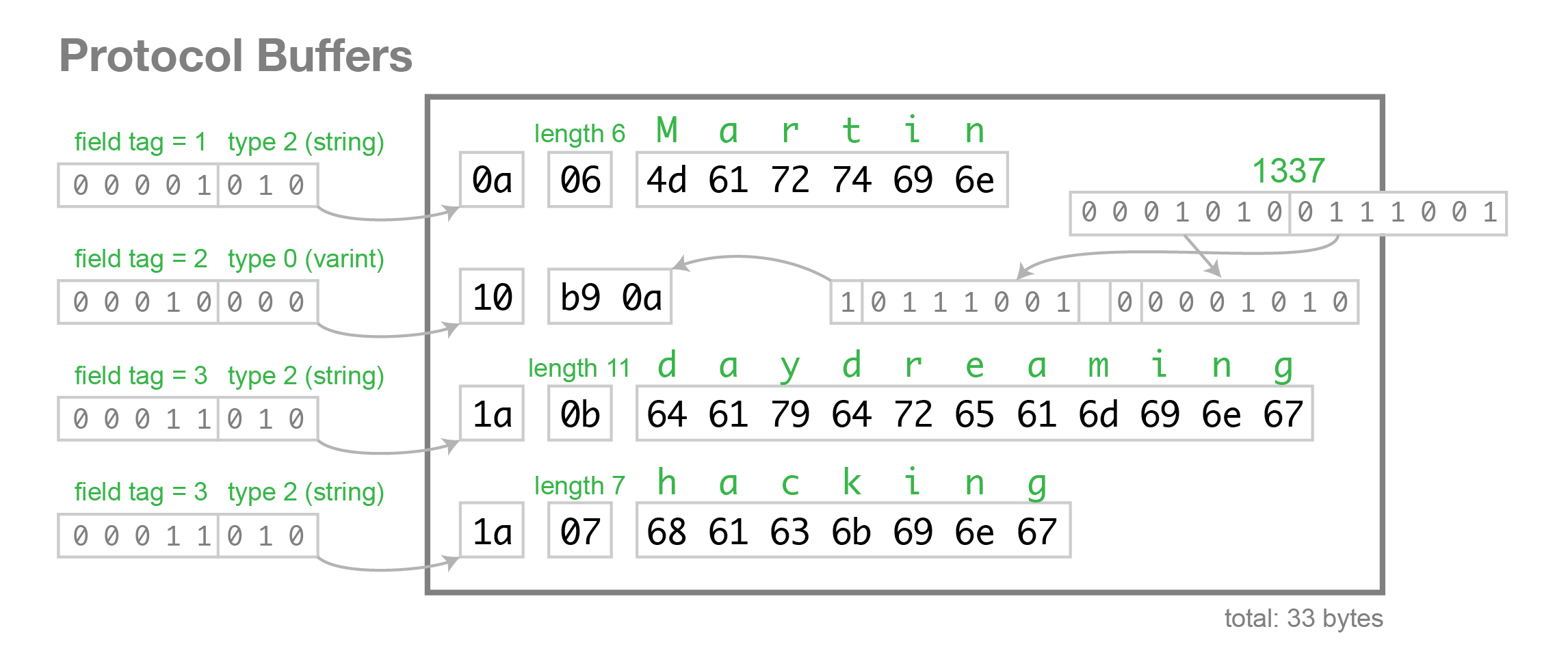
Data with wire_type 2 uses a length-delimited encoding: key + length + content. The encoding of key is uniform; length uses varint encoding; and content is the Bytes whose length is specified by length.
For example, suppose the following message format is defined:
message Test2 {
  optional string b = 2;
}
Set this value to “testing” and view it in binary format:
12 07 74 65 73 74 69 6e 67
74 65 73 74 69 6e 67 is the UTF-8 encoding of “testing”.
Here, the key is represented in hexadecimal, so when expanded:
12 -> 0001 0010. The last three bits, 010, indicate wire type = 2. Shifting 0001 0010 right by three bits gives 0000 0010, i.e., tag = 2.
Here, length is 7, followed by 7 bytes, which are our string “testing”.
Therefore, data with wire_type type 2 is encoded by default in T-L-V (Tag - Length - Value) form.
5. Embedded message
Assume the following nested message is defined:
message Test3 {
  optional Test1 c = 3;
}
Set the field to the integer 150; the encoded bytes are:
1a 03 08 96 01
08 96 01 These three represent 150, as explained above, so it will not be repeated here.
1a -> 0001 1010. The last three bits, 010, indicate wire type = 2. Shifting 0001 1010 right by three bits gives 0000 0011, so tag = 3.
length is 3, meaning there are 3 bytes following it: 08 96 01.
The types that need to be converted into T - L - V form also include string, bytes, embedded messages, and packed repeated fields (that is, any form where wire_type is 2 will be converted into T - L - V form).
6. Encoding Optional and Repeated Fields
In proto2, a field defined as repeated (without the [packed=true] option) is encoded in the message as one or more key-value pairs with the same tag number. These repeated values do not need to appear consecutively; they may be interleaved with other fields. Although they are unordered, they need to be ordered during parsing. In proto3, repeated fields use packed encoding by default (for the specific reason, see the Packed Repeated Fields section).
For any non-repeated field in proto3, or optional field in proto2, the encoded message may or may not contain a key-value pair with that field number.
Usually, in an encoded message, required and optional fields have at most one instance. However, parsers still need to handle the many-to-one case. For numeric and string types, if the same value appears multiple times, the parser accepts the last value it receives. For embedded fields, the parser merges multiple instances of the same field that it receives. Just like the MergeFrom method, for all singular fields, later values replace earlier ones; all singular embedded messages are merged; and all repeated fields are concatenated. The result of this rule is that parsing two concatenated encoded messages is equivalent to parsing the two messages separately and then merging them. For example:
MyMessage message;
message.ParseFromString(str1 + str2);
Equivalent to
MyMessage message, message2;
message.ParseFromString(str1);
message2.ParseFromString(str2);
message.MergeFrom(message2);
This approach is sometimes very useful. For example, it allows messages to be merged even when the type of the message is unknown.
7. Packed Repeated Fields
Starting with version 2.1.0, protocol buffers introduced this type. It is the same as a repeated field, except that [packed=true] is declared at the end. It is similar to a repeated field, but not identical. In proto3, repeated fields are handled this way by default. For a packed repeated field, if the field is not set in the message, it will not appear in the encoded data. Otherwise, all elements of the field are packed into a single key-value pair, with wire_type=2 and a length-delimited encoding. Each element is encoded normally, except that it is not preceded by a tag. For example, consider the following message type:
message Test4 {
  repeated int32 d = 4 [packed=true];
}
Construct a Test4 field and set the repeated field d to three values: 3, 270, and 86942. After encoding:
22 // tag 0010 0010(field number 010 0 = 4, wire type 010 = 2)

06 // payload size (set length = 6 bytes)

03 // first element (varint 3)

8E 02 // second element (varint 270)

9E A7 05 // third element (varint 86942)
This forms Tag - Length - Value - Value - Value …… pairs.
Only repeated fields of primitive numeric types (using varint, 32-bit, or 64-bit) can be declared as “packed”.
One thing to note: for packed repeated fields, although there is usually no reason to encode them as multiple key-value pairs, encoders must be prepared to receive multiple key-pair pairs. In this case, the payloads must be concatenated, and each pair must contain complete elements.
Protocol Buffer parsers must be able to parse fields that have been recompiled as packed as if they were not packed, and vice versa. This allows [packed = true] to be added to existing fields in a forward- and backward-compatible way.
8. Field Order
Encoding/decoding is independent of field order, which is guaranteed by the key-value mechanism.
If a message has unknown fields, the current Java and C++ implementations write them in arbitrary order after the known fields sorted by field number. The current Python implementation does not track unknown fields.
VII. Pros and Cons of protocol buffers

In terms of serialization, protocol buffers have many advantages over XML:
- Simpler
- Data size is 3–10 times smaller
- Faster deserialization, improving speed by 20–100 times
- Can automatically generate data access classes that are easier to use in code
For example:
If you want to encode a user’s name and email information, the XML representation is as follows:
  <person>
    <name>John Doe</name>
    <email>jdoe@example.com</email>
  </person>
For the same requirement, if implemented with Protocol Buffers, the definition file is as follows:
# Textual representation of a protocol buffer.

# This is *not* the binary format used on the wire.
person {
  name: "John Doe"
  email: "jdoe@example.com"
}
After protocol buffers are encoded, data is transmitted in binary form, requiring at most only 28 bytes of space and 100–200 ns for deserialization. XML, however, requires at least 69 bytes of space (after compression and removing all whitespace) and 5,000–10,000 ns for deserialization.
The above describes the performance advantages. Next, let’s discuss the advantages in terms of encoding.
protocol buffers come with a code generation tool that can generate developer-friendly data access and storage interfaces, making it more convenient for developers to encode with them. For example, in the example above, if you read a user’s name and email in C++, you can directly call the corresponding getter methods (the code for the getter and setter methods for all fields is automatically generated, so you only need to call them).
  cout << "Name: " << person.name() << endl;
  cout << "E-mail: " << person.email() << endl;
Reading data from XML, however, is a bit more cumbersome:
  cout << "Name: "
       << person.getElementsByTagName("name")->item(0)->innerText()
       << endl;
  cout << "E-mail: "
       << person.getElementsByTagName("email")->item(0)->innerText()
       << endl;
Protobuf has clearer semantics and does not require anything like an XML parser (because the Protobuf compiler compiles .proto files into the corresponding data access classes, which are used to serialize and deserialize Protobuf data).
Using Protobuf does not require learning a complex document object model. Protobuf’s programming model is developer-friendly, simple, and easy to learn. It also has good documentation and examples. For people who prefer simple things, Protobuf is more attractive than other technologies.
The last excellent feature of protocol buffers is its strong “backward” compatibility. People can upgrade data structures without breaking deployed programs that depend on the “old” data format. This means your program does not need to worry about large-scale code refactoring or migration caused by changes to message structures. Adding new fields to a message does not cause any changes to already released programs (because the storage format is inherently unordered and in k-v form).
Of course, protocol buffers are not perfect; there are some limitations in their usage.
Because text is not well suited for describing data structures, Protobuf is also not suitable for modeling text-based markup documents such as HTML. In addition, because XML is self-describing to some extent, it can be read and edited directly by humans. Protobuf cannot do this: it is stored in binary form, and unless you have the .proto definition, you cannot directly read any Protobuf content.
8. Conclusion
After reading this article on the encoding principles of Protocol Buffer, readers should understand the following points:
- After Protocol Buffer compresses data using the varint principle, the binary data is very compact, and option can also be considered a measure for reducing size. Therefore, pb is smaller; if it is used for network data transmission, the same data will necessarily consume less network traffic. However, it is not compressed to the absolute limit: floating-point types such as float and double are not compressed.
- Protocol Buffer omits symbols such as {, }, and : compared with JSON and XML, which also reduces the size somewhat. Combined with varint compression and gzip compression, the size becomes even smaller!
- Protocol Buffer is an implementation of the Tag - Value (Tag - Length - Value) encoding scheme. It reduces the use of delimiters and stores data more compactly.
- Another core value of Protocol Buffer is that it provides a set of tools—a compiler that automatically generates get/set code. This simplifies the complexity of multilingual interoperability and makes encoding and decoding more productive.
- Protocol Buffer is not self-describing. Without the data description
.protofile, the binary data stream cannot be understood. This is both an advantage, giving the data a certain degree of “encryption,” and a disadvantage, because the data is extremely unreadable. Therefore, Protocol Buffer is very suitable for RPC calls and data transfer between internal services. - Protocol Buffer has backward compatibility. After the data structure is updated, older versions can still remain compatible. This was also one of the problems Protocol Buffer was originally intended to solve. The reason is that the compiler skips newly added fields it does not recognize.
This concludes the article on Protocol Buffer encoding principles. The next article will discuss why Protocol Buffer deserialization and unpacking are fast.
Reference:
Official Google documentation
thrift-protobuf-compare - Benchmarking.wiki
jvm-serializers
GitHub Repo: Halfrost-Field
Follow: halfrost · GitHub
