Analysis of RACCommand’s Underlying Implementation in ReactiveCocoa
Preface
In ReactiveCocoa, aside from signal classes such as RACSignal and RACSubject, there are times when we may also need to encapsulate a fixed set of operations. These operation sets are fixed: whenever they are triggered, they execute a predefined process. In iOS development, button tap events may have this kind of requirement. RACCommand can be used to implement this.
Of course, in addition to encapsulating a set of operations, RACCommand can also centralize error handling and provide other capabilities. Today, let’s look from the ground up at how RACCommand is implemented.
Table of Contents
- 1.Definition of RACCommand
- 2.Analysis of the underlying implementation of initWithEnabled: signalBlock:
- 3.Analysis of the underlying implementation of execute:
- 4.Some RACCommand Categories
1. Definition of RACCommand

First, let’s talk about what RACCommand does. In ReactiveCocoa, RACCommand encapsulates the trigger conditions for an action and the triggered events it produces.
Trigger condition: the input parameter enabledSignal used to initialize RACCommand determines whether RACCommand can begin execution. The enabledSignal parameter is the trigger condition. For example, whether a button can be tapped, and whether it can trigger a tap event, is determined by the enabledSignal parameter.
Triggered event: another input parameter used to initialize RACCommand, (RACSignal * (^)(id input))signalBlock, encapsulates the triggered event. Each time RACCommand executes, it invokes the signalBlock closure once.
The most common example of RACCommand is the “Get verification code” button during registration or login. The button’s tap event and trigger condition can be encapsulated with RACCommand. The trigger condition is a signal, which may be an enabledSignal produced by validation conditions such as phone number validation, email validation, or ID card validation. The triggered event is the event executed after the button is tapped, such as a network request to send the verification code.
RACCommand is a rather special construct in ReactiveCocoa, because its implementation is not FRP-based; it is OOP-based. In essence, RACCommand is an object, and this object encapsulates four signals.
The definition of RACCommand is as follows:
@interface RACCommand : NSObject
@property (nonatomic, strong, readonly) RACSignal *executionSignals;
@property (nonatomic, strong, readonly) RACSignal *executing;
@property (nonatomic, strong, readonly) RACSignal *enabled;
@property (nonatomic, strong, readonly) RACSignal *errors;
@property (atomic, assign) BOOL allowsConcurrentExecution;
volatile uint32_t _allowsConcurrentExecution;

@property (atomic, copy, readonly) NSArray *activeExecutionSignals;
NSMutableArray *_activeExecutionSignals;

@property (nonatomic, strong, readonly) RACSignal *immediateEnabled;
@property (nonatomic, copy, readonly) RACSignal * (^signalBlock)(id input);
@end
The four most important signals in RACCommand are the four signals defined at the beginning: executionSignals, executing, enabled, and errors. Note that these four signals are basically (though not entirely) executed on the main thread.
1. RACSignal *executionSignals
executionSignals is a higher-order signal, so when using it, you need to flatten it. Flattening was analyzed earlier. In ReactiveCocoa v2.5, only three flattening methods are supported: flatten, switchToLatest, and concat. Choose the flattening method according to your needs.
Another selection principle is: in a RACCommand where concurrent execution is not allowed, switchToLatest is generally used. In a RACCommand where concurrent execution is allowed, flatten is generally used.
2. RACSignal *executing
The executing signal indicates whether the current RACCommand is executing. The values in the signal are all of type BOOL. YES means the RACCommand is currently executing; the name also indicates an ongoing state with “ing”. NO means the RACCommand has not been executed or has already finished executing.
3. RACSignal *enabled
The enabled signal is a switch that indicates whether the RACCommand is available. This signal returns NO in the following two cases:
- The
enabledSignalpassed when initializing theRACCommand: if it returnsNO, then theenabledsignal returnsNO. - When the
RACCommandstarts executing andallowsConcurrentExecutionisNO, theenabledsignal returnsNO.
Except for the two cases above, the enabled signal basically returns YES.
4. RACSignal *errors
The errors signal is the error signal generated during RACCommand execution. One thing to pay special attention to here: when handling errors for RACCommand, we should not use subscribeError: to subscribe to errors on the RACCommand’s executionSignals, because the executionSignals signal does not send error events. So when the signal wrapped by RACCommand sends an error event, how do we subscribe to it? We should use subscribeNext: to subscribe to the error signal.
[commandSignal.errors subscribeNext:^(NSError *x) {
    NSLog(@"ERROR! --> %@",x);
}];
5. BOOL allowsConcurrentExecution

allowsConcurrentExecution is a BOOL variable used to indicate whether the current RACCommand allows concurrent execution. Its default value is NO.
If allowsConcurrentExecution is NO, then while the RACCommand is executing, the enabled signal will always return NO, and concurrent execution is not allowed. If allowsConcurrentExecution is YES, concurrent execution is allowed.
When concurrent execution is allowed, multiple signals may emit values at the same time. In this case, the resulting higher-order signal can generally be flattened using flatten (equivalent to flatten:0, +merge:).
In the concrete implementation, this variable uses volatile atomic operations, and its get and set methods are overridden.
// Override get method
- (BOOL)allowsConcurrentExecution {
    return _allowsConcurrentExecution != 0;
}

// Override set method
- (void)setAllowsConcurrentExecution:(BOOL)allowed {
    [self willChangeValueForKey:@keypath(self.allowsConcurrentExecution)];

    if (allowed) {
        OSAtomicOr32Barrier(1, &_allowsConcurrentExecution);
    } else {
        OSAtomicAnd32Barrier(0, &_allowsConcurrentExecution);
    }

    [self didChangeValueForKey:@keypath(self.allowsConcurrentExecution)];
}
OSAtomicOr32Barrier is an atomic operation; its purpose is to perform a logical “OR” operation. Accessing the volatile-qualified _allowsConcurrentExecution object through an atomic operation ensures that the function is executed only once. The corresponding OSAtomicAnd32Barrier is also an atomic operation; its purpose is to perform a logical “AND” operation.
6. NSArray *activeExecutionSignals
This NSArray array contains ordered signals that are currently executing. NSArray arrays can be observed via KVO.
- (NSArray *)activeExecutionSignals {
    @synchronized (self) {
        return [_activeExecutionSignals copy];
    }
}
Of course, there is also an internal NSMutableArray version; the NSArray array is its copied version. When using it, you need to add a lock to ensure thread safety.
Inside RACCommand, operations are performed on the NSMutableArray; additions and removals are made on this mutable array here.
- (void)addActiveExecutionSignal:(RACSignal *)signal {
    NSCParameterAssert([signal isKindOfClass:RACSignal.class]);

    @synchronized (self) {
        NSIndexSet *indexes = [NSIndexSet indexSetWithIndex:_activeExecutionSignals.count];
        [self willChange:NSKeyValueChangeInsertion valuesAtIndexes:indexes forKey:@keypath(self.activeExecutionSignals)];
        [_activeExecutionSignals addObject:signal];
        [self didChange:NSKeyValueChangeInsertion valuesAtIndexes:indexes forKey:@keypath(self.activeExecutionSignals)];
    }
}
Adding data to the array is KVO-compliant; here, index is monitored for NSKeyValueChangeInsertion.
- (void)removeActiveExecutionSignal:(RACSignal *)signal {
    NSCParameterAssert([signal isKindOfClass:RACSignal.class]);

    @synchronized (self) {
        NSIndexSet *indexes = [_activeExecutionSignals indexesOfObjectsPassingTest:^ BOOL (RACSignal *obj, NSUInteger index, BOOL *stop) {
            return obj == signal;
        }];

        if (indexes.count == 0) return;

        [self willChange:NSKeyValueChangeRemoval valuesAtIndexes:indexes forKey:@keypath(self.activeExecutionSignals)];
        [_activeExecutionSignals removeObjectsAtIndexes:indexes];
        [self didChange:NSKeyValueChangeRemoval valuesAtIndexes:indexes forKey:@keypath(self.activeExecutionSignals)];
    }
}
Removal from the array is also performed based on indexes. Note that both add and delete operations must be wrapped in @synchronized (self) to ensure thread safety.
+ (BOOL)automaticallyNotifiesObserversForKey:(NSString *)key {
    return NO;
}
From the add and remove operations above, we can see that the author of RAC manually sends change notifications by manually invoking the willChange: and didChange: methods. The author’s intention is to prevent unnecessary swizzling from potentially affecting the add and remove operations, so they chose to manually send notifications here.
In the Meituan Tech Blog article ReactiveCocoa Core Elements and Signal Flow, there is a data flow diagram illustrating the changes triggered by changes to activeExecutionSignals:
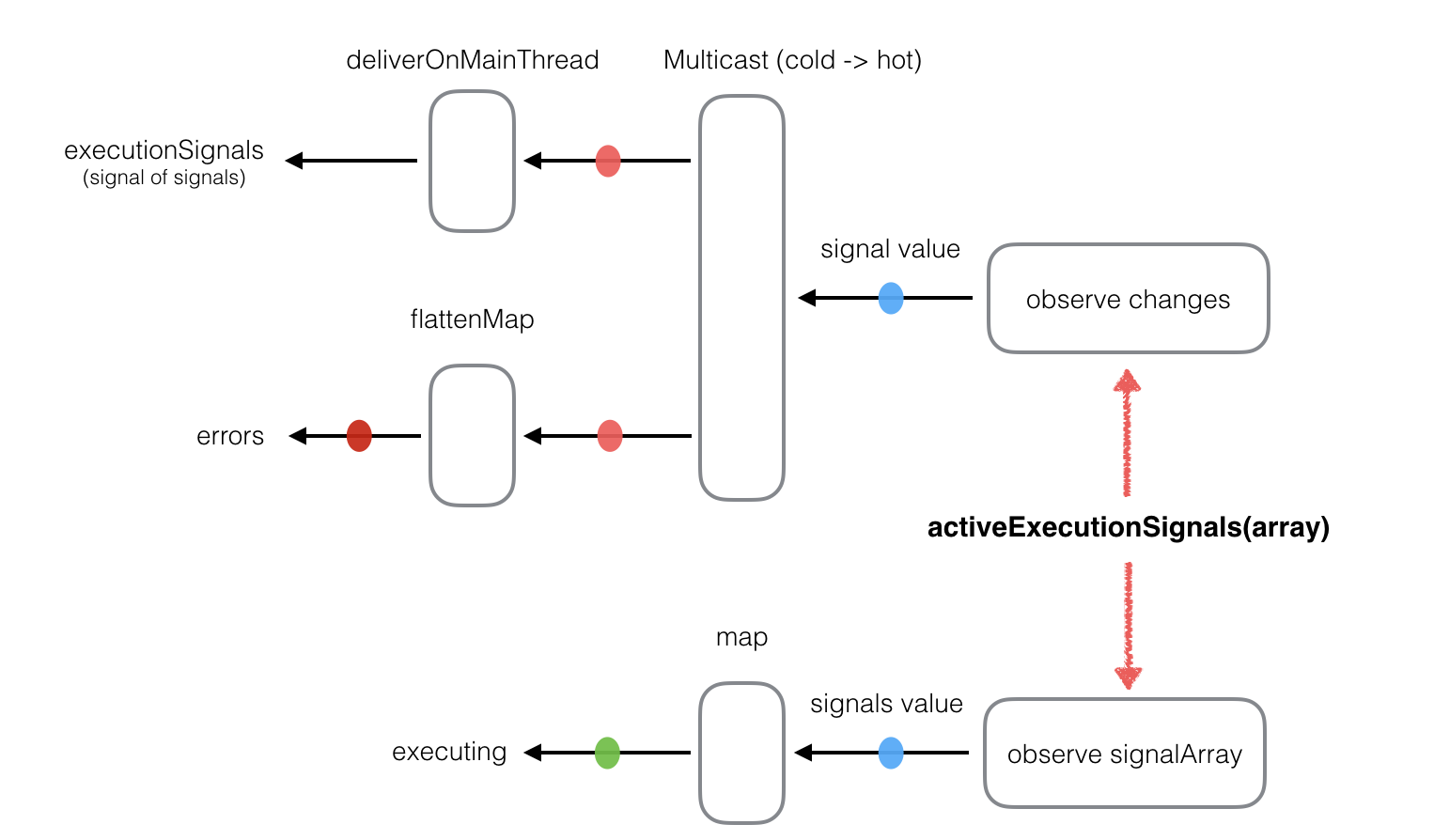
Apart from not affecting the enabled signal, changes to activeExecutionSignals affect the other three signals.
7. RACSignal *immediateEnabled

This signal is also an enabled signal, but unlike the earlier enabled signal, it is not guaranteed to be on the main thread. It can be on any thread.
8. RACSignal * (^signalBlock)(id input)
The return value of this closure is a signal. This closure is used when initializing RACCommand; it will appear in the source code analysis below.
- (id)initWithSignalBlock:(RACSignal * (^)(id input))signalBlock;
- (id)initWithEnabled:(RACSignal *)enabledSignal signalBlock:(RACSignal * (^)(id input))signalBlock;
- (RACSignal *)execute:(id)input;
RACCommand exposes only three methods: two initialization methods and one execute: method. Next, let’s analyze the underlying implementation of these methods.
II. Underlying Implementation Analysis of initWithEnabled: signalBlock:

First, let’s take a look at the shorter initialization method.
- (id)initWithSignalBlock:(RACSignal * (^)(id input))signalBlock {
    return [self initWithEnabled:nil signalBlock:signalBlock];
}
The initWithSignalBlock: method actually just calls the initWithEnabled: signalBlock: method.
- (id)initWithEnabled:(RACSignal *)enabledSignal signalBlock:(RACSignal * (^)(id input))signalBlock {

}
The initWithSignalBlock: method is equivalent to calling initWithEnabled: signalBlock: with nil passed as the first argument. The first argument is enabledSignal, and the second argument is the signalBlock closure. If nil is passed for enabledSignal, it is equivalent to passing in [RACSignal return:@YES].
Next, let’s analyze the implementation of the initWithEnabled: signalBlock: method in detail.
The implementation of this method is very long, so we need to analyze it in sections. The initialization of RACCommand is essentially the initialization of its four signals: executionSignals, executing, enabled, and errors.
1. Initialization of the executionSignals Signal
RACSignal *newActiveExecutionSignals = [[[[[self rac_valuesAndChangesForKeyPath:@keypath(self.activeExecutionSignals) options:NSKeyValueObservingOptionNew observer:nil]

    reduceEach:^(id _, NSDictionary *change) {
    NSArray *signals = change[NSKeyValueChangeNewKey];
    if (signals == nil) return [RACSignal empty];

    return [signals.rac_sequence signalWithScheduler:RACScheduler.immediateScheduler];
    }]
   concat]
   publish]
   autoconnect];
Use rac_valuesAndChangesForKeyPath: options: observer: to observe whether any new signals are added to the self.activeExecutionSignals array. The return value of rac_valuesAndChangesForKeyPath: options: observer: is an RACTuple, defined as follows: RACTuplePack(value, change).
Whenever a new signal is added to the array, rac_valuesAndChangesForKeyPath: options: observer: wraps the newly added value and the change dictionary into an RACTuple and returns it. Then perform a reduceEach: operation on this signal.
For example, the change dictionary might look like this:
{
    indexes = "<_NSCachedIndexSet: 0x60000023b8a0>[number of indexes: 1 (in 1 ranges), indexes: (0)]";
    kind = 2;
    new =     (
        "<RACReplaySubject: 0x6000006613c0> name: "
    );
}
Extracting change[NSKeyValueChangeNewKey] gives you the array of newly added signals for each change, and then this array is converted into a signal via signalWithScheduler:.
For the original signal, each value is a signal filled with RACTuples. Through transformation, it is converted into a third-order signal filled with RACSignals; then concat is used to flatten it by one level, reducing it to a second-order signal. Finally, publish and autoconnect are used to convert the cold signal into a hot signal.
newActiveExecutionSignals ultimately is a second-order hot signal.
Next, let’s take a look at how executionSignals is transformed.
_executionSignals = [[[newActiveExecutionSignals
                       map:^(RACSignal *signal) {
                           return [signal catchTo:[RACSignal empty]];
                       }]
                      deliverOn:RACScheduler.mainThreadScheduler]
                     setNameWithFormat:@"%@ -executionSignals", self];
executionSignals replaces all error signals in newActiveExecutionSignals with empty signals. After the map transformation, executionSignals is the error-free version of newActiveExecutionSignals. Since map only transforms and does not flatten, executionSignals is still a second-order higher-order cold signal.
Note that deliverOn is added at the end, so each value of the executionSignals signal is sent on the main thread.
2. Initialization of the errors signal
In RACCommand, all of its error signals are collected and put into its own errors signal. This is also one of RACCommand’s characteristics: it can handle errors in a unified way.
RACMulticastConnection *errorsConnection = [[[newActiveExecutionSignals
                                              flattenMap:^(RACSignal *signal) {
                                                  return [[signal ignoreValues]
                                                          catch:^(NSError *error) {
                                                              return [RACSignal return:error];
                                                          }];
                                              }]
                                             deliverOn:RACScheduler.mainThreadScheduler]
                                             publish];
From the analysis above, we know that newActiveExecutionSignals is ultimately a second-order hot signal. Here, in the transformation of errorsConnection, we perform a flattenMap: operation on this second-order hot signal to flatten it, keeping only all error signals. Finally, all error signals are wrapped into a lower-order signal, where each value in the signal is an error. Similarly, the transformation also appends a deliverOn: operation to switch back to the main thread for execution. Lastly, this cold signal is converted into a hot signal, but note that it has not been connected yet.
_errors = [errorsConnection.signal setNameWithFormat:@"%@ -errors", self];
[errorsConnection connect];
Suppose a subscriber subscribes only after the signal in RACCommand has already started executing. If the error signal is a cold signal, then any errors that occurred before the subscription will not be received. Therefore, the error signal should be a hot signal, so that all errors can be received regardless of when the subscription happens.
The error signal is the hot signal emitted by the hot signal errorsConnection. Every value of the error signal is sent on the main thread.
3. Initialization of the executing Signal
The executing signal indicates whether the current RACCommand is executing. The values in the signal are all of type BOOL. So how do we obtain such a BOOL signal?
RACSignal *immediateExecuting = [RACObserve(self, activeExecutionSignals) map:^(NSArray *activeSignals) {
    return @(activeSignals.count > 0);
}];
Because self.activeExecutionSignals is KVO-observable, whenever activeExecutionSignals changes, we can check whether the current array still contains any signals. If the array has values, it means there are currently signals being executed.
_executing = [[[[[immediateExecuting
                  deliverOn:RACScheduler.mainThreadScheduler]
                  startWith:@NO]
                  distinctUntilChanged]
                  replayLast]
                  setNameWithFormat:@"%@ -executing", self];
The immediateExecuting signal indicates whether a signal is currently executing. Its initial value is NO; once immediateExecuting is no longer NO, the signal will be sent. Finally, it is converted via replayLast into a hot signal that always keeps only the latest value.
Except for the first default value NO, every other value of the executing signal is also sent on the main thread.
4. Initialization of the enabled Signal
RACSignal *moreExecutionsAllowed = [RACSignal
                                    if:RACObserve(self, allowsConcurrentExecution)
                                    then:[RACSignal return:@YES]
                                    else:[immediateExecuting not]];
First, observe whether self.allowsConcurrentExecution changes. The default value of allowsConcurrentExecution is NO. If it changes and allowsConcurrentExecution is YES, that means concurrent execution is allowed, so a RACSignal with a value of YES is returned. If allowsConcurrentExecution is NO, that means concurrent execution is not allowed, so we need to check whether there is currently a signal being executed. immediateExecuting indicates whether there is currently an executing signal. Negating that signal gives the BOOL value that indicates whether the next signal is allowed to execute. This is the moreExecutionsAllowed signal.
if (enabledSignal == nil) {
    enabledSignal = [RACSignal return:@YES];
} else {
    enabledSignal = [[[enabledSignal
                       startWith:@YES]
                       takeUntil:self.rac_willDeallocSignal]
                       replayLast];
}
The code here shows that if the first argument passed in is nil, it is equivalent to passing in a [RACSignal return:@YES] signal.
If enabledSignal is not nil, a YES signal is inserted before enabledSignal. The purpose is to prevent cases where the provided enabledSignal is not nil but contains no signals—for example, [RACSignal never] or [RACSignal empty]. Passing in those signals is effectively useless, so an initial YES signal is added at the beginning.
Finally, it is likewise converted via the replayLast operation into a hot signal that retains only the latest value.
_immediateEnabled = [[RACSignal
                      combineLatest:@[ enabledSignal, moreExecutionsAllowed ]]
                      and];
This involves the transformation operation combineLatest:, which was analyzed in a previous article, so we won’t go into the source implementation in detail here. The role of combineLatest: is to take each signal passed in the following array and, whenever any one of those signals sends a value, combine the latest values from all signals in the array into an RACTuple. immediateEnabled performs a logical AND operation on all elements in each RACTuple, so the values carried by the immediateEnabled signal are all BOOL values.
The purpose of the immediateEnabled signal is to continuously observe whether the RACCommand can be enabled. It is derived by applying an AND operation to two signals. Whenever allowsConcurrentExecution changes, it produces a signal; combined with the enabledSignal, it can determine whether the RACCommand can be enabled at that moment. Whenever enabledSignal changes, it also produces a signal; combined with whether allowsConcurrentExecution allows concurrency, it can likewise determine whether the RACCommand can be enabled at that moment. Therefore, immediateEnabled is produced by applying combineLatest: to these two signals and then performing an AND operation.
_enabled = [[[[[self.immediateEnabled
                take:1]
                concat:[[self.immediateEnabled skip:1] deliverOn:RACScheduler.mainThreadScheduler]]
                distinctUntilChanged]
                replayLast]
                setNameWithFormat:@"%@ -enabled", self];
From the source code above, we can see that self.immediateEnabled is composed from enabledSignal and moreExecutionsAllowed. According to the source code, the first signal value of enabledSignal must be [RACSignal return:@YES], while moreExecutionsAllowed is produced by RACObserve(self, allowsConcurrentExecution). Since the default value of allowsConcurrentExecution is NO, the first value of moreExecutionsAllowed is [immediateExecuting not].
What is a bit strange here is why a concat operation is used to concatenate the first signal value with the subsequent ones. If it were written directly as [self.immediateEnabled deliverOn:RACScheduler.mainThreadScheduler], then the entire self.immediateEnabled would be delivered on the main thread. Since the author did not write it this way, there must be a reason.
This signal will send its current value upon subscription, and then all future values on the main thread.
After checking the documentation, the author’s intention becomes clear: the goal is to make every value after the first one be sent on the main thread, which is why skip:1 is followed by deliverOn:RACScheduler.mainThreadScheduler. What about the first value? The first value is sent as soon as subscription occurs, on the same thread as the subscriber.
distinctUntilChanged ensures that the enabled signal emits only one state value each time its state changes. Finally, replayLast is called to convert it into a hot signal that only stores the latest value.
From the source code, every value of the enabled signal except the first one is also sent on the main thread.
III. Analysis of the Underlying Implementation of execute:

- (RACSignal *)execute:(id)input {
    // 1
    BOOL enabled = [[self.immediateEnabled first] boolValue];
    if (!enabled) {
        NSError *error = [NSError errorWithDomain:RACCommandErrorDomain code:RACCommandErrorNotEnabled userInfo:@{
                          NSLocalizedDescriptionKey: NSLocalizedString(@"The command is disabled and cannot be executed", nil),RACUnderlyingCommandErrorKey: self }];

        return [RACSignal error:error];
    }
    // 2
    RACSignal *signal = self.signalBlock(input);
    NSCAssert(signal != nil, @"nil signal returned from signal block for value: %@", input);
    // 3
    RACMulticastConnection *connection = [[signal subscribeOn:RACScheduler.mainThreadScheduler] multicast:[RACReplaySubject subject]];

    @weakify(self);
    // 4
    [self addActiveExecutionSignal:connection.signal];
    [connection.signal subscribeError:^(NSError *error) {
        @strongify(self);
        // 5
        [self removeActiveExecutionSignal:connection.signal];
    } completed:^{
        @strongify(self);
        // 5
        [self removeActiveExecutionSignal:connection.signal];
    }];

    [connection connect];
     // 6
    return [connection.signal setNameWithFormat:@"%@ -execute: %@", self, [input rac_description]];
}
Analyze the code above in 6 steps:
self.immediateEnabledis used to ensure that the first value can be sent to subscribers normally, so using the synchronousfirstmethod here is acceptable. After callingfirst, it determines whether theRACCommandcan begin execution based on this first value. If it cannot execute, it returns an error signal.This is where the
RACCommandstarts executing.self.signalBlockis a parameter passed in when theRACCommandis initialized. The closureRACSignal * (^signalBlock)(id input)takes anid inputas its parameter and returns a signal. Here, theinputparameter ofexecuteis passed in.After the
RACCommandexecutes, first callsubscribeOn:on the resulting signal to ensure that thedidSubscribe block( )closure runs on the main thread, then convert it into aRACMulticastConnection, preparing to convert it into a hot signal.Before the final signal is subscribed to by subscribers, we need to update the
executingandenabledsignals insideRACCommandfirst. Therefore, we first addconnection.signalto theself.activeExecutionSignalsarray.Subscribe to the final result signal. Whether an error occurs or it completes,
self.activeExecutionSignalsmust be updated.What this is meant to show is that the final signal returned by
execute:is the same asexecutionSignals.
There is one point to pay attention to here:
Although executionSignals is a cold signal, it is produced by the internal addedExecutionSignalsSubject, which is a hot signal. Subscribers need to subscribe to it before execute: is called; otherwise, after this hot signal addedExecutionSignalsSubject has sent signals to all of its currently saved subscribers, any later subscription will not receive any signal. Therefore, you need to subscribe before the hot signal sends its signal, so that the subscriber is stored in the hot signal’s subscriber array. For this reason, subscription to executionSignals must happen before execute: is executed.
The signal returned by execute: is a RACReplaySubject hot signal. It stores subscribers, so even if the signal is sent first and the subscription happens later, the subscriber can still receive the previously sent values.
Although the contents of the two signals are the same, their required subscription order is different: executionSignals must be subscribed to before execute: is executed, while the signal returned by execute: is subscribed to after execute: is executed.
4. Some Categories of RACCommand

In day-to-day iOS development, RACCommand is well suited for operations such as pull-to-refresh, infinite scroll, and button taps. Therefore, ReactiveCocoa wraps a RACCommand property on these UI controls: rac\_command.
1. UIBarButtonItem+RACCommandSupport
Once the UIBarButtonItem is tapped, the RACCommand will execute.
- (RACCommand *)rac_command {
    return objc_getAssociatedObject(self, UIControlRACCommandKey);
}

- (void)setRac_command:(RACCommand *)command {
    objc_setAssociatedObject(self, UIControlRACCommandKey, command, OBJC_ASSOCIATION_RETAIN_NONATOMIC);

    // Check the previously stored signal, remove the old one, and add a new one
    RACDisposable *disposable = objc_getAssociatedObject(self, UIControlEnabledDisposableKey);
    [disposable dispose];

    if (command == nil) return;

    disposable = [command.enabled setKeyPath:@keypath(self.enabled) onObject:self];
    objc_setAssociatedObject(self, UIControlEnabledDisposableKey, disposable, OBJC_ASSOCIATION_RETAIN_NONATOMIC);

    [self rac_hijackActionAndTargetIfNeeded];
}
Adding the rac_command property to UIBarButtonItem uses Associated Objects from the runtime. Here, two associated objects are added to the UIBarButtonItem class, with keys UIControlRACCommandKey and UIControlEnabledDisposableKey. UIControlRACCommandKey corresponds to the bound command, while UIControlEnabledDisposableKey corresponds to the disposable signal for command.enabled.
At the end of the setter method, rac_hijackActionAndTargetIfNeeded is called. This method requires special attention:
- (void)rac_hijackActionAndTargetIfNeeded {
    SEL hijackSelector = @selector(rac_commandPerformAction:);
    if (self.target == self && self.action == hijackSelector) return;

    if (self.target != nil) NSLog(@"WARNING: UIBarButtonItem.rac_command hijacks the control's existing target and action.");

        self.target = self;
        self.action = hijackSelector;
}

- (void)rac_commandPerformAction:(id)sender {
    [self.rac_command execute:sender];
}
The rac\_hijackActionAndTargetIfNeeded method checks the current UIBarButtonItem's target and action.
If the current UIBarButtonItem has target = self and action = @selector(rac\_commandPerformAction:), then the check is considered to have passed and the prerequisites for executing the RACCommand are satisfied, so it returns directly.
If the above conditions are not met, it forcibly changes the UIBarButtonItem's target = self and action = @selector(rac\_commandPerformAction:). So what you need to note here is that when rac\_command is called on a UIBarButtonItem, its target and action will be forcibly changed.
2. UIButton+RACCommandSupport
Once the UIButton is tapped, the RACCommand will be executed.
- (RACCommand *)rac_command {
    return objc_getAssociatedObject(self, UIButtonRACCommandKey);
}

- (void)setRac_command:(RACCommand *)command {
    objc_setAssociatedObject(self, UIButtonRACCommandKey, command, OBJC_ASSOCIATION_RETAIN_NONATOMIC);

    RACDisposable *disposable = objc_getAssociatedObject(self, UIButtonEnabledDisposableKey);
    [disposable dispose];

    if (command == nil) return;

    disposable = [command.enabled setKeyPath:@keypath(self.enabled) onObject:self];
    objc_setAssociatedObject(self, UIButtonEnabledDisposableKey, disposable, OBJC_ASSOCIATION_RETAIN_NONATOMIC);

    [self rac_hijackActionAndTargetIfNeeded];
}
Adding bindings for the two properties on UIButton also uses Associated Objects from the runtime. The code is basically the same as the UIBarButtonItem implementation. Likewise, two associated objects are added to the UIButton class, with the keys UIButtonRACCommandKey and UIButtonEnabledDisposableKey. UIButtonRACCommandKey corresponds to the bound command, while UIButtonEnabledDisposableKey corresponds to the disposable signal for command.enabled.
- (void)rac_hijackActionAndTargetIfNeeded {
    SEL hijackSelector = @selector(rac_commandPerformAction:);

    for (NSString *selector in [self actionsForTarget:self forControlEvent:UIControlEventTouchUpInside]) {
        if (hijackSelector == NSSelectorFromString(selector)) {
            return;
        }
    }

    [self addTarget:self action:hijackSelector forControlEvents:UIControlEventTouchUpInside];
}

- (void)rac_commandPerformAction:(id)sender {
    [self.rac_command execute:sender];
}
The rac\_hijackActionAndTargetIfNeeded function is the same as before: it checks the UIButton's target and action. In the end, the UIButton's target = self, and action = @selector(rac_commandPerformAction:)
3. UIRefreshControl+RACCommandSupport
- (RACCommand *)rac_command {
    return objc_getAssociatedObject(self, UIRefreshControlRACCommandKey);
}

- (void)setRac_command:(RACCommand *)command {
    objc_setAssociatedObject(self, UIRefreshControlRACCommandKey, command, OBJC_ASSOCIATION_RETAIN_NONATOMIC);

    [objc_getAssociatedObject(self, UIRefreshControlDisposableKey) dispose];

    if (command == nil) return;

    RACDisposable *enabledDisposable = [command.enabled setKeyPath:@keypath(self.enabled) onObject:self];

    RACDisposable *executionDisposable = [[[[self
                                             rac_signalForControlEvents:UIControlEventValueChanged]
                                             map:^(UIRefreshControl *x) {
                                                return [[[command
                                                          execute:x]
                                                          catchTo:[RACSignal empty]]
                                                          then:^{
                                                            return [RACSignal return:x];
                                                        }];
                                            }]
                                            concat]
                                            subscribeNext:^(UIRefreshControl *x) {
                                              [x endRefreshing];
                                            }];

    RACDisposable *commandDisposable = [RACCompoundDisposable compoundDisposableWithDisposables:@[ enabledDisposable, executionDisposable ]];
    objc_setAssociatedObject(self, UIRefreshControlDisposableKey, commandDisposable, OBJC_ASSOCIATION_RETAIN_NONATOMIC);
}
Here, adding bindings for two properties to UIRefreshControl also uses AssociatedObject from the runtime. The code is basically the same as the UIBarButtonItem implementation. Likewise, two associated objects are added to the UIButton class, with the keys UIRefreshControlRACCommandKey and UIRefreshControlDisposableKey. UIRefreshControlRACCommandKey corresponds to the bound command, and UIRefreshControlDisposableKey corresponds to the disposable signal for command.enabled.
There is one additional executionDisposable signal here, which is used to end the refresh operation.
[[[command execute:x] catchTo:[RACSignal empty]] then:^{ return [RACSignal return:x]; }];
This signal transformation first executes the RACCommand, and after execution, filters out all errors from the resulting signal. The then operation ignores all values and finally appends a signal that returns the UIRefreshControl object.
After [self rac_signalForControlEvents:UIControlEventValueChanged], map is used to lift it into a higher-order signal, so concat is used at the end to flatten it. Finally, subscribe to this signal. The subscription will receive only one value. When the signal produced after the command finishes executing has sent all of its values, the moment this value is received is the point at which the refresh has finally ended.
Therefore, the final disposable signal also needs to include executionDisposable.
Finally
The analysis of the underlying implementation of RACCommand is now complete. Feedback and corrections are welcome.
