Realm Database: From Beginner to “Giving Up”
Preface
Since we have been using Realm in a recent project, I’d like to summarize and share some of what I’ve learned through practice.
Realm is a cross-platform mobile database incubated by Y Combinator that can be used on iOS (for both Swift and Objective-C) and Android. The latest version is currently Realm 2.0.2, and supported platforms include Java, Objective-C, Swift, React Native, and Xamarin.
The Realm official website lists many advantages. In my opinion, the three most compelling reasons to choose Realm are:
Cross-platform: Many apps now need to support simultaneous development on both iOS and Android. If both platforms can use the same database, you no longer need to worry about differences in the internal data architecture. By using the APIs provided by Realm, the data persistence layer can be converted seamlessly between the two platforms.
Simple and easy to use: The redundant and complex knowledge and code required by Core Data and SQLite are enough to discourage most beginner developers. Switching to Realm can greatly reduce the learning cost and let you quickly learn how to implement local storage. Without exaggeration, after reading through the latest official documentation once, you can start developing with it right away.
Visualization: Realm also provides a lightweight database viewer. You can download the “Realm Browser” tool from the Mac App Store. Developers can inspect the contents of the database and perform simple insert and delete operations. After all, in many cases, developers use a database because they need to provide some kind of so-called “knowledge base”.
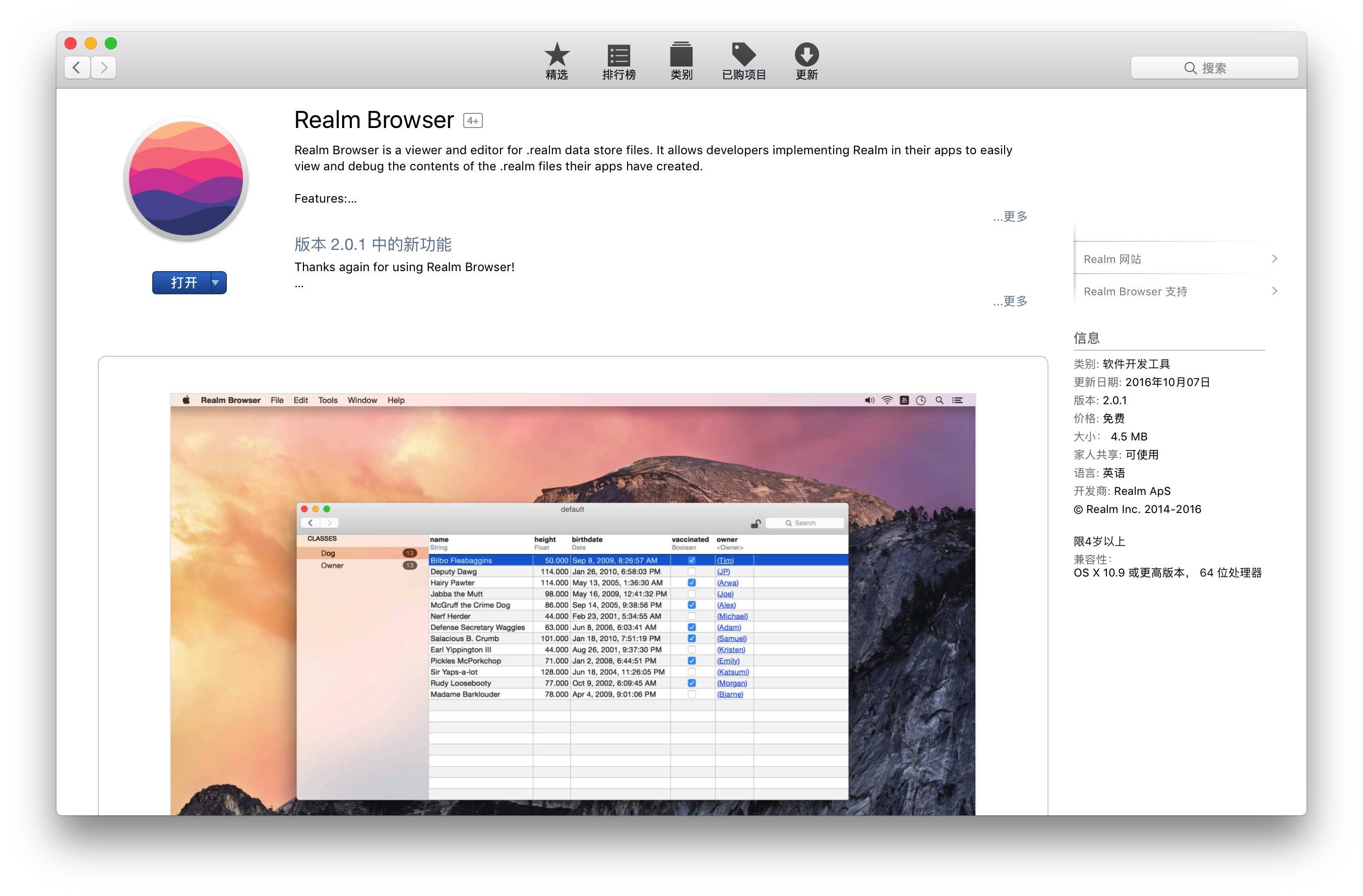
The “Realm Browser” tool is incredibly useful for debugging Realm databases. Highly recommended.
If you are debugging with the simulator, you can use
[RLMRealmConfiguration defaultConfiguration].fileURL
Print the Realm database path, then in Finder press ⌘⇧G to jump to that path. Open the corresponding .realm file with Realm Browser, and you’ll be able to view the data.
If you are debugging on a physical device, go to “Xcode->Window->Devices(⌘⇧2
)”, then find the corresponding device and project, click Download Container, export the xcappdata file, show the package contents, go to AppData->Documents, and open the .realm file with Realm Browser.
Realm has been used in production commercial products since 2012. After 4 years of use, it has gradually become stable.
Table of Contents
- 1.Realm Installation
- 2.Related Terms in Realm
- 3.Getting Started with Realm — How to Use It
- 4.Some Issues to Watch Out for When Using Realm
- 5.Realm “Abandonment” — Pros and Cons
- 6.What Exactly Is Realm?
- 7.Summary
I. Realm Installation
Basic requirements for building apps with Realm:
- iOS 7 and later, macOS 10.9 and later. In addition, Realm supports all versions of tvOS and watchOS.
- Xcode 7.3 or later is required.
Note If this is a pure Objective-C project, install the Objective-C version of Realm. If it is a pure Swift project, install the Swift version of Realm. If it is a mixed-language project, you need to install the Objective-C version of Realm, and also compile the Swift/RLMSupport.swift file into the project.
The RLMSupport.swift file adds Sequence conformance to the collection types in the Objective-C version of Realm, and re-exposes some Objective-C methods that cannot be accessed natively from Swift, such as variadic arguments. For more detailed information, see the official documentation.
There are only 4 installation methods:
I. Dynamic Framework
Note: Dynamic frameworks are not compatible with iOS 7. If you need to support iOS 7, see “Static Framework”.
- Download the latest Realm release and unzip it;
- Go to the “General” settings of your Xcode project, and drag
Realm.frameworkfrom ios/dynamic/, osx/, tvos/ or watchos/ into the “Embedded Binaries” section. Make sure Copy items if needed is selected, then click Finish; - In the unit test Target’s “Build Settings”, add the parent directory of Realm.framework to “Framework Search Paths”;
- If you want to load Realm from Swift, drag the Swift/RLMSupport.swift file into the Xcode project’s file navigator and select Copy items if needed;
- If you use Realm in an iOS, watchOS, or tvOS project, create a new “Run Script Phase” in your app target’s “Build Phases”, and
bash "${BUILT_PRODUCTS_DIR}/${FRAMEWORKS_FOLDER_PATH}/Realm.framework/strip-frameworks.sh"
Copy this script into the text box. Because you need to work around an App Store submission bug, this step is required when packaging a universal-device binary release build.
II. CocoaPods

In the project’s Podfile, add pod ‘Realm’, then run pod install in the terminal.
III. Carthage
- Add github “realm/realm-cocoa” to Carthage, then run carthage update. To change the Swift toolchain used to build the project, specify the appropriate toolchain via the --toolchain parameter. The --no-use-binaries parameter is also required; it prevents Carthage from downloading the prebuilt Swift 3.0 binary package. For example:
carthage update --toolchain com.apple.dt.toolchain.Swift_2_3 --no-use-binaries
From the corresponding platform folder under the Carthage/Build/ directory, drag Realm.framework into the “Linked Frameworks and Libraries” section of the “General” settings for your Xcode project;
iOS/tvOS/watchOS: In the “Build Phases” settings tab of your app target, click the “+” button and select “New Run Script Phase”. In the newly created Run Script, enter:
/usr/local/bin/carthage copy-frameworks
Add the framework path you want to use under “Input Files”, for example:
$(SRCROOT)/Carthage/Build/iOS/Realm.framework
Because this step is required to work around the App Store submission bug, it is mandatory when packaging a binary release build for universal devices.
IV. Static Framework (iOS only)
- Download the latest version of Realm and unzip it, then drag Realm.framework from the ios/static/ folder into the file navigator of your Xcode project. Make sure Copy items if needed is selected, then click Finish;
- In Xcode’s file navigator, select your project, then select your app target and go to the Build Phases tab. Under Link Binary with Libraries, click the + button and add libc++.dylib;
II. Realm Terminology
To better understand how to use Realm, let’s first introduce the relevant terminology involved.
RLMRealm: Realm is the core of the framework and the access point through which we build and use the database, much like Core Data’s managed object context. For simplicity, Realm provides a convenient defaultRealm( ) constructor method.
RLMObject: This is our custom Realm data model. Defining a data model corresponds to defining the database schema. To create a data model, we only need to subclass RLMObject and then design the properties we want to store.
Relationships: By simply declaring a property of type RLMObject in a data model, we can create a “one-to-many” object relationship. Similarly, we can also create “many-to-one” and “many-to-many” relationships.
Write Transactions: All operations in the database, such as creating, editing, or deleting objects, must be performed inside a transaction. A “transaction” refers to the block of code inside the write closure.
Queries: To retrieve information from the database, we need to perform “query” operations. The simplest form of retrieval is sending a query message to the Realm( ) database. If more complex data retrieval is required, we can also use predicates, compound queries, result sorting, and other operations.
RLMResults: This is the class returned after executing any query request, and it contains a collection of RLMObject objects. RLMResults is similar to NSArray: we can access it using subscript syntax and also determine relationships between objects. Beyond that, it provides many more powerful capabilities, including sorting, searching, and other operations.
III. Getting Started with Realm — How to Use It
Because Realm’s API is extremely developer-friendly and easy to understand at a glance, this section organizes the required usage in the order typically followed during development.
1. Create the Database
- (void)creatDataBaseWithName:(NSString *)databaseName
{
    NSArray *docPath = NSSearchPathForDirectoriesInDomains(NSDocumentDirectory, NSUserDomainMask, YES);
    NSString *path = [docPath objectAtIndex:0];
    NSString *filePath = [path stringByAppendingPathComponent:databaseName];
    NSLog(@"Database directory = %@",filePath);

    RLMRealmConfiguration *config = [RLMRealmConfiguration defaultConfiguration];
    config.fileURL = [NSURL URLWithString:filePath];
    config.objectClasses = @[MyClass.class, MyOtherClass.class];
    config.readOnly = NO;
    int currentVersion = 1.0;
    config.schemaVersion = currentVersion;

    config.migrationBlock = ^(RLMMigration *migration , uint64_t oldSchemaVersion) {
       // This is the block for setting up data migration
        if (oldSchemaVersion < currentVersion) {
        }
    };

    [RLMRealmConfiguration setDefaultConfiguration:config];

}
Creating a database mainly involves configuring RLMRealmConfiguration, setting the database name and storage location. Concatenate the path and database name into a string, then assign it to fileURL.
The objectClasses property is used to restrict which classes can be stored in a specified Realm database. For example, if two teams are responsible for developing different parts of your app and both use Realm databases internally, you definitely don’t want to coordinate data migrations between them. You can restrict classes by setting the objectClasses property of RLMRealmConfiguration. In general, objectClasses does not need to be set.
readOnly controls whether the database is read-only.
There is also a very special type of database: an in-memory database.
Normally, Realm databases are stored on disk, but you can create a database that runs entirely in memory by setting inMemoryIdentifier instead of the fileURL property in RLMRealmConfiguration.
RLMRealmConfiguration *config = [RLMRealmConfiguration defaultConfiguration];config.inMemoryIdentifier = @"MyInMemoryRealm";RLMRealm *realm = [RLMRealm realmWithConfiguration:config error:nil];
In-memory databases do not persist data between program runs. However, this does not affect Realm’s other capabilities, including queries, relationships, and thread safety.
If you need a flexible way to read and write data but do not want to persist it, you can choose an in-memory database. (The performance of in-memory databases and class properties has not been tested yet. I suspect there will not be much difference, so there may not be many use cases for in-memory databases.)
Things to note when using an in-memory database:
An in-memory database creates multiple files in the temporary folder to coordinate transactions such as cross-process notifications. In practice, no data is written to these files unless the operating system needs to purge excess data on disk due to memory pressure.
If an in-memory Realm database instance is no longer referenced, all of its data will be released. Therefore, you must keep a strong reference to the in-memory Realm database throughout the application lifecycle to avoid data loss.
2. Creating Tables
Realm data models are defined based on standard Objective-C classes, using properties to specify the details of the model.
You only need to inherit from RLMObject or an existing model class to create a new Realm data model object. In the database, this corresponds to a table.
#import <Realm/Realm.h>

@interface RLMUser : RLMObject

@property NSString       *accid;
//User registration ID
@property NSInteger      custId;
//Name
@property NSString       *custName;
//Large avatar image URL
@property NSString       *avatarBig;
@property RLMArray<Car> *cars;

RLM_ARRAY_TYPE(RLMUser) // Define RLMArray<RLMUser>


@interface Car : RLMObject
@property NSString *carName;
@property RLMUser *owner;
@end

RLM_ARRAY_TYPE(Car) // Define RLMArray<Car>

@end
Note: RLMObject officially recommends not adding Objective-C property attributes (such as nonatomic, atomic, strong, copy, weak, and so on). If they are set, these attributes remain in effect until the RLMObject is written to the Realm database.
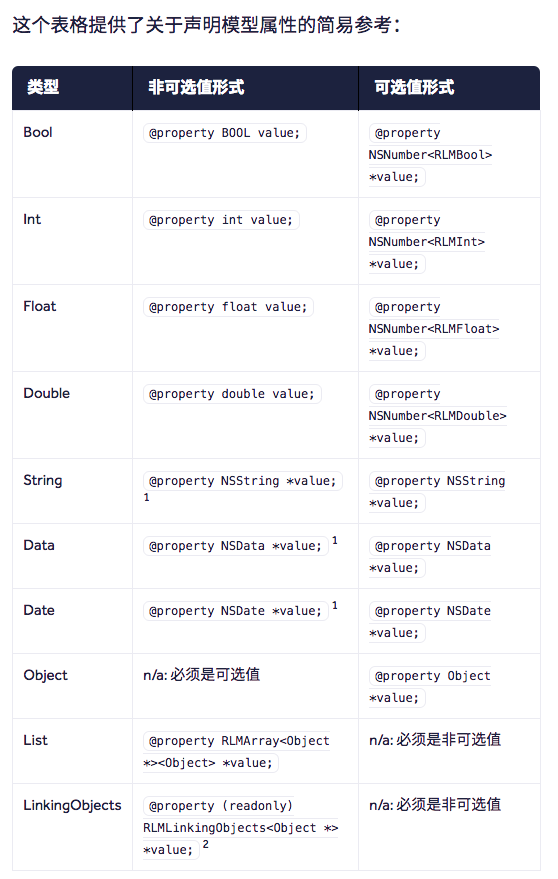
The RLM_ARRAY_TYPE macro creates a protocol, enabling the use of the RLMArray syntax. If this macro is not placed at the bottom of the model interface, you may need to forward-declare the model class.
About RLMObject relationships
- To-One Relationships
For many-to-one or one-to-one relationships, you only need to declare a property whose type is an RLMObject subclass. For example, in the code above: @property RLMUser *owner;
To-Many Relationships You can define a to-many relationship using a property of type RLMArray. For example, in the code above: @property RLMArray *cars;
Inverse Relationships
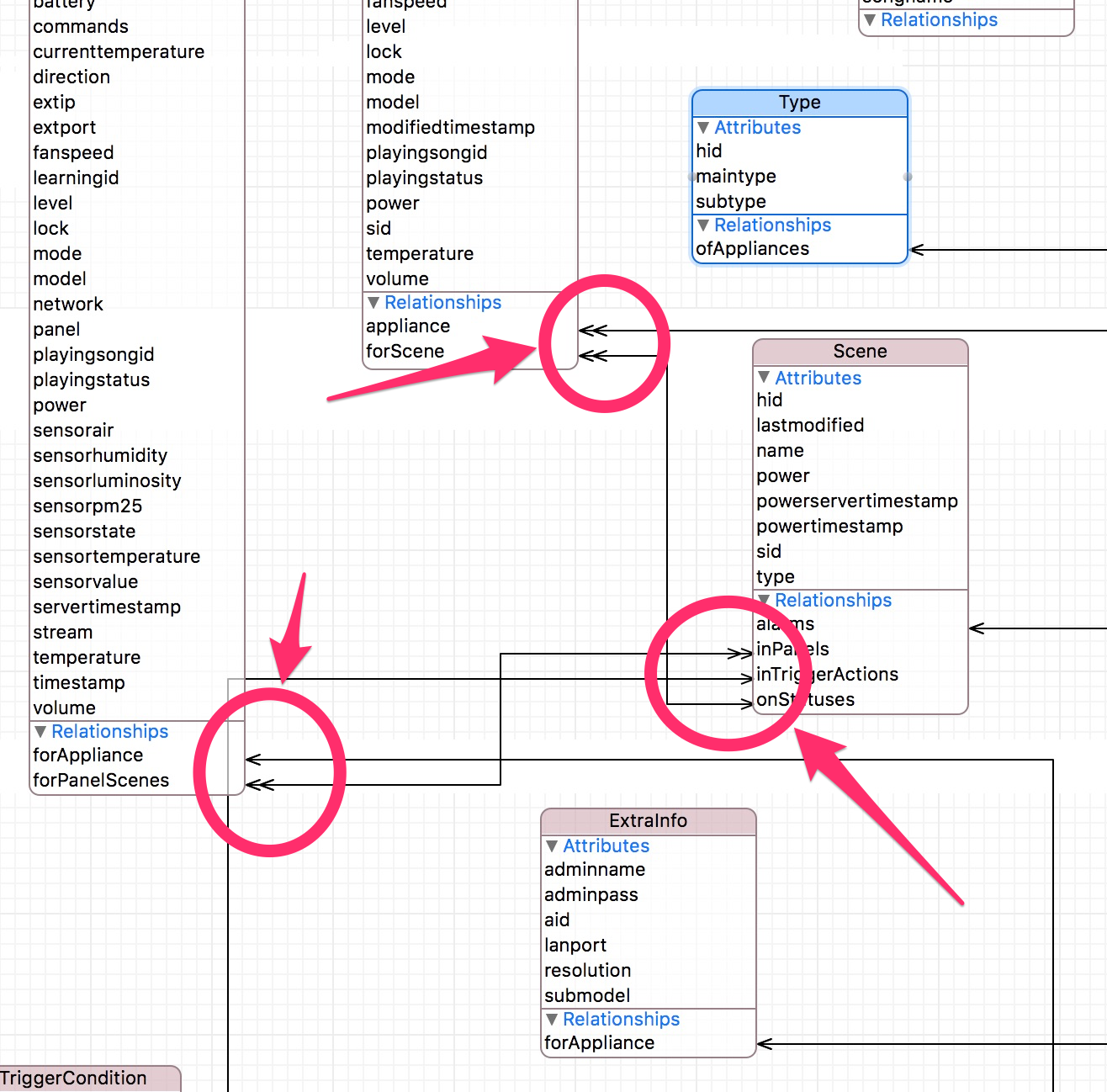
Links are unidirectional. Therefore, if a to-many relationship property RLMUser.cars links to a Car instance, and that instance’s to-one relationship property Car.owner links back to the corresponding RLMUser instance, these links are still independent of each other.
@interface Car : RLMObject
@property NSString *carName;
@property (readonly) RLMLinkingObjects *owners;
@end

@implementation Car
+ (NSDictionary *)linkingObjectsProperties {
    return @{
             @"owners": [RLMPropertyDescriptor descriptorWithClass:RLMUser.class propertyName:@"cars"],
             };
}
@end
This can be compared to those “arrows” in the xcdatamodel file in Core Data.
@implementation Book

// Primary key
+ (NSString *)primaryKey {
    return @"ID";
}

//Set default property values
+ (NSDictionary *)defaultPropertyValues{
    return @{@"carName":@"test" };
}

//Set ignored properties, i.e. not stored in the Realm database
+ (NSArray<NSString *> *)ignoredProperties {
    return @[@"ID"];
}

//Generally, if a property is nil, Realm will throw an exception, but if this method is implemented, only name being nil will throw an exception, meaning the cover property can now be nil
+ (NSArray *)requiredProperties {
    return @[@"name"];
}

//Set indexes, can speed up queries
+ (NSArray *)indexedProperties {
    return @[@"ID"];
}
@end
You can also set primaryKey, default values defaultPropertyValues, ignored properties ignoredProperties, required properties requiredProperties, and indexed properties indexedProperties for RLMObject. The most useful ones are the primary key and indexes.
3. Storing Data
Create a new object
// (1) Create a Car object, then set its properties
Car *car = [[Car alloc] init];
car.carName = @"Lamborghini";

// (2) Create a Car object from a dictionary
Car *myOtherCar = [[Car alloc] initWithValue:@{@"name" : @"Rolls-Royce"}];

// (3) Create a dog object from an array
Car *myThirdcar = [[Car alloc] initWithValue:@[@"BMW"]];
Note: all required properties must be assigned before the object is added to Realm
4. Add

[realm beginWriteTransaction];
[realm addObject:Car];
[realm commitWriteTransaction];
Note that if multiple write operations exist in a process, a single write operation will block all other write operations and will also lock the current thread on which that operation is running.
This Realm behavior is similar to other persistence solutions, and we recommend following the standard best practice for this approach: move write operations to a dedicated thread.
The official recommendation is:
Because Realm uses an MVCC architecture, read operations are not affected by an ongoing write transaction. Unless you need to use multiple threads to perform write operations concurrently immediately, you should use batched write transactions instead of many small write transactions.
dispatch_async(dispatch_get_global_queue(DISPATCH_QUEUE_PRIORITY_DEFAULT, 0), ^{

        RLMRealm *realm = [RLMRealm defaultRealm];
        [realm transactionWithBlock:^{
            [realm addObject: Car];
        }];
    });
The code above simply moves the write transaction into a child thread for processing.
5. Delete

[realm beginWriteTransaction];
// Delete a single record
[realm deleteObject:Car];
// Delete multiple records
[realm deleteObjects:CarResult];
// Delete all records
[realm deleteAllObjects];

[realm commitWriteTransaction];
6. Update

When there is no primary key, you need to query first, then modify the data. When there is a primary key, the following APIs are very useful:
[realm addOrUpdateObject:Car];

[Car createOrUpdateInRealm:realm withValue:@{@"id": @1, @"price": @9000.0f}];
addOrUpdateObject first checks whether there is an existing Car with the same primary key as the one passed in. If there is, it updates that record. Note that addOrUpdateObject is not an incremental update: all values must be provided. If any values are null, they will overwrite the existing values, which can lead to data loss.
createOrUpdateInRealm:withValue: This method performs incremental updates. You pass a dictionary as the second argument, and the prerequisite for using this method is that a primary key exists. The method first looks for a record whose primary key matches the one provided in the dictionary. If it exists, it updates only the subset of fields present in the dictionary. If it does not exist, it creates a new record.
7. Query

In Realm, all queries (including queries and property access) are lazy-loaded. The corresponding data is read only when a property is accessed.
Query results are not copies of the data: modifying query results (within a write transaction) directly modifies the data on disk. Likewise, you can traverse the relationship graph directly through the RLMObject objects contained in RLMResults . Unless the query results are used, execution of the retrieval is deferred. This means that chaining several different temporary {RLMResults } objects to sort and match data does not perform extra work, such as processing intermediate states. Once a retrieval has been executed, or once a notification module has been added, RLMResults will stay up to date at all times and receive any changes that may be made in Realm by retrieval operations running on a background thread.
// Query all cars from the default database
RLMResults<Car *> *cars = [Car allObjects];

// Query using a predicate string
RLMResults<Dog *> *tanDogs = [Dog objectsWhere:@"color = 'tan' AND name BEGINSWITH 'Big'"];

// Query using NSPredicate
NSPredicate *pred = [NSPredicate predicateWithFormat:@"color = %@ AND name BEGINSWITH %@",
                     @"tan", @"Big"];
RLMResults *results = [Dog objectsWithPredicate:pred];

// Sort tan dogs whose names start with 'Big'
RLMResults<Dog *> *sortedDogs = [[Dog objectsWhere:@"color = 'tan' AND name BEGINSWITH 'Big'"] sortedResultsUsingProperty:@"name" ascending:YES];
Operators that may be used in queries are shown in the table below:
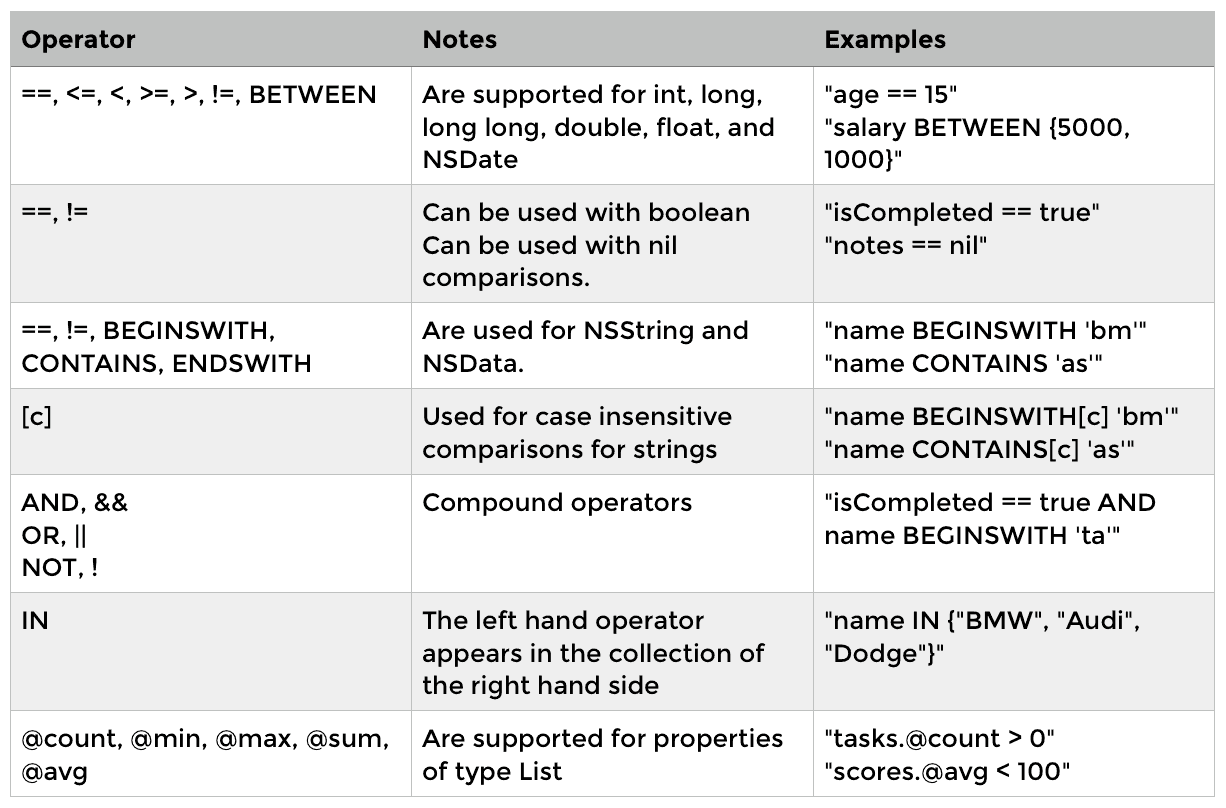
Realm also supports chained queries.
One feature of the Realm query engine is that it can execute chained queries with very low transaction overhead, without creating a separate database server access for each successful query as traditional databases do.
RLMResults<Car *> *Cars = [Car objectsWhere:@"color = blue"];
RLMResults<Car *> *CarsWithBNames = [Cars objectsWhere:@"name BEGINSWITH 'B'"];
8. Other Related Features
- Supports KVC and KVO
RLMObject, RLMResult, and RLMArray all conform to the Key-Value Coding (KVC) mechanism. This approach is most useful when you can only determine at runtime which property needs to be updated. Applying KVC to collections is an excellent way to update objects in bulk, so you do not have to repeatedly iterate over the collection and create an accessor for each item.
RLMResults<Person *> *persons = [Person allObjects];
[[RLMRealm defaultRealm] transactionWithBlock:^{
    [[persons firstObject] setValue:@YES forKeyPath:@"isFirst"]; // Set each person's planet property to “Earth”
    [persons setValue:@"Earth" forKeyPath:@"planet"];
}];
Most properties of Realm objects comply with the KVO mechanism. All persisted storage properties (non-ignored properties) of RLMObject subclasses comply with KVO, and the invalidated properties in RLMObject and RLMArray also comply with KVO. However, RLMLinkingObjects properties cannot be observed using KVO.
2.Supports database encryption
// Generate a random key
NSMutableData *key = [NSMutableData dataWithLength:64];
SecRandomCopyBytes(kSecRandomDefault, key.length, (uint8_t *)key.mutableBytes);

// Open the encrypted file
RLMRealmConfiguration *config = [RLMRealmConfiguration defaultConfiguration];
config.encryptionKey = key;
NSError *error = nil;
RLMRealm *realm = [RLMRealm realmWithConfiguration:config error:&error];
if (!realm) {
    // If the key is incorrect, `error` will indicate that the database is inaccessible
    NSLog(@"Error opening realm: %@", error);
}
Realm supports encrypting database files with AES-256+SHA2 using a 64-byte key when creating a Realm database. This means all data on disk is encrypted and decrypted with AES-256, and verified with SHA-2 HMAC. Each time you obtain a Realm instance, you must provide the same key.
However, an encrypted Realm incurs only minimal additional resource overhead (typically at most about 10% slower than usual).
3.Notifications
// Get Realm notifications
token = [realm addNotificationBlock:^(NSString *notification, RLMRealm * realm) {
     [myViewController updateUI];
}];

[token stop];

// Remove notification
[realm removeNotification:self.token];
After each write transaction is committed, a Realm instance sends notifications to Realm instances on other threads. In general, if a controller wants to retain this notification, it needs to declare a property and hold the notification strongly.
- (void)viewDidLoad {
    [super viewDidLoad];

    // Observe RLMResults notifications
    __weak typeof(self) weakSelf = self;
    self.notificationToken = [[Person objectsWhere:@"age > 5"] addNotificationBlock:^(RLMResults<Person *> *results, RLMCollectionChange *change, NSError *error) {
        if (error) {
            NSLog(@"Failed to open Realm on background worker: %@", error);
            return;
        }

        UITableView *tableView = weakSelf.tableView;
        // The initial query run passes nil for change info
        if (!changes) {
            [tableView reloadData];
            return;
        }

        // The query results changed, so apply them to the UITableView
        [tableView beginUpdates];
        [tableView deleteRowsAtIndexPaths:[changes deletionsInSection:0]
                         withRowAnimation:UITableViewRowAnimationAutomatic];
        [tableView insertRowsAtIndexPaths:[changes insertionsInSection:0]
                         withRowAnimation:UITableViewRowAnimationAutomatic];
        [tableView reloadRowsAtIndexPaths:[changes modificationsInSection:0]
                         withRowAnimation:UITableViewRowAnimationAutomatic];
        [tableView endUpdates];
    }];
}
We can also perform more fine-grained notifications; collection notifications make this possible.
Collection notifications are triggered asynchronously. First, they are triggered when the initial results become available. After that, whenever a write transaction changes all objects in the collection or any individual object in it, the notification is triggered again. These changes can be accessed through the RLMCollectionChange parameter passed to the notification closure. This object contains index information affected by the deletions, insertions, and modifications states.
For RLMResults, RLMArray, RLMLinkingObjects, and derived collections such as RLMResults, collection notifications will also trigger this state change when objects in the relationship are added or removed.
4.Database Migration
This is one of Realm’s strengths: migrations are easy.
Compared with Core Data data migration, it is much more convenient. For a guide to iOS Core Data migration, see this article.
There should not be many issues with basic database CRUD operations. The more painful part is usually data migration. During version iterations, tables may be added or deleted, or table schemas may change. If the new version does not perform data migration, users may crash immediately after upgrading. Compared with the relatively complex migration process in Core Data, Realm migration is really simple.
1.Adding or deleting tables does not require a migration in Realm. 2.Adding or deleting fields does not require a migration in Realm. Realm automatically detects newly added properties and properties that need to be removed, then updates the on-disk database schema automatically.
Here is an official example of data migration:
RLMRealmConfiguration *config = [RLMRealmConfiguration defaultConfiguration];
config.schemaVersion = 2;
config.migrationBlock = ^(RLMMigration *migration, uint64_t oldSchemaVersion)
{
    // enumerateObjects:block: iterates over every “Person” object stored in the Realm file
    [migration enumerateObjects:Person.className block:^(RLMObject *oldObject, RLMObject *newObject) {
        // Adds the “fullName” property only when the Realm database schema version is 0
        if (oldSchemaVersion < 1) {
            newObject[@"fullName"] = [NSString stringWithFormat:@"%@ %@", oldObject[@"firstName"], oldObject[@"lastName"]];
        }
        // Adds the “email” property only when the Realm database schema version is 0 or 1
        if (oldSchemaVersion < 2) {
            newObject[@"email"] = @"";
        }
       // Rename property
       if (oldSchemaVersion < 3) { // The rename operation should be performed outside the call to `enumerateObjects:`
            [migration renamePropertyForClass:Person.className oldName:@"yearsSinceBirth" newName:@"age"]; }
    }];
};
[RLMRealmConfiguration setDefaultConfiguration:config];
// Now that we have successfully updated the schema version and provided a migration block, opening the old Realm database will automatically run this data migration and then allow successful access
[RLMRealm defaultRealm];
There are three migration approaches in the block: the first is an example of merging fields, the second is an example of adding a new field, and the third is an example of renaming an existing field.
IV. Some Issues to Watch Out for When Using Realm

From the time I started learning Realm from scratch until I became proficient with it, the only real pitfall I encountered was multithreading. This shows how friendly Realm’s API documentation is. Although there are not many pitfalls, there are still a few things worth paying attention to.
1. When accessing the database across threads, you must create a new Realm object
*** Terminating app due to uncaught exception 'RLMException', reason: 'Realm accessed from incorrect thread.'**
***** First throw call stack:**
**(**
** 0   CoreFoundation                      0x000000011479f34b __exceptionPreprocess + 171**
** 1   libobjc.A.dylib                     0x00000001164a321e objc_exception_throw + 48**
** 2   BHFangChuang                        0x000000010dd4c2b5 -[RLMRealm beginWriteTransaction] + 77**
** 3   BHFangChuang                        0x000000010dd4c377 -[RLMRealm transactionWithBlock:error:] + 45**
** 4   BHFangChuang                        0x000000010dd4c348 -[RLMRealm transactionWithBlock:] + 19**
** 5   BHFangChuang                        0x000000010d51d7ae __71-[RealmDataBaseHelper updateUserWithLoginDate:andLogoutDate:according:]_block_invoke + 190**
** 6   libdispatch.dylib                   0x00000001180ef980 _dispatch_call_block_and_release + 12**
** 7   libdispatch.dylib                   0x00000001181190cd _dispatch_client_callout + 8**
** 8   libdispatch.dylib                   0x00000001180f8366 _dispatch_queue_override_invoke + 1426**
** 9   libdispatch.dylib                   0x00000001180fa3b7 _dispatch_root_queue_drain + 720**
** 10  libdispatch.dylib                   0x00000001180fa08b _dispatch_worker_thread3 + 123**
** 11  libsystem_pthread.dylib             0x00000001184c8746 _pthread_wqthread + 1299**
** 12  libsystem_pthread.dylib             0x00000001184c8221 start_wqthread + 13**
**)**
**libc++abi.dylib: terminating with uncaught exception of type NSException**
If the program crashes with the above error, it means the Realm object you are using to access Realm data belongs to a different thread than the current one.
The solution is to re-fetch the latest Realm on the current thread.
2. Wrapping a global Realm singleton yourself is not very useful
This was also a misunderstanding I had earlier due to an unclear understanding of Realm multithreading.
Many developers probably wrap Core Data, Sqlite3, or FMDB in a Helper-like singleton. So I did the same here: after creating the Realm database, I strongly held a Realm object in a singleton. Then, for subsequent access, I only needed to read the Realm object held by that singleton to get the database.
The idea is fine, but the same Realm object does not support cross-thread operations on the Realm database.
Realm makes concurrent execution very easy by ensuring that each thread always has a snapshot of the Realm. Any number of threads can access the same Realm file at the same time, and because each thread has its corresponding snapshot, threads never affect each other. One thing to note is that you must not allow multiple threads to hold the same instance of a Realm object. If multiple threads need to access the same object, they each obtain the instance they need; otherwise, changes that happen on one thread may cause other threads to see incomplete or inconsistent data.
In fact, RLMRealm *realm = [RLMRealm defaultRealm]; gets an instance of the current Realm object; the implementation is essentially retrieving a singleton. So every time we are inside a background thread, we should not read the Realm instance we wrapped and held ourselves. Just call this system method directly, and it will ensure access does not go wrong.
3. transactionWithBlock is already inside a write transaction; transactions cannot be nested
[realm transactionWithBlock:^{
                [self.realm beginWriteTransaction];
                [self convertToRLMUserWith:bhUser To:[self convertToRLMUserWith:bhUser To:nil]];
                [self.realm commitWriteTransaction];
            }];
transactionWithBlock is already inside a write transaction. If you call commitWriteTransaction again within the block, an error will occur; write transactions cannot be nested.
The error message is as follows:
*** Terminating app due to uncaught exception 'RLMException', reason: 'The Realm is already in a write transaction'**
***** First throw call stack:**
**(**
** 0   CoreFoundation                      0x0000000112e2d34b __exceptionPreprocess + 171**
** 1   libobjc.A.dylib                     0x0000000114b3121e objc_exception_throw + 48**
** 2   BHFangChuang                        0x000000010c4702b5 -[RLMRealm beginWriteTransaction] + 77**
** 3   BHFangChuang                        0x000000010bc4175a __71-[RealmDataBaseHelper updateUserWithLoginDate:andLogoutDate:according:]_block_invoke_2 + 42**
** 4   BHFangChuang                        0x000000010c470380 -[RLMRealm transactionWithBlock:error:] + 54**
** 5   BHFangChuang                        0x000000010c470348 -[RLMRealm transactionWithBlock:] + 19**
** 6   BHFangChuang                        0x000000010bc416d7 __71-[RealmDataBaseHelper updateUserWithLoginDate:andLogoutDate:according:]_block_invoke + 231**
** 7   libdispatch.dylib                   0x0000000116819980 _dispatch_call_block_and_release + 12**
** 8   libdispatch.dylib                   0x00000001168430cd _dispatch_client_callout + 8**
** 9   libdispatch.dylib                   0x0000000116822366 _dispatch_queue_override_invoke + 1426**
** 10  libdispatch.dylib                   0x00000001168243b7 _dispatch_root_queue_drain + 720**
** 11  libdispatch.dylib                   0x000000011682408b _dispatch_worker_thread3 + 123**
** 12  libsystem_pthread.dylib             0x0000000116bed746 _pthread_wqthread + 1299**
** 13  libsystem_pthread.dylib             0x0000000116bed221 start_wqthread + 13**
**)**
**libc++abi.dylib: terminating with uncaught exception of type NSException**
4. It is recommended that every model have a primary key set, making add and update easier
If a primary key can be set, please set one whenever possible, because this makes it easier for us to update data. We can conveniently call addOrUpdateObject: or createOrUpdateInRealm:withValue: to perform updates. This way, we do not need to first query the data by primary key and then update it. With a primary key, these two operations can be completed in a single step.
5. Queries also cannot be performed across threads
RLMResults * results = [self selectUserWithAccid:bhUser.accid];

    dispatch_async(dispatch_get_global_queue(DISPATCH_QUEUE_PRIORITY_DEFAULT, 0), ^{

        RLMRealm *realm = [RLMRealm defaultRealm];
        [realm transactionWithBlock:^{
            [realm addOrUpdateObject:results[0]];
        }];
    });
Because the query is performed outside the child thread, cross-thread access will also fail. The error message is as follows:
***** Terminating app due to uncaught exception 'RLMException', reason: 'Realm accessed from incorrect thread'**
***** First throw call stack:**
**(**
** 0   CoreFoundation                      0x000000011517a34b __exceptionPreprocess + 171**
** 1   libobjc.A.dylib                     0x0000000116e7e21e objc_exception_throw + 48**
** 2   BHFangChuang                        0x000000010e7c34ab _ZL10throwErrorP8NSString + 129**
** 3   BHFangChuang                        0x000000010e7c177f -[RLMResults count] + 40**
** 4   BHFangChuang                        0x000000010df8f3bf -[RealmDataBaseHelper convertToRLMUserWith:LoginDate:LogoutDate:To:] + 159**
** 5   BHFangChuang                        0x000000010df8efc1 __71-[RealmDataBaseHelper updateUserWithLoginDate:andLogoutDate:according:]_block_invoke_2 + 81**
** 6   BHFangChuang                        0x000000010e7bd320 -[RLMRealm transactionWithBlock:error:] + 54**
** 7   BHFangChuang                        0x000000010e7bd2e8 -[RLMRealm transactionWithBlock:] + 19**
** 8   BHFangChuang                        0x000000010df8eecf __71-[RealmDataBaseHelper updateUserWithLoginDate:andLogoutDate:according:]_block_invoke + 351**
** 9   libdispatch.dylib                   0x0000000118b63980 _dispatch_call_block_and_release + 12**
** 10  libdispatch.dylib                   0x0000000118b8d0cd _dispatch_client_callout + 8**
** 11  libdispatch.dylib                   0x0000000118b6c366 _dispatch_queue_override_invoke + 1426**
** 12  libdispatch.dylib                   0x0000000118b6e3b7 _dispatch_root_queue_drain + 720**
** 13  libdispatch.dylib                   0x0000000118b6e08b _dispatch_worker_thread3 + 123**
** 14  libsystem_pthread.dylib             0x0000000118f3c746 _pthread_wqthread + 1299**
** 15  libsystem_pthread.dylib             0x0000000118f3c221 start_wqthread + 13**
**)**
**libc++abi.dylib: terminating with uncaught exception of type **
V. “Giving Up” on Realm — Pros and Cons
The official website already says a lot about Realm’s advantages, and I also mentioned the three advantages that impressed me most at the beginning of this article.
For a comparison of CoreData vs. Realm, you can read this article

When it comes to the last two barriers to using Realm, one is how to migrate from other databases to Realm, and the other is some of the limitations of the Realm database.
If you are still considering whether to use Realm, please read the following carefully. These are important criteria you need to weigh when deciding whether to switch to the Realm database. (The descriptions below are based on the latest Realm version, 2.0.2.)
1. Migrating from other databases to Realm

If you are migrating from another database to Realm, please read a previous article I wrote. To briefly mention the painful part: because the database is being switched, you will need to maintain two sets of databases for several future versions, since existing users’ data needs to be gradually migrated from the old database to Realm. That is a bit painful. The code that migrates the data has to “disgustingly” remain in the project. But once the migration is fully completed, the path afterward is relatively smooth.
Let me also mention the issue that, after migrating from Core Data, there is no fetchedResultController. If you use Realm, you can no longer use Core Data’s fetchedResultController. So if the database updates data, does that mean the tableview can only be updated via reloadData? For now, basically yes. Realm provides a notification mechanism. The current version of Realm supports adding notifications to realm database objects, so you can receive them after a database write transaction is committed and then update the UI. For details, see https://realm.io/cn/docs/swift/latest/#notification. Of course, if you still want to use NSFetchedResultsController, RBQFetchedResultsController is recommended as a replacement. Its address is: https://github.com/Roobiq/RBQFetchedResultsController. Realm currently plans to implement similar behavior in the future. For details, you can refer to this PR: http://github.com/realm/realm-cocoa/issues/687.
Of course, if it is a new App that is still under development, you can consider using Realm directly, which will be much nicer.
The above is the first barrier. If you feel that the migration cost is still acceptable, then congratulations—you are already halfway into Realm. Now please look at the second “barrier.”
2. Limitations of the current version of the Realm database
The second barrier is what still keeps some users at Realm’s doorstep. Because of these limitations—these “drawbacks”—an App’s business requirements may not be satisfiable with Realm, so Realm is ultimately abandoned. Of course, some of these issues can be solved flexibly by changing the table structure. After all, people are adaptable (if you really want to use Realm and are willing to find ways, no one can stop you).

The maximum length of a class name is 57 UTF8 characters.
The maximum length of a property name is 63 UTF8 characters.
NSData and NSString properties cannot store data larger than 16 MB. If you need to store large amounts of data, you can split it into 16 MB chunks, or store it directly in the file system and then store the file path in Realm. If your app attempts to store a single property larger than 16 MB, the system will throw an exception at runtime.
Sorting strings and case-insensitive queries only support the “Basic Latin,” “Latin-1 Supplement,” “Latin Extended-A,” and “Latin Extended-B” character sets (UTF-8 range 0–591).
Although Realm files can be accessed by multiple threads simultaneously, you cannot pass Realms, Realm objects, queries, or query results across threads. (This is not really a problem; we can solve it by creating a new Realm object in each thread.)
Realm object setters & getters cannot be overridden
Because Realm overrides setters and getters in the underlying database, you cannot override them again on your objects. A simple alternative is to create a new Realm-ignored property whose accessor can be overridden and which can call other getter and setter methods.
- File size & version tracking
Generally speaking, Realm databases take up less disk space than SQLite databases. If your Realm file size is larger than you expected, it may be because the RLMRealm in your database contains old versions of data. To ensure that your data is displayed consistently, Realm only updates the data version at the beginning of a run loop iteration. This means that if you read some data from Realm and perform a long-running operation on a locked thread, while other threads read from and write to the Realm database, the version will not be updated. Realm will preserve intermediate versions of the data, even though that data is no longer useful, which causes the file size to grow. This space will be reused on the next write operation. These operations can be performed by calling writeCopyToPath:error:.
Solution: Call invalidate to tell Realm that you no longer need the data copied into Realm. This allows us to stop tracking intermediate versions of those objects. The version will be updated again the next time a new version appears. You may also have noticed this issue when using Realm with Grand Central Dispatch. When the dispatch queue is automatically released after dispatch completes, the dispatch queue is not released along with the program. This causes the space occupied by Realm’s intermediate versions to be reused only after the RLMRealm object is released. To avoid this problem, you should use an explicit autorelease pool in the dispatch queue.
- Realm does not have auto-increment properties
Realm does not provide a thread-/process-safe auto-increment property mechanism, which is commonly used in other databases to generate primary keys. However, in most cases, what we need for a primary key is a unique, automatically generated value, so there is no need to use sequential, contiguous integer IDs as primary keys.
Solution:
In this case, a unique string primary key usually satisfies the requirement. A common pattern is to set the default property value to [[NSUUID UUID] UUIDString] to generate a unique string ID. Another common motivation for auto-increment properties is to preserve insertion order. In some cases, this can be done by adding objects to an RLMArray, or by using a createdAt property with a default value of [NSDate date].
- All data models must directly inherit from RealmObject. This prevents us from using arbitrary inheritance in data models.
This is not really a problem either. We can solve it by creating another model ourselves. The model we create can inherit however we like. This model is used specifically to receive network data, and then we convert this model into the model that needs to be stored in the table, namely an RLMObject object. In this way, this issue can also be solved.
Realm allows models to generate more subclasses and also allows code reuse across models, but certain Cocoa features make rich class polymorphism at runtime unavailable. The following operations can be done:
- Class methods, instance methods, and properties in a parent class can be inherited by its subclasses
- Subclasses can use the parent class as a parameter in methods and functions
The following cannot be done:
- Conversions between polymorphic classes (for example, subclass to subclass, subclass to parent class, parent class to subclass, etc.)
- Querying multiple classes at the same time
- Multi-class containers (RLMArray and RLMResults)
- Realm does not support collection types
This is also rather painful.
Realm supports the following property types: BOOL, bool, int, NSInteger, long, long long, float, double, NSString, NSDate, NSData, and NSNumber marked as a special type. Support for CGFloat properties has been removed because it is not platform-independent.
What is not supported here are collections, such as NSArray, NSMutableArray, NSDictionary, NSMutableDictionary, NSSet, and NSMutableSet. If the server sends a dictionary where the key is a string and the corresponding value is an array, it becomes difficult to store that array. Of course, Realm does have collections, namely RLMArray, but what it contains are all RLMObject instances.
So if we want to solve this problem, we need to extract everything from the data. If it is a model, we first receive it ourselves, then convert it into an RLMObject model, and then store it in an RLMArray. With this conversion step, it can still be done.
Here I have listed the current “drawbacks” of Realm for the time being. If these 10 points can all satisfy the business requirements of your App, then this barrier is not a problem either.
Please carefully evaluate the two barriers above. Here is another article about experiences and lessons learned when replacing a database: Changing a Tire on the Highway — Replacing the Database of a Legacy System. Those considering a replacement can also take a look. If these two barriers are truly unsuitable and cannot be overcome, then please give up on Realm!
VI. What Exactly Is Realm?
Everyone knows that Sqlite3 is a lightweight database used on mobile devices, and FMDB is a wrapper based on Sqlite3.
So is Core Data a database? Core Data itself is not a database. It is a framework with multiple capabilities, one important capability being that it automates the interaction process between an application and a database. With the Core Data framework, we do not need to write Objective-C code, yet we can still use a relational database. This is because Core Data automatically generates properly optimized SQL statements for us underneath.
So is Realm a database?
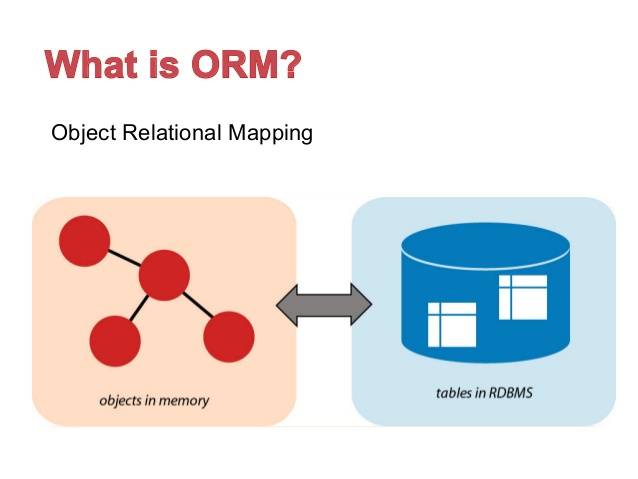
Realm is not an ORM, nor is it built on SQLite. It is a full-featured database tailored for mobile developers. It can map native objects directly into Realm’s database engine (far more than just a key-value store).
Realm is an MVCC database, written in C++ at the lower level. MVCC refers to multiversion concurrency control.
Realm satisfies ACID: Atomicity, Consistency, Isolation, and Durability. A database that supports transactions must have these four properties. Realm satisfies all of them.
1. Realm adopts the MVCC design philosophy
MVCC solves an important concurrency problem: in every database, there are times when someone wants to read from the database while someone else is writing to it (for example, different threads may read from or write to the same database at the same time). This can lead to data inconsistency—when you read a record, a write operation may have only partially completed.
There are many ways to solve read/write concurrency problems, the most common being to lock the database. In the scenario above, we would acquire a lock while writing data. Until the write operation completes, all read operations are blocked. This is the well-known read-write lock. It is often slow. Realm takes advantage of MVCC databases, which is where its extremely high speed comes from.
MVCC is designed using the same source-file management algorithm as Git. You can imagine Realm’s internals as a Git-like system, with branches and atomic commits. This means you may be working on many branches (versions of the database), but you do not have a full copy of the data. Realm is still somewhat different from a true MVCC database. In a true MVCC database like Git, you can have multiple candidates for HEAD on the version tree. Realm, however, allows only one write operation at any given time, and it always operates on the latest version—it cannot work on an older version.
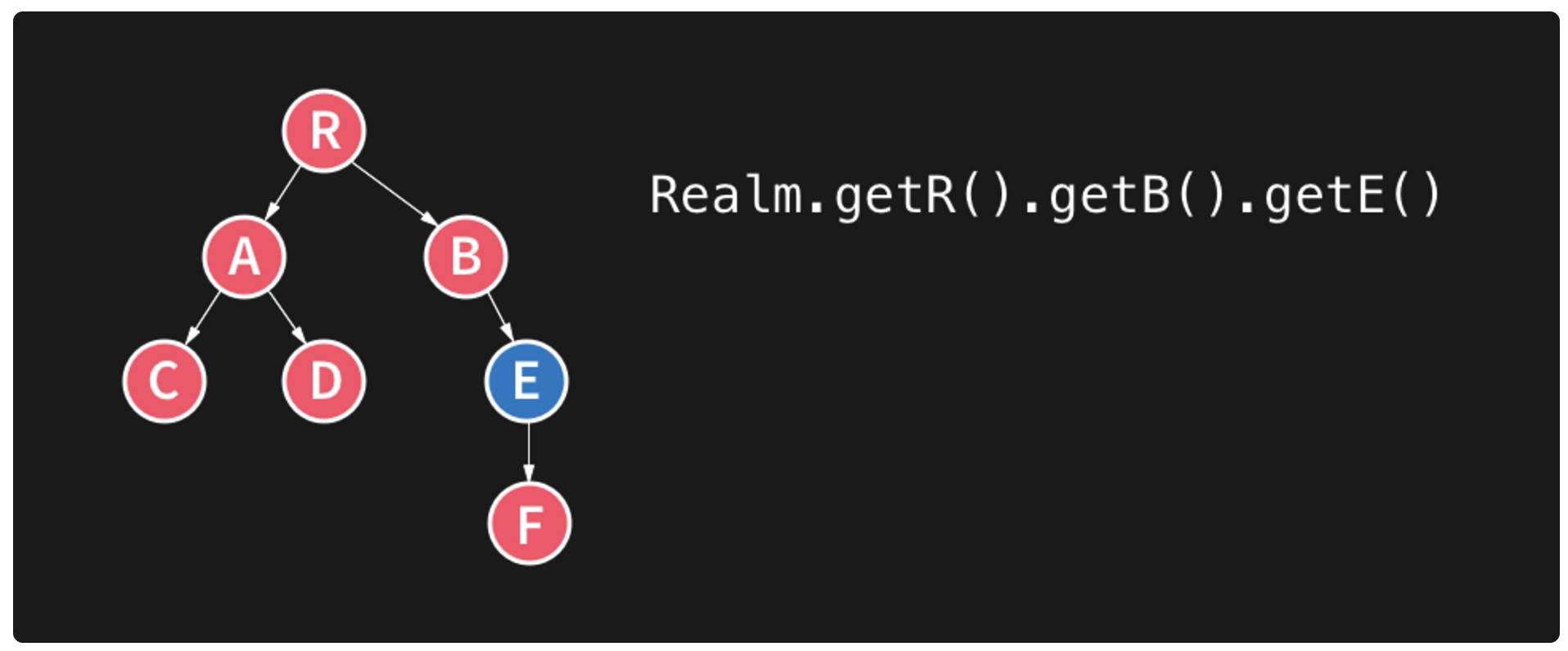
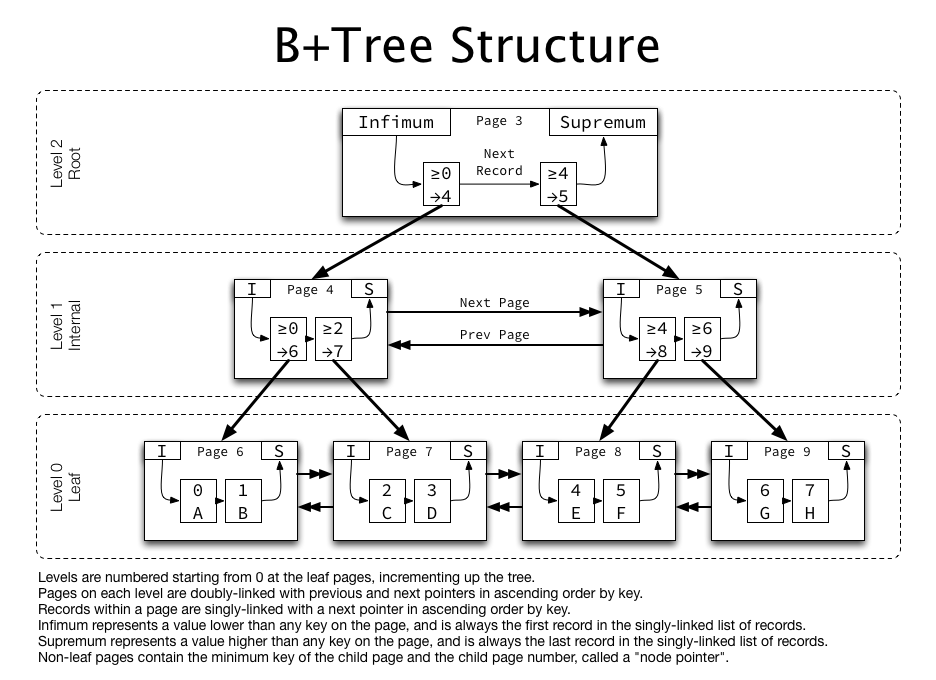
Realm is implemented on top of a B+ tree. You can see the source code in realm-core, which Realm’s team open-sourced; it uses bpTree, an implementation of a B+ tree. A B+ tree is a tree data structure, specifically an n-ary tree. Each node usually has multiple children. A B+ tree consists of a root node, internal nodes, and leaf nodes. The root node may be a leaf node, or it may be a node with two or more child nodes.
B+ trees are commonly used in databases and operating-system file systems. File systems such as NTFS, ReiserFS, NSS, XFS, JFS, ReFS, and BFS all use B+ trees as metadata indexes. The key property of a B+ tree is that it keeps data stable and ordered, while insertions and modifications have relatively stable logarithmic time complexity. Elements in a B+ tree are inserted from the bottom up.
Realm gives every connected thread a snapshot of the data at a specific point in time. This is why it can perform a large number of operations across hundreds of threads while accessing the database concurrently, without crashing.
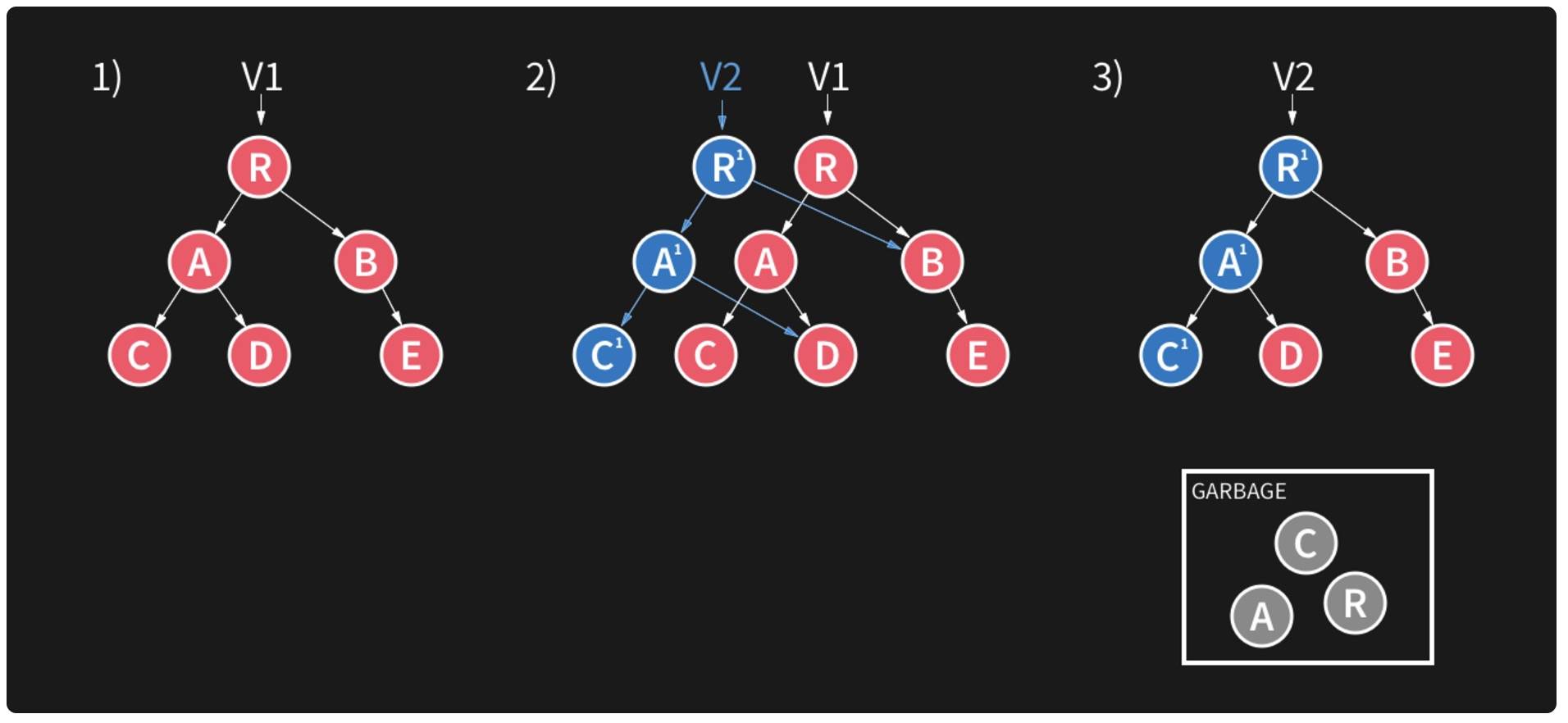
The diagram above clearly shows the flow of a Realm write operation. There are three phases. In phase one, V1 points to the root node R. In phase two, the write operation is prepared. At this point, there is a V2 node pointing to the new R’, and a new branch is created with A’ and C’. The corresponding right child points to the right child of R, which was originally pointed to by V1. If the write operation fails, this left branch is discarded. This design ensures that even if a failure occurs, only the latest data is lost, and the entire database is not corrupted. If the write succeeds, the original R, A, and C nodes are placed into Garbage. Then we reach phase three: the write succeeds, and V2 points to the root node.
In this write process, phase two is the most critical. The write operation does not modify the existing data; instead, it creates a new branch. This avoids locking while still solving the database concurrency problem.
It is precisely the underlying B+ tree data structure + MVCC design that guarantees Realm’s high performance.
2.Realm uses a zero-copy architecture
Because Realm uses a zero-copy architecture, it has almost no memory overhead. This is because every Realm object maps directly to the underlying database through a native long pointer; that pointer is the hook into the data in the database.
A typical traditional database operation looks like this: data is stored in database files on disk, and our query request is translated into a series of SQL statements, creating a database connection. The database server receives the request, performs lexical, syntactic, and semantic analysis on the SQL statements through the parser, then optimizes the SQL statements through the query optimizer. After optimization, it executes the corresponding query, reads the database files from disk (reading indexes first if indexes exist), reads each row that matches the query, and then stores the data in memory (which consumes memory). After that, you need to serialize the data into a format that can be stored in memory. This means bit alignment, so that the CPU can process it. Finally, the data needs to be converted into language-level types, and then it is returned as objects, such as Objective-C objects.
This is another reason Realm is fast. Realm’s database files are memory-mapped, meaning the database file itself is mapped into memory (actually virtual memory). Accessing file offsets in Realm is as if the file were already in memory (here, “memory” refers to virtual memory). This allows the file to be read directly from memory without deserialization, improving read efficiency. Realm only needs to compute the offset to find the data in the file, then return the value of the data structure from the original access point.
It is precisely because Realm uses a zero-copy architecture, with almost no memory overhead, and because Realm’s core file format is based on memory-mapped files, that it saves a large amount of serialization and deserialization overhead, making object retrieval in Realm especially efficient.
3. Realm objects cannot be shared across different threads
The reason Realm objects cannot be passed between threads is to ensure isolation and data consistency. There is only one goal behind this design: speed.
Because Realm is zero-copy-based and all objects are in memory, they update automatically. If Realm objects were allowed to be shared across threads, Realm would be unable to ensure data consistency, because different threads could modify the object’s data simultaneously at indeterminate points in time.
To ensure that multiple threads can share objects, you would need locking. But locking would cause a long-running background write transaction to block a UI read transaction. Without locking, data consistency cannot be guaranteed, but the speed requirement can be met. After weighing the trade-offs, Realm still chose speed and made the compromise of disallowing sharing across threads.
It is precisely because objects are not allowed to be shared across different threads that data consistency is guaranteed; by avoiding thread locks, Realm maintains a decisive speed advantage.
4. True lazy loading
Most databases tend to store data horizontally, which is why when you read one property from SQLite, you have to load the entire row. It is stored contiguously in the file.
Realm is different: it tries to store properties contiguously at the vertical level. You can also think of this as column-oriented storage.
After a set of data is queried, it is only actually loaded when you truly access the object.
5. Files in Realm
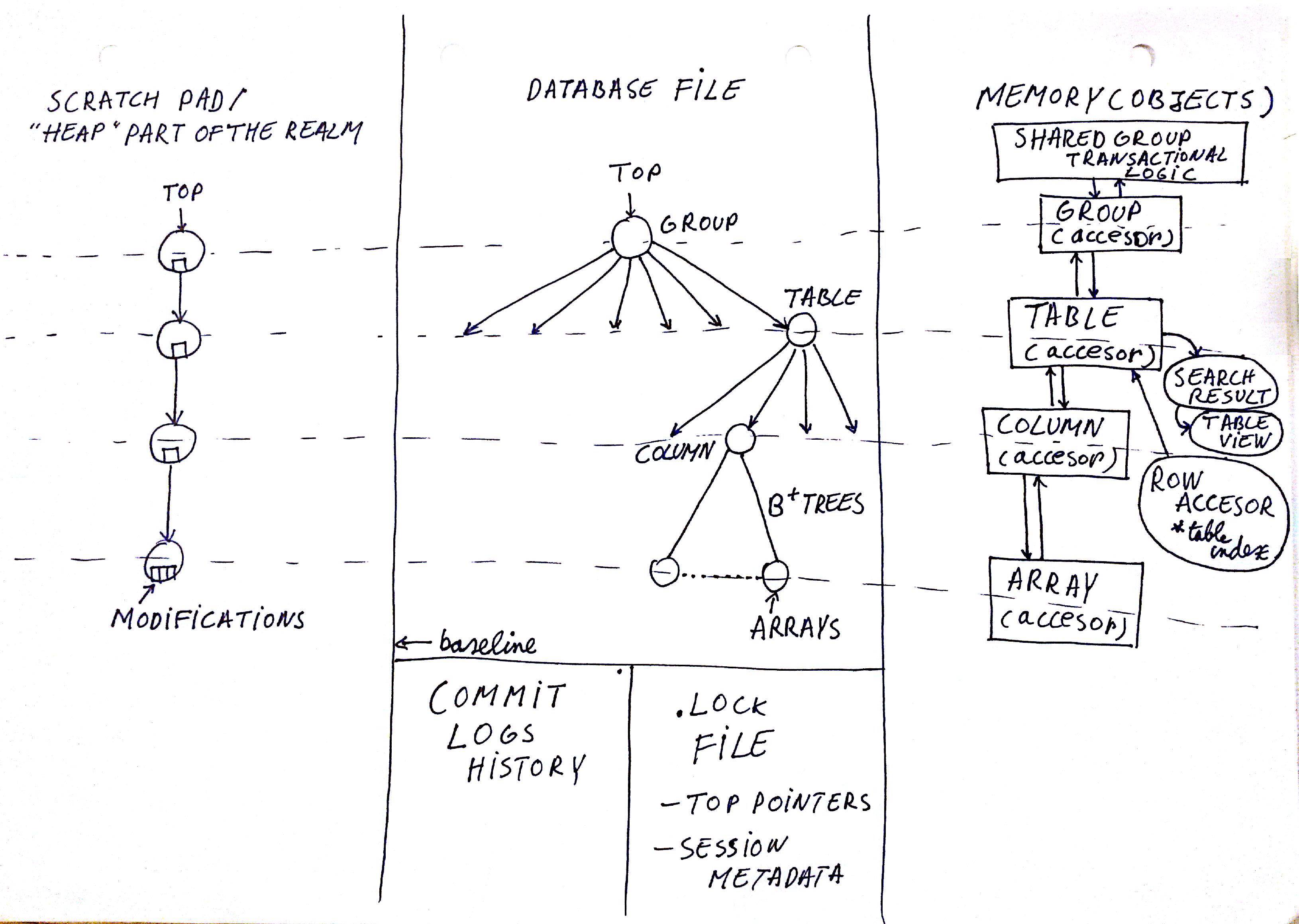
First, let’s talk about the Database File in the middle.
The .realm file is memory mapped, and every object is a reference to an offset from the file’s starting address. Object storage is not necessarily contiguous, but Array can be guaranteed to be stored contiguously.
When .realm performs a write operation, there are three pointers: one is the *current top pointer, one is the other top pointer, and the last one is the switch bit*.
switch bit* indicates whether the top pointer has already been used. If it has been used, it means the database is already readable.
the top pointer is updated first, followed by the switch bit. Because even if the write fails, although all data is lost, this ensures the database remains readable.
Next, let’s talk about the .lock file.
The .lock file contains the metadata of the shared group. This file is responsible for allowing multiple threads to access the same Realm object.
Finally, let’s talk about Commit logs history.
This file is used to update indexes and for synchronization. It mainly maintains three small files: two are data-related, and one is for operation management.
Summary
After the analysis above, it is clear that Realm was born for speed! While satisfying ACID requirements, many of its design choices prioritize speed. Of course, Realm’s core philosophy is object-driven design, which is Realm’s fundamental principle. Realm is essentially an embedded database, but it is also another way of looking at data. It rethinks models and business logic in mobile applications from a different perspective.
Realm is also cross-platform, and it is wonderful that multiple platforms can use the same database. I believe more and more developers will use Realm as the database for their apps.
Reference links
Realm official website
Realm official documentation
Realm GitHub
