Remote debugging on iOS with Safari Web Inspector
Debugging Hybrid apps at the company used to be pretty painful: I had to open the ZIP package locally, run the JS, and then debug it. Every time I had to locate the ZIP file, which was fairly annoying. Later, I found this remote debugging method—just plug in the phone and you can debug directly, without all that hassle. You can also see the real-time results directly on the phone.
I later found that some JS frontend developers still didn’t know about this method, so I’m sharing it today. Take a look, and please feel free to point out any issues.
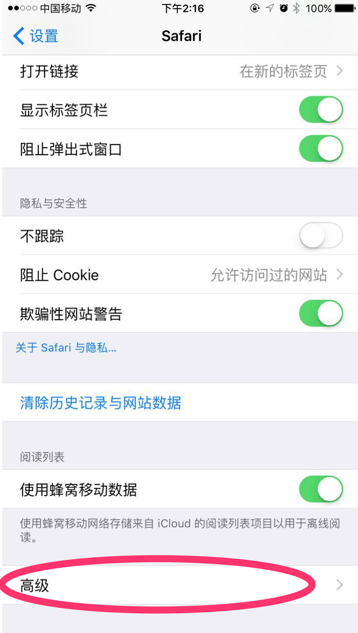
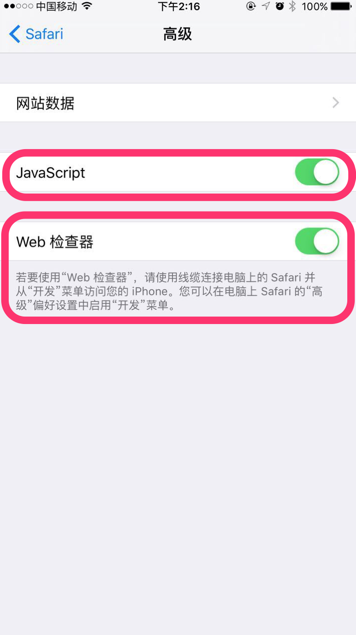
- First, connect the iPhone to the Mac, tap Trust, and make sure iTunes connects successfully. Then open “Settings” - “Safari” - “Advanced” on the iPhone, and enable “JavaScript” and “Web Inspector”.
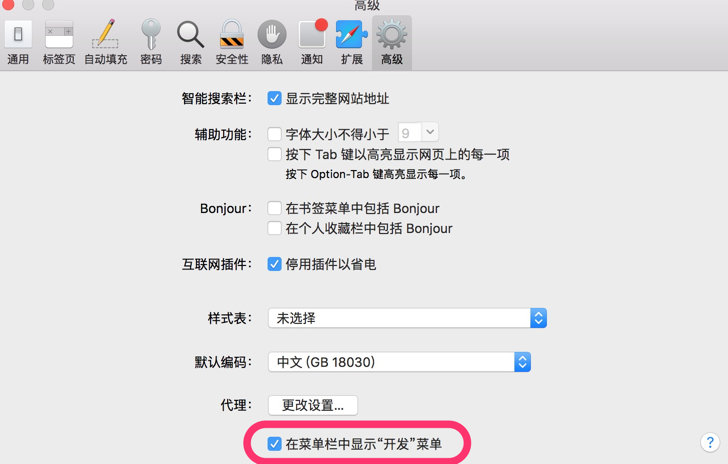
- Open Safari on the Mac, choose “Preferences” - “Advanced” - “Show Develop menu in menu bar”
- Open Safari on the iPhone, or run the PhoneGap app, and navigate to a page. Then go back to Safari on the Mac, choose “Develop”, and select your iPhone. You’ll be able to inspect that web page.

