This site now supports TLS 1.3
I’ve recently been studying the TLS 1.3 protocol, so I wanted to get some hands-on experience with it; the blog needs to deploy TLS 1.3 first. Its 0-RTT feature can also improve the blog’s performance. Note that Chrome 68 and Firefox currently support TLS 1.3 draft 28, so do not use it in production environments for now.
More details about TLS 1.3 will be analyzed in later articles.
I. Install dependencies
First, let’s take a look at the dependencies.
Nginx 1.13.0 officially introduced support for the TLSv1.3 option in ssl_protocols. Before that, the TLSv1.2 option would automatically enable TLSv1.3.
OpenSSL currently has a draft-18 branch, draft-23 in the pre2 version, and draft-28 in pre7+. You can check the current draft via tls1.h (include/openssl/tls1.h line 35).
TLSv1.3 Draft 23 has been enabled and used by default since Chrome 65, and Draft 28 has been supported since Chrome 68 (Firefox Nightly should support it as well).
My ECS system is centOS 7.0. If you use another distribution, adjust the package-management commands accordingly.
Currently, the latest nginx is Nginx 1.15.3, and the latest OpenSSL is 1.1.1-pre9. This time I will install the latest versions of both.
First, install the dependency libraries and the tools needed for compilation:
$ sudo yum groupinstall -y "Development Tools"
$ sudo yum install -y git wget zlib zlib-devel pcre-devel google-perftools google-perftools-devel lua-devel GeoIP-devel
$ sudo yum install -y git gcc gcc-c clang automake make autoconf libtool zlib-devel libatomic_ops-devel pcre-devel openssl-devel libxml2-devel libxslt-devel gd-devel GeoIP-devel gperftools-devel  perl-devel perl-ExtUtils-Embed
Nginx 1.15.3
#Download Nginx 1.15.3
$ wget https://nginx.org/download/nginx-1.15.3.tar.gz
$ tar zxf nginx-1.15.3.tar.gz
Installing the vanilla Nginx 1.15.3 leaves out some useful features. Fortunately, patches are available. I applied 5 patches here and recommend them as well.
- Restore support for the SPDY protocol
- Support HTTP/2 HPACK encryption
- Support Dynamic TLS Record (highly recommended)
- Support SSL_OP_PRIORITIZE_CHACHA (highly recommended)
- Fix Http2 Push Error patch (recommended)
These patches may not apply to the latest Nginx versions. For tested versions, see https://github.com/kn007/patch
# Apply SPDY, HTTP2 HPACK, Dynamic TLS Record, PRIORITIZE_CHACHA, Fix Http2 Push Error patches

$ cd nginx-1.15.3
$ wget https://raw.githubusercontent.com/kn007/patch/45f1417c450fc82cd470cb73a32e23085c4ba3d5/nginx.patch
$ wget https://raw.githubusercontent.com/kn007/patch/c59592bc1269ba666b3bb471243c5212b50fd608/nginx_auto_using_PRIORITIZE_CHACHA.patch
$ patch -p1 < nginx.patch
$ patch -p1 < nginx_auto_using_PRIORITIZE_CHACHA.patch
$ cd ..
Update:
For Nginx with TLS 1.3 0-RTT support, it is best to use version 1.15.4 or later. Here, I upgraded directly to the latest version, 1.15.8.
#Download Nginx 1.15.8
$ wget https://nginx.org/download/nginx-1.15.8.tar.gz
$ tar zxf nginx-1.15.8.tar.gz
The patch corresponding to Nginx 1.15.8 has changed:
# SPDY, HTTP2 HPACK, Dynamic TLS Record, Fix Http2 Push Error Patch

# This patch may not apply to the latest Nginx; for tested versions, see https://github.com/kn007/patch
$ cd nginx-1.15.8
$ curl https://raw.githubusercontent.com/kn007/patch/d6bd9f7e345a0afc88e050a4dd991a57b7fb39be/nginx.patch | patch -p1
$ cd ..
The following is the Strict-SNI Patch; installation is optional, and I did not install it:
# Strict-SNI Patch

# Strict SNI requires at least two ssl server (fake) settings (server { listen 443 ssl }).

#It does not matter what kind of certificate or duplicate.

$ cd nginx-1.15.8
$ curl https://raw.githubusercontent.com/hakasenyang/openssl-patch/master/nginx_strict-sni.patch | patch -p1
$ cd ..
OpenSSL 1.1.1-pre9
# Download OpenSSL 1.1.1-pre9
$ wget https://www.openssl.org/source/openssl-1.1.1-pre9.tar.gz
$ tar zxf openssl-1.1.1-pre9.tar.gz
Because different versions of Chrome support different TLS variants, we should ideally support all mainstream TLS 1.3 versions. Here we apply another patch to support drafts 23, 26, and 28 simultaneously.
# Apply TLS 1.3 Draft 23, 26, 28 patches

# Depends on the OpenSSL version; see https://github.com/hakasenyang/openssl-patch for details
$ cd openssl-1.1.1-pre9
$ wget https://raw.githubusercontent.com/hakasenyang/openssl-patch/master/openssl-equal-pre9.patch
$ patch -p1 < openssl-equal-pre9.patch
$ cd ..
Update:
OpenSSL must be version 1.1.1+ to support TLS 1.3 0-RTT; here, I upgraded directly to the latest version, 1.1.1a.
# Install OpenSSL 1.1.1a (LTS)
$ wget https://www.openssl.org/source/openssl-1.1.1a.tar.gz
$ tar zxf openssl-1.1.1a.tar.gz
Similarly, to support different versions of Chrome, several major draft versions of TLS 1.3 need to be supported: Draft 23, 26, 28, and Final. Patch them in!
# Apply patches for TLS1.3 Draft 23, 26, 28, and Final Patch

#Depends on the OpenSSL version, see https://github.com/hakasenyang/openssl-patch
$ cd openssl-1.1.1a
$ curl https://raw.githubusercontent.com/hakasenyang/openssl-patch/master/openssl-equal-1.1.1a_ciphers.patch | patch -p1
$ cd ..
To add the following two features to OpenSSL:
- Enable OpenSSL to support functionality equivalent to BoringSSL cipher groups.
- In TLS 1.1 and later, prevent 3DES from being used with ECDHE cipher suites to improve security.
A patch is required.
# Apply the CHACHA20-POLY1305-OLD Patch
$ cd openssl-1.1.1a
$ curl https://raw.githubusercontent.com/hakasenyang/openssl-patch/master/openssl-1.1.1a-chacha_draft.patch | patch -p1
$ cd ..
ngx_brotli
This site supports the Brotli compression format developed by Google. By using a built-in dictionary derived from analyzing a large number of web pages, it achieves a higher compression ratio while having almost no impact on compression/decompression speed.
# Install ngx_brotli
$ git clone https://github.com/eustas/ngx_brotli.git
pushd ngx_brotli
$ git submodule update --init
$ cd ..
jemalloc
This plugin is also optional; I did not install it.
$ git clone https://github.com/jemalloc/jemalloc.git
$ cd jemalloc
$ ./autogen.sh
$ make -j$(nproc --all)
$ touch doc/jemalloc.html
$ touch doc/jemalloc.3
$ sudo make install
$ echo '/usr/local/lib' | sudo tee /etc/ld.so.conf.d/local.conf
$ sudo ldconfig
zlib (Cloudflare)
zlib is recommended by Cloudflare, but I haven’t installed it yet. The main issue is that there seems to be a problem with the compilation parameters, and the resulting build reports errors. I’ll need to look into it further when I have time.
$ git clone https://github.com/cloudflare/zlib.git
$ cd zlib
$ ./configure
$ cd ..
libatomic_ops
This plugin is also optional to install; I did not install it. This is likewise due to issues with the compilation parameters.
$ git clone https://github.com/ivmai/libatomic_ops.git
$ cd libatomic_ops
$ ./autogen.sh
$ ./configure
$ make -j$(nproc --all)
$ make install
$ sudo ldconfig
$ cd ..
pcre
This plugin is also optional; I did not install it. This is likewise due to compilation parameter issues.
$ wget https://ftp.pcre.org/pub/pcre/pcre-8.42.zip
$ unzip pcre-8.42.zip&&rm pcre-8.42.zip
$ mv pcre-8.42 pcre
$ cd pcre
$ ./configure
$ cd ..
II. Compiling Nginx
Use --with\-openssl=../openssl\-1.1.1\-pre9 to specify the OpenSSL path.
HTTP/2 HPACK requires adding --with-http_v2_hpack_enc
SPDY requires adding --with-http_spdy_module
TLS 1.3 requires adding --with-openssl-opt='enable-tls1_3'
All the compilation options together are as follows:
$ auto/configure --prefix=/etc/nginx --sbin-path=/usr/sbin/nginx --modules-path=/usr/lib64/nginx/modules --conf-path=/etc/nginx/nginx.conf --error-log-path=/var/log/nginx/error.log --http-log-path=/var/log/nginx/access.log --pid-path=/var/run/nginx.pid --lock-path=/var/run/nginx.lock --http-client-body-temp-path=/var/cache/nginx/client_temp --http-proxy-temp-path=/var/cache/nginx/proxy_temp --http-fastcgi-temp-path=/var/cache/nginx/fastcgi_temp --http-uwsgi-temp-path=/var/cache/nginx/uwsgi_temp --http-scgi-temp-path=/var/cache/nginx/scgi_temp --user=nginx --group=nginx --with-compat --with-file-aio --with-threads --with-http_addition_module --with-http_auth_request_module --with-http_dav_module --with-http_flv_module --with-http_gunzip_module --with-http_gzip_static_module --with-http_mp4_module --with-http_random_index_module --with-openssl=/tmp/openssl-OpenSSL_1_1_1-pre9 --with-openssl-opt='enable-tls1_3' --with-http_realip_module --with-http_secure_link_module --with-http_slice_module --with-http_ssl_module --with-http_stub_status_module --with-http_sub_module --with-http_v2_module --with-mail --with-mail_ssl_module --with-stream --with-stream_realip_module --with-stream_ssl_module --with-stream_ssl_preread_module --with-cc-opt='-O2 -g -pipe -Wall -Wp,-D_FORTIFY_SOURCE=2 -fexceptions -fstack-protector-strong --param=ssp-buffer-size=4 -grecord-gcc-switches -m64 -mtune=generic -fPIC' --with-ld-opt='-Wl,-z,relro -Wl,-z,now -pie' --with-http_spdy_module --with-http_v2_hpack_enc --add-module=/tmp/ngx_brotli
If you have installed all the patches recommended above, you may run into issues when compiling further. Simply remove -O2 from the --with-cc-opt build option.
My final build options are as follows, for reference only:
$ auto/configure --prefix=/etc/nginx --sbin-path=/usr/sbin/nginx --modules-path=/usr/lib64/nginx/modules --conf-path=/etc/nginx/nginx.conf --error-log-path=/var/log/nginx/error.log --http-log-path=/var/log/nginx/access.log --pid-path=/var/run/nginx.pid --lock-path=/var/run/nginx.lock --http-client-body-temp-path=/var/cache/nginx/client_temp --http-proxy-temp-path=/var/cache/nginx/proxy_temp --http-fastcgi-temp-path=/var/cache/nginx/fastcgi_temp --http-uwsgi-temp-path=/var/cache/nginx/uwsgi_temp --http-scgi-temp-path=/var/cache/nginx/scgi_temp --user=nginx --group=nginx --with-compat --with-file-aio --with-threads --with-http_addition_module --with-http_auth_request_module --with-http_dav_module --with-http_flv_module --with-http_gunzip_module --with-http_gzip_static_module --with-http_mp4_module --with-http_random_index_module --with-openssl=/tmp/openssl-OpenSSL_1_1_1-pre9 --with-openssl-opt='enable-tls1_3' --with-http_realip_module --with-http_secure_link_module --with-http_slice_module --with-http_ssl_module --with-http_stub_status_module --with-http_sub_module --with-http_v2_module --with-mail --with-mail_ssl_module --with-stream --with-stream_realip_module --with-stream_ssl_module --with-stream_ssl_preread_module --with-cc-opt='-g -pipe -Wall -Wp,-D_FORTIFY_SOURCE=2 -fexceptions -fstack-protector-strong --param=ssp-buffer-size=4 -grecord-gcc-switches -m64 -mtune=generic -fPIC' --with-ld-opt='-Wl,-z,relro -Wl,-z,now -pie' --with-http_spdy_module --with-http_v2_hpack_enc --add-module=/tmp/ngx_brotli
After updating the build parameters, you can start running make:
$ make
If you also encounter a pthread_atfork error during compilation:
threads_pthread.c:(.text+0x16): undefined reference to `pthread_atfork'
collect2: error: ld returned 1 exit status
make[1]: *** [objs/nginx] Error 1
Modify the Makefile in the objs directory under the nginx directory:
$ vim ./objs/Makefile
Find the following line:
-Wl,-z,relro -Wl,-z,now -pie -ldl -lpthread -lpthread -lcrypt -lpcre /tmp/openssl-master/.openssl/lib/libssl.a /tmp/openssl-master/.openssl/lib/libcrypto.a -ldl -lz \
Change to:
-Wl,-z,relro -Wl,-z,now -pie -ldl -lcrypt -lpcre /tmp/openssl-master/.openssl/lib/libssl.a /tmp/openssl-master/.openssl/lib/libcrypto.a -ldl -lz -lpthread \
After compilation is complete, verify it:
$ nginx -V

nginx version: nginx/1.15.3
built by gcc 4.8.5 20150623 (Red Hat 4.8.5-28) (GCC)
built with OpenSSL 1.1.1-pre9 (beta) 21 Aug 2018
TLS SNI support enabled
configure arguments: --prefix=/etc/nginx --sbin-path=/usr/sbin/nginx --modules-path=/usr/lib64/nginx/modules --conf-path=/etc/nginx/nginx.conf --error-log-path=/var/log/nginx/error.log --http-log-path=/var/log/nginx/access.log --pid-path=/var/run/nginx.pid --lock-path=/var/run/nginx.lock --http-client-body-temp-path=/var/cache/nginx/client_temp --http-proxy-temp-path=/var/cache/nginx/proxy_temp --http-fastcgi-temp-path=/var/cache/nginx/fastcgi_temp --http-uwsgi-temp-path=/var/cache/nginx/uwsgi_temp --http-scgi-temp-path=/var/cache/nginx/scgi_temp --user=nginx --group=nginx --with-compat --with-file-aio --with-threads --with-http_addition_module --with-http_auth_request_module --with-http_dav_module --with-http_flv_module --with-http_gunzip_module --with-http_gzip_static_module --with-http_mp4_module --with-http_random_index_module --with-openssl=/tmp/openssl-OpenSSL_1_1_1-pre9 --with-openssl-opt=enable-tls1_3 --with-http_realip_module --with-http_secure_link_module --with-http_slice_module --with-http_ssl_module --with-http_stub_status_module --with-http_sub_module --with-http_v2_module --with-mail --with-mail_ssl_module --with-stream --with-stream_realip_module --with-stream_ssl_module --with-stream_ssl_preread_module --with-cc-opt='-g -pipe -Wall -Wp,-D_FORTIFY_SOURCE=2 -fexceptions -fstack-protector-strong --param=ssp-buffer-size=4 -grecord-gcc-switches -m64 -mtune=generic -fPIC' --with-ld-opt='-Wl,-z,relro -Wl,-z,now -pie' --with-http_spdy_module --with-http_v2_hpack_enc --add-module=/tmp/ngx_brotli
Update:
Since both Nginx and OpenSSL now support TLS 1.3 0-RTT, the build parameters have also been updated:
$ cd nginx-1.15.8
$ ./configure --prefix=/etc/nginx --sbin-path=/usr/sbin/nginx --modules-path=/usr/lib64/nginx/modules --conf-path=/etc/nginx/nginx.conf --error-log-path=/var/log/nginx/error.log --http-log-path=/var/log/nginx/access.log --pid-path=/var/run/nginx.pid --lock-path=/var/run/nginx.lock --http-client-body-temp-path=/var/cache/nginx/client_temp --http-proxy-temp-path=/var/cache/nginx/proxy_temp --http-fastcgi-temp-path=/var/cache/nginx/fastcgi_temp --http-uwsgi-temp-path=/var/cache/nginx/uwsgi_temp --http-scgi-temp-path=/var/cache/nginx/scgi_temp --user=nginx --group=nginx --with-compat --with-file-aio --with-threads --with-http_addition_module --with-http_auth_request_module --with-http_dav_module --with-http_flv_module --with-http_gunzip_module --with-http_gzip_static_module --with-http_mp4_module --with-http_random_index_module --with-libatomic --with-openssl=/tmp/openssl-1.1.1a --with-openssl-opt='zlib -march=native -ljemalloc -Wl,-flto' --with-http_realip_module --with-http_secure_link_module --with-http_slice_module --with-http_ssl_module --with-http_stub_status_module --with-http_sub_module --with-http_v2_module --with-mail --with-mail_ssl_module --with-stream --with-stream_realip_module --with-stream_ssl_module --with-stream_ssl_preread_module --with-pcre-jit --with-http_geoip_module --with-http_degradation_module --with-cc-opt='-g -pipe -Wall -Wp,-D_FORTIFY_SOURCE=2 -fexceptions -fstack-protector-strong --param=ssp-buffer-size=4 -grecord-gcc-switches -m64 -mtune=generic -fPIC' --with-ld-opt='-Wl,-z,relro -Wl,-z,now -pie' --with-http_spdy_module --with-http_v2_hpack_enc --add-module=/tmp/ngx_brotli
Build command:
$ make -j$(nproc --all)
$ sudo make install
After compilation is complete, verify it:
$ nginx -t

nginx: the configuration file /etc/nginx/nginx.conf syntax is ok
nginx: configuration file /etc/nginx/nginx.conf test is successful

$ nginx -V

nginx version: nginx/1.15.8
built by gcc 4.8.5 20150623 (Red Hat 4.8.5-28) (GCC)
built with OpenSSL 1.1.1a  20 Nov 2018
TLS SNI support enabled
configure arguments: --prefix=/etc/nginx --sbin-path=/usr/sbin/nginx --modules-path=/usr/lib64/nginx/modules --conf-path=/etc/nginx/nginx.conf --error-log-path=/var/log/nginx/error.log --http-log-path=/var/log/nginx/access.log --pid-path=/var/run/nginx.pid --lock-path=/var/run/nginx.lock --http-client-body-temp-path=/var/cache/nginx/client_temp --http-proxy-temp-path=/var/cache/nginx/proxy_temp --http-fastcgi-temp-path=/var/cache/nginx/fastcgi_temp --http-uwsgi-temp-path=/var/cache/nginx/uwsgi_temp --http-scgi-temp-path=/var/cache/nginx/scgi_temp --user=nginx --group=nginx --with-compat --with-file-aio --with-threads --with-http_addition_module --with-http_auth_request_module --with-http_dav_module --with-http_flv_module --with-http_gunzip_module --with-http_gzip_static_module --with-http_mp4_module --with-http_random_index_module --with-libatomic --with-openssl=/tmp/openssl-1.1.1a --with-openssl-opt='zlib -march=native -ljemalloc -Wl,-flto' --with-http_realip_module --with-http_secure_link_module --with-http_slice_module --with-http_ssl_module --with-http_stub_status_module --with-http_sub_module --with-http_v2_module --with-mail --with-mail_ssl_module --with-stream --with-stream_realip_module --with-stream_ssl_module --with-stream_ssl_preread_module --with-pcre-jit --with-http_geoip_module --with-http_degradation_module --with-cc-opt='-g -pipe -Wall -Wp,-D_FORTIFY_SOURCE=2 -fexceptions -fstack-protector-strong --param=ssp-buffer-size=4 -grecord-gcc-switches -m64 -mtune=generic -fPIC' --with-ld-opt='-Wl,-z,relro -Wl,-z,now -pie' --with-http_spdy_module --with-http_v2_hpack_enc --add-module=/tmp/ngx_brotli
III. Replace Nginx
$ cd /usr/sbin
$ mv nginx nginx.1.13.8_old
$ cp /tmp/nginx-release-1.15.3/objs/nginx ./
Test whether nginx is working properly:
$ nginx -t
IV. Configure Nginx
Configure Brotli (Optional)
$ sudo vim /etc/nginx/nginx.conf

# Add inside http{}
brotli             on;
brotli_static      on;
brotli_comp_level  6;
brotli_buffers     32 8k;
brotli_types       text/plain text/css application/json application/x-javascript text/xml application/xml application/xml+rss text/javascript application/javascript image/svg+xml;
Configure the Web Site
In the Nginx site configuration, the following two parameters need to be modified:
ssl_protocols              TLSv1 TLSv1.1 TLSv1.2 TLSv1.3; # Add TLSv1.3
ssl_ciphers                TLS13-AES-256-GCM-SHA384:TLS13-CHACHA20-POLY1305-SHA256:TLS13-AES-128-GCM-SHA256:TLS13-AES-128-CCM-8-SHA256:TLS13-AES-128-CCM-SHA256:EECDH+CHACHA20:EECDH+CHACHA20-draft:EECDH+ECDSA+AES128:EECDH+aRSA+AES128:RSA+AES128:EECDH+ECDSA+AES256:EECDH+aRSA+AES256:RSA+AES256:EECDH+ECDSA+3DES:EECDH+aRSA+3DES:RSA+3DES:!MD5;
The entries containing TLS13 are Cipher Suites newly added in TLS 1.3; just place them at the beginning.
Finally, run nginx -t to test and confirm there are no issues.
5. Deploy Nginx
Restart nginx to apply all the configurations above.
$ systemctl restart nginx
VI. Verifying TLS 1.3
Chrome Verification
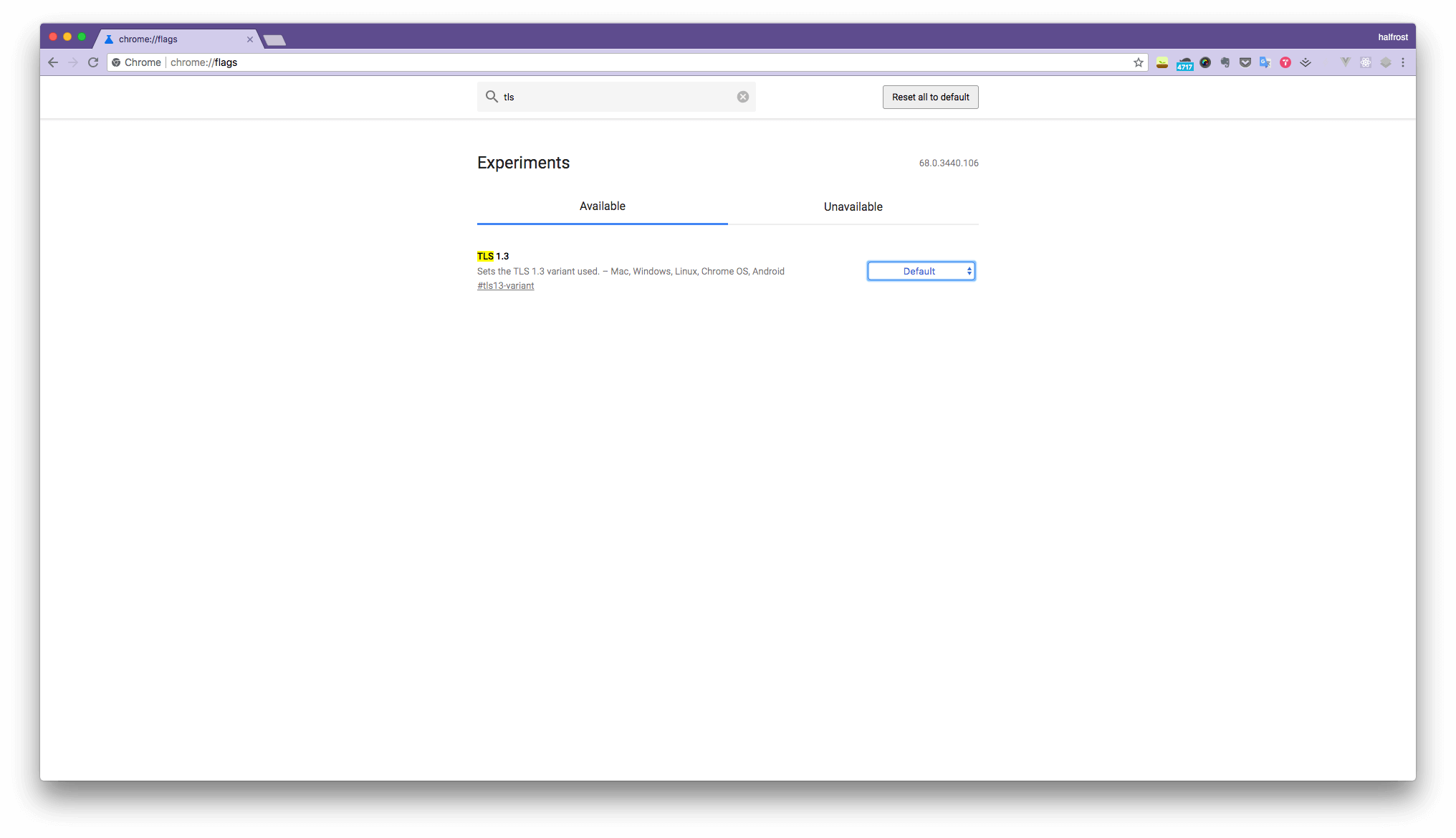
Go to the chrome://flags page, find TLS 1.3, and select support for draft-28.
Then visit the blog homepage, open Developer Tools, and go to the Security tab:
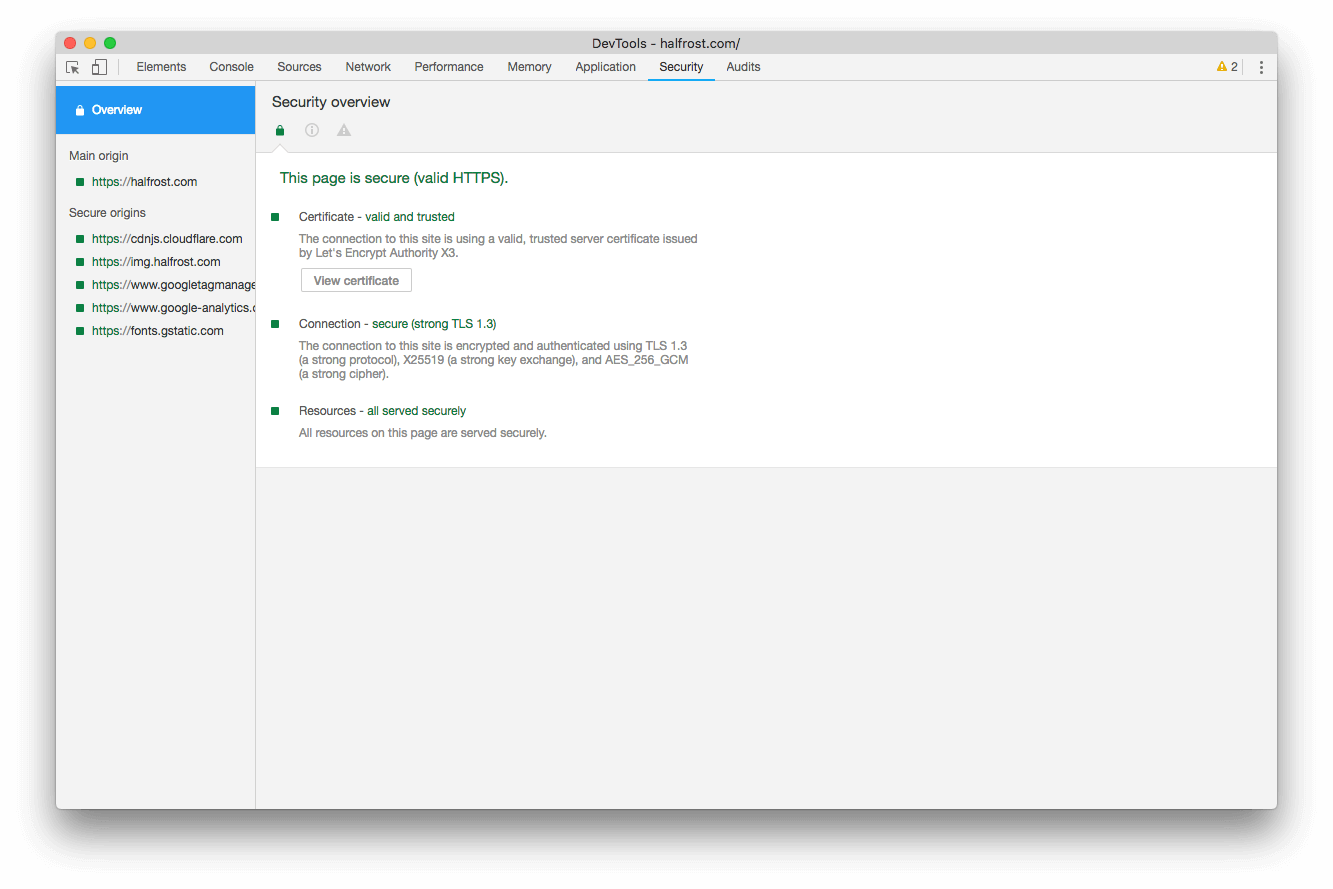
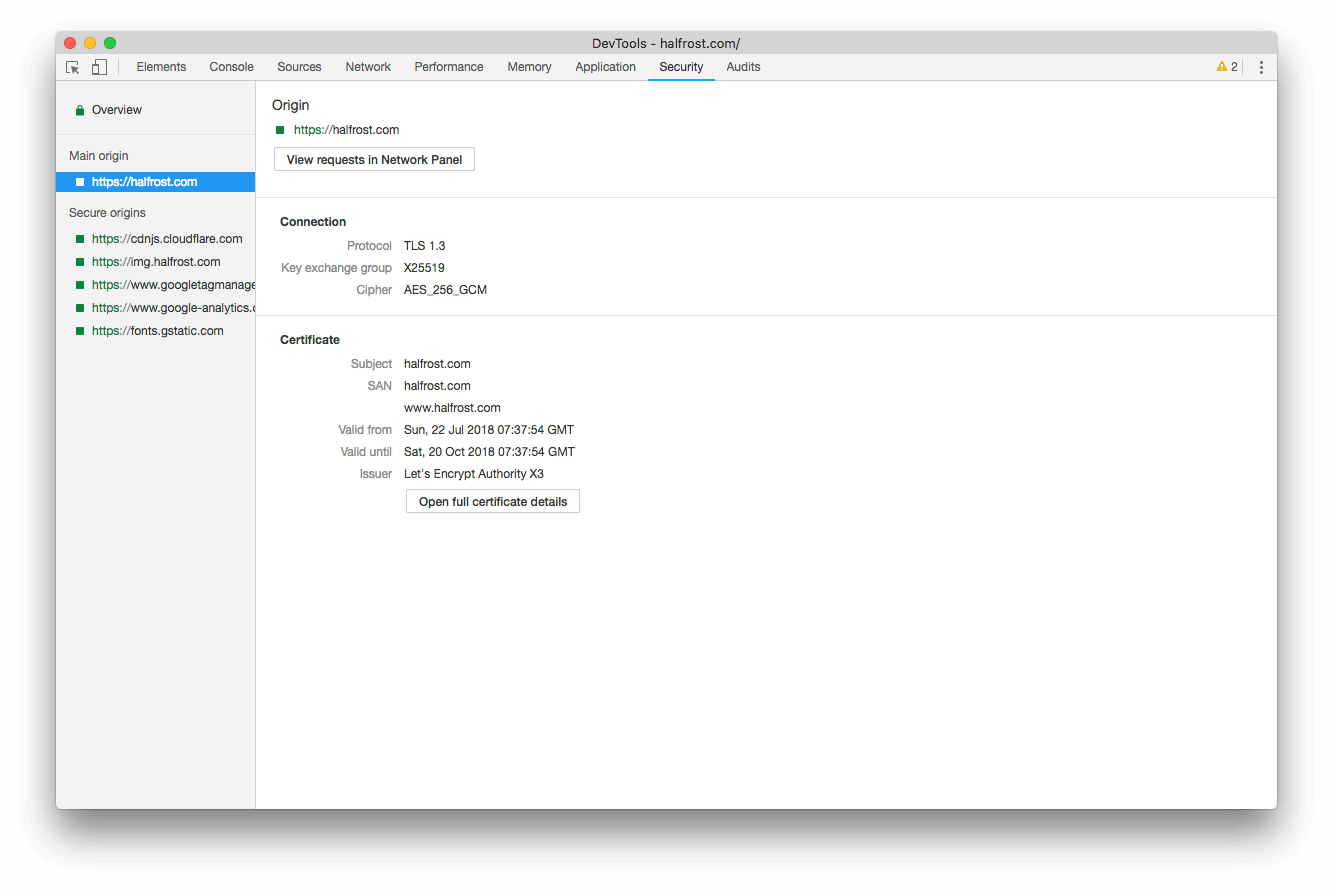
You can see that the connection is already using TLS 1.3.
Verifying with Wireshark Packet Capture
If you still want to be sure, you can verify whether TLS 1.3 is enabled by capturing packets.
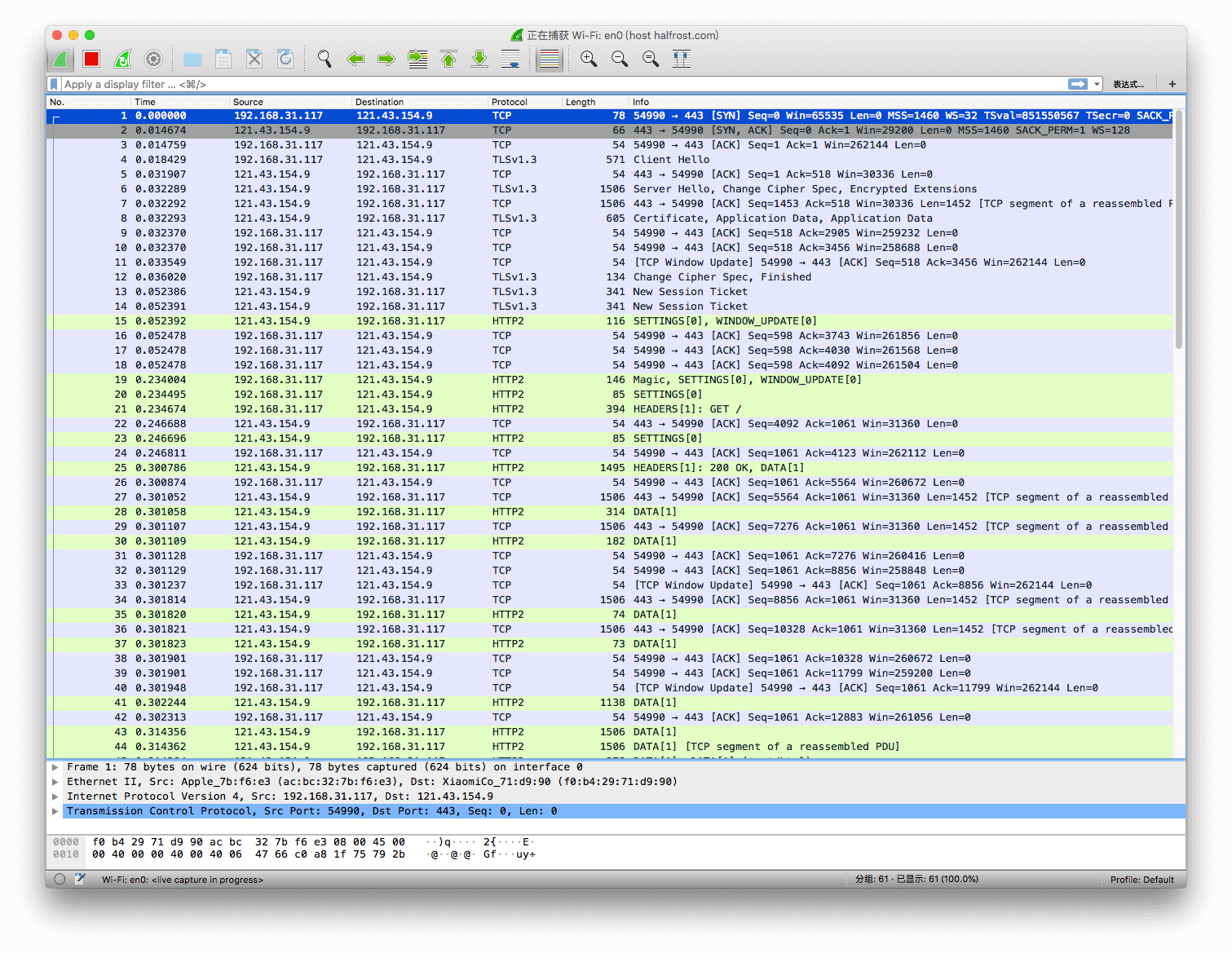
From the packets, the handshake phase is indeed using TLS 1.3.
SSL Labs Test Report
You can use https://www.ssllabs.com/ to check your site’s TLS support.
MySSL Test Report
You can use https://myssl.com/ to check your site’s TLS support.
Using the testssl Tool
Install the testssl tool on the server.
$ git clone --depth 1 https://github.com/drwetter/testssl.sh.git
$ cd testssl.sh
$ ./testssl.sh --help
$ ./testssl.sh -p halfrost.com

 Testing protocols via sockets except NPN+ALPN

 SSLv2      not offered (OK)
 SSLv3      not offered (OK)
 TLS 1      offered
 TLS 1.1    offered
 TLS 1.2    offered (OK)
 TLS 1.3    offered (OK): draft 28, draft 27, draft 26
 NPN/SPDY   h2, spdy/3.1, http/1.1 (advertised)
 ALPN/HTTP2 h2, spdy/3.1, http/1.1 (offered)
Use -P for details.
$ ./testssl.sh -P halfrost.com

 Testing server preferences

 Has server cipher order?     yes (OK)
 Negotiated protocol          TLSv1.3
 Negotiated cipher            TLS_AES_256_GCM_SHA384, 253 bit ECDH (X25519)
I won’t paste the more detailed report here; anyone interested can use
$ ./testssl.sh halfrost.com
$ ./testssl.sh --full https://halfrost.com
Self-test.
Enable TLS 1.3 0-RTT
Update:
Add the following to the nginx conf configuration file:
ssl_early_data on;
It is also recommended to add the Early-Data header to notify the backend and prevent replay attacks.
proxy_set_header Early-Data $ssl_early_data;
Finally, test it with sudo nginx -t.
More details about TLS 1.3 will be analyzed in future articles. Enjoy ~
GitHub Repo: Halfrost-Field
Follow: halfrost · GitHub
