How Weex Runs on the iOS Client
Preface
On April 21, 2016, Alibaba announced an open invitation for the closed beta of Weex, a cross-platform mobile development tool, at QCon. Weex strikes an excellent balance between performance and dynamism, allowing mobile developers to deliver native-level performance and user experience using simple frontend syntax, while supporting deployment across iOS, Android, YunOS, Web, and other platforms.
Over the past year, cross-platform technologies such as React Native and Weex have had a huge impact on native developers. Native app development has several drawbacks: clients need to be updated frequently, and iOS update timelines are constrained by App Store review; implementing the same requirement simultaneously across iOS, Android, and frontend requires significant staffing cost; and Hybrid performance still falls a bit short compared with Native.
React Native and Weex emerged to address exactly these pain points.

In just two weeks after the closed beta was announced on April 21, more than 5,000 developers applied.

On June 30, 2016, Alibaba officially announced that Weex was open source. Marketed as a cross-platform mobile development tool for building large-scale applications with native-level performance using a Web-style development approach, Weex reached the top of GitHub Trending on its first day as an open-source project. As of now, Weex has already reached 13,393 stars on GitHub, making it one of the most popular open-source projects from China on GitHub in 2016.
Table of Contents
- Weex Overview
- How Weex Works
- How Weex Runs on iOS
- About Weex, React Native, and JSPatch
I. Weex Overview
From the day Weex was born, it seemed destined to be paired with React Native.
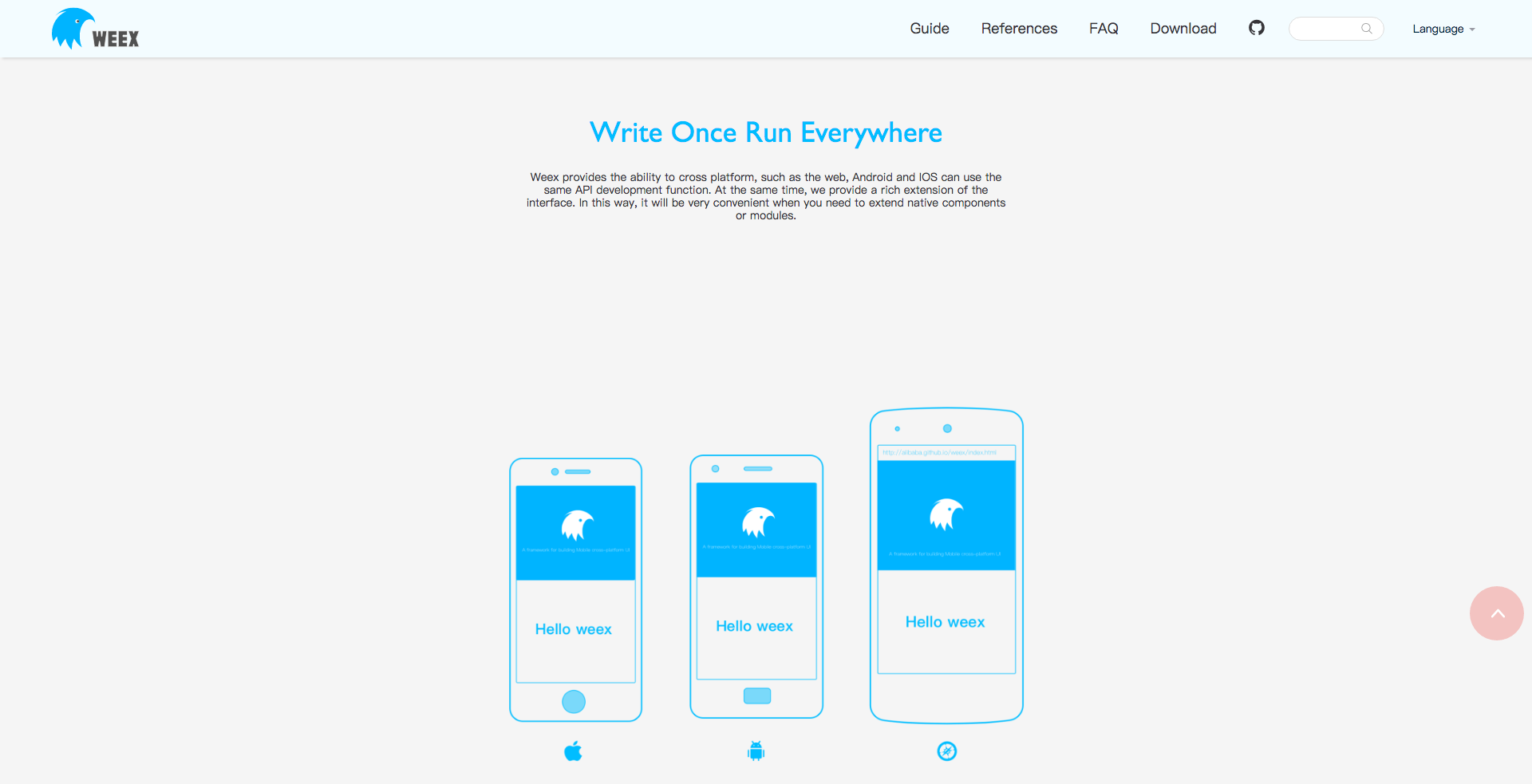
React Native claims “Learn once, write anywhere”, while Weex claims “Write Once, Run Everywhere”. From its inception, Weex was expected to unify all three platforms. React Native supports iOS and Android, while Weex supports iOS, Android, and HTML5. Unifying the three platforms addresses the second pain point mentioned in the preface: the staffing cost wasted by developing the same feature in parallel.
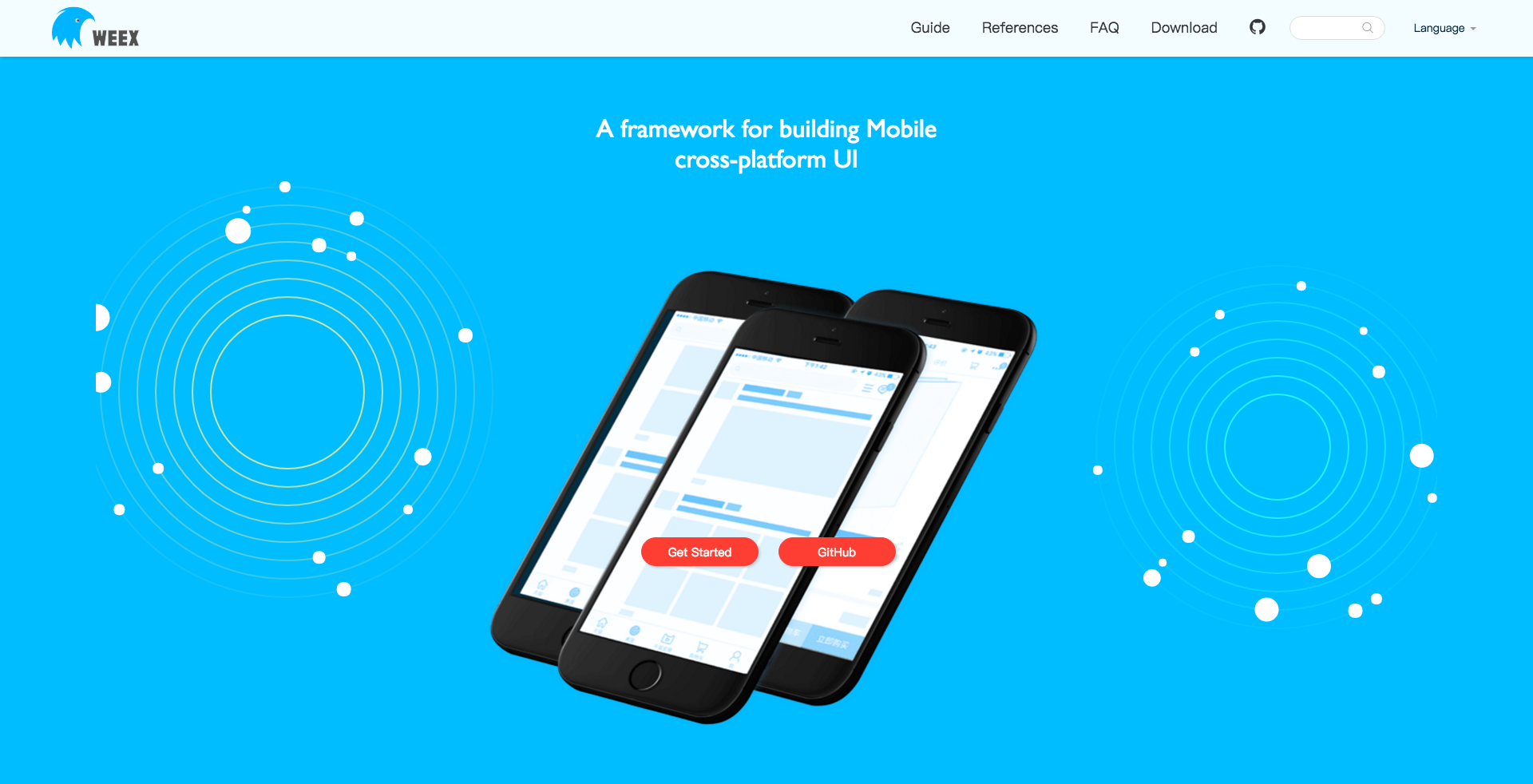
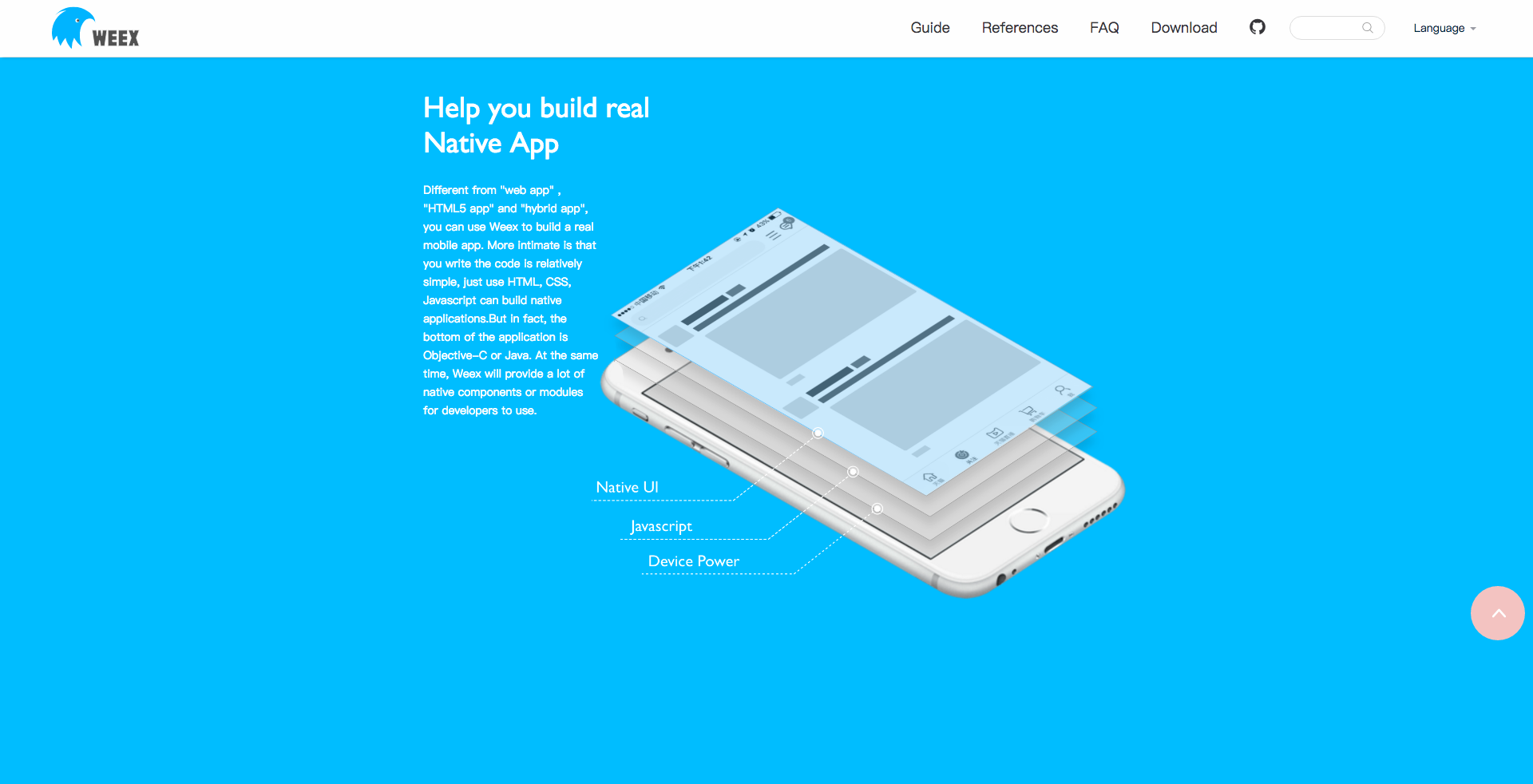
Native mobile developers only need to import the Weex SDK locally, and they can develop native-level Weex interfaces using the familiar HTML/CSS/JavaScript web programming stack. This means they can directly leverage code completion, hints, inspections, and other features from existing Web development editors and IDEs. It also gives frontend engineers a lower development and learning cost when building for Native platforms.
Weex is a lightweight, extensible, high-performance framework. Integration is also convenient: it can be embedded directly into HTML5 pages, or embedded into native UI. Because, like React Native, it calls native controls on the Native side, its performance is a level above Hybrid. This solves the third pain point mentioned in the preface: performance.
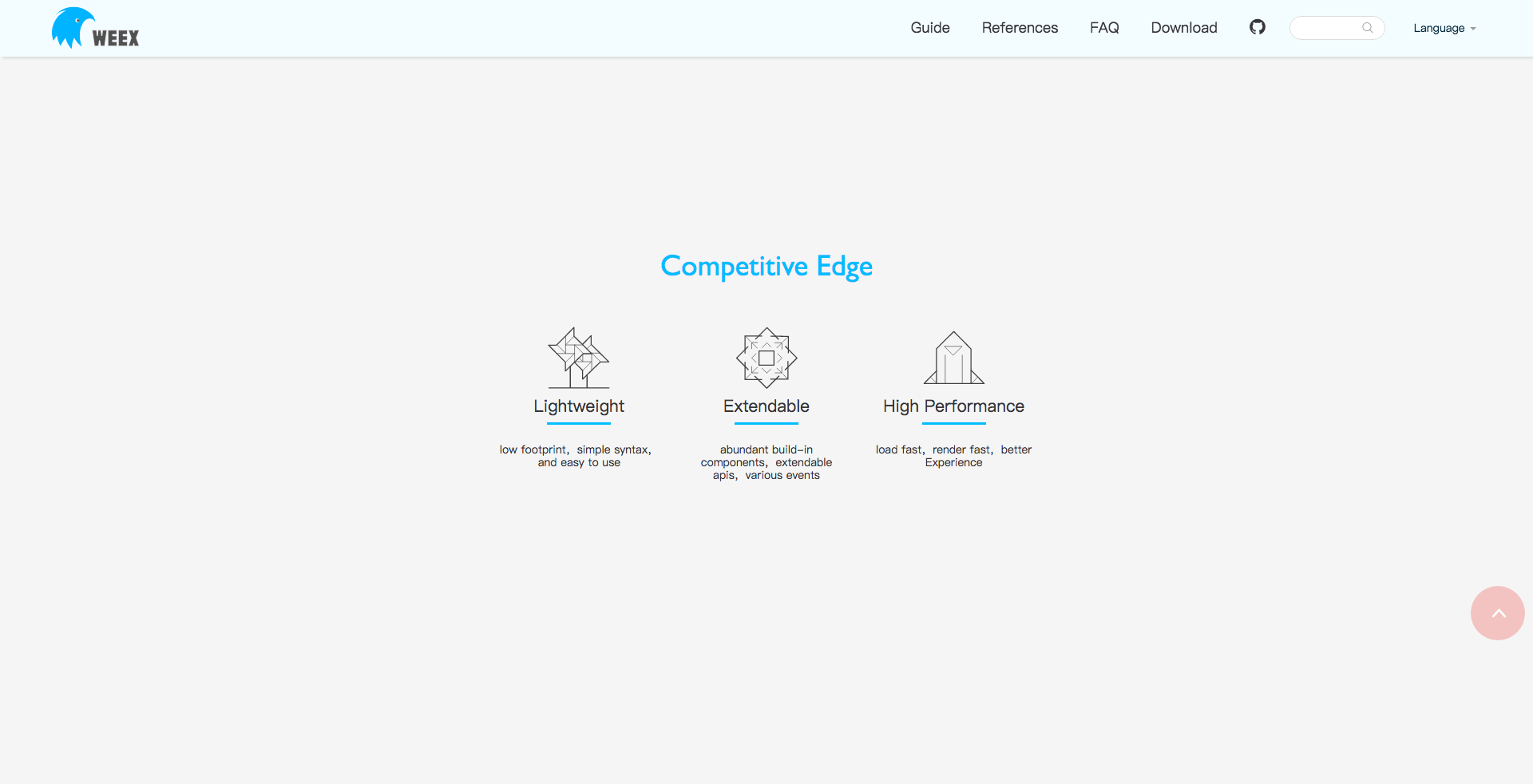
Weex is very lightweight, compact, syntactically simple, and easy to integrate and get started with. React Native officially only allows the base React Native JS library and business JS to be packaged together into a single JS bundle, and does not provide code-splitting functionality. So if you want to save bandwidth, you have to build your own split-bundling tool. By default, the JS bundle produced by Weex contains only business JS code, so it is much smaller; the base JS library is included in the Weex SDK. Compared with Facebook’s React Native and Microsoft’s Cordova, Weex is more lightweight and compact in this respect. You can easily deploy the JS bundle generated by Weex to the server side, then push it to the client, or have the client request the new resource, to complete a release. Such rapid iteration solves the first pain point mentioned in the preface: not being able to control release timing,
In Weex, Native components and APIs can both be extended horizontally. Business teams can decentralize and flexibly customize components and functional modules horizontally. They can also directly reuse frontend engineering management tools, performance monitoring tools, and so on.
There is a very good comparison article about Weex and React Native on Zhihu: weex & React Native comparison. I recommend reading it.
Weex officially released v0.10.0 on February 17, 2017. Starting with this milestone release, Weex became fully compatible with using Vue.js to develop Weex interfaces.
Weex was then migrated to the Apache Foundation on February 24, 2017, and Alibaba will continue iterating on it based on Apache infrastructure. A brand-new GitHub repository was also launched: https://github.com/apache/incubator-weex
Therefore, the following source code analysis is based on version v0.10.0.
II. How Weex Works
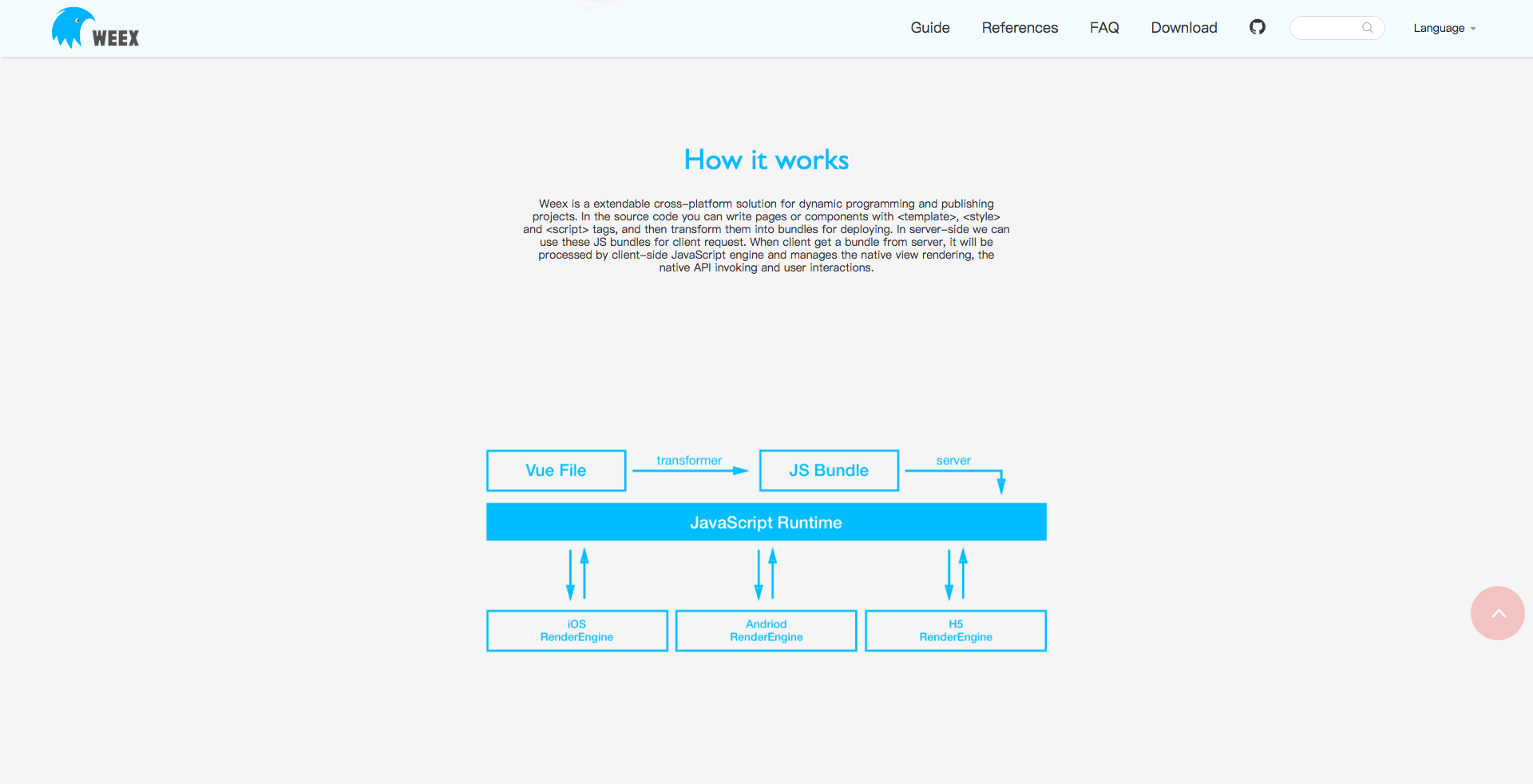
The diagram above is an official architecture diagram. This article will not cover how Weex packages JS into a JS Bundle for the time being. Instead, it will analyze in detail how Weex works on the Native side. I further break down the Native-side mechanism as shown below:

With its self-designed DSL, Weex lets you write .we files or .vue files to develop interfaces. An entire page is divided into three sections: template, style, and script, borrowing from the mature ideas of MVVM.
For performance, in order to improve client-side performance as much as possible, Weex puts all DSL Transformers on the server side. On the server side, Weex converts all XML + CSS + JavaScript code into a JS Bundle. The server then deploys the JS Bundle to the Server and CDN.
Unlike React Native, Weex builds the JS Framework into the SDK, using it to parse the JS Bundle downloaded from the server. This also reduces the size of each JS Bundle, eliminating React Native’s need for bundle splitting. After the client requests the JS Bundle, it passes it to the JS Framework. Once the JS Framework finishes parsing, it outputs a Virtual DOM in JSON format. The client-side Native layer only needs to focus on parsing and laying out the Virtual DOM, and rendering the UI. In practice, the SDK has already implemented most of this parsing, layout, and rendering logic.
Finally, Weex supports consistency across three platforms. A single JS Bundle on the server can be parsed to achieve consistency across iOS/Android/HTML5.
III. How Weex Runs on iOS
After the analysis in the previous chapter, we understand the overall Weex workflow. Since my frontend knowledge is limited, this article will not cover the frontend source code analysis from .we or .vue files to JS bundle for now. Once I become more familiar with frontend development, I will add that part later.
Before the analysis, let me clarify one thing: all of Weex’s source code has in fact already been open sourced. However, the SDK Demo also depends on an ATSDK.framework, which is not open source. ATSDK.framework is actually a plugin for Weex performance monitoring.
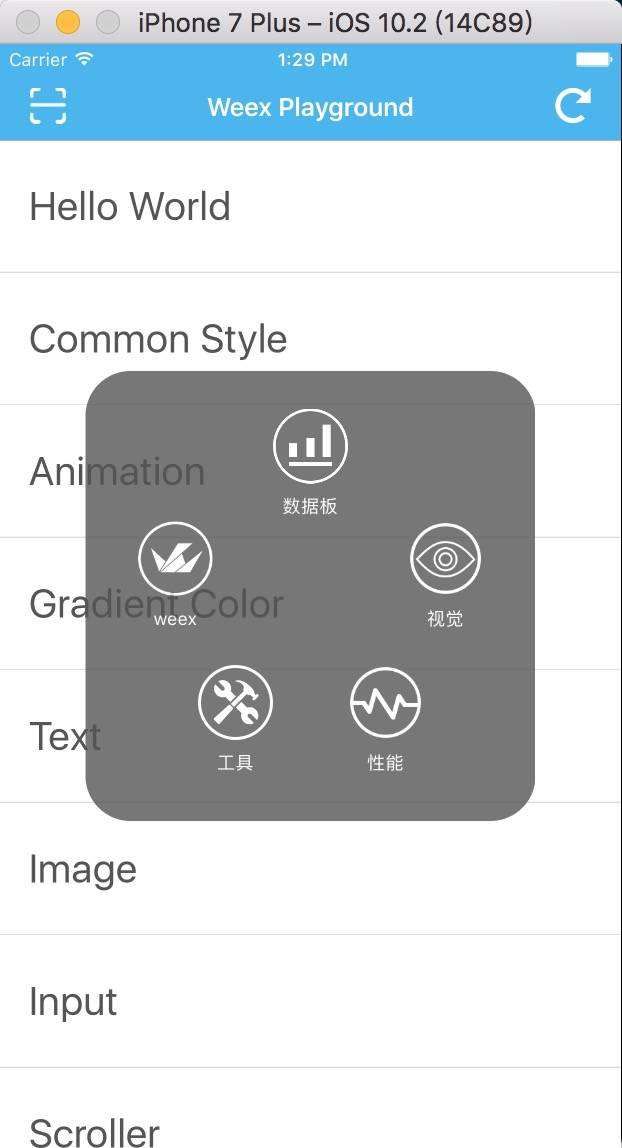
It is the plugin shown in the gray box in the diagram above. Some large companies have their own APM systems for this kind of plugin. Alibaba has not open sourced this part for now, but it does not affect any Weex functionality.
Next, let’s analyze in detail how Weex runs on the iOS Native side, directly from the source code.
(1). Weex SDK Initialization
This is the first step for running Weex on the Native side.
- (BOOL)application:(UIApplication *)application didFinishLaunchingWithOptions:(NSDictionary *)launchOptions
{
    self.window = [[UIWindow alloc] initWithFrame:[UIScreen mainScreen].bounds];
    self.window.backgroundColor = [UIColor whiteColor];

    // Initialize the SDK here
    [self initWeexSDK];

    self.window.rootViewController = [[WXRootViewController alloc] initWithRootViewController:[self demoController]];
    [self.window makeKeyAndVisible];

    return YES;
}
Initialize the SDK in the application: didFinishLaunchingWithOptions: function. A lot of things are initialized here. Some may ask: if initialization is done here, and so much is initialized, won’t that block the app’s startup time? Keep reading with that question in mind.
#pragma mark weex
- (void)initWeexSDK
{
    [WXAppConfiguration setAppGroup:@"AliApp"];
    [WXAppConfiguration setAppName:@"WeexDemo"];
    [WXAppConfiguration setExternalUserAgent:@"ExternalUA"];

    [WXSDKEngine initSDKEnvironment];

    [WXSDKEngine registerHandler:[WXImgLoaderDefaultImpl new] withProtocol:@protocol(WXImgLoaderProtocol)];
    [WXSDKEngine registerHandler:[WXEventModule new] withProtocol:@protocol(WXEventModuleProtocol)];

    [WXSDKEngine registerComponent:@"select" withClass:NSClassFromString(@"WXSelectComponent")];
    [WXSDKEngine registerModule:@"event" withClass:[WXEventModule class]];
    [WXSDKEngine registerModule:@"syncTest" withClass:[WXSyncTestModule class]];

#if !(TARGET_IPHONE_SIMULATOR)
    [self checkUpdate];

#endif

#ifdef DEBUG
    [self atAddPlugin];
    [WXDebugTool setDebug:YES];
    [WXLog setLogLevel:WXLogLevelLog];

    #ifndef UITEST
        [[ATManager shareInstance] show];
    #endif

#else
    [WXDebugTool setDebug:NO];
    [WXLog setLogLevel:WXLogLevelError];

#endif
}
The above is everything that needs to be initialized in application:didFinishLaunchingWithOptions:. Let’s go through it line by line.
WXAppConfiguration is a singleton object used to record the app’s configuration information.
@interface WXAppConfiguration : NSObject

@property (nonatomic, strong) NSString * appGroup;
@property (nonatomic, strong) NSString * appName;
@property (nonatomic, strong) NSString * appVersion;
@property (nonatomic, strong) NSString * externalUA;
@property (nonatomic, strong) NSString * JSFrameworkVersion;
@property (nonatomic, strong) NSArray  * customizeProtocolClasses;


/**
 * AppGroup name or company/organization name, default is nil
 */
+ (NSString *)appGroup;
+ (void)setAppGroup:(NSString *) appGroup;

/**
 * App name, default is CFBundleDisplayName in the main bundle
 */
+ (NSString *)appName;
+ (void)setAppName:(NSString *)appName;

/**
 * App version information, default is CFBundleShortVersionString in the main bundle
 */
+ (NSString *)appVersion;
+ (void)setAppVersion:(NSString *)appVersion;

/**
 * External user agent name for the app, all Weex request headers will set the user agent field, default is nil
 */
+ (NSString *)externalUserAgent;
+ (void)setExternalUserAgent:(NSString *)userAgent;

/**
 * JSFrameworkVersion version
 */
+ (NSString *)JSFrameworkVersion;
+ (void)setJSFrameworkVersion:(NSString *)JSFrameworkVersion;


/*
 *  Custom customizeProtocolClasses
 */
+ (NSArray*)customizeProtocolClasses;
+ (void)setCustomizeProtocolClasses:(NSArray*)customizeProtocolClasses;

@end
Note that all methods of WXAppConfiguration are + class methods. Internally, they are implemented using the WXAppConfiguration singleton. Class methods are used here to make them easier to call.
Next is the actual code for initializing the SDK.
[WXSDKEngine initSDKEnvironment];
For the specific implementation of initialization, see below; comments are included:
+ (void)initSDKEnvironment
{
    // Record status metrics
    WX_MONITOR_PERF_START(WXPTInitalize)
    WX_MONITOR_PERF_START(WXPTInitalizeSync)

    // Load local main.js
    NSString *filePath = [[NSBundle bundleForClass:self] pathForResource:@"main" ofType:@"js"];
    NSString *script = [NSString stringWithContentsOfFile:filePath encoding:NSUTF8StringEncoding error:nil];

    // Initialize SDK environment
    [WXSDKEngine initSDKEnvironment:script];

    // Record status metrics
    WX_MONITOR_PERF_END(WXPTInitalizeSync)

    // Simulator-specific code

#if TARGET_OS_SIMULATOR
    static dispatch_once_t onceToken;
    dispatch_once(&onceToken, ^{
        [WXSimulatorShortcutManager registerSimulatorShortcutWithKey:@"i" modifierFlags:UIKeyModifierCommand | UIKeyModifierAlternate action:^{
            NSURL *URL = [NSURL URLWithString:@"http://localhost:8687/launchDebugger"];
            NSURLRequest *request = [NSURLRequest requestWithURL:URL];

            NSURLSession *session = [NSURLSession sharedSession];
            NSURLSessionDataTask *task = [session dataTaskWithRequest:request
                                                    completionHandler:
                                          ^(NSData *data, NSURLResponse *response, NSError *error) {
                                              // ...
                                          }];

            [task resume];
            WXLogInfo(@"Launching browser...");

            dispatch_after(dispatch_time(DISPATCH_TIME_NOW, (int64_t)(1 * NSEC_PER_SEC)), dispatch_get_main_queue(), ^{
                [self connectDebugServer:@"ws://localhost:8687/debugger/0/renderer"];
            });

        }];
    });

#endif
}
The entire SDKEnvironment initialization is divided into four steps: the WXMonitor monitor records the state, the local main.js is loaded, WXSDKEngine is initialized, and the simulator’s WXSimulatorShortcutManager connects to the local server. Next, let’s analyze these step by step.
1. The WXMonitor Monitor Records the State

WXMonitor is a regular object. It only stores a thread-safe dictionary, WXThreadSafeMutableDictionary.
@interface WXThreadSafeMutableDictionary<KeyType, ObjectType> : NSMutableDictionary
@property (nonatomic, strong) dispatch_queue_t queue;
@property (nonatomic, strong) NSMutableDictionary* dict;
@end
When this dictionary is initialized, a queue is initialized as well.
- (instancetype)init
{
    self = [self initCommon];
    if (self) {
        _dict = [NSMutableDictionary dictionary];
    }
    return self;
}

- (instancetype)initCommon
{
    self = [super init];
    if (self) {
        NSString* uuid = [NSString stringWithFormat:@"com.taobao.weex.dictionary_%p", self];
        _queue = dispatch_queue_create([uuid UTF8String], DISPATCH_QUEUE_CONCURRENT);
    }
    return self;
}
Each time a WXThreadSafeMutableDictionary is created, a corresponding concurrent queue is associated with its memory address.
This queue is what ensures thread safety.
- (NSUInteger)count
{
    __block NSUInteger count;
    dispatch_sync(_queue, ^{
        count = _dict.count;
    });
    return count;
}

- (id)objectForKey:(id)aKey
{
    __block id obj;
    dispatch_sync(_queue, ^{
        obj = _dict[aKey];
    });
    return obj;
}

- (NSEnumerator *)keyEnumerator
{
    __block NSEnumerator *enu;
    dispatch_sync(_queue, ^{
        enu = [_dict keyEnumerator];
    });
    return enu;
}

- (id)copy{
    __block id copyInstance;
    dispatch_sync(_queue, ^{
        copyInstance = [_dict copy];
    });
    return copyInstance;
}
The four operations count, objectForKey:, keyEnumerator, and copy are all synchronous operations, and dispatch_sync is used to ensure thread safety.
- (void)setObject:(id)anObject forKey:(id<NSCopying>)aKey
{
    aKey = [aKey copyWithZone:NULL];
    dispatch_barrier_async(_queue, ^{
        _dict[aKey] = anObject;
    });
}

- (void)removeObjectForKey:(id)aKey
{
    dispatch_barrier_async(_queue, ^{
        [_dict removeObjectForKey:aKey];
    });
}

- (void)removeAllObjects{
    dispatch_barrier_async(_queue, ^{
        [_dict removeAllObjects];
    });
}
setObject:forKey:, removeObjectForKey:, and removeAllObjects are the three operations that have been guarded with dispatch_barrier_async.
Within Weex, WXMonitor is responsible for recording the tag values of various operations, as well as the reasons for success or failure. WXMonitor encapsulates various macros to make method invocation more convenient.
#define WX_MONITOR_PERF_START(tag) [WXMonitor performancePoint:tag willStartWithInstance:nil];

#define WX_MONITOR_PERF_END(tag) [WXMonitor performancePoint:tag didEndWithInstance:nil];

#define WX_MONITOR_INSTANCE_PERF_START(tag, instance) [WXMonitor performancePoint:tag willStartWithInstance:instance];

#define WX_MONITOR_INSTANCE_PERF_END(tag, instance) [WXMonitor performancePoint:tag didEndWithInstance:instance];

#define WX_MONITOR_PERF_SET(tag, value, instance) [WXMonitor performancePoint:tag didSetValue:value withInstance:instance];

#define WX_MONITOR_INSTANCE_PERF_IS_RECORDED(tag, instance) [WXMonitor performancePoint:tag isRecordedWithInstance:instance]

// These macros correspond to the specific method implementations below.
+ (void)performancePoint:(WXPerformanceTag)tag willStartWithInstance:(WXSDKInstance *)instance;
+ (void)performancePoint:(WXPerformanceTag)tag didEndWithInstance:(WXSDKInstance *)instance;
+ (void)performancePoint:(WXPerformanceTag)tag didSetValue:(double)value withInstance:(WXSDKInstance *)instance;
+ (BOOL)performancePoint:(WXPerformanceTag)tag isRecordedWithInstance:(WXSDKInstance *)instance;
The entire operation is defined in two categories: global operations and specific operations.
typedef enum : NSUInteger {
    // global
    WXPTInitalize = 0,
    WXPTInitalizeSync,
    WXPTFrameworkExecute,
    // instance
    WXPTJSDownload,
    WXPTJSCreateInstance,
    WXPTFirstScreenRender,
    WXPTAllRender,
    WXPTBundleSize,
    WXPTEnd
} WXPerformanceTag;
Before WXSDKInstance is initialized, all global global operations are stored in WXMonitor’s WXThreadSafeMutableDictionary. After WXSDKInstance is initialized, all operations under instance in WXPerformanceTag are stored in WXSDKInstance’s performanceDict. Note that performanceDict is not thread-safe.
For example:
+ (void)performancePoint:(WXPerformanceTag)tag willStartWithInstance:(WXSDKInstance *)instance
{
    NSMutableDictionary *performanceDict = [self performanceDictForInstance:instance];
    NSMutableDictionary *dict = [[NSMutableDictionary alloc] initWithCapacity:2];
    dict[kStartKey] = @(CACurrentMediaTime() * 1000);
    performanceDict[@(tag)] = dict;
}
All operations are recorded over time:
    WX_MONITOR_PERF_START(WXPTInitalize)
    WX_MONITOR_PERF_START(WXPTInitalizeSync)
The WXThreadSafeMutableDictionary dictionary stores data like the following:
{
    0 =     {
        start = "146297522.903652";
    };
    1 =     {
        start = "146578019.356428";
    };
}
The dictionary uses the operation’s tag as the key. In general, WX_MONITOR_PERF_START and WX_MONITOR_PERF_END appear in pairs; after initialization finishes, WX_MONITOR_PERF_END is called. Ultimately, the dictionary will store the data in the following form:
{
    0 =     {
        end = "148750673.312226";
        start = "148484241.723654";
    };
    1 =     {
        end = "148950673.312226";
        start = "148485865.699819";
    };
}
WXMonitor also records some success and failure information:
#define WX_MONITOR_SUCCESS_ON_PAGE(tag, pageName) [WXMonitor monitoringPointDidSuccess:tag onPage:pageName];

#define WX_MONITOR_FAIL_ON_PAGE(tag, errorCode, errorMessage, pageName) \
NSError *error = [NSError errorWithDomain:WX_ERROR_DOMAIN \
                                     code:errorCode \
                                 userInfo:@{NSLocalizedDescriptionKey:(errorMessage?:@"No message")}]; \
[WXMonitor monitoringPoint:tag didFailWithError:error onPage:pageName];

#define WX_MONITOR_SUCCESS(tag) WX_MONITOR_SUCCESS_ON_PAGE(tag, nil)

#define WX_MONITOR_FAIL(tag, errorCode, errorMessage) WX_MONITOR_FAIL_ON_PAGE(tag, errorCode, errorMessage, nil)

// The macros above each correspond to the specific method implementations below.
+ (void)monitoringPointDidSuccess:(WXMonitorTag)tag onPage:(NSString *)pageName;
+ (void)monitoringPoint:(WXMonitorTag)tag didFailWithError:(NSError *)error onPage:(NSString *)pageName;
These functions aren’t used here for now, so we’ll skip parsing them for the time being.
2. Load the local main.js

The SDK includes a main.js. If you open this file directly, you’ll see a bundle of files compressed by webpack. The source for this file is under https://github.com/apache/incubator-weex/tree/master/html5. The corresponding entry file is html5/render/native/index.js
import { subversion } from '../../../package.json'
import runtime from '../../runtime'
import frameworks from '../../frameworks/index'
import services from '../../services/index'

const { init, config } = runtime
config.frameworks = frameworks
const { native, transformer } = subversion

for (const serviceName in services) {
  runtime.service.register(serviceName, services[serviceName])
}

runtime.freezePrototype()
runtime.setNativeConsole()

// register framework meta info
global.frameworkVersion = native
global.transformerVersion = transformer

// init frameworks
const globalMethods = init(config)

// set global methods
for (const methodName in globalMethods) {
  global[methodName] = (...args) => {
    const ret = globalMethods[methodName](...args)
    if (ret instanceof Error) {
      console.error(ret.toString())
    }
    return ret
  }
}
This JS snippet is passed as an input parameter to WXSDKManager. It is also the JSFramework on the Native side.
3. Initialization of WXSDKEngine
The initialization of WXSDKEngine is the key to initializing the entire SDK.
+ (void)initSDKEnvironment:(NSString *)script
{
    if (!script || script.length <= 0) {
        WX_MONITOR_FAIL(WXMTJSFramework, WX_ERR_JSFRAMEWORK_LOAD, @"framework loading is failure!");
        return;
    }

    // Register Components, Modules, Handlers
    [self registerDefaults];

    // Execute JsFramework
    [[WXSDKManager bridgeMgr] executeJsFramework:script];
}
It does two things in total: registers Components, Modules, and Handlers, and executes JSFramework.
First, let’s look at how registration works.
+ (void)registerDefaults
{
    static dispatch_once_t onceToken;
    dispatch_once(&onceToken, ^{
        [self _registerDefaultComponents];
        [self _registerDefaultModules];
        [self _registerDefaultHandlers];
    });
}
During WXSDKEngine initialization, these three things are registered separately: Components, Modules, and Handlers.

Let’s start with Components:
+ (void)_registerDefaultComponents
{
    [self registerComponent:@"container" withClass:NSClassFromString(@"WXDivComponent") withProperties:nil];
    [self registerComponent:@"div" withClass:NSClassFromString(@"WXComponent") withProperties:nil];
    [self registerComponent:@"text" withClass:NSClassFromString(@"WXTextComponent") withProperties:nil];
    [self registerComponent:@"image" withClass:NSClassFromString(@"WXImageComponent") withProperties:nil];
    [self registerComponent:@"scroller" withClass:NSClassFromString(@"WXScrollerComponent") withProperties:nil];
    [self registerComponent:@"list" withClass:NSClassFromString(@"WXListComponent") withProperties:nil];

    [self registerComponent:@"header" withClass:NSClassFromString(@"WXHeaderComponent")];
    [self registerComponent:@"cell" withClass:NSClassFromString(@"WXCellComponent")];
    [self registerComponent:@"embed" withClass:NSClassFromString(@"WXEmbedComponent")];
    [self registerComponent:@"a" withClass:NSClassFromString(@"WXAComponent")];

    [self registerComponent:@"select" withClass:NSClassFromString(@"WXSelectComponent")];
    [self registerComponent:@"switch" withClass:NSClassFromString(@"WXSwitchComponent")];
    [self registerComponent:@"input" withClass:NSClassFromString(@"WXTextInputComponent")];
    [self registerComponent:@"video" withClass:NSClassFromString(@"WXVideoComponent")];
    [self registerComponent:@"indicator" withClass:NSClassFromString(@"WXIndicatorComponent")];
    [self registerComponent:@"slider" withClass:NSClassFromString(@"WXSliderComponent")];
    [self registerComponent:@"web" withClass:NSClassFromString(@"WXWebComponent")];
    [self registerComponent:@"loading" withClass:NSClassFromString(@"WXLoadingComponent")];
    [self registerComponent:@"loading-indicator" withClass:NSClassFromString(@"WXLoadingIndicator")];
    [self registerComponent:@"refresh" withClass:NSClassFromString(@"WXRefreshComponent")];
    [self registerComponent:@"textarea" withClass:NSClassFromString(@"WXTextAreaComponent")];
	[self registerComponent:@"canvas" withClass:NSClassFromString(@"WXCanvasComponent")];
    [self registerComponent:@"slider-neighbor" withClass:NSClassFromString(@"WXSliderNeighborComponent")];
}
When WXSDKEngine is initialized, it registers these 23 basic components by default. Here, we’ll use the most complex component, WXWebComponent, as an example to see how it is registered.
First, one point needs to be clarified,
+ (void)registerComponent:(NSString *)name withClass:(Class)clazz
{
    [self registerComponent:name withClass:clazz withProperties: @{@"append":@"tree"}];
}
The difference between the registerComponent:withClass: method and the registerComponent:withClass:withProperties: method is whether the last argument is passed as @{@“append”:@“tree”}. If it is marked as @“tree”, then when many tasks have accumulated in syncQueue, a layout will be forcibly executed once.
So among the 23 basic components above, only the first 5—container, div, text, image, scroller, and list—are not marked as @“tree”; the remaining 18 may all forcibly execute a layout once.
+ (void)registerComponent:(NSString *)name withClass:(Class)clazz withProperties:(NSDictionary *)properties
{
    if (!name || !clazz) {
        return;
    }
    WXAssert(name && clazz, @"Fail to register the component, please check if the parameters are correct !");

    // 1.WXComponentFactory method for registering components
    [WXComponentFactory registerComponent:name withClass:clazz withPros:properties];
    // 2.Enumerate all asynchronous methods
    NSMutableDictionary *dict = [WXComponentFactory componentMethodMapsWithName:name];
    dict[@"type"] = name;

    // 3.Register the component with WXBridgeManager
    if (properties) {
        NSMutableDictionary *props = [properties mutableCopy];
        if ([dict[@"methods"] count]) {
            [props addEntriesFromDictionary:dict];
        }
        [[WXSDKManager bridgeMgr] registerComponents:@[props]];
    } else {
        [[WXSDKManager bridgeMgr] registerComponents:@[dict]];
    }
}
All components are registered through WXComponentFactory. WXComponentFactory is a singleton.
@interface WXComponentFactory : NSObject
{
    NSMutableDictionary *_componentConfigs;
    NSLock *_configLock;
}
@property (nonatomic, strong) NSDictionary *properties;
@end
In WXComponentFactory, _componentConfigs stores all component configurations, and the registration process is also the process of generating _componentConfigs.
- (void)registerComponent:(NSString *)name withClass:(Class)clazz withPros:(NSDictionary *)pros
{
    WXAssert(name && clazz, @"name or clazz must not be nil for registering component.");

    WXComponentConfig *config = nil;
    [_configLock lock];
    config = [_componentConfigs objectForKey:name];

    // If the component has already been registered, it will warn about duplicate registration and override the previous registration
    if(config){
        WXLogInfo(@"Overrider component name:%@ class:%@, to name:%@ class:%@",
                  config.name, config.class, name, clazz);
    }

    config = [[WXComponentConfig alloc] initWithName:name class:NSStringFromClass(clazz) pros:pros];
    [_componentConfigs setValue:config forKey:name];

    // Register class methods
    [config registerMethods];
    [_configLock unlock];
}
In the _componentConfigs dictionary of WXComponentFactory, each component’s configuration is stored with the component name as the key and WXComponentConfig as the value.
@interface WXComponentConfig : WXInvocationConfig
@property (nonatomic, strong) NSDictionary *properties;
@end


@interface WXInvocationConfig : NSObject
@property (nonatomic, strong) NSString *name;
@property (nonatomic, strong) NSString *clazz;
@property (nonatomic, strong) NSMutableDictionary *asyncMethods;
@property (nonatomic, strong) NSMutableDictionary *syncMethods;
@end
WXComponentConfig inherits from WXInvocationConfig. WXInvocationConfig stores the component name name, the class name clazz, the dictionary of synchronous methods syncMethods, and the dictionary of asynchronous methods asyncMethods.
A key point in component registration is registering class methods.
- (void)registerMethods
{
    Class currentClass = NSClassFromString(_clazz);

    if (!currentClass) {
        WXLogWarning(@"The module class [%@] doesn't exit!", _clazz);
        return;
    }

    while (currentClass != [NSObject class]) {
        unsigned int methodCount = 0;
        // Get the class method list
        Method *methodList = class_copyMethodList(object_getClass(currentClass), &methodCount);
        for (unsigned int i = 0; i < methodCount; i++) {
            // Get the string name of the SEL
            NSString *selStr = [NSString stringWithCString:sel_getName(method_getName(methodList[i])) encoding:NSUTF8StringEncoding];

            BOOL isSyncMethod = NO;
            // If the SEL name contains sync, it is a synchronous method
            if ([selStr hasPrefix:@"wx_export_method_sync_"]) {
                isSyncMethod = YES;
            // If the SEL name does not contain sync, it is an asynchronous method
            } else if ([selStr hasPrefix:@"wx_export_method_"]) {
                isSyncMethod = NO;
            } else {
                // Methods whose names do not have the wx_export_method_ prefix are not exposed methods; continue to the next check
                continue;
            }

            NSString *name = nil, *method = nil;
            SEL selector = NSSelectorFromString(selStr);
            if ([currentClass respondsToSelector:selector]) {
                method = ((NSString* (*)(id, SEL))[currentClass methodForSelector:selector])(currentClass, selector);
            }

            if (method.length <= 0) {
                WXLogWarning(@"The module class [%@] doesn't has any method!", _clazz);
                continue;
            }

            // Remove the : from the method name
            NSRange range = [method rangeOfString:@":"];
            if (range.location != NSNotFound) {
                name = [method substringToIndex:range.location];
            } else {
                name = method;
            }

            // Save into the final method dictionary by async or sync method
            NSMutableDictionary *methods = isSyncMethod ? _syncMethods : _asyncMethods;
            [methods setObject:method forKey:name];
        }

        free(methodList);
        currentClass = class_getSuperclass(currentClass);
    }

}
The approach here is also fairly conventional: find the corresponding class method, then determine whether the method is synchronous or asynchronous based on whether its name contains “sync”. The key point to analyze here is how a component’s method is converted into a class method and exposed.
Weex exposes class methods externally through the WX_EXPORT_METHOD macro.
#define WX_EXPORT_METHOD(method) WX_EXPORT_METHOD_INTERNAL(method,wx_export_method_)


#define WX_EXPORT_METHOD_INTERNAL(method, token) \
+ (NSString *)WX_CONCAT_WRAPPER(token, __LINE__) { \
    return NSStringFromSelector(method); \
}

#define WX_CONCAT_WRAPPER(a, b)    WX_CONCAT(a, b)

#define WX_CONCAT(a, b)   a ## b
The WX_EXPORT_METHOD macro fully expands to the following:
#define WX_EXPORT_METHOD(method)

+ (NSString *)wx_export_method_ __LINE__ { \
    return NSStringFromSelector(method); \
}
For example, line 52 of WXWebComponent contains the following line of code:
WX_EXPORT_METHOD(@selector(goBack))
During preprocessing, this macro will be expanded into the following form:
+ (NSString *)wx_export_method_52 {
    return NSStringFromSelector(@selector(goBack));
}
As a result, the WXWebComponent class methods ended up with an additional method named wx_export_method_52. Because they are in the same file, the WX_EXPORT_METHOD macro is not allowed to be written on the same line, so the generated method names are guaranteed not to be the same. However, there is no such constraint on line numbers across different classes; the line numbers may be the same, which means different classes may end up with the same method name.
For example, line 58 in WXScrollerComponent:
WX_EXPORT_METHOD(@selector(resetLoadmore))
Line 58 in WXTextAreaComponent
WX_EXPORT_METHOD(@selector(focus))
These are two different components, but after macro expansion, the method names are the same. Class methods of two different classes can have the same name, but this has no impact at all, because class methods are retrieved via class_copyMethodList. It is only necessary to ensure that the names in this list are unique.
There is one more point to clarify. Although class_copyMethodList retrieves all class methods (+ methods), some people may wonder: wouldn’t ordinary + methods that are not exposed via the WX_EXPORT_METHOD macro also be selected?
Answer: yes, they will be retrieved by class_copyMethodList, but there is a condition here that skips those ordinary + class methods that are not exposed via the WX_EXPORT_METHOD macro.
If an ordinary + class method is not declared as externally exposed via the WX_EXPORT_METHOD macro, then its name will not contain the wx_export_method_ prefix. Such methods are not considered exposed methods. In the filtering code above, they will be skipped directly with continue, moving on to the next round of filtering. So there is no need to worry that those ordinary + class methods will interfere.
Returning to WXWebComponent registration: after obtaining the class methods using the approach above, the dictionary stores the following information:
methods = {
    goBack = goBack;
    goForward = goForward;
    reload = reload;
}
This completes the first step of component registration: registering the configuration WXComponentConfig.
The second step of component registration is to iterate through all asynchronous methods.
- (NSMutableDictionary *)_componentMethodMapsWithName:(NSString *)name
{
    NSMutableDictionary *dict = [NSMutableDictionary dictionary];
    NSMutableArray *methods = [NSMutableArray array];

    [_configLock lock];
    [dict setValue:methods forKey:@"methods"];

    WXComponentConfig *config = _componentConfigs[name];
    void (^mBlock)(id, id, BOOL *) = ^(id mKey, id mObj, BOOL * mStop) {
        [methods addObject:mKey];
    };
    [config.asyncMethods enumerateKeysAndObjectsUsingBlock:mBlock];
    [_configLock unlock];
    return dict;
}
Here, it again calls the WXComponentFactory method _componentMethodMapsWithName:. This iterates through the asynchronous methods, puts them into a dictionary, and returns that dictionary of asynchronous methods.
Still using the most complex WXWebComponent as an example, this will return the following asynchronous method dictionary:
{
    methods =     (
        goForward,
        goBack,
        reload
    );
}
The final step in registering a component registers the component in JSFrame.
@interface WXSDKManager ()
@property (nonatomic, strong) WXBridgeManager *bridgeMgr;
@property (nonatomic, strong) WXThreadSafeMutableDictionary *instanceDict;
@end
WXSDKManager strongly holds a WXBridgeManager. This WXBridgeManager is the Bridge used to interact with JS.
@interface WXBridgeManager : NSObject
@property (nonatomic, weak, readonly) WXSDKInstance *topInstance;
@property (nonatomic, strong) WXBridgeContext   *bridgeCtx;
@property (nonatomic, assign) BOOL  stopRunning;
@property (nonatomic, strong) NSMutableArray *instanceIdStack;
@end
WXBridgeManager holds a weak reference to the WXSDKInstance instance so that it can call certain properties and methods of WXSDKInstance. The most important property in WXBridgeManager is WXBridgeContext.
@interface WXBridgeContext ()
@property (nonatomic, weak, readonly) WXSDKInstance *topInstance;
@property (nonatomic, strong) id<WXBridgeProtocol>  jsBridge;
@property (nonatomic, strong) WXDebugLoggerBridge *devToolSocketBridge;
@property (nonatomic, assign) BOOL  debugJS;
// Stores methods native is about to call on JS
@property (nonatomic, strong) NSMutableDictionary   *sendQueue;
// Instance stacks
@property (nonatomic, strong) WXThreadSafeMutableArray    *insStack;
// Indicates whether JSFramework has finished loading
@property (nonatomic) BOOL frameworkLoadFinished;
// Temporarily stores methods before JSFramework finishes loading
@property (nonatomic, strong) NSMutableArray *methodQueue;
// Stores services for JS templates
@property (nonatomic, strong) NSMutableArray *jsServiceQueue;
@end
A jsBridge is strongly held in WXBridgeContext. This is the Bridge used to interact with JS.
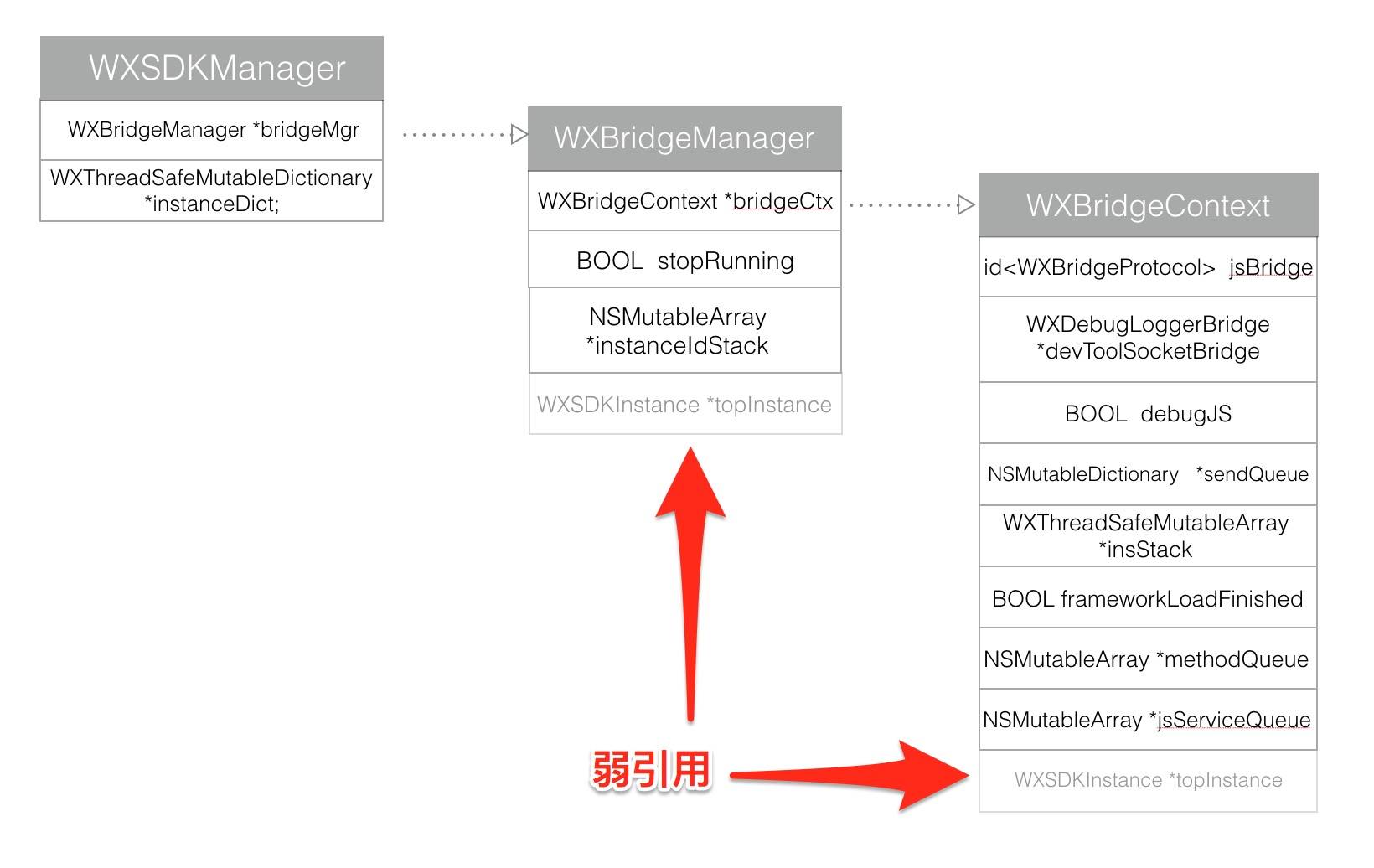
The relationship among the three is illustrated in the diagram above. Since it is a weak reference, it is represented with a dashed outline.
Returning to the registration process, the following method is called in WXSDKEngine:
[[WXSDKManager bridgeMgr] registerComponents:@[dict]];
WXBridgeManager calls the registerComponents method.
- (void)registerComponents:(NSArray *)components
{
    if (!components) return;

    __weak typeof(self) weakSelf = self;
    WXPerformBlockOnBridgeThread(^(){
        [weakSelf.bridgeCtx registerComponents:components];
    });
}
Ultimately, WXBridgeContext inside WXBridgeManager calls registerComponents to register the components. However, this component registration step is executed on a special thread.
void WXPerformBlockOnBridgeThread(void (^block)())
{
    [WXBridgeManager _performBlockOnBridgeThread:block];
}

+ (void)_performBlockOnBridgeThread:(void (^)())block
{
    if ([NSThread currentThread] == [self jsThread]) {
        block();
    } else {
        [self performSelector:@selector(_performBlockOnBridgeThread:)
                     onThread:[self jsThread]
                   withObject:[block copy]
                waitUntilDone:NO];
    }
}
Here you can see that the block closure is executed on the jsThread, not on the main thread. WXBridgeManager creates a jsThread named @“com.taobao.weex.bridge”, and all component registration is performed on this background thread. This jsThread is also a singleton and is globally unique.
+ (NSThread *)jsThread
{
    static dispatch_once_t onceToken;
    dispatch_once(&onceToken, ^{

        WXBridgeThread = [[NSThread alloc] initWithTarget:[[self class]sharedManager] selector:@selector(_runLoopThread) object:nil];
        [WXBridgeThread setName:WX_BRIDGE_THREAD_NAME];
        if(WX_SYS_VERSION_GREATER_THAN_OR_EQUAL_TO(@"8.0")) {
            [WXBridgeThread setQualityOfService:[[NSThread mainThread] qualityOfService]];
        } else {
            [WXBridgeThread setThreadPriority:[[NSThread mainThread] threadPriority]];
        }

        [WXBridgeThread start];
    });

    return WXBridgeThread;
}
This is the code that creates jsThread; jsThread uses @selector(_runLoopThread) as the selector.
- (void)_runLoopThread
{
    [[NSRunLoop currentRunLoop] addPort:[NSMachPort port] forMode:NSDefaultRunLoopMode];

    while (!_stopRunning) {
        @autoreleasepool {
            [[NSRunLoop currentRunLoop] runMode:NSDefaultRunLoopMode beforeDate:[NSDate distantFuture]];
        }
    }
}
So this starts a run loop for jsThread. Here the run loop is started using [NSMachPort port]. After that, there is no way to obtain this port again, and this run loop is not a CFRunLoop, so the three methods mentioned in the official documentation can no longer be used to stop it. The only option is to stop it manually with a while loop. The code above is one way to write it; of course, the approach recommended on Stack Overflow is the one below, which is also the style I usually use.
BOOL shouldKeepRunning = YES;        // global
NSRunLoop *theRL = [NSRunLoop currentRunLoop];
while (shouldKeepRunning && [theRL runMode:NSDefaultRunLoopMode beforeDate:[NSDate distantFuture]]);
- (void)registerComponents:(NSArray *)components
{
    WXAssertBridgeThread();
    if(!components) return;
    [self callJSMethod:@"registerComponents" args:@[components]];
}
Registering components in WXBridgeContext actually calls the JS method "registerComponents".
One important point to note here: because components are registered on a background thread, if the JSFramework has not finished loading, any native call to a JS method will inevitably fail. Therefore, before the JSFramework finishes loading, all native calls to JS methods need to be cached. Once the JSFramework has finished loading, all cached methods should be handed over to the JSFramework for execution.
- (void)callJSMethod:(NSString *)method args:(NSArray *)args
{
    if (self.frameworkLoadFinished) {
        [self.jsBridge callJSMethod:method args:args];
    } else {
        [_methodQueue addObject:@{@"method":method, @"args":args}];
    }
}
Therefore, WXBridgeContext needs an NSMutableArray to cache calls to JS methods made before JSFramework has finished loading. Here, they are stored in \_methodQueue. Once JSFramework has finished loading, callJSMethod:args: will be invoked.
- (JSValue *)callJSMethod:(NSString *)method args:(NSArray *)args
{
    WXLogDebug(@"Calling JS... method:%@, args:%@", method, args);
    return [[_jsContext globalObject] invokeMethod:method withArguments:args];
}
Since the definitions of these registered methods are global functions, the method should obviously be invoked on the globalObject of the JSContext. (At this point in the flow, you still cannot see the defined global functions; keep reading and you will see them.)
Still using WXWebComponent as an example, the component method registered here is @“registerComponents”, and the args parameter is as follows:
        (
                {
            append = tree;
            methods =             (
                goForward,
                goBack,
                reload
            );
            type = web;
        }
    )
In fact, when the program reaches this point, it will not execute callJSMethod:args:, because JSFramework has not finished loading yet.
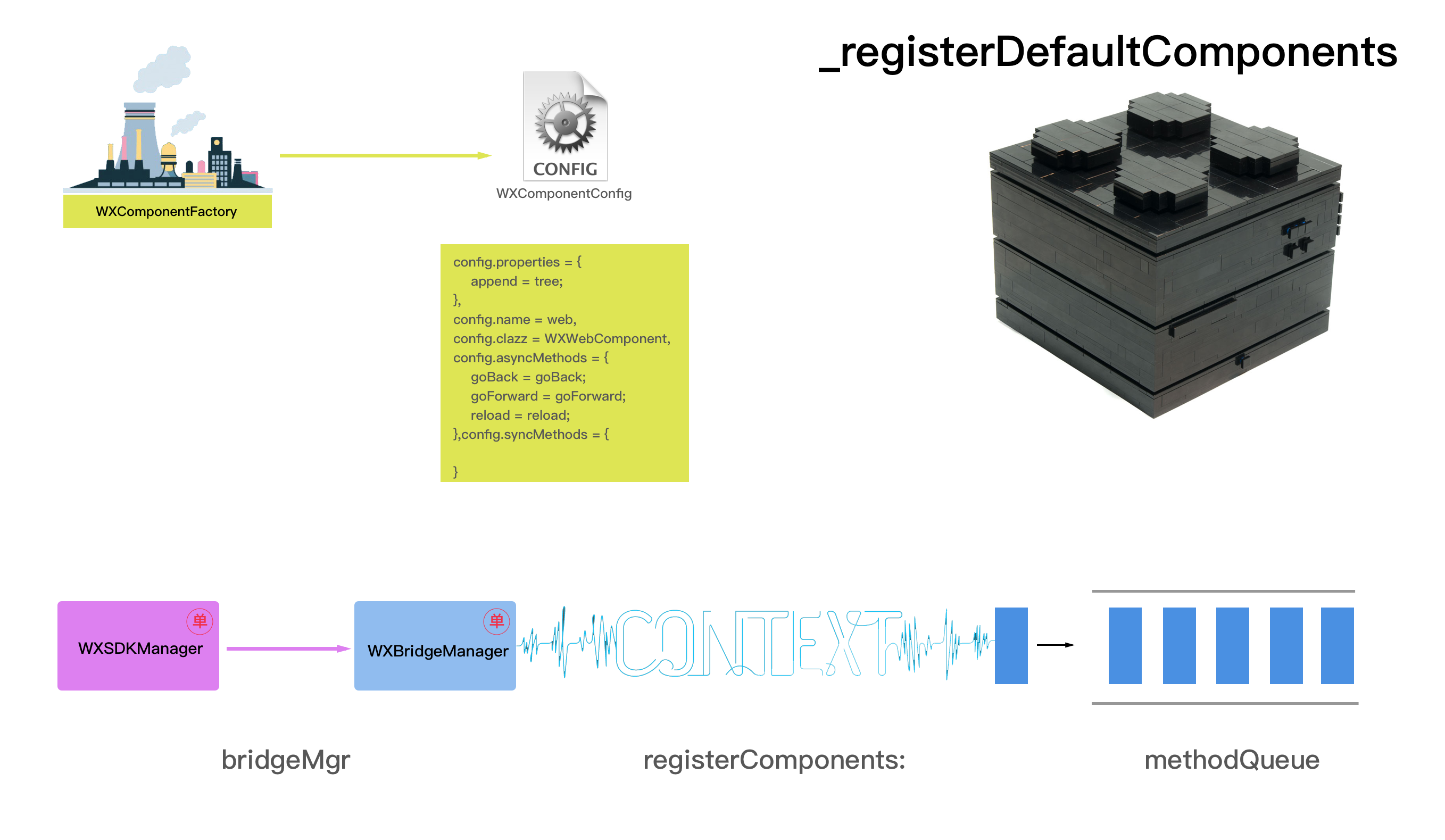
The complete process for registering components is as follows:
Then register Modules

The flow for registering Modules is very similar to the Component registration flow above.
+ (void)_registerDefaultModules
{
    [self registerModule:@"dom" withClass:NSClassFromString(@"WXDomModule")];
    [self registerModule:@"navigator" withClass:NSClassFromString(@"WXNavigatorModule")];
    [self registerModule:@"stream" withClass:NSClassFromString(@"WXStreamModule")];
    [self registerModule:@"animation" withClass:NSClassFromString(@"WXAnimationModule")];
    [self registerModule:@"modal" withClass:NSClassFromString(@"WXModalUIModule")];
    [self registerModule:@"webview" withClass:NSClassFromString(@"WXWebViewModule")];
    [self registerModule:@"instanceWrap" withClass:NSClassFromString(@"WXInstanceWrap")];
    [self registerModule:@"timer" withClass:NSClassFromString(@"WXTimerModule")];
    [self registerModule:@"storage" withClass:NSClassFromString(@"WXStorageModule")];
    [self registerModule:@"clipboard" withClass:NSClassFromString(@"WXClipboardModule")];
    [self registerModule:@"globalEvent" withClass:NSClassFromString(@"WXGlobalEventModule")];
    [self registerModule:@"canvas" withClass:NSClassFromString(@"WXCanvasModule")];
    [self registerModule:@"picker" withClass:NSClassFromString(@"WXPickerModule")];
    [self registerModule:@"meta" withClass:NSClassFromString(@"WXMetaModule")];
    [self registerModule:@"webSocket" withClass:NSClassFromString(@"WXWebSocketModule")];
}
WXSDKEngine registers these 15 basic modules by default. Here, we’ll use the relatively complex WXWebSocketModule as an example to see how it is registered.
+ (void)registerModule:(NSString *)name withClass:(Class)clazz
{
    WXAssert(name && clazz, @"Fail to register the module, please check if the parameters are correct !");

    // 1. WXModuleFactory registers the module
    NSString *moduleName = [WXModuleFactory registerModule:name withClass:clazz];
    // 2.Iterate through all synchronous and asynchronous methods
    NSDictionary *dict = [WXModuleFactory moduleMethodMapsWithName:moduleName];
    // 3.Register the module with WXBridgeManager
    [[WXSDKManager bridgeMgr] registerModules:dict];
}
The registration module is also divided into three steps. The first step is to register it in WXModuleFactory.
@interface WXModuleFactory ()
@property (nonatomic, strong)  NSMutableDictionary  *moduleMap;
@property (nonatomic, strong)  NSLock   *moduleLock;
@end
In WXModuleFactory, moduleMap stores the configuration information for all modules, and the registration process is also the process of generating moduleMap.
- (NSString *)_registerModule:(NSString *)name withClass:(Class)clazz
{
    WXAssert(name && clazz, @"Fail to register the module, please check if the parameters are correct !");

    [_moduleLock lock];
    // Note here: registering modules allows modules with the same name
    WXModuleConfig *config = [[WXModuleConfig alloc] init];
    config.name = name;
    config.clazz = NSStringFromClass(clazz);
    [config registerMethods];
    [_moduleMap setValue:config forKey:name];
    [_moduleLock unlock];

    return name;
}
The entire registration process stores WXModuleConfig as the value and name as the key in the _moduleMap dictionary.
@interface WXModuleConfig : WXInvocationConfig
@end
WXModuleConfig merely inherits from WXInvocationConfig, so it is exactly the same as WXInvocationConfig. The [config registerMethods] method is the same method used for registering components, so the specific registration process will not be repeated here.
WXModuleFactory records each WXModuleConfig:
_moduleMap = {
    animation = "<WXModuleConfig: 0x60000024a230>";
    canvas = "<WXModuleConfig: 0x608000259ce0>";
    clipboard = "<WXModuleConfig: 0x608000259b30>";
    dom = "<WXModuleConfig: 0x608000259440>";
    event = "<WXModuleConfig: 0x60800025a280>";
    globalEvent = "<WXModuleConfig: 0x60000024a560>";
    instanceWrap = "<WXModuleConfig: 0x608000259a70>";
    meta = "<WXModuleConfig: 0x60000024a7a0>";
    modal = "<WXModuleConfig: 0x6080002597d0>";
    navigator = "<WXModuleConfig: 0x600000249fc0>";
    picker = "<WXModuleConfig: 0x608000259e60>";
    storage = "<WXModuleConfig: 0x60000024a4a0>";
    stream = "<WXModuleConfig: 0x6080002596e0>";
    syncTest = "<WXModuleConfig: 0x60800025a520>";
    timer = "<WXModuleConfig: 0x60000024a380>";
    webSocket = "<WXModuleConfig: 0x608000259fb0>";
    webview = "<WXModuleConfig: 0x6080002598f0>";
}
Each WXModuleConfig records all synchronous and asynchronous methods.
config.name = dom,
config.clazz = WXDomModule,
config.asyncMethods = {
    addElement = "addElement:element:atIndex:";
    addEvent = "addEvent:event:";
    addRule = "addRule:rule:";
    createBody = "createBody:";
    createFinish = createFinish;
    getComponentRect = "getComponentRect:callback:";
    moveElement = "moveElement:parentRef:index:";
    refreshFinish = refreshFinish;
    removeElement = "removeElement:";
    removeEvent = "removeEvent:event:";
    scrollToElement = "scrollToElement:options:";
    updateAttrs = "updateAttrs:attrs:";
    updateFinish = updateFinish;
    updateStyle = "updateStyle:styles:";
},
config.syncMethods = {

}
Step two iterates over all method lists.
- (NSMutableDictionary *)_moduleMethodMapsWithName:(NSString *)name
{
    NSMutableDictionary *dict = [NSMutableDictionary dictionary];
    NSMutableArray *methods = [self _defaultModuleMethod];

    [_moduleLock lock];
    [dict setValue:methods forKey:name];
    WXModuleConfig *config = _moduleMap[name];
    void (^mBlock)(id, id, BOOL *) = ^(id mKey, id mObj, BOOL * mStop) {
        [methods addObject:mKey];
    };
    [config.syncMethods enumerateKeysAndObjectsUsingBlock:mBlock];
    [config.asyncMethods enumerateKeysAndObjectsUsingBlock:mBlock];
    [_moduleLock unlock];
    return dict;
}
Iterating over a module’s method list here is somewhat different from doing so for a component. First, modules have default methods.
- (NSMutableArray*)_defaultModuleMethod
{
    return [NSMutableArray arrayWithObjects:@"addEventListener",@"removeAllEventListeners", nil];
}
All modules have addEventListener and removeAllEventListeners methods. The second difference is that modules iterate over all synchronous and asynchronous methods (whereas components only iterate over asynchronous methods). The final result is a dictionary containing all methods generated for the module.
Taking the dom module as an example, the dictionary it returns is as follows:
{
    dom =     (
        addEventListener,
        removeAllEventListeners,
        addEvent,
        removeElement,
        updateFinish,
        getComponentRect,
        scrollToElement,
        addRule,
        updateAttrs,
        addElement,
        createFinish,
        createBody,
        updateStyle,
        removeEvent,
        refreshFinish,
        moveElement
    );
}
The final step is also to register the module with WXBridgeManager.
- (void)registerModules:(NSDictionary *)modules
{
    if (!modules) return;

    __weak typeof(self) weakSelf = self;
    WXPerformBlockOnBridgeThread(^(){
        [weakSelf.bridgeCtx registerModules:modules];
    });
}
The registration process here is exactly the same as for components; it is also performed on the jsThread of the child thread @“com.taobao.weex.bridge”.
- (void)registerModules:(NSDictionary *)modules
{
    WXAssertBridgeThread();
    if(!modules) return;
    [self callJSMethod:@"registerModules" args:@[modules]];
}
Here, the JS method being called changes to @“registerModules”, and the input parameter args is the method dictionary generated in step 2.
    args =     (
                {
            dom =             (
                addEventListener,
                removeAllEventListeners,
                addEvent,
                removeElement,
                updateFinish,
                getComponentRect,
                scrollToElement,
                addRule,
                updateAttrs,
                addElement,
                createFinish,
                createBody,
                updateStyle,
                removeEvent,
                refreshFinish,
                moveElement
            );
        }
    )
Similarly, at this point the module is not actually registered yet, because JSFramework has not finished loading. It is also added to methodQueue and queued there.
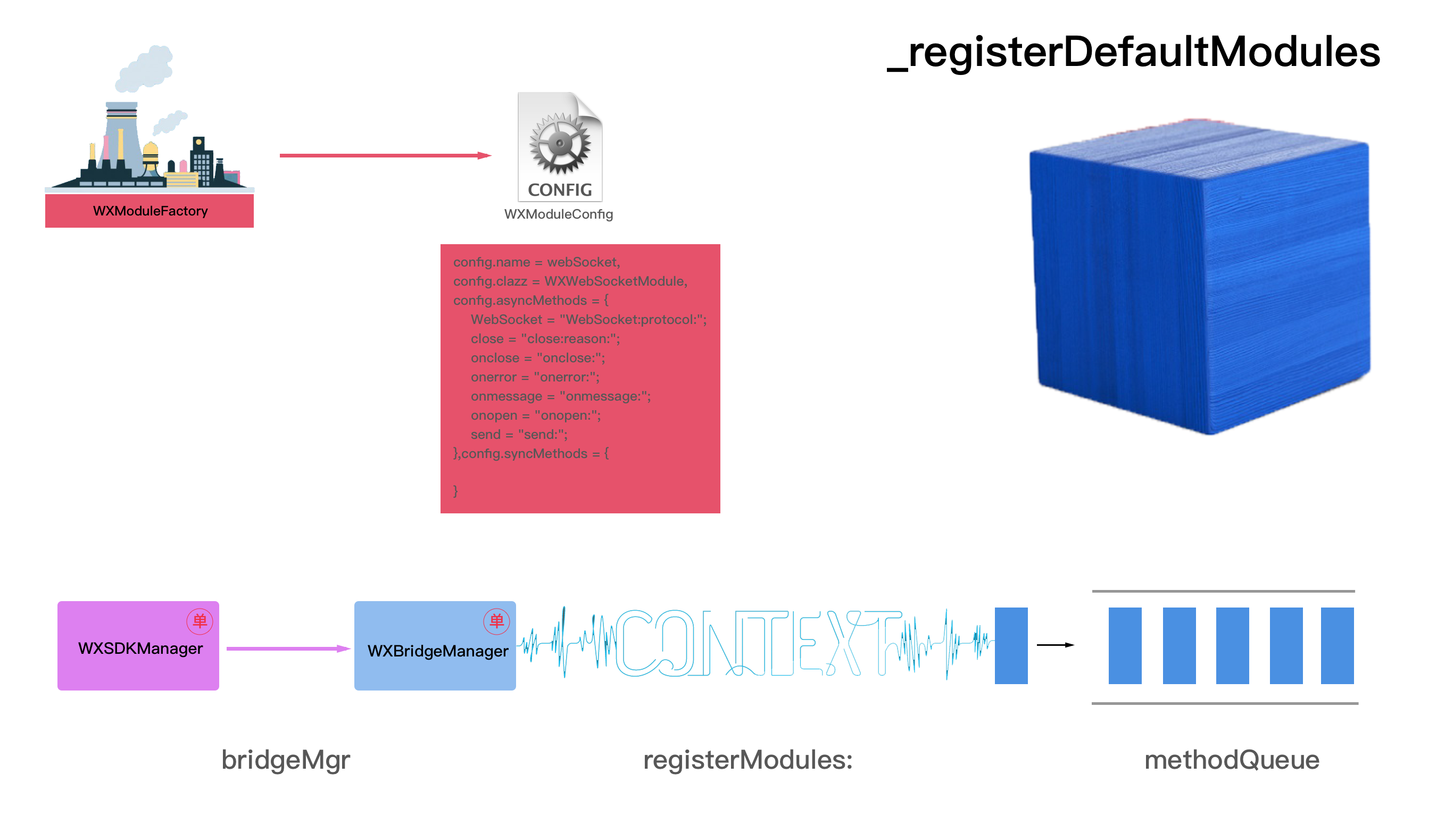
The complete module registration flow is as follows:
Finally, the Handlers are registered.
+ (void)_registerDefaultHandlers
{
    [self registerHandler:[WXResourceRequestHandlerDefaultImpl new] withProtocol:@protocol(WXResourceRequestHandler)];
    [self registerHandler:[WXNavigationDefaultImpl new] withProtocol:@protocol(WXNavigationProtocol)];
    [self registerHandler:[WXURLRewriteDefaultImpl new] withProtocol:@protocol(WXURLRewriteProtocol)];
    [self registerHandler:[WXWebSocketDefaultImpl new] withProtocol:@protocol(WXWebSocketHandler)];

}
WXSDKEngine registers 4 Handlers by default.
+ (void)registerHandler:(id)handler withProtocol:(Protocol *)protocol
{
    WXAssert(handler && protocol, @"Fail to register the handler, please check if the parameters are correct !");

    [WXHandlerFactory registerHandler:handler withProtocol:protocol];
}
WXSDKEngine will then call WXHandlerFactory’s registerHandler:withProtocol: method.
@interface WXHandlerFactory : NSObject
@property (nonatomic, strong) WXThreadSafeMutableDictionary *handlers;
+ (void)registerHandler:(id)handler withProtocol:(Protocol *)protocol;
+ (id)handlerForProtocol:(Protocol *)protocol;
+ (NSDictionary *)handlerConfigs;
@end
WXHandlerFactory is also a singleton. It contains a thread-safe dictionary, handlers, which is used to store the mapping between instances and Protocol names.
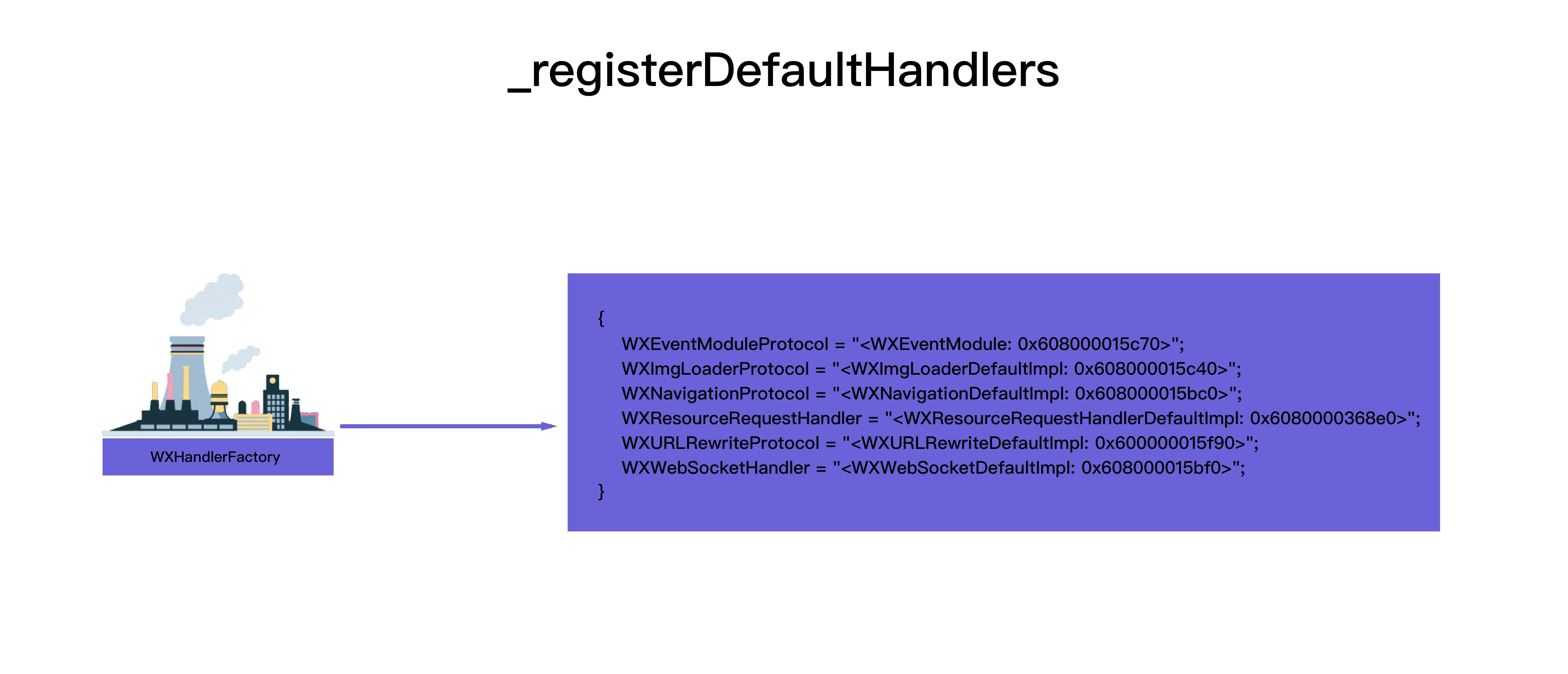
The final step of initializing WXSDKEngine is to execute JSFramework.
[[WXSDKManager bridgeMgr] executeJsFramework:script];
WXSDKManager calls WXBridgeManager to execute the main.js file in the SDK.
- (void)executeJsFramework:(NSString *)script
{
    if (!script) return;

    __weak typeof(self) weakSelf = self;
    WXPerformBlockOnBridgeThread(^(){
        [weakSelf.bridgeCtx executeJsFramework:script];
    });
}
WXBridgeManager calls the executeJsFramework: method via WXBridgeContext. This method call is also performed on a background thread.
- (void)executeJsFramework:(NSString *)script
{
    WXAssertBridgeThread();
    WXAssertParam(script);

    WX_MONITOR_PERF_START(WXPTFrameworkExecute);

    [self.jsBridge executeJSFramework:script];

    WX_MONITOR_PERF_END(WXPTFrameworkExecute);

    if ([self.jsBridge exception]) {
        NSString *message = [NSString stringWithFormat:@"JSFramework executes error: %@", [self.jsBridge exception]];
        WX_MONITOR_FAIL(WXMTJSFramework, WX_ERR_JSFRAMEWORK_EXECUTE, message);
    } else {
        WX_MONITOR_SUCCESS(WXMTJSFramework);
        // At this point, JSFramework is fully loaded
        self.frameworkLoadFinished = YES;

        // Execute all registered JsServices
        [self executeAllJsService];

         // Get the JSFramework version number
        JSValue *frameworkVersion = [self.jsBridge callJSMethod:@"getJSFMVersion" args:nil];
        if (frameworkVersion && [frameworkVersion isString]) {
            // Store the version number in WXAppConfiguration
            [WXAppConfiguration setJSFrameworkVersion:[frameworkVersion toString]];
        }

        // Execute all methods previously cached in the _methodQueue array
        for (NSDictionary *method in _methodQueue) {
            [self callJSMethod:method[@"method"] args:method[@"args"]];
        }

        [_methodQueue removeAllObjects];

        // At this point, initialization is complete.
        WX_MONITOR_PERF_END(WXPTInitalize);
    };
}
WX_MONITOR_PERF_START marks WXPTFrameworkExecute before the operation. After JSFramework finishes executing, WX_MONITOR_PERF_END marks execution completion.
- (void)executeJSFramework:(NSString *)frameworkScript
{
    WXAssertParam(frameworkScript);
    if (WX_SYS_VERSION_GREATER_THAN_OR_EQUAL_TO(@"8.0")) {
        [_jsContext evaluateScript:frameworkScript withSourceURL:[NSURL URLWithString:@"main.js"]];
    }else{
        [_jsContext evaluateScript:frameworkScript];
    }
}
The core code for loading JSFramework is here. JSFramework is loaded by executing evaluateScript: through JSContext. Since there is no return value here, the purpose of loading JSFramework is merely to declare all the methods inside it, without invoking them. This is also consistent with the process of loading other Frameworks in OC: loading only brings them into memory, and the methods in the Framework can be called at any time, rather than all being invoked as soon as the Framework is loaded.
After JSFramework has been loaded, the previously cached JSService and JSMethod need to be loaded. JSService is cached in jsServiceQueue. JSMethod is cached in methodQueue.
- (void)executeAllJsService
{
    for(NSDictionary *service in _jsServiceQueue) {
        NSString *script = [service valueForKey:@"script"];
        NSString *name = [service valueForKey:@"name"];
        [self executeJsService:script withName:name];
    }

    [_jsServiceQueue removeAllObjects];
}
Because JSService is converted directly from JS into an NSString, you can simply run executeJsService:withName here.
   for (NSDictionary *method in _methodQueue) {
       [self callJSMethod:method[@"method"] args:method[@"args"]];
     }

    [_methodQueue removeAllObjects];

- (JSValue *)callJSMethod:(NSString *)method args:(NSArray *)args
{
    WXLogDebug(@"Calling JS... method:%@, args:%@", method, args);

    NSLog(@"WXJSCoreBridge jsContext is about to call method");

    return [[_jsContext globalObject] invokeMethod:method withArguments:args];
}
Because _methodQueue contains global JS methods, invokeMethod: withArguments: needs to be called to execute them.
Once all of this has finished loading, the SDK initialization is essentially complete. At this point, WXPTInitalize is marked as finished.
One more thing to explain here is how jsBridge is loaded for the first time.
- (id<WXBridgeProtocol>)jsBridge
{
    WXAssertBridgeThread();
    _debugJS = [WXDebugTool isDevToolDebug];

    Class bridgeClass = _debugJS ? NSClassFromString(@"WXDebugger") : [WXJSCoreBridge class];

    if (_jsBridge && [_jsBridge isKindOfClass:bridgeClass]) {
        return _jsBridge;
    }

    if (_jsBridge) {
        [_methodQueue removeAllObjects];
        _frameworkLoadFinished = NO;
    }

    _jsBridge = _debugJS ? [NSClassFromString(@"WXDebugger") alloc] : [[WXJSCoreBridge alloc] init];

    [self registerGlobalFunctions];

    return _jsBridge;
}
The first time this function is entered, when there is no jsBridge instance yet, it first creates an instance of WXJSCoreBridge, and then immediately registers the global functions. The next time this function is called, _jsBridge is already of type WXJSCoreBridge, so it returns directly, and the statements below will not be executed again.
typedef NSInteger(^WXJSCallNative)(NSString *instance, NSArray *tasks, NSString *callback);
typedef NSInteger(^WXJSCallAddElement)(NSString *instanceId,  NSString *parentRef, NSDictionary *elementData, NSInteger index);
typedef NSInvocation *(^WXJSCallNativeModule)(NSString *instanceId, NSString *moduleName, NSString *methodName, NSArray *args, NSDictionary *options);
typedef void (^WXJSCallNativeComponent)(NSString *instanceId, NSString *componentRef, NSString *methodName, NSArray *args, NSDictionary *options);
These four closures are the four global functions exposed to JS by the OC wrapper.
- (void)registerCallNative:(WXJSCallNative)callNative
{
    JSValue* (^callNativeBlock)(JSValue *, JSValue *, JSValue *) = ^JSValue*(JSValue *instance, JSValue *tasks, JSValue *callback){
        NSString *instanceId = [instance toString];
        NSArray *tasksArray = [tasks toArray];
        NSString *callbackId = [callback toString];

        WXLogDebug(@"Calling native... instance:%@, tasks:%@, callback:%@", instanceId, tasksArray, callbackId);
        return [JSValue valueWithInt32:(int32_t)callNative(instanceId, tasksArray, callbackId) inContext:[JSContext currentContext]];
    };

    _jsContext[@"callNative"] = callNativeBlock;
}
- (void)registerCallAddElement:(WXJSCallAddElement)callAddElement
{
    id callAddElementBlock = ^(JSValue *instanceId, JSValue *ref, JSValue *element, JSValue *index, JSValue *ifCallback) {

        NSString *instanceIdString = [instanceId toString];
        NSDictionary *componentData = [element toDictionary];
        NSString *parentRef = [ref toString];
        NSInteger insertIndex = [[index toNumber] integerValue];

         WXLogDebug(@"callAddElement...%@, %@, %@, %ld", instanceIdString, parentRef, componentData, (long)insertIndex);

        return [JSValue valueWithInt32:(int32_t)callAddElement(instanceIdString, parentRef, componentData, insertIndex) inContext:[JSContext currentContext]];
    };

    _jsContext[@"callAddElement"] = callAddElementBlock;
}
- (void)registerCallNativeModule:(WXJSCallNativeModule)callNativeModuleBlock
{
    _jsContext[@"callNativeModule"] = ^JSValue *(JSValue *instanceId, JSValue *moduleName, JSValue *methodName, JSValue *args, JSValue *options) {
        NSString *instanceIdString = [instanceId toString];
        NSString *moduleNameString = [moduleName toString];
        NSString *methodNameString = [methodName toString];
        NSArray *argsArray = [args toArray];
        NSDictionary *optionsDic = [options toDictionary];

        WXLogDebug(@"callNativeModule...%@,%@,%@,%@", instanceIdString, moduleNameString, methodNameString, argsArray);

        NSInvocation *invocation = callNativeModuleBlock(instanceIdString, moduleNameString, methodNameString, argsArray, optionsDic);
        JSValue *returnValue = [JSValue wx_valueWithReturnValueFromInvocation:invocation inContext:[JSContext currentContext]];
        return returnValue;
    };
}
- (void)registerCallNativeComponent:(WXJSCallNativeComponent)callNativeComponentBlock
{
    _jsContext[@"callNativeComponent"] = ^void(JSValue *instanceId, JSValue *componentName, JSValue *methodName, JSValue *args, JSValue *options) {
        NSString *instanceIdString = [instanceId toString];
        NSString *componentNameString = [componentName toString];
        NSString *methodNameString = [methodName toString];
        NSArray *argsArray = [args toArray];
        NSDictionary *optionsDic = [options toDictionary];

        WXLogDebug(@"callNativeComponent...%@,%@,%@,%@", instanceIdString, componentNameString, methodNameString, argsArray);

        callNativeComponentBlock(instanceIdString, componentNameString, methodNameString, argsArray, optionsDic);
    };
}
Because of the way JS methods are written, multiple parameters are listed sequentially inside parentheses, unlike in OC where multiple parameters are separated by colons. Therefore, when exposing them to JS, the Block needs to be wrapped in another layer. The four wrapper methods are shown above; finally, inject these four methods into the JSContext.
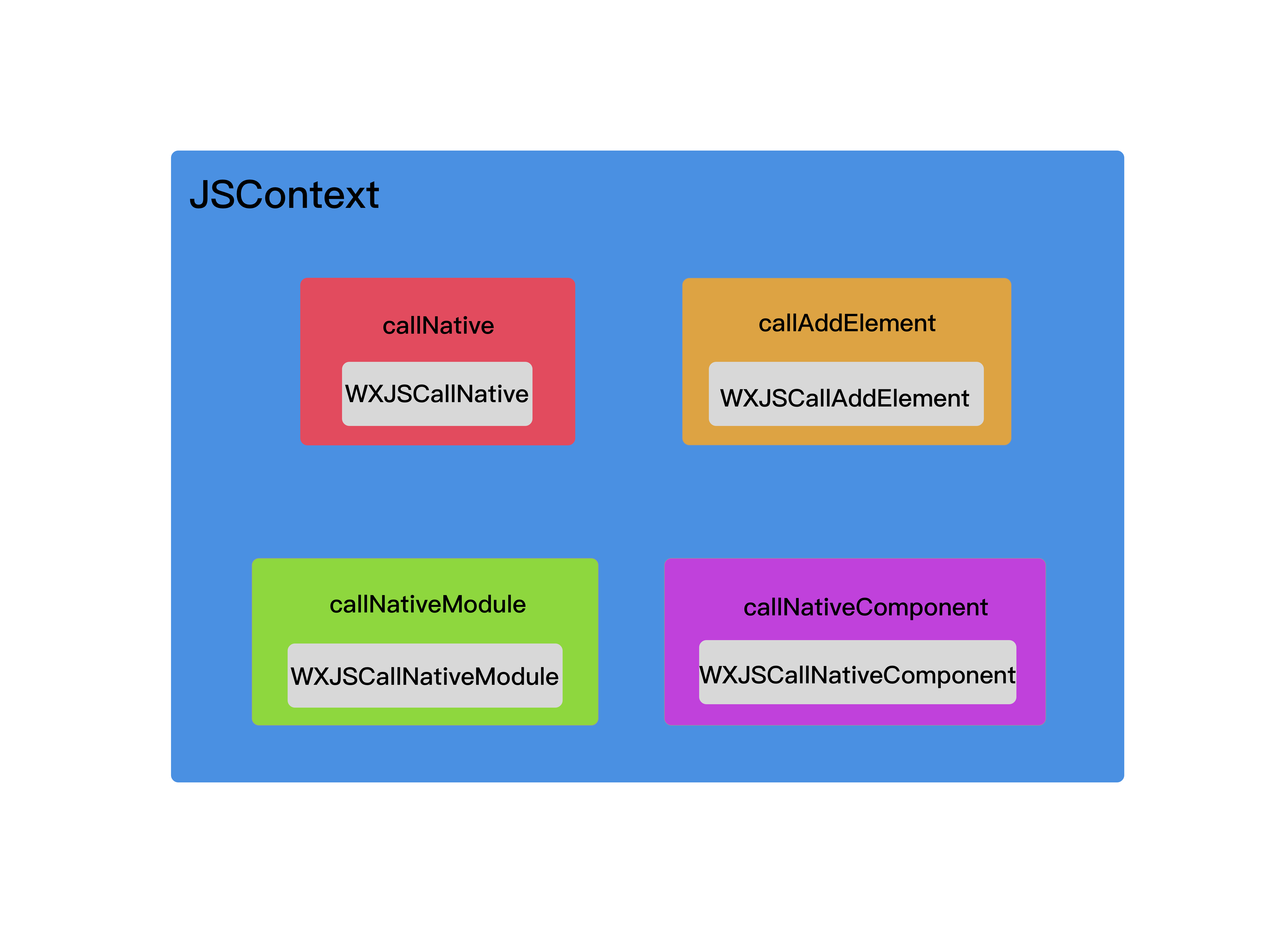
As shown above, the gray part is the Block passed in from native OC. Wrapping another layer around it turns it into a JS method, which is then injected into the JSContext.
4. The simulator WXSimulatorShortcutManager connects to the local debugging tool
#if TARGET_OS_SIMULATOR
    static dispatch_once_t onceToken;
    dispatch_once(&onceToken, ^{
        [WXSimulatorShortcutManager registerSimulatorShortcutWithKey:@"i" modifierFlags:UIKeyModifierCommand | UIKeyModifierAlternate action:^{
            NSURL *URL = [NSURL URLWithString:@"http://localhost:8687/launchDebugger"];
            NSURLRequest *request = [NSURLRequest requestWithURL:URL];

            NSURLSession *session = [NSURLSession sharedSession];
            NSURLSessionDataTask *task = [session dataTaskWithRequest:request
                                                    completionHandler:
                                          ^(NSData *data, NSURLResponse *response, NSError *error) {
                                              // ...
                                          }];

            [task resume];
            WXLogInfo(@"Launching browser...");

            dispatch_after(dispatch_time(DISPATCH_TIME_NOW, (int64_t)(1 * NSEC_PER_SEC)), dispatch_get_main_queue(), ^{

                // Connect to the WebSocket debugger
                [self connectDebugServer:@"ws://localhost:8687/debugger/0/renderer"];
            });

        }];
    });

#endif
Since emulators may be used during development, debugging connects to a local browser (Chrome, Safari) to display the debugging UI. In this case, when emulation is enabled, the browser is launched and connected to the websocket debugger.
The complete initialization flow of WXSDKEngine can be roughly illustrated as follows:
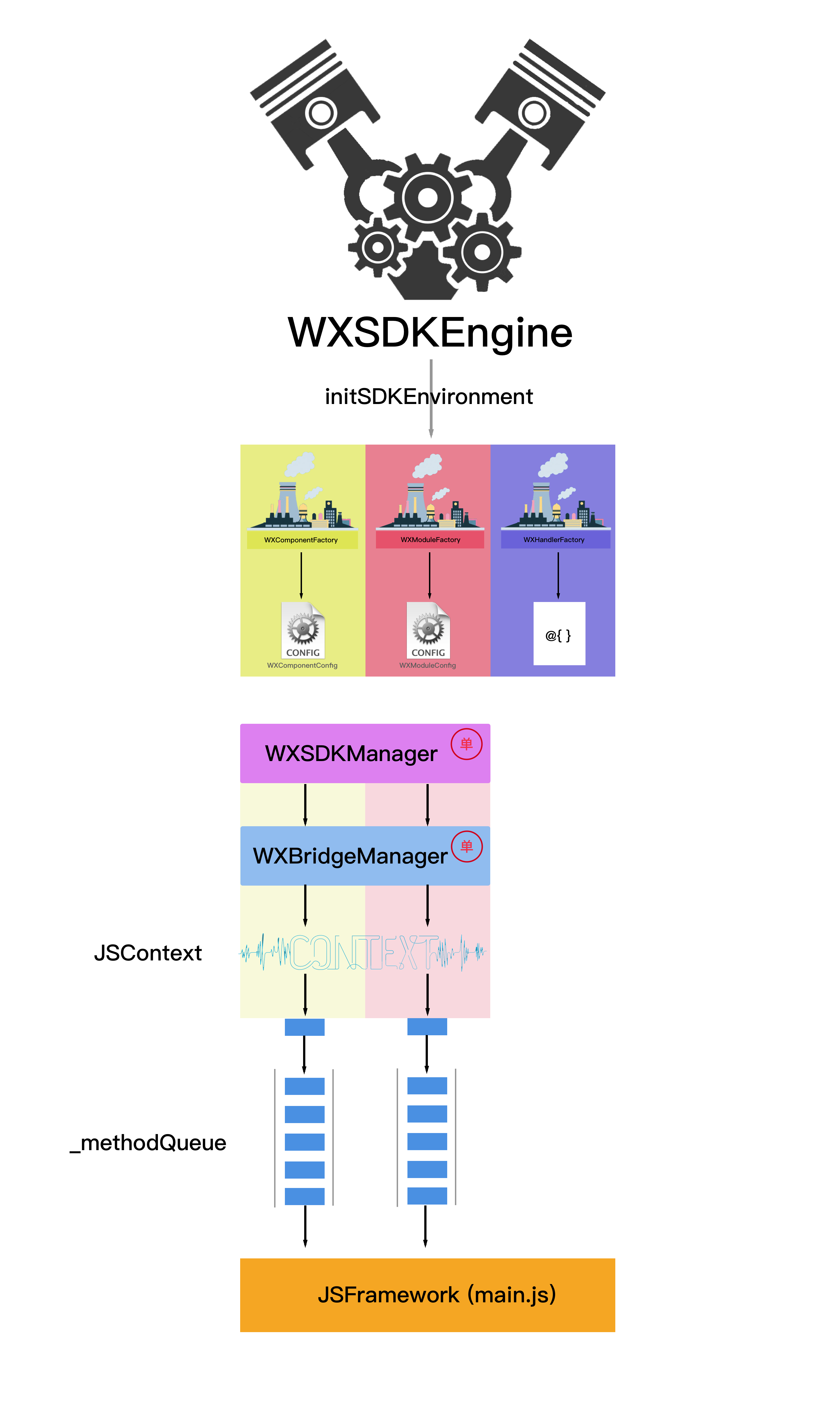
(2). How Does Weex Let JS Invoke Native OC UIView?
In the previous section, we analyzed how WXSDKEngine is initialized. After initialization is complete, how does the iOS Native client receive the JS page and call OC to generate a UIView? In this section, we’ll take a closer look.
Before analyzing this problem, let’s first look at how the QR-code scanning feature in WeexPlayground, the official sample app provided by Weex on the App Store, enters a page after scanning a QR code.
1. The Principle Behind Scanning a QR Code
First, let’s look at some properties of the scanning screen:
@interface WXScannerVC : UIViewController <AVCaptureMetadataOutputObjectsDelegate>
@property (nonatomic, strong) AVCaptureSession * session;
@property (nonatomic, strong) AVCaptureVideoPreviewLayer *captureLayer;
@end
This page has no additional configuration; it’s just a set of proxies for accessing the camera.
- (void)captureOutput:(AVCaptureOutput *)captureOutput didOutputMetadataObjects:(NSArray *)metadataObjects fromConnection:(AVCaptureConnection *)connection
{
    [_captureLayer removeFromSuperlayer];
    [_session stopRunning];
    AudioServicesPlaySystemSound(kSystemSoundID_Vibrate);
    if (metadataObjects.count > 0) {
        AVMetadataMachineReadableCodeObject * metadataObject = [metadataObjects objectAtIndex : 0 ];
        [self openURL:metadataObject.stringValue];
    }
}
After the QR code is scanned, the delegate calls the function above, and the scanned URL is metadataObject.stringValue.
- (void)openURL:(NSString*)URL
{
    NSString *transformURL = URL;
    NSArray* elts = [URL componentsSeparatedByString:@"?"];
    if (elts.count >= 2) {
        NSArray *urls = [elts.lastObject componentsSeparatedByString:@"="];
        for (NSString *param in urls) {
            if ([param isEqualToString:@"_wx_tpl"]) {
                transformURL = [[urls lastObject]  stringByReplacingPercentEscapesUsingEncoding:NSUTF8StringEncoding];
                break;
            }
        }
    }
    NSURL *url = [NSURL URLWithString:transformURL];
    if ([self remoteDebug:url]) {
        return;
    }
    [self jsReplace:url];
    WXDemoViewController * controller = [[WXDemoViewController alloc] init];
    controller.url = url;
    controller.source = @"scan";

    NSMutableDictionary *queryDict = [NSMutableDictionary new];
    if (WX_SYS_VERSION_GREATER_THAN_OR_EQUAL_TO(@"8.0")) {
        NSURLComponents *components = [NSURLComponents componentsWithURL:url resolvingAgainstBaseURL:NO];
        NSArray *queryItems = [components queryItems];

        for (NSURLQueryItem *item in queryItems)
            [queryDict setObject:item.value forKey:item.name];
    }else {
        queryDict = [self queryWithURL:url];
    }
    NSString *wsport = queryDict[@"wsport"] ?: @"8082";
    NSURL *socketURL = [NSURL URLWithString:[NSString stringWithFormat:@"ws://%@:%@", url.host, wsport]];
    controller.hotReloadSocket = [[SRWebSocket alloc] initWithURL:socketURL protocols:@[@"echo-protocol"]];
    controller.hotReloadSocket.delegate = controller;
    [controller.hotReloadSocket open];

    [[self navigationController] pushViewController:controller animated:YES];
}
The code above implements the QR code page opening logic, including some handling for checking the URL query parameters. To simplify it a bit, it can be reduced to the following:
- (void)openURL:(NSString*)URL
{
    // 1. Get URL
    NSString *transformURL = URL;
    NSURL *url = [NSURL URLWithString:transformURL];
    // 2. Configure the URL for the new page
    WXDemoViewController * controller = [[WXDemoViewController alloc] init];
    controller.url = url;
    controller.source = @"scan";
    // 3. Connect WebSocket
    NSString *wsport = queryDict[@"wsport"] ?: @"8082";
    NSURL *socketURL = [NSURL URLWithString:[NSString stringWithFormat:@"ws://%@:%@", url.host, wsport]];
    controller.hotReloadSocket = [[SRWebSocket alloc] initWithURL:socketURL protocols:@[@"echo-protocol"]];
    controller.hotReloadSocket.delegate = controller;
    [controller.hotReloadSocket open];
    // 4. Navigate to page
    [[self navigationController] pushViewController:controller animated:YES];
}
openURL: It actually only does the four things mentioned in the comment above. The most important one is configuring a URL for the new screen. As for connecting to the websocket, that is so changes to .we or .vue files can be reflected on the phone in real time. The final step is page navigation. So the reason scanning the QR code can open a new page is simply that a URL has been configured for that new page—nothing more.
2. How JS Invokes an OC Native View
Back to our main topic: how exactly does JS invoke an OC native View?
The whole secret lies in the WXSDKInstance class.
@interface WXSDKInstance : NSObject

// The viewController currently to be rendered
@property (nonatomic, weak) UIViewController *viewController;
// The native root container view is fully controlled by WXSDKInstance and cannot be changed by developers
@property (nonatomic, strong) UIView *rootView;
// If the component wants to fix the rootView frame, set this property to YES; when Weex lays out, it will not change the rootView frame. Otherwise set it to NO
@property (nonatomic, assign) BOOL isRootViewFrozen;
// scriptURL of the Weex bundle
@property (nonatomic, strong) NSURL *scriptURL;
// Parent instance
@property (nonatomic, weak) WXSDKInstance *parentInstance;
// Reference to the parent instance node
@property (nonatomic, weak) NSString *parentNodeRef;
// Unique ID identifying the current Weex instance
@property (nonatomic, strong) NSString *instanceId;
// State of the current Weex instance
@property (nonatomic, assign) WXState state;
// Callback block when the Weex instance finishes creating the rootView
@property (nonatomic, copy) void (^onCreate)(UIView *);
// Callback when the root container frame changes
@property (nonatomic, copy) void (^onLayoutChange)(UIView *);
// Callback block when the Weex instance finishes rendering
@property (nonatomic, copy) void (^renderFinish)(UIView *);
// Callback block when the Weex instance finishes refreshing
@property (nonatomic, copy) void (^refreshFinish)(UIView *);
// Callback block when the Weex instance fails to render
@property (nonatomic, copy) void (^onFailed)(NSError *error);
// Callback block when the Weex instance page scrolls
@property (nonatomic, copy) void (^onScroll)(CGPoint contentOffset);
// Callback block while the Weex instance is rendering
@property (nonatomic, copy) void (^onRenderProgress)(CGRect renderRect);
// Frame of the current Weex instance
@property (nonatomic, assign) CGRect frame;
// Some info stored by the user
@property (nonatomic, strong) NSMutableDictionary *userInfo;
// Conversion scale factor between CSS units and device pixels
@property (nonatomic, assign, readonly) CGFloat pixelScaleFactor;
// Whether to track component rendering
@property (nonatomic, assign)BOOL trackComponent;

- (void)renderWithURL:(NSURL *)url;
- (void)renderWithURL:(NSURL *)url options:(NSDictionary *)options data:(id)data;
- (void)renderView:(NSString *)source options:(NSDictionary *)options data:(id)data;
// If forcedReload is YES, each load rereads from the URL; if NO, reads from cache
- (void)reload:(BOOL)forcedReload;
- (void)refreshInstance:(id)data;
- (void)destroyInstance;
- (id)moduleForClass:(Class)moduleClass;
- (WXComponent *)componentForRef:(NSString *)ref;
- (NSUInteger)numberOfComponents;
- (BOOL)checkModuleEventRegistered:(NSString*)event moduleClassName:(NSString*)moduleClassName;
- (void)fireModuleEvent:(Class)module eventName:(NSString *)eventName params:(NSDictionary*)params;
- (void)fireGlobalEvent:(NSString *)eventName params:(NSDictionary *)params;
- (NSURL *)completeURL:(NSString *)url;

@end
A WXSDKInstance corresponds to a UIViewController, so every Weex page has a corresponding WXSDKInstance.
@property (nonatomic, strong) WXSDKInstance *instance;
WXSDKInstance is mainly used to render pages, typically by calling the renderWithURL method.
The active rendering process for a Weex page is as follows:
- (void)render
{
    CGFloat width = self.view.frame.size.width;
    [_instance destroyInstance];
    _instance = [[WXSDKInstance alloc] init];
    _instance.viewController = self;
    _instance.frame = CGRectMake(self.view.frame.size.width-width, 0, width, _weexHeight);

    __weak typeof(self) weakSelf = self;
    _instance.onCreate = ^(UIView *view) {
        [weakSelf.weexView removeFromSuperview];
        weakSelf.weexView = view;
        [weakSelf.view addSubview:weakSelf.weexView];
        UIAccessibilityPostNotification(UIAccessibilityScreenChangedNotification, weakSelf.weexView);
    };
    _instance.onFailed = ^(NSError *error) {

    };

    _instance.renderFinish = ^(UIView *view) {
        [weakSelf updateInstanceState:WeexInstanceAppear];
    };

    _instance.updateFinish = ^(UIView *view) {

    };

    if (!self.url) {
        WXLogError(@"error: render url is nil");
        return;
    }
    NSURL *URL = [self testURL: [self.url absoluteString]];
    NSString *randomURL = [NSString stringWithFormat:@"%@%@random=%d",URL.absoluteString,URL.query?@"&":@"?",arc4random()];
    [_instance renderWithURL:[NSURL URLWithString:randomURL] options:@{@"bundleUrl":URL.absoluteString} data:nil];
}
Because WXSDKInstance supports real-time refresh, when creating one you need to destroy the existing instance first, then create a new one.
WXSDKInstance supports setting callback functions for various states. For the specific states it supports, refer to the WXSDKInstance definition above.
Weex supports loading JS from local storage as well as from a server. If loading from local storage, you can use the following method to load a JSBundle locally.
- (void)loadLocalBundle:(NSURL *)url
{
    NSURL * localPath = nil;
    NSMutableArray * pathComponents = nil;
    if (self.url) {
        pathComponents =[NSMutableArray arrayWithArray:[url.absoluteString pathComponents]];
        [pathComponents removeObjectsInRange:NSRangeFromString(@"0 3")];
        [pathComponents replaceObjectAtIndex:0 withObject:@"bundlejs"];

        NSString *filePath = [NSString stringWithFormat:@"%@/%@",[NSBundle mainBundle].bundlePath,[pathComponents componentsJoinedByString:@"/"]];
        localPath = [NSURL fileURLWithPath:filePath];
    }else {
        NSString *filePath = [NSString stringWithFormat:@"%@/bundlejs/index.js",[NSBundle mainBundle].bundlePath];
        localPath = [NSURL fileURLWithPath:filePath];
    }

    NSString *bundleUrl = [NSURL fileURLWithPath:[NSString stringWithFormat:@"%@/bundlejs/",[NSBundle mainBundle].bundlePath]].absoluteString;
     [_instance renderWithURL:localPath options:@{@"bundleUrl":bundleUrl} data:nil];
}
Finally, the page is rendered by calling renderWithURL:options:data:.
- (void)renderWithURL:(NSURL *)url options:(NSDictionary *)options data:(id)data
{
    if (!url) {
        WXLogError(@"Url must be passed if you use renderWithURL");
        return;
    }

    WXResourceRequest *request = [WXResourceRequest requestWithURL:url resourceType:WXResourceTypeMainBundle referrer:@"" cachePolicy:NSURLRequestUseProtocolCachePolicy];
    [self _renderWithRequest:request options:options data:data];
}
When WXSDKInstance calls the renderWithURL:options:data: method, a WXResourceRequest is generated. NSMutableURLRequest is defined as follows:
@interface WXResourceRequest : NSMutableURLRequest
@property (nonatomic, strong) id taskIdentifier;
@property (nonatomic, assign) WXResourceType type;
@property (nonatomic, strong) NSString *referrer;
@property (nonatomic, strong) NSString *userAgent;
@end
WXResourceRequest is essentially a wrapper around NSMutableURLRequest.
Next, let’s analyze the most core function, renderWithURL:options:data: (the code below is slightly trimmed from the original source. The source is too long, and the omissions do not affect readability).
- (void)_renderWithRequest:(WXResourceRequest *)request options:(NSDictionary *)options data:(id)data;
{
    NSURL *url = request.URL;
    _scriptURL = url;
    _options = options;
    _jsData = data;
    NSMutableDictionary *newOptions = [options mutableCopy] ?: [NSMutableDictionary new];

    WX_MONITOR_INSTANCE_PERF_START(WXPTJSDownload, self);
    __weak typeof(self) weakSelf = self;
    _mainBundleLoader = [[WXResourceLoader alloc] initWithRequest:request];

      // Request completion callback
    _mainBundleLoader.onFinished = ^(WXResourceResponse *response, NSData *data) {
        __strong typeof(weakSelf) strongSelf = weakSelf;

        if ([response isKindOfClass:[NSHTTPURLResponse class]] && ((NSHTTPURLResponse *)response).statusCode != 200) {
            NSError *error = [NSError errorWithDomain:WX_ERROR_DOMAIN
                                                 code:((NSHTTPURLResponse *)response).statusCode
                                             userInfo:@{@"message":@"status code error."}];
            if (strongSelf.onFailed) {
                strongSelf.onFailed(error);
            }
            return ;
        }

        if (!data) {

            if (strongSelf.onFailed) {
                strongSelf.onFailed(error);
            }
            return;
        }

        NSString *jsBundleString = [[NSString alloc] initWithData:data encoding:NSUTF8StringEncoding];

        if (!jsBundleString) {
            return;
        }

        [strongSelf _renderWithMainBundleString:jsBundleString];
    };

    // Request failure callback
    _mainBundleLoader.onFailed = ^(NSError *loadError) {

        if (weakSelf.onFailed) {
            weakSelf.onFailed(loadError);
        }
    };

    [_mainBundleLoader start];
}
The code above mainly does two things. First, it creates a WXResourceLoader and sets its onFinished and onFailed callbacks. Second, it calls the start method.
WXSDKInstance holds a strong reference to a WXResourceLoader. WXResourceLoader is defined as follows:
@interface WXResourceLoader : NSObject

@property (nonatomic, strong) WXResourceRequest *request;
@property (nonatomic, copy) void (^onDataSent)(unsigned long long /* bytesSent */, unsigned long long /* totalBytesToBeSent */);
@property (nonatomic, copy) void (^onResponseReceived)(const WXResourceResponse *);
@property (nonatomic, copy) void (^onDataReceived)(NSData *);
@property (nonatomic, copy) void (^onFinished)(const WXResourceResponse *, NSData *);
@property (nonatomic, copy) void (^onFailed)(NSError *);

- (instancetype)initWithRequest:(WXResourceRequest *)request;
- (void)start;
- (void)cancel:(NSError **)error;
@end
WXResourceLoader contains a WXResourceRequest, so WXResourceRequest can also be viewed as an encapsulation of a network request, and it provides callback functions for five different states.
- (void)start
{
    if ([_request.URL isFileURL]) {
        [self _handleFileURL:_request.URL];
        return;
    }

    id<WXResourceRequestHandler> requestHandler = [WXHandlerFactory handlerForProtocol:@protocol(WXResourceRequestHandler)];
    if (requestHandler) {
        [requestHandler sendRequest:_request withDelegate:self];
    } else if ([WXHandlerFactory handlerForProtocol:NSProtocolFromString(@"WXNetworkProtocol")]){
        // deprecated logic
        [self _handleDEPRECATEDNetworkHandler];
    } else {
        WXLogError(@"No resource request handler found!");
    }
}
After the start method of WXResourceLoader is called, it first checks whether the URL is local. If it is a local file, loading starts directly.
- (void)_handleFileURL:(NSURL *)url
{
    dispatch_async(dispatch_get_global_queue(DISPATCH_QUEUE_PRIORITY_DEFAULT, 0), ^{
        NSData *fileData = [[NSFileManager defaultManager] contentsAtPath:[url path]];
        if (self.onFinished) {
            self.onFinished([WXResourceResponse new], fileData);
        }
    });
}
For local files, the onFinished function is invoked directly.
If it is not a local file, a network request is initiated to fetch the JS file from the server.
- (void)sendRequest:(WXResourceRequest *)request withDelegate:(id<WXResourceRequestDelegate>)delegate
{
    if (!_session) {
        NSURLSessionConfiguration *urlSessionConfig = [NSURLSessionConfiguration defaultSessionConfiguration];
        if ([WXAppConfiguration customizeProtocolClasses].count > 0) {
            NSArray *defaultProtocols = urlSessionConfig.protocolClasses;
            urlSessionConfig.protocolClasses = [[WXAppConfiguration customizeProtocolClasses] arrayByAddingObjectsFromArray:defaultProtocols];
        }
        _session = [NSURLSession sessionWithConfiguration:urlSessionConfig
                                                 delegate:self
                                            delegateQueue:[NSOperationQueue mainQueue]];
        _delegates = [WXThreadSafeMutableDictionary new];
    }

    NSURLSessionDataTask *task = [_session dataTaskWithRequest:request];
    request.taskIdentifier = task;
    [_delegates setObject:delegate forKey:task];
    [task resume];
}
The network request here is just a regular, normal NSURLSession network request.
If it succeeds, the onFinished callback will eventually be invoked.
_mainBundleLoader.onFinished = ^(WXResourceResponse *response, NSData *data) {
        __strong typeof(weakSelf) strongSelf = weakSelf;

        if ([response isKindOfClass:[NSHTTPURLResponse class]] && ((NSHTTPURLResponse *)response).statusCode != 200) {
            NSError *error = [NSError errorWithDomain:WX_ERROR_DOMAIN
                                        code:((NSHTTPURLResponse *)response).statusCode
                                    userInfo:@{@"message":@"status code error."}];
            if (strongSelf.onFailed) {
                strongSelf.onFailed(error);
            }
            return ;
        }

        if (!data) {
            NSString *errorMessage = [NSString stringWithFormat:@"Request to %@ With no data return", request.URL];
            WX_MONITOR_FAIL_ON_PAGE(WXMTJSDownload, WX_ERR_JSBUNDLE_DOWNLOAD, errorMessage, strongSelf.pageName);

            if (strongSelf.onFailed) {
                strongSelf.onFailed(error);
            }
            return;
        }

        NSString *jsBundleString = [[NSString alloc] initWithData:data encoding:NSUTF8StringEncoding];


        NSLog(@"Downloaded jsBundleString = %@",jsBundleString);

        if (!jsBundleString) {
            WX_MONITOR_FAIL_ON_PAGE(WXMTJSDownload, WX_ERR_JSBUNDLE_STRING_CONVERT, @"data converting to string failed.", strongSelf.pageName)
            return;
        }

        WX_MONITOR_SUCCESS_ON_PAGE(WXMTJSDownload, strongSelf.pageName);
        WX_MONITOR_INSTANCE_PERF_END(WXPTJSDownload, strongSelf);

        [strongSelf _renderWithMainBundleString:jsBundleString];
    };
In the onFinished callback, there are also three types of error checks: status code error, no data returned, and failure to convert data to a string.
NSString *jsBundleString = [[NSString alloc] initWithData:data encoding:NSUTF8StringEncoding];
[strongSelf _renderWithMainBundleString:jsBundleString];
If everything succeeds, the onFinished callback simply obtains jsBundleString and performs the rendering operation.
- (void)_renderWithMainBundleString:(NSString *)mainBundleString
{
//Some code below is omitted; some error checks have been removed, but readability is unaffected

    NSMutableDictionary *dictionary = [_options mutableCopy];

    //Create WXRootView
    WXPerformBlockOnMainThread(^{
        _rootView = [[WXRootView alloc] initWithFrame:self.frame];
        _rootView.instance = self;
        if(self.onCreate) {
            self.onCreate(_rootView);
        }
    });

    // Register the default modules, components, and handlers again to ensure they are registered before creating the instance
    [WXSDKEngine registerDefaults];

    // Start createInstance
    [[WXSDKManager bridgeMgr] createInstance:self.instanceId template:mainBundleString options:dictionary data:_jsData];

}
Here, WXSDKEngine will re-register the modules, components, and handlers to ensure they have all been registered before the instance is created.
- (void)createInstance:(NSString *)instance
              template:(NSString *)temp
               options:(NSDictionary *)options
                  data:(id)data
{
    if (!instance || !temp) return;
    if (![self.instanceIdStack containsObject:instance]) {
        if ([options[@"RENDER_IN_ORDER"] boolValue]) {
            [self.instanceIdStack addObject:instance];
        } else {
            [self.instanceIdStack insertObject:instance atIndex:0];
        }
    }
    __weak typeof(self) weakSelf = self;
    WXPerformBlockOnBridgeThread(^(){
        [weakSelf.bridgeCtx createInstance:instance
                                  template:temp
                                   options:options
                                      data:data];
    });
}
WXSDKManager calls the createInstance:template:options:data: method, which must also be executed on JSThread.
- (void)createInstance:(NSString *)instance
              template:(NSString *)temp
               options:(NSDictionary *)options
                  data:(id)data
{
    if (![self.insStack containsObject:instance]) {
        if ([options[@"RENDER_IN_ORDER"] boolValue]) {
            [self.insStack addObject:instance];
        } else {
            [self.insStack insertObject:instance atIndex:0];
        }
    }

    //create a sendQueue bind to the current instance
    NSMutableArray *sendQueue = [NSMutableArray array];
    [self.sendQueue setValue:sendQueue forKey:instance];

    NSArray *args = nil;
    if (data){
        args = @[instance, temp, options ?: @{}, data];
    } else {
        args = @[instance, temp, options ?: @{}];
    }

    [self callJSMethod:@"createInstance" args:args];
}
Ultimately, it is still invoked by the JSContext inside WXJSCoreBridge.
[[_jsContext globalObject] invokeMethod:method withArguments:args];
Call the JavaScript createInstance method. From this point on, it begins making mutual calls with the JSFramework.
Before giving an example, let’s first summarize the preceding flow with a diagram:

Next, let’s use an example to illustrate how JavaScript invokes a native OC View.
First, write a page in JavaScript:
<template>
    <div class="container">
        <image src="http://9.pic.paopaoche.net/up/2016-7/201671315341.png" class="pic" onclick="picClick"></image>
        <text class="text">{{title}}</text>
    </div>
</template>

<style>

    .container{
        align-items: center;
    }
    .pic{
        width: 200px;
        height: 200px;
    }
    .text{
        font-size: 40px;
        color: black;
    }

</style>

<script>
    module.exports = {
        data:{
            title:'Hello World',
            toggle:false,
        },
        ready:function(){
            console.log('this.title == '+this.title);
            this.title = 'hello Weex';
            console.log('this.title == '+this.title);
        },
        methods:{
            picClick: function () {
                this.toggle = !this.toggle;
                if(this.toggle){
                    this.title = 'Image clicked';
                }else{
                    this.title = 'Hello Weex';
                }

            }
        }
    }
</script>
When this page runs, it looks like this:
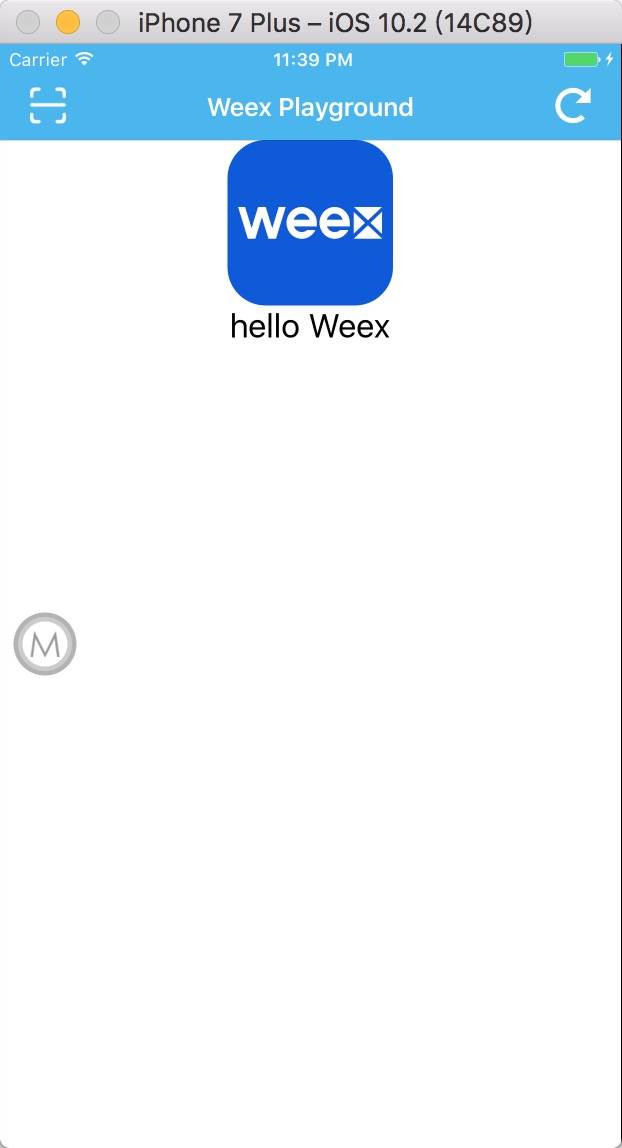
The above is my .we source file. After being compiled by Weex, it becomes index.js, with the following code:
// { "framework": "Weex" }
/******/ (function(modules) { // webpackBootstrap
/******/ 	// The module cache
/******/ 	var installedModules = {};

/******/ 	// The require function
/******/ 	function __webpack_require__(moduleId) {

/******/ 		// Check if module is in cache
/******/ 		if(installedModules[moduleId])
/******/ 			return installedModules[moduleId].exports;

/******/ 		// Create a new module (and put it into the cache)
/******/ 		var module = installedModules[moduleId] = {
/******/ 			exports: {},
/******/ 			id: moduleId,
/******/ 			loaded: false
/******/ 		};

/******/ 		// Execute the module function
/******/ 		modules[moduleId].call(module.exports, module, module.exports, __webpack_require__);

/******/ 		// Flag the module as loaded
/******/ 		module.loaded = true;

/******/ 		// Return the exports of the module
/******/ 		return module.exports;
/******/ 	}


/******/ 	// expose the modules object (__webpack_modules__)
/******/ 	__webpack_require__.m = modules;

/******/ 	// expose the module cache
/******/ 	__webpack_require__.c = installedModules;

/******/ 	// __webpack_public_path__
/******/ 	__webpack_require__.p = "";

/******/ 	// Load entry module and return exports
/******/ 	return __webpack_require__(0);
/******/ })
/************************************************************************/
/******/ ([
/* 0 */
/***/ function(module, exports, __webpack_require__) {

	var __weex_template__ = __webpack_require__(1)
	var __weex_style__ = __webpack_require__(2)
	var __weex_script__ = __webpack_require__(3)

	__weex_define__('@weex-component/916f9ecb075bbff1f4ea98389a4bb514', [], function(__weex_require__, __weex_exports__, __weex_module__) {

	    __weex_script__(__weex_module__, __weex_exports__, __weex_require__)
	    if (__weex_exports__.__esModule && __weex_exports__.default) {
	      __weex_module__.exports = __weex_exports__.default
	    }

	    __weex_module__.exports.template = __weex_template__

	    __weex_module__.exports.style = __weex_style__

	})

	__weex_bootstrap__('@weex-component/916f9ecb075bbff1f4ea98389a4bb514',undefined,undefined)

/***/ },
/* 1 */
/***/ function(module, exports) {

	module.exports = {
	  "type": "div",
	  "classList": [
	    "container"
	  ],
	  "children": [
	    {
	      "type": "image",
	      "attr": {
	        "src": "http://9.pic.paopaoche.net/up/2016-7/201671315341.png"
	      },
	      "classList": [
	        "pic"
	      ],
	      "events": {
	        "click": "picClick"
	      }
	    },
	    {
	      "type": "text",
	      "classList": [
	        "text"
	      ],
	      "attr": {
	        "value": function () {return this.title}
	      }
	    }
	  ]
	}

/***/ },
/* 2 */
/***/ function(module, exports) {

	module.exports = {
	  "container": {
	    "alignItems": "center"
	  },
	  "pic": {
	    "width": 200,
	    "height": 200
	  },
	  "text": {
	    "fontSize": 40,
	    "color": "#000000"
	  }
	}

/***/ },
/* 3 */
/***/ function(module, exports) {

	module.exports = function(module, exports, __weex_require__){'use strict';

	module.exports = {
	    data: function () {return {
	        title: 'Hello World',
	        toggle: false
	    }},
	    ready: function ready() {
	        console.log('this.title == ' + this.title);
	        this.title = 'hello Weex';
	        console.log('this.title == ' + this.title);
	    },
	    methods: {
	        picClick: function picClick() {
	            this.toggle = !this.toggle;
	            if (this.toggle) {
	                this.title = 'Image clicked';
	            } else {
	                this.title = 'Hello Weex';
	            }
	        }
	    }
	};}
	/* generated by weex-loader */


/***/ }
/******/ ]);
It looks like a pile of code, but if you take a closer look, the underlying structure becomes clear.
(function(modules) { // webpackBootstrap

……  ……
}
This section of code is added automatically, so we can ignore it for now. Below it are four code sections, each prefixed with a number: 0, 1, 2, and 3. Code sections 1, 2, and 3 correspond to <template>, <style>, and <script>, respectively. The code above is the code requested from the server.
After the server obtains the JS, OC calls the JS method createInstance(id, code, config, data).
args:(
    0,
    “(JS downloaded from the web,omitted because it's too long)”,
        {
        bundleUrl = "http://192.168.31.117:8081/HelloWeex.js";
        debug = 1;
    }
)
Next, some transformation operations will be executed inside JSFramework:
[JS Framework] create an Weex@undefined instance from undefined  [;
[JS Framework] Intialize an instance with: undefined  [;
[JS Framework] define a component @weex-component/916f9ecb075bbff1f4ea98389a4bb514  [;
[JS Framework] bootstrap for @weex-component/916f9ecb075bbff1f4ea98389a4bb514  [;
[JS Framework] "init" lifecycle in Vm(916f9ecb075bbff1f4ea98389a4bb514)  [;
[JS Framework] "created" lifecycle in Vm(916f9ecb075bbff1f4ea98389a4bb514)  [;
[JS Framework] compile native component by {"type":"div","classList":["container"],"children":[{"type":"image","attr":{"src":"http://9.pic.paopaoche.net/up/2016-7/201671315341.png"},"classList":["pic"],"events":{"click":"picClick"}},{"type":"text","classList":["text"],"attr":{}}]}  [;
[JS Framework] compile to create body for div  [;
[JS Framework] compile to append single node for {"ref":"_root","type":"div","attr":{},"style":{"alignItems":"center"}}
Next, JSFramework calls OC’s callNative method. It invokes the createBody method of the dom module to create rootView. The parameters are as follows:
(
        {
        args =         (
                        {
                attr =                 {
                };
                ref = "_root";
                style =                 {
                    alignItems = center;
                };
                type = div;
            }
        );
        method = createBody;
        module = dom;
    }
)
After creating the rootView, the next step is to continue adding Views.
[JS Framework] compile native component by {"type":"image","attr":{"src":"http://9.pic.paopaoche.net/up/2016-7/201671315341.png"},"classList":["pic"],"events":{"click":"picClick"}}  [;
[JS Framework] compile to create element for image  [;
[JS Framework] compile to append single node for {"ref":"3","type":"image","attr":{"src":"http://9.pic.paopaoche.net/up/2016-7/201671315341.png"},"style":{"width":200,"height":200},"event":["click"]}
JSFramework then calls OC’s callAddElement method to add a View. The parameters are as follows:
{
    attr =     {
        src = "http://9.pic.paopaoche.net/up/2016-7/201671315341.png";
    };
    event =     (
        click
    );
    ref = 3;
    style =     {
        height = 200;
        width = 200;
    };
    type = image;
}
After adding the UIImage, continue by adding a UILabel.
[JS Framework] compile native component by {"type":"text","classList":["text"],"attr":{}}  [;
[JS Framework] compile to create element for text  [;
[JS Framework] compile to append single node for {"ref":"4","type":"text","attr":{"value":"Hello World"},"style":{"fontSize":40,"color":"#000000"}}
JSFramework continues to call OC’s callAddElement method to add a View. The parameters are as follows:
{
    attr =     {
        value = "Hello World";
    };
    ref = 4;
    style =     {
        color = "#000000";
        fontSize = 40;
    };
    type = text;
}
Once ready:
[JS Framework] "ready" lifecycle in Vm(916f9ecb075bbff1f4ea98389a4bb514)
JSFramework continues to call OC’s callNative method, with the following parameters:
(
        {
        args =         (
            4,
                        {
                value = "hello Weex";
            }
        );
        method = updateAttrs;
        module = dom;
    }
)
At this point, all layout work has been completed. JSFramework will continue to call OC’s callNative method.
(
        {
        args =         (
        );
        method = createFinish;
        module = dom;
    }
)
At this point, all Views have been created. The final overall layout is as follows:
{layout: {width: 414, height: 672, top: 0, left: 0}, flexDirection: 'column', alignItems: 'stretch', flex: 0, width: 414, height: 672, left: 0, top: 0, children: [
  {_root:div layout: {width: 414, height: 672, top: 0, left: 0}, flexDirection: 'column', alignItems: 'center', flex: 0, width: 414, height: 672, children: [
    {3:image layout: {width: 110.4, height: 110.4, top: 0, left: 151.8}, flexDirection: 'column', alignItems: 'stretch', flex: 0, width: 110.4, height: 110.4, },
    {4:text layout: {width: 107.333, height: 26.6667, top: 110.4, left: 153.333}, flexDirection: 'column', alignItems: 'stretch', flex: 0, },
  ]},
]}
From the final layout, we can see that every module and component has its own unique id.
The next step is for WXImageComponent to update the image. Once the update completes, the entire render process is fully finished.
The role of JSFramework throughout this process is to continuously output a JSON-formatted Virtual DOM based on the input JSBundle, then call Objective-C native methods through JSCore to generate the View.
In the example above, the working principles of JSFramework are essentially demonstrated. The overall flow is shown below:
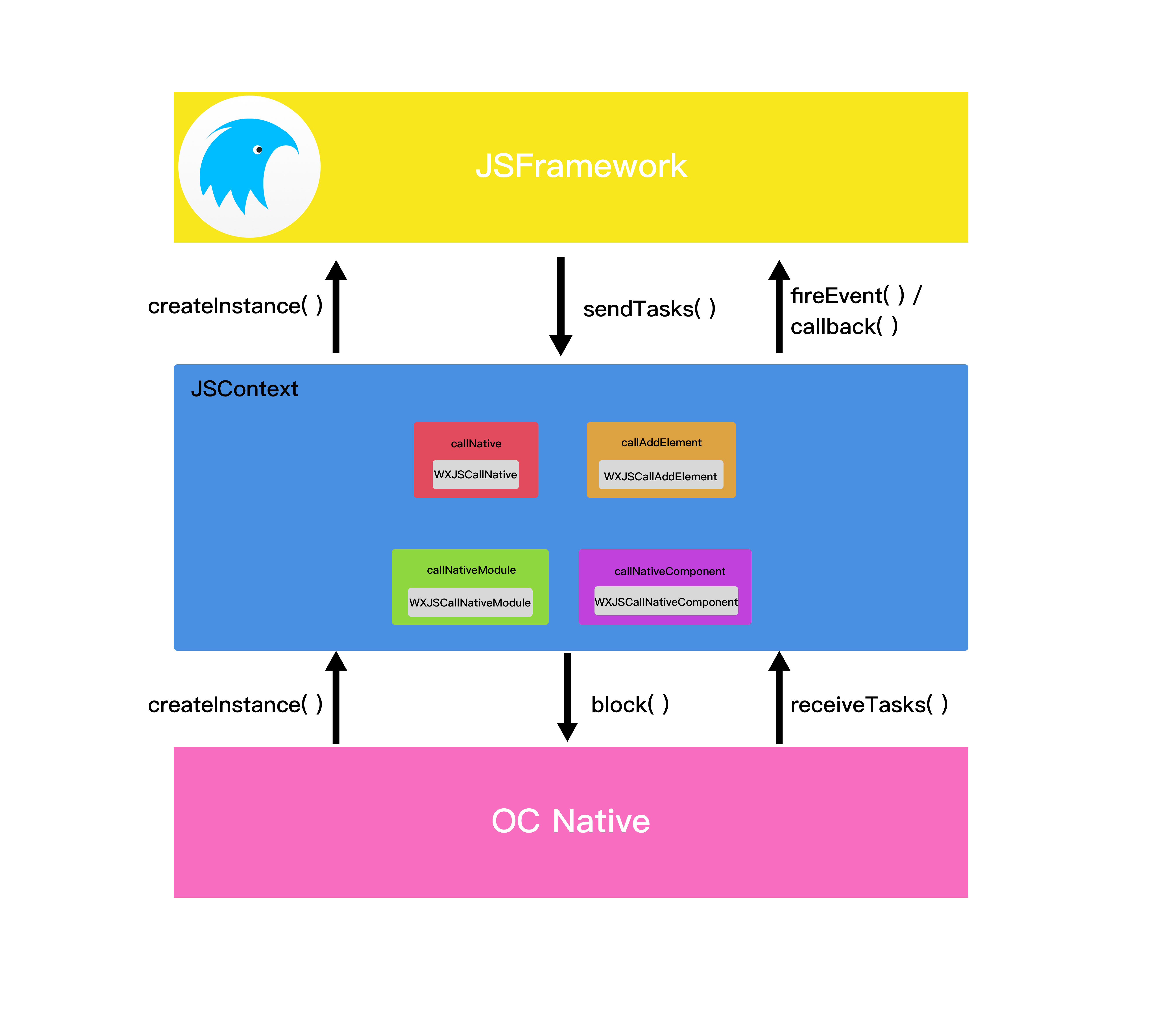
Next, let’s summarize in detail how JSFramework works on the Native side.
First, JSFramework is initialized only once when the app starts, and multiple pages share the same JSFramework instance. This design also improves the opening speed of all Weex pages. The JS Framework startup process takes several hundred milliseconds, which means those several hundred milliseconds are saved every time a page is opened.
Although there is only one global JSFramework, how does Weex prevent multiple Weex pages from interfering with each other within the same JS Runtime? Weex takes two measures. First, it requires every Weex page to create a globally unique instance ID, which can directly map to a Weex page. Second, whenever JS and Native call each other, every method requires the first parameter to be the ID. For example: createInstance(id, code, config, data), sendTasks(id, tasks), receiveTasks(id, tasks). In this way, the state of different pages is isolated into different closures, ensuring that they do not affect each other.
When Native needs to render a page, it actively calls createInstance(id, code, config, data), where the code parameter is the String converted from the JS Bundle. After JSFramework receives these input parameters, it begins parsing and starts sendTasks(id, tasks).
sendTasks(id, tasks) calls Objective-C Native methods through JSBridge. The tasks specify the module name, method name, and parameters for the corresponding functionality. For example:
sendTasks(id, [{ module: 'dom', method: 'removeElement', args: [elementRef]}])will call the Objective-C method previously registered in JSContext.The client also calls receiveTasks(id, tasks) to invoke JS methods. There are two modes in receiveTasks. One is fireEvent, which corresponds to an event triggered by the client on a DOM element, such as fireEvent(titleElementRef, ‘click’, eventObject). The other is callback, which is the callback generated after invoking the aforementioned functional modules. For example, when we send an HTTP request to the Native side through the fetch interface and set a callback function, the JS side first generates a callbackID for this callback function, such as the string “123”. What gets sent to the Native side is this callbackID. After the request finishes, native needs to return the request result to the JS Runtime. To correlate the response with the original request, this callback eventually becomes a format similar to callback(callbackID, result).
4. About Weex, ReactNative, and JSPatch
This section was not originally part of the article, but because Apple’s App Review has recently caused some controversy, I decided to briefly mention it here.
By the time you read this article, pure ReactNative and pure Weex projects can already pass review without issue, while JSPatch is still blocked.
Since this article analyzes how Weex works, let’s briefly discuss the differences between RN, Weex, and JSpatch.
First, all three are based on JS for hot updates, but the biggest difference between RN/Weex and JSPatch is this: if Native does not provide method interfaces that JS can call, then RN and Weex pages cannot implement certain Native capabilities no matter what.
JSPatch is different. Although it is also a JSCore-based bridge, it is based on Runtime—specifically Objective-C Runtime. It can implement all kinds of requirements. Even if Native did not expose an interface in advance, JSPatch can add methods to implement the requirement, and it can also modify already implemented methods.
From the perspective of hot-update capability, RN and Weex only have moderate capability, while JSPatch is almost omnipotent: anything Runtime can implement, it can implement.
Therefore, from the perspective of hot-update capability, RN and Weex cannot change native Native code, nor can they dynamically call private Native system APIs. That is why Apple’s review process allows RN and Weex to pass.
Finally

This article only explains how Weex runs on the iOS Native side, but there is still a lot about Weex that has not been covered. For example: when an element in a Vue.js page changes, how does the Native page update in time? How is a Weex page rendered using the FlexBox algorithm? How is a frontend page packaged into a JS bundle? How are .we and .vue files translated through a DSL? How can we use the JS Runtime to write powerful JSService logic? How do webpackBootstrap and weex-loader generate the final JS code, and what optimizations happen in the process? …
All of these questions will be explained one by one in the upcoming series of Weex articles. I welcome your feedback and guidance!
GitHub Repo: Halfrost-Field
Follow: halfrost · GitHub
Source: https://halfrost.com/weex_ios/
