The Ingenious JS Framework in Weex
Preface
To push Native performance to the limit, Weex has done a great deal of optimization work.
The goal is for all pages to open instantly on the user side—that is, for the combined time of network transfer (JS Bundle download) and first-screen rendering (the time required to render what appears in the user’s first screen) to be less than 1s.
When the Taobao Mobile team optimized Weex performance, they encountered many problems and challenges:
JS Bundle downloads were slow. A JS Bundle of around 60 KB after compression took more than 800 ms to download on average across all network conditions (and even more than 2s on 2G/3G). Communication between JS and Native was inefficient, slowing down first-screen load time.
The solution they eventually came up with was to embed JSFramework into the SDK to achieve extreme optimization.
When the client accesses a Weex page, it first makes a network request for the JS Bundle. After the JS Bundle is loaded locally on the client, it is passed into JSFramework for parsing and rendering. The parsing and rendering process of JS Framework essentially creates the Virtual DOM and data bindings based on the data structure of the JS Bundle, then passes them to the client for rendering.
Because JSFramework is local, the size of the JS Bundle is reduced. Each JS Bundle can be made smaller, retaining only business code inside the Bundle. The download time for each page’s Bundle can be reduced by 10–20 ms. If there are many Weex pages, the cumulative time savings across pages become substantial. Weex’s default design of split-package loading is stronger than React Native’s, so it avoids the package-splitting problem that has long troubled React Native.Throughout the process, JSFramework splits the rendering of the entire page into individual rendering instructions, then sends them through JS Bridge to each platform’s RenderEngine for Native rendering. Therefore, although development is done with HTML / CSS / JS, the final rendered result on each mobile platform (iOS Native UI on iOS, Android Native UI on Android) is a pure Native page. Because JSFramework is in the local SDK, it only needs to be initialized once during initialization, and each subsequent page no longer needs to initialize it again. This further improves communication efficiency with Native.
The role of JSFramework on the client side was also mentioned in the previous articles. It has three responsibilities on the Native side:
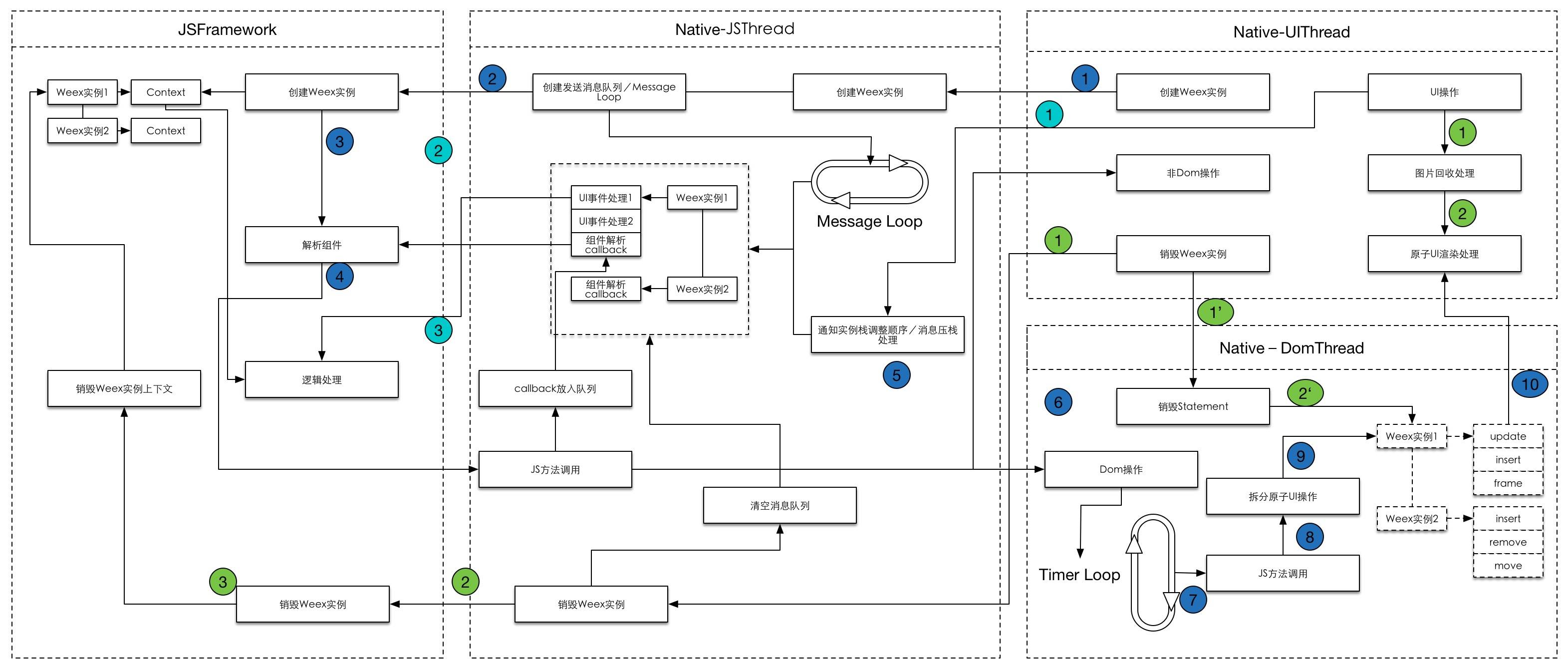
- Manage the lifecycle of each Weex instance.
- Continuously receive JS Bundles passed from Native, convert them into Virtual DOM, and then call Native methods to build the page layout.
- Respond to events passed from Native.
Next, from the perspective of the source code, the author will analyze in detail how Weex’s ingenious JS Framework implements the features described above.
Table of Contents
- Weex JS Framework Initialization
- Weex JS Framework Managing the Instance Lifecycle
- Weex JS Framework Building the Virtual DOM
- Weex JS Framework Handling Events Triggered by Native
- What Weex JS Framework May Do in the Future
I. Weex JS Framework Initialization
Before analyzing Weex JS Framework, let’s first look at the tree diagram of the code file structure of the entire Weex JS Framework. The code version below is 0.19.8.
weex/html5/frameworks
    ├── index.js
    ├── legacy
    │     ├── api         // define interfaces on Vm
    │     │   ├── methods.js        // internal methods starting with $
    │     │   └── modules.js        // information about some components
    │     ├── app        // page instance related code
    │     │   ├── bundle            // main bundled and compiled code
    │     │   │     ├── bootstrap.js
    │     │   │     ├── define.js
    │     │   │     └── index.js  // entry for handling jsbundle
    │     │   ├── ctrl              // handle methods triggered back by Native
    │     │   │     ├── index.js
    │     │   │     ├── init.js
    │     │   │     └── misc.js
    │     │   ├── differ.js        // differ-related processing methods
    │     │   ├── downgrade.js     //  H5 downgrade-related processing methods
    │     │   ├── index.js
    │     │   ├── instance.js      // constructor for Weex instances
    │     │   ├── register.js      // processing methods for registering modules and components
    │     │   ├── viewport.js
    │     ├── core       // data-observation related code, core ViewModel code
    │     │   ├── array.js
    │     │   ├── dep.js
    │     │   ├── LICENSE
    │     │   ├── object.js
    │     │   ├── observer.js
    │     │   ├── state.js
    │     │   └── watcher.js
    │     ├── static     // some static methods
    │     │   ├── bridge.js
    │     │   ├── create.js
    │     │   ├── life.js
    │     │   ├── map.js
    │     │   ├── misc.js
    │     │   └── register.js
    │     ├── util        // utility functions such as isReserved, toArray, isObject, etc.
    │     │   ├── index.js
    │     │   └── LICENSE
    │     │   └── shared.js
    │     ├── vm         // component model related code
    │     │   ├── compiler.js     // ViewModel template parser and data-binding operations
    │     │   ├── directive.js    // directive compiler
    │     │   ├── dom-helper.js   // helper for Dom elements
    │     │   ├── events.js       // all component events and lifecycle
    │     │   └── index.js        // ViewModel constructor and definition
    │     ├── config.js
    │     └── index.js // entry file
    └── vanilla
          └── index.js
Files in the runtime directory will also be used, so let’s also go through the structure of the runtime directory.
weex/html5/runtime
    ├── callback-manager.js
    ├── config.js
    ├── handler.js
    ├── index.js
    ├── init.js
    ├── listener.js
    ├── service.js
    ├── task-center.js
    └── vdom
          ├── comment.js
          ├── document.js
          ├── element-types.js
          ├── element.js
          ├── index.js
          ├── node.js
          └── operation.js
Next, we will analyze Weex JS Framework initialization.
Weex JS Framework initialization starts from the corresponding entry file html5/render/native/index.js
import { subversion } from '../../../package.json'
import runtime from '../../runtime'
import frameworks from '../../frameworks/index'
import services from '../../services/index'

const { init, config } = runtime
config.frameworks = frameworks
const { native, transformer } = subversion

// Register services by serviceName
for (const serviceName in services) {
  runtime.service.register(serviceName, services[serviceName])
}

// Call runtime's freezePrototype() method to prevent changing existing property attributes and values, and adding new properties.
runtime.freezePrototype()

// Call runtime's setNativeConsole() method to set the corresponding Console based on the logLevel set by Native
runtime.setNativeConsole()

// Register framework metadata
global.frameworkVersion = native
global.transformerVersion = transformer

// Initialize frameworks
const globalMethods = init(config)

// Set global methods
for (const methodName in globalMethods) {
  global[methodName] = (...args) => {
    const ret = globalMethods[methodName](...args)
    if (ret instanceof Error) {
      console.error(ret.toString())
    }
    return ret
  }
}
The above method calls the init() method, which initializes the JS Framework.
The init() method is in weex/html5/runtime/init.js.
export default function init (config) {
  runtimeConfig = config || {}
  frameworks = runtimeConfig.frameworks || {}
  initTaskHandler()

  // Each framework is initialized by init,
  // config contains 3 important virtual-DOM classes, `Document`, `Element`, `Comment`, and a JS bridge method sendTasks(...args)
  for (const name in frameworks) {
    const framework = frameworks[name]
    framework.init(config)
  }

  // @todo: The method `registerMethods` will be re-designed or removed later.
  ; ['registerComponents', 'registerModules', 'registerMethods'].forEach(genInit)

  ; ['destroyInstance', 'refreshInstance', 'receiveTasks', 'getRoot'].forEach(genInstance)

  adaptInstance('receiveTasks', 'callJS')

  return methods
}
The config parameter is passed into the initialization method, and this argument comes from weex/html5/runtime/config.js.
import { Document, Element, Comment } from './vdom'
import Listener from './listener'
import { TaskCenter } from './task-center'

const config = {
  Document, Element, Comment, Listener,
  TaskCenter,
  sendTasks (...args) {
    return global.callNative(...args)
  }
}

Document.handler = config.sendTasks

export default config
config contains Document, Element, Comment, Listener, TaskCenter, and a sendTasks method.
After config is initialized, a framework property is also added. This property is passed in from weex/html5/frameworks/index.js.
import * as Vanilla from './vanilla/index'
import * as Vue from 'weex-vue-framework'
import * as Weex from './legacy/index'
import Rax from 'weex-rax-framework'

export default {
  Vanilla,
  Vue,
  Rax,
  Weex
}
After init( ) obtains config and config.frameworks, it starts executing the initTaskHandler() method.
import { init as initTaskHandler } from './task-center'
The initTaskHandler() method comes from the init() method in task-center.js.
export function init () {
  const DOM_METHODS = {
    createFinish: global.callCreateFinish,
    updateFinish: global.callUpdateFinish,
    refreshFinish: global.callRefreshFinish,

    createBody: global.callCreateBody,

    addElement: global.callAddElement,
    removeElement: global.callRemoveElement,
    moveElement: global.callMoveElement,
    updateAttrs: global.callUpdateAttrs,
    updateStyle: global.callUpdateStyle,

    addEvent: global.callAddEvent,
    removeEvent: global.callRemoveEvent
  }
  const proto = TaskCenter.prototype

  for (const name in DOM_METHODS) {
    const method = DOM_METHODS[name]
    proto[name] = method ?
      (id, args) => method(id, ...args) :
      (id, args) => fallback(id, [{ module: 'dom', method: name, args }], '-1')
  }

  proto.componentHandler = global.callNativeComponent ||
    ((id, ref, method, args, options) =>
      fallback(id, [{ component: options.component, ref, method, args }]))

  proto.moduleHandler = global.callNativeModule ||
    ((id, module, method, args) =>
      fallback(id, [{ module, method, args }]))
}
The initialization method here adds 11 methods to prototype: createFinish, updateFinish, refreshFinish, createBody, addElement, removeElement, moveElement, updateAttrs, updateStyle, addEvent, and removeEvent.
If method exists, it initializes via method(id, ...args); otherwise, it initializes via fallback(id, [{ module: 'dom', method: name, args }], '-1').
Finally, componentHandler and moduleHandler are added as well.
The initTaskHandler( ) method initializes 13 methods in total (including 2 handlers), all of which are bound to prototype.
    createFinish(id, [{ module: 'dom', method: createFinish, args }], '-1')
    updateFinish(id, [{ module: 'dom', method: updateFinish, args }], '-1')
    refreshFinish(id, [{ module: 'dom', method: refreshFinish, args }], '-1')
    createBody:(id, [{ module: 'dom', method: createBody, args }], '-1')

    addElement:(id, [{ module: 'dom', method: addElement, args }], '-1')
    removeElement:(id, [{ module: 'dom', method: removeElement, args }], '-1')
    moveElement:(id, [{ module: 'dom', method: moveElement, args }], '-1')
    updateAttrs:(id, [{ module: 'dom', method: updateAttrs, args }], '-1')
    updateStyle:(id, [{ module: 'dom', method: updateStyle, args }], '-1')

    addEvent:(id, [{ module: 'dom', method: addEvent, args }], '-1')
    removeEvent:(id, [{ module: 'dom', method: removeEvent, args }], '-1')

    componentHandler(id, [{ component: options.component, ref, method, args }]))
    moduleHandler(id, [{ module, method, args }]))
Returning to the init( ) method, after initTaskHandler() is handled, there is a loop:
  for (const name in frameworks) {
    const framework = frameworks[name]
    framework.init(config)
  }
In this loop, the init method is called on each object in frameworks, with config passed as the argument.
For example, Vanilla’s init( ) implementation is as follows:
function init (cfg) {
  config.Document = cfg.Document
  config.Element = cfg.Element
  config.Comment = cfg.Comment
  config.sendTasks = cfg.sendTasks
}
The implementation of Weex’s init( ) is as follows:
export function init (cfg) {
  config.Document = cfg.Document
  config.Element = cfg.Element
  config.Comment = cfg.Comment
  config.sendTasks = cfg.sendTasks
  config.Listener = cfg.Listener
}
After initializing config, genInit starts executing.
['registerComponents', 'registerModules', 'registerMethods'].forEach(genInit)
function genInit (methodName) {
  methods[methodName] = function (...args) {
    if (methodName === 'registerComponents') {
      checkComponentMethods(args[0])
    }
    for (const name in frameworks) {
      const framework = frameworks[name]
      if (framework && framework[methodName]) {
        framework[methodName](...args)
      }
    }
  }
}
methods has 3 methods by default
const methods = {
  createInstance,
  registerService: register,
  unregisterService: unregister
}
Except for these three methods, all of them call the corresponding methods in the framework.
export function registerComponents (components) {
  if (Array.isArray(components)) {
    components.forEach(function register (name) {
      /* istanbul ignore if */
      if (!name) {
        return
      }
      if (typeof name === 'string') {
        nativeComponentMap[name] = true
      }
      /* istanbul ignore else */
      else if (typeof name === 'object' && typeof name.type === 'string') {
        nativeComponentMap[name.type] = name
      }
    })
  }
}
The methods above are the core implementation for registering Native components. The final registration information is stored in the nativeComponentMap object, which initially contains the following data:
export default {
  nativeComponentMap: {
    text: true,
    image: true,
    container: true,
    slider: {
      type: 'slider',
      append: 'tree'
    },
    cell: {
      type: 'cell',
      append: 'tree'
    }
  }
}
The registerModules method is then called:
export function registerModules (modules) {
  /* istanbul ignore else */
  if (typeof modules === 'object') {
    initModules(modules)
  }
}
initModules comes from ./frameworks/legacy/app/register.js. In this file, initModules(modules, ifReplace) is called for initialization. This method contains the core implementation for registering Native modules.
Finally, registerMethods is called.
export function registerMethods (methods) {
  /* istanbul ignore else */
  if (typeof methods === 'object') {
    initMethods(Vm, methods)
  }
}
initMethods comes from ./frameworks/legacy/app/register.js. Within this method, initMethods (Vm, apis) is called to perform initialization. The initMethods method contains the core implementation for registering Native handlers.
After registerComponents, registerModules, and registerMethods have finished initialization, the methods for each instance are registered.
['destroyInstance', 'refreshInstance', 'receiveTasks', 'getRoot'].forEach(genInstance)
Here, the four method names destroyInstance, refreshInstance, receiveTasks, and getRoot are passed to genInstance, respectively.
function genInstance (methodName) {
  methods[methodName] = function (...args) {
    const id = args[0]
    const info = instanceMap[id]
    if (info && frameworks[info.framework]) {
      const result = frameworks[info.framework][methodName](...args)

      // Lifecycle methods
      if (methodName === 'refreshInstance') {
        services.forEach(service => {
          const refresh = service.options.refresh
          if (refresh) {
            refresh(id, { info, runtime: runtimeConfig })
          }
        })
      }
      else if (methodName === 'destroyInstance') {
        services.forEach(service => {
          const destroy = service.options.destroy
          if (destroy) {
            destroy(id, { info, runtime: runtimeConfig })
          }
        })
        delete instanceMap[id]
      }

      return result
    }
    return new Error(`invalid instance id "${id}"`)
  }
}
The code above is the concrete implementation for registering methods on each instance. In Weex, every instance has three lifecycle methods by default: createInstance, refreshInstance, and destroyInstance. All instance methods are stored in services.
The final step of init( ) initialization is to add the callJS method to each instance.
adaptInstance('receiveTasks', 'callJS')
function adaptInstance (methodName, nativeMethodName) {
  methods[nativeMethodName] = function (...args) {
    const id = args[0]
    const info = instanceMap[id]
    if (info && frameworks[info.framework]) {
      return frameworks[info.framework][methodName](...args)
    }
    return new Error(`invalid instance id "${id}"`)
  }
}
When Native calls the callJS method, it invokes the receiveTasks method on the instance with the corresponding id.
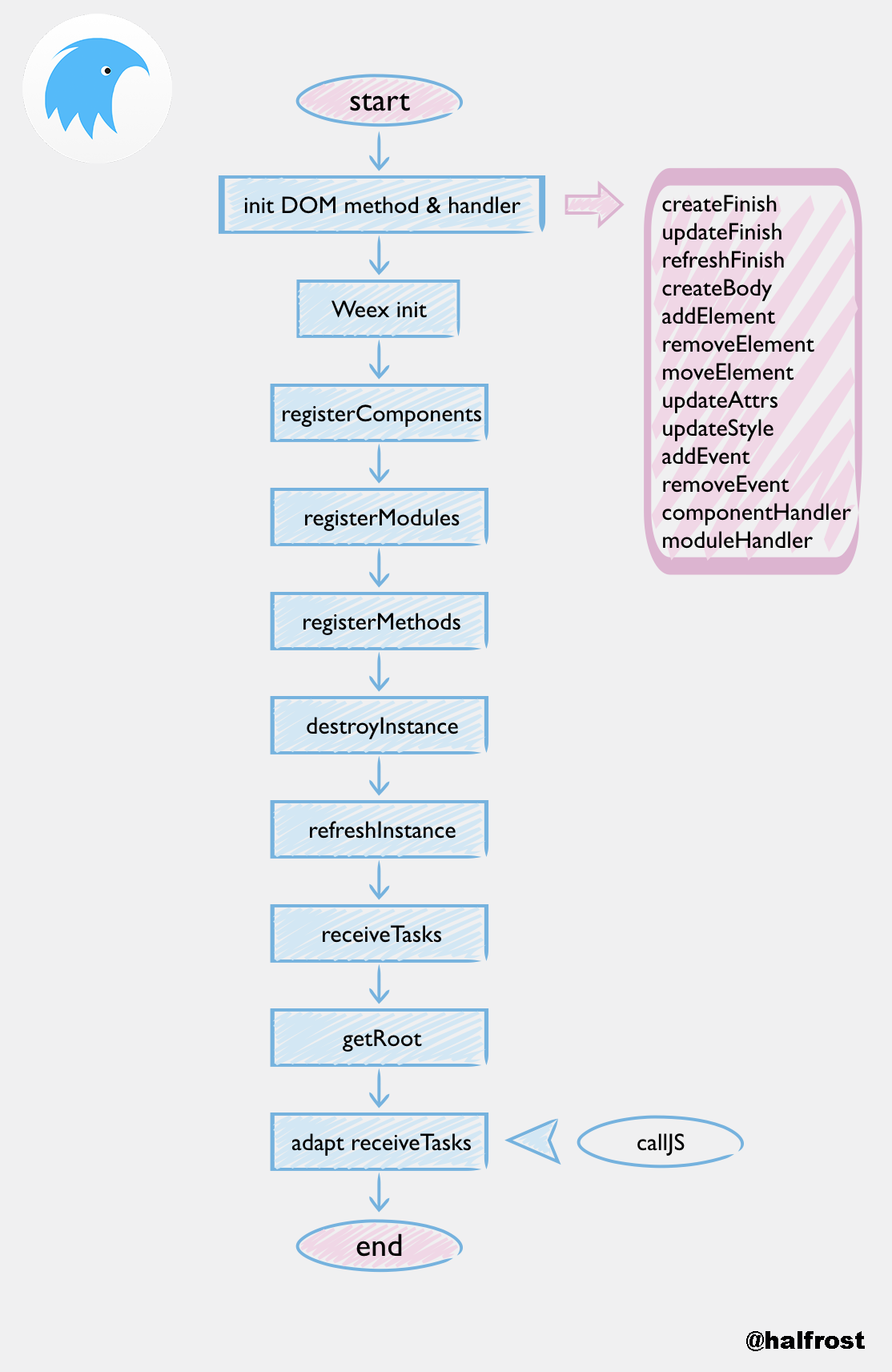
The overall init flow is summarized in the diagram above.
After init completes, global methods are set.
for (const methodName in globalMethods) {
  global[methodName] = (...args) => {
    const ret = globalMethods[methodName](...args)
    if (ret instanceof Error) {
      console.error(ret.toString())
    }
    return ret
  }
}
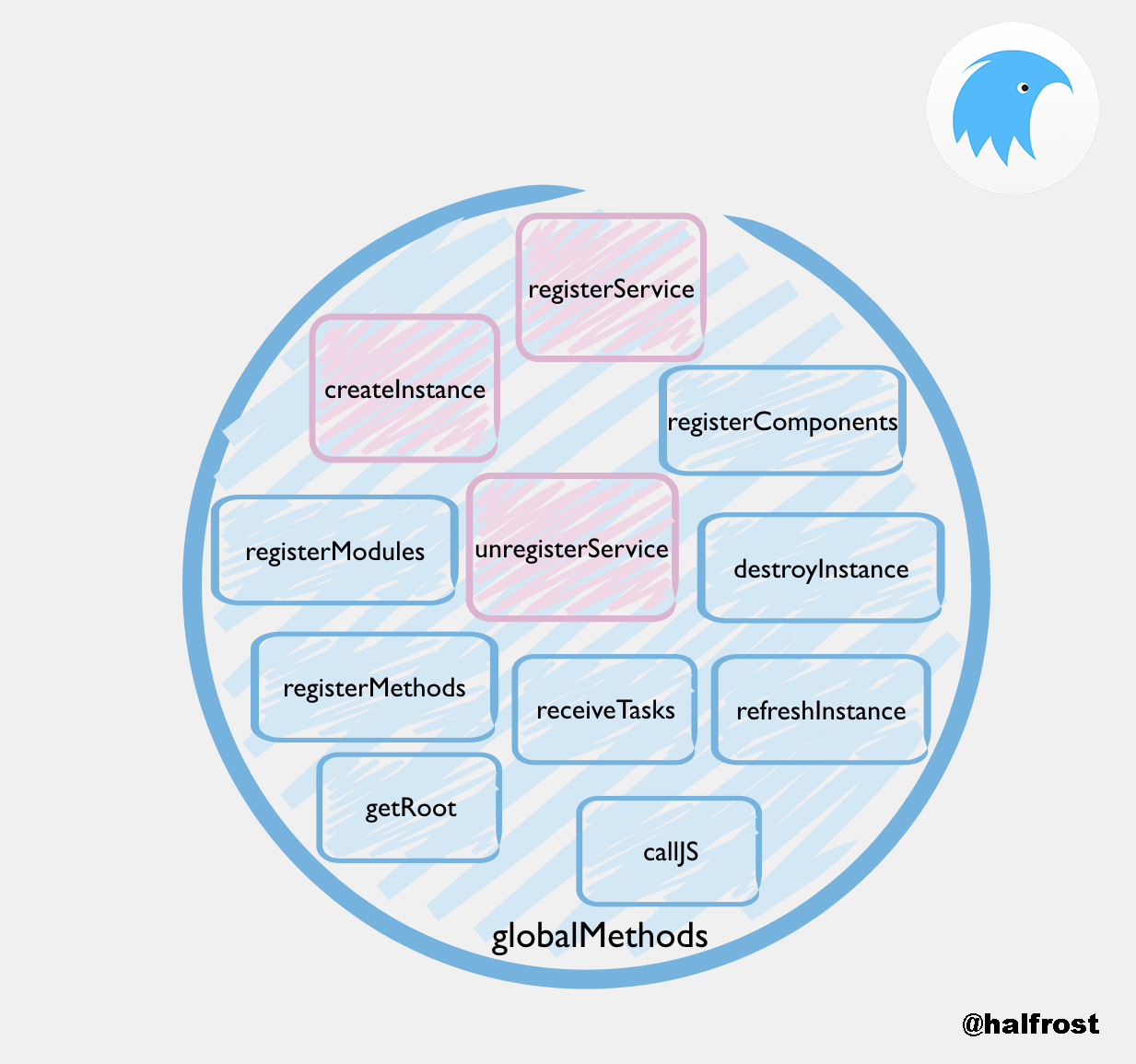
The three methods marked in red in the diagram are the methods available by default.
At this point, the Weex JS Framework initialization is complete.
II. The Weex JS Framework Manages the Instance Lifecycle
After Native has finished initializing Components, Modules, and handlers, it requests the JS Bundle from the remote endpoint. Native then calls the createInstance method to pass the JS Bundle to the JS Framework. Everything that follows starts with createInstance.
When Native calls createInstance, execution reaches the function createInstance (id, code, config, data) method in html5/runtime/init.js.
function createInstance (id, code, config, data) {
  let info = instanceMap[id]

  if (!info) {
    // Check version info
    info = checkVersion(code) || {}
    if (!frameworks[info.framework]) {
      info.framework = 'Weex'
    }

    // Initialize instance config.
    config = JSON.parse(JSON.stringify(config || {}))
    config.bundleVersion = info.version
    config.env = JSON.parse(JSON.stringify(global.WXEnvironment || {}))
    console.debug(`[JS Framework] create an ${info.framework}@${config.bundleVersion} instance from ${config.bundleVersion}`)

    const env = {
      info,
      config,
      created: Date.now(),
      framework: info.framework
    }
    env.services = createServices(id, env, runtimeConfig)
    instanceMap[id] = env

    return frameworks[info.framework].createInstance(id, code, config, data, env)
  }
  return new Error(`invalid instance id "${id}"`)
}
This method initializes the version information, config, date, and other data, and records a log entry in Native:
[JS Framework] create an Weex@undefined instance from undefined
The createInstance method above ultimately still calls the createInstance (id, code, options, data, info) method in html5/framework/legacy/static/create.js.
export function createInstance (id, code, options, data, info) {
  const { services } = info || {}
  // Initialize target
  resetTarget()
  let instance = instanceMap[id]
  /* istanbul ignore else */
  options = options || {}
  let result
  /* istanbul ignore else */
  if (!instance) {
    instance = new App(id, options)
    instanceMap[id] = instance
    result = initApp(instance, code, data, services)
  }
  else {
    result = new Error(`invalid instance id "${id}"`)
  }
  return result
}
The new App() method creates a new App instance object and stores it in instanceMap.
The App object is defined as follows:
export default function App (id, options) {
  this.id = id
  this.options = options || {}
  this.vm = null
  this.customComponentMap = {}
  this.commonModules = {}

  // document
  this.doc = new renderer.Document(
    id,
    this.options.bundleUrl,
    null,
    renderer.Listener
  )
  this.differ = new Differ(id)
}
There are three relatively important attributes:
idis the unique identifier used when the JS Framework communicates with the Native side.vmis the View Model, the component model, which includes functionality related to data binding.docis the root node in the Virtual DOM.
For example, suppose Native passes in the following information to initialize createInstance:
args:(
      0,
       “(JS downloaded from the network, omitted because it is too long)”,
      {
        bundleUrl = "http://192.168.31.117:8081/HelloWeex.js";
        debug = 1;
      }
)
So instance = 0, code is the JS code, data corresponds to the dictionary below, and service = @{ }. These input parameters are passed into the initApp(instance, code, data, services) method. This method is in html5/framework/legacy/app/ctrl/init.js.
export function init (app, code, data, services) {
  console.debug('[JS Framework] Intialize an instance with:\n', data)
  let result

  /* Some code is omitted here*/

  // Initialize weexGlobalObject
  const weexGlobalObject = {
    config: app.options,
    define: bundleDefine,
    bootstrap: bundleBootstrap,
    requireModule: bundleRequireModule,
    document: bundleDocument,
    Vm: bundleVm
  }

  // Prevent weexGlobalObject from being modified
  Object.freeze(weexGlobalObject)
  /* Some code is omitted here*/

  // Start transforming the JS Bundle code below
  let functionBody
  /* istanbul ignore if */
  if (typeof code === 'function') {
    // `function () {...}` -> `{...}`
    // not very strict
    functionBody = code.toString().substr(12)
  }
  /* istanbul ignore next */
  else if (code) {
    functionBody = code.toString()
  }
  // wrap IFFE and use strict mode
  functionBody = `(function(global){\n\n"use strict";\n\n ${functionBody} \n\n})(Object.create(this))`

  // run code and get result
  const globalObjects = Object.assign({
    define: bundleDefine,
    require: bundleRequire,
    bootstrap: bundleBootstrap,
    register: bundleRegister,
    render: bundleRender,
    __weex_define__: bundleDefine, // alias for define
    __weex_bootstrap__: bundleBootstrap, // alias for bootstrap
    __weex_document__: bundleDocument,
    __weex_require__: bundleRequireModule,
    __weex_viewmodel__: bundleVm,
    weex: weexGlobalObject
  }, timerAPIs, services)

  callFunction(globalObjects, functionBody)

  return result
}
The method above is very important. It encapsulates a globalObjects object, which contains the five methods define, require, bootstrap, register, and render.
It also records a log entry on the native side:
[JS Framework] Intialize an instance with: undefined
Among the five methods above:
/**
 * @deprecated
 */
export function register (app, type, options) {
  console.warn('[JS Framework] Register is deprecated, please install lastest transformer.')
  registerCustomComponent(app, type, options)
}
Among these, register, render, and require are deprecated methods.
bundleDefine function signature:
(...args) => defineFn(app, ...args)
bundleBootstrap function prototype:
(name, config, _data) => {
    result = bootstrap(app, name, config, _data || data)
    updateActions(app)
    app.doc.listener.createFinish()
    console.debug(`[JS Framework] After intialized an instance(${app.id})`)
  }
Prototype of the bundleRequire function:
name => _data => {
    result = bootstrap(app, name, {}, _data)
  }
bundleRegister function prototype:
(...args) => register(app, ...args)
bundleRender function prototype:
(name, _data) => {
    result = bootstrap(app, name, {}, _data)
  }
The five methods above are encapsulated in globalObjects and passed into the JS Bundle.
function callFunction (globalObjects, body) {
  const globalKeys = []
  const globalValues = []
  for (const key in globalObjects) {
    globalKeys.push(key)
    globalValues.push(globalObjects[key])
  }
  globalKeys.push(body)
  // The final JS Bundle will be executed via new Function( )
  const result = new Function(...globalKeys)
  return result(...globalValues)
}
The final JS Bundle is executed via new Function( ). The JS Bundle code runs in the global environment and cannot access data from the JS Framework execution environment; it can only use the methods in the globalObjects object. The JS Bundle itself also uses an IFFE and strict mode, so it does not pollute the global environment.

That is everything createInstance does. When it receives a createInstance call from Native, it first creates a new App instance object in the JS Framework and stores it in instanceMap. It then passes five methods (three of which are already deprecated) into new Function( ). new Function( ) performs the most important work of the JS Framework: converting the JS Bundle into a Virtual DOM and sending it to the native module for rendering.
III. Building the Virtual DOM in the Weex JS Framework
The process of building the Virtual DOM is the process of compiling and executing the JS Bundle.
First, here is a real JS Bundle example, such as the following code:
// { "framework": "Weex" }
/******/ (function(modules) { // webpackBootstrap
/******/ 	// The module cache
/******/ 	var installedModules = {};

/******/ 	// The require function
/******/ 	function __webpack_require__(moduleId) {

/******/ 		// Check if module is in cache
/******/ 		if(installedModules[moduleId])
/******/ 			return installedModules[moduleId].exports;

/******/ 		// Create a new module (and put it into the cache)
/******/ 		var module = installedModules[moduleId] = {
/******/ 			exports: {},
/******/ 			id: moduleId,
/******/ 			loaded: false
/******/ 		};

/******/ 		// Execute the module function
/******/ 		modules[moduleId].call(module.exports, module, module.exports, __webpack_require__);

/******/ 		// Flag the module as loaded
/******/ 		module.loaded = true;

/******/ 		// Return the exports of the module
/******/ 		return module.exports;
/******/ 	}


/******/ 	// expose the modules object (__webpack_modules__)
/******/ 	__webpack_require__.m = modules;

/******/ 	// expose the module cache
/******/ 	__webpack_require__.c = installedModules;

/******/ 	// __webpack_public_path__
/******/ 	__webpack_require__.p = "";

/******/ 	// Load entry module and return exports
/******/ 	return __webpack_require__(0);
/******/ })
/************************************************************************/
/******/ ([
/* 0 */
/***/ function(module, exports, __webpack_require__) {

	var __weex_template__ = __webpack_require__(1)
	var __weex_style__ = __webpack_require__(2)
	var __weex_script__ = __webpack_require__(3)

	__weex_define__('@weex-component/916f9ecb075bbff1f4ea98389a4bb514', [], function(__weex_require__, __weex_exports__, __weex_module__) {

	    __weex_script__(__weex_module__, __weex_exports__, __weex_require__)
	    if (__weex_exports__.__esModule && __weex_exports__.default) {
	      __weex_module__.exports = __weex_exports__.default
	    }

	    __weex_module__.exports.template = __weex_template__

	    __weex_module__.exports.style = __weex_style__

	})

	__weex_bootstrap__('@weex-component/916f9ecb075bbff1f4ea98389a4bb514',undefined,undefined)

/***/ },
/* 1 */
/***/ function(module, exports) {

	module.exports = {
	  "type": "div",
	  "classList": [
	    "container"
	  ],
	  "children": [
	    {
	      "type": "image",
	      "attr": {
	        "src": "http://9.pic.paopaoche.net/up/2016-7/201671315341.png"
	      },
	      "classList": [
	        "pic"
	      ],
	      "events": {
	        "click": "picClick"
	      }
	    },
	    {
	      "type": "text",
	      "classList": [
	        "text"
	      ],
	      "attr": {
	        "value": function () {return this.title}
	      }
	    }
	  ]
	}

/***/ },
/* 2 */
/***/ function(module, exports) {

	module.exports = {
	  "container": {
	    "alignItems": "center"
	  },
	  "pic": {
	    "width": 200,
	    "height": 200
	  },
	  "text": {
	    "fontSize": 40,
	    "color": "#000000"
	  }
	}

/***/ },
/* 3 */
/***/ function(module, exports) {

	module.exports = function(module, exports, __weex_require__){'use strict';

	module.exports = {
	    data: function () {return {
	        title: 'Hello World',
	        toggle: false
	    }},
	    ready: function ready() {
	        console.log('this.title == ' + this.title);
	        this.title = 'hello Weex';
	        console.log('this.title == ' + this.title);
	    },
	    methods: {
	        picClick: function picClick() {
	            this.toggle = !this.toggle;
	            if (this.toggle) {
	                this.title = 'Image clicked';
	            } else {
	                this.title = 'Hello Weex';
	            }
	        }
	    }
	};}
	/* generated by weex-loader */


/***/ }
/******/ ]);
After the JS Framework obtains the JS Bundle, it first executes bundleDefine.
export const defineFn = function (app, name, ...args) {
  console.debug(`[JS Framework] define a component ${name}`)

  /*code below omitted*/
  /*Register custom components and regular modules in this method*/

}
User-defined components are placed in app.customComponentMap. After bundleDefine finishes executing, the bundleBootstrap method is called.
- define: used to define a custom composite component
- bootstrap: used to render the page with a given composite component as the root node
bundleDefine parses the components defined in the code via __weex_define__("@weex-component/"), including dependent child components. It records each component in the customComponentMap[name] = exports array, maintaining the mapping between components and their component code. Because child components may be dependencies, it may be called multiple times until all components have been fully parsed.
export function bootstrap (app, name, config, data) {
  console.debug(`[JS Framework] bootstrap for ${name}`)

  // 1. Validate the custom Component name
  let cleanName
  if (isWeexComponent(name)) {
    cleanName = removeWeexPrefix(name)
  }
  else if (isNpmModule(name)) {
    cleanName = removeJSSurfix(name)
    // Check whether it was defined via the old 'define' method
    if (!requireCustomComponent(app, cleanName)) {
      return new Error(`It's not a component: ${name}`)
    }
  }
  else {
    return new Error(`Wrong component name: ${name}`)
  }

  // 2. Validate configuration
  config = isPlainObject(config) ? config : {}
  // 2.1 transformer version check
  if (typeof config.transformerVersion === 'string' &&
    typeof global.transformerVersion === 'string' &&
    !semver.satisfies(config.transformerVersion,
      global.transformerVersion)) {
    return new Error(`JS Bundle version: ${config.transformerVersion} ` +
      `not compatible with ${global.transformerVersion}`)
  }
  // 2.2 downgrade version check
  const downgradeResult = downgrade.check(config.downgrade)

  if (downgradeResult.isDowngrade) {
    app.callTasks([{
      module: 'instanceWrap',
      method: 'error',
      args: [
        downgradeResult.errorType,
        downgradeResult.code,
        downgradeResult.errorMessage
      ]
    }])
    return new Error(`Downgrade[${downgradeResult.code}]: ${downgradeResult.errorMessage}`)
  }

  // Set viewport
  if (config.viewport) {
    setViewport(app, config.viewport)
  }

  // 3. Create a new viewModel with the custom Component name and data
  app.vm = new Vm(cleanName, null, { _app: app }, null, data)
}
The bootstrap method logs to the native local log:
[JS Framework] bootstrap for @weex-component/677c57764d82d558f236d5241843a2a2(the number here is just an example)
The purpose of the bootstrap method is to validate parameters and environment information. If the current conditions are not met, it triggers page fallback (this can also be done manually; for example, if Native has an issue, fall back to H5). Finally, it creates the corresponding viewModel based on the Component.
export default function Vm (
  type,
  options,
  parentVm,
  parentEl,
  mergedData,
  externalEvents
) {
  /*code omitted*/
  // Initialize
  this._options = options
  this._methods = options.methods || {}
  this._computed = options.computed || {}
  this._css = options.style || {}
  this._ids = {}
  this._vmEvents = {}
  this._childrenVms = []
  this._type = type

  // Bind events and lifecycle
  initEvents(this, externalEvents)

  console.debug(`[JS Framework] "init" lifecycle in
  Vm(${this._type})`)
  this.$emit('hook:init')
  this._inited = true

  // Bind data to viewModel
  this._data = typeof data === 'function' ? data() : data
  if (mergedData) {
    extend(this._data, mergedData)
  }
  initState(this)

  console.debug(`[JS Framework] "created" lifecycle in Vm(${this._type})`)
  this.$emit('hook:created')
  this._created = true

  // backward old ready entry
  if (options.methods && options.methods.ready) {
    console.warn('"exports.methods.ready" is deprecated, ' +
      'please use "exports.created" instead')
    options.methods.ready.call(this)
  }

  if (!this._app.doc) {
    return
  }

  // If there is no parentElement, specify documentElement
  this._parentEl = parentEl || this._app.doc.documentElement
  // Build template
  build(this)
}
The code above is the key code for creating a new viewModel. In this function, if it completes normally, two log entries will be recorded in Native:
[JS Framework] "init" lifecycle in Vm(677c57764d82d558f236d5241843a2a2)  [;
[JS Framework] "created" lifecycle in Vm(677c57764d82d558f236d5241843a2a2)  [;
It does three things at the same time:
initEventsinitializes events and lifecycleinitStateimplements data binding- Builds the template and renders the Native UI
1. initEvents Initializes Events and Lifecycle
export function initEvents (vm, externalEvents) {
  const options = vm._options || {}
  const events = options.events || {}
  for (const type1 in events) {
    vm.$on(type1, events[type1])
  }
  for (const type2 in externalEvents) {
    vm.$on(type2, externalEvents[type2])
  }
  LIFE_CYCLE_TYPES.forEach((type) => {
    vm.$on(`hook:${type}`, options[type])
  })
}
In the initEvents method, three categories of events are listened for:
- Events defined in the component
options - Some external events,
externalEvents - Lifecycle
hookcallbacks that also need to be bound
const LIFE_CYCLE_TYPES = ['init', 'created', 'ready', 'destroyed']
The lifecycle hooks include the four types above: init, created, ready, and destroyed.
The $on method adds an event listener. The $emit method is used to execute a method, but it does not perform dispatch or broadcast. The $dispatch method dispatches an event and propagates it upward along the parent chain. The $broadcast method broadcasts an event and propagates it downward along the child chain. The $off method removes an event listener.
The event object is defined as follows:
function Evt (type, detail) {
  if (detail instanceof Evt) {
    return detail
  }

  this.timestamp = Date.now()
  this.detail = detail
  this.type = type

  let shouldStop = false
  this.stop = function () {
    shouldStop = true
  }
  this.hasStopped = function () {
    return shouldStop
  }
}
Each component’s events include the event object, event listeners, the event emitter, and lifecycle hooks.
The role of initEvents is to bind listeners for the three types of events above to the current viewModel.
2. initState Implements Data Binding Functionality
export function initState (vm) {
  vm._watchers = []
  initData(vm)
  initComputed(vm)
  initMethods(vm)
}
- initData: set up proxies and observe the properties in _data; then add reactiveGetter & reactiveSetter to implement data observation. (
- initComputed: initialize computed properties, which only have getters and have no corresponding values in _data.
- initMethods attaches the methods in _method to the instance.
export function initData (vm) {
  let data = vm._data

  if (!isPlainObject(data)) {
    data = {}
  }
  // proxy data on instance
  const keys = Object.keys(data)
  let i = keys.length
  while (i--) {
    proxy(vm, keys[i])
  }
  // observe data
  observe(data, vm)
}
In the last step of the initData method, observe is performed on data.
The core idea behind data binding is based on the ES5 Object.defineProperty method: a series of getter / setter pairs are created on the vm instance, with support for arrays and deeply nested objects. When a property value is set, an update event is dispatched.
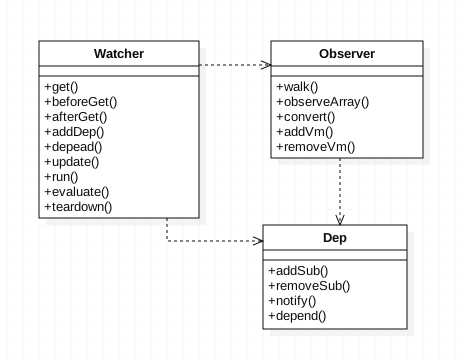
This data-binding approach is partly inspired by Vue’s implementation. I plan to write a dedicated article about it in the future.
3. build template
export function build (vm) {
  const opt = vm._options || {}
  const template = opt.template || {}

  if (opt.replace) {
    if (template.children && template.children.length === 1) {
      compile(vm, template.children[0], vm._parentEl)
    }
    else {
      compile(vm, template.children, vm._parentEl)
    }
  }
  else {
    compile(vm, template, vm._parentEl)
  }

  console.debug(`[JS Framework] "ready" lifecycle in Vm(${vm._type})`)
  vm.$emit('hook:ready')
  vm._ready = true
}
The build approach is as follows:
compile(template, parentNode)
- If type is content, create a contentNode.
- Otherwise, if it has a v-for tag, iterate through it, create the context, and continue with compile(templateWithoutFor, parentNode).
- Otherwise, if it has a v-if tag, continue with compile(templateWithoutIf, parentNode).
- Otherwise, if type is dynamic, continue with compile(templateWithoutDynamicType, parentNode).
- Otherwise, if type is custom, call addChildVm(vm, parentVm), build(externalDirs), traverse the child nodes, and then compile(childNode, template).
- Finally, if type is Native, update (id/attr/style/class), append(template, parentNode), traverse the child nodes, and compile(childNode, template).
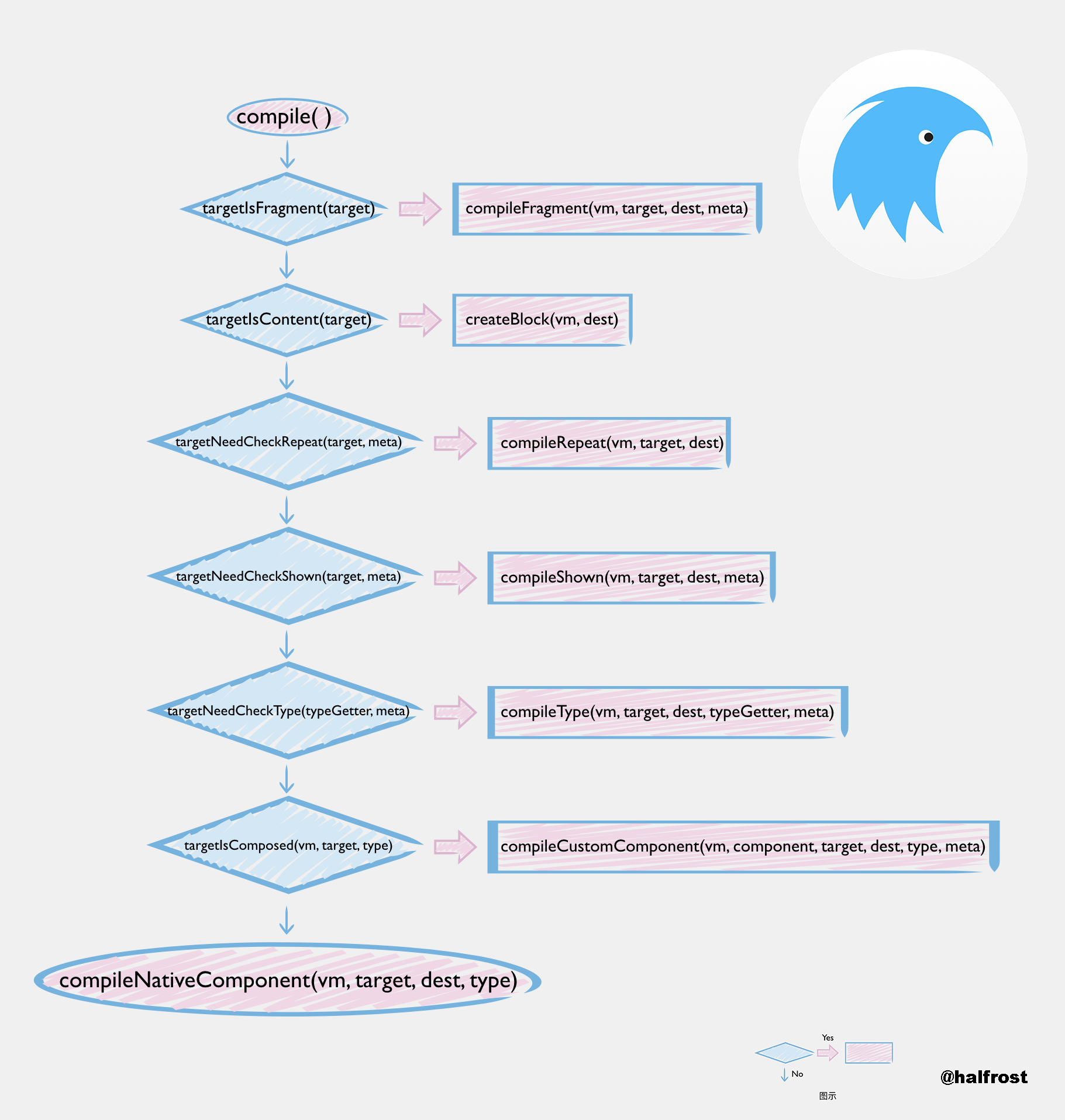
In the series of compile methods above, there are four parameters:
- vm: the Vm object to be compiled.
- target: the node to be compiled; it is the structure produced after the tag in the template is transformed by the transformer.
- dest: the Virtual DOM of the current node’s parent node.
- meta: metadata, which can be used to pass data during internal calls.
The compilation methods are also divided into the following seven types:
- compileFragment compiles multiple nodes and creates a Fragment.
- compileBlock creates a special Block.
- compileRepeat compiles the repeat directive, and also performs data binding. When the data changes, it triggers updates to the DOM nodes.
- compileShown compiles the if directive, and also performs data binding.
- compileType compiles components with dynamic types.
- compileCustomComponent compiles and expands user-defined components. This process recursively creates child vm instances, binds the parent-child relationship, and also triggers the child component’s lifecycle functions.
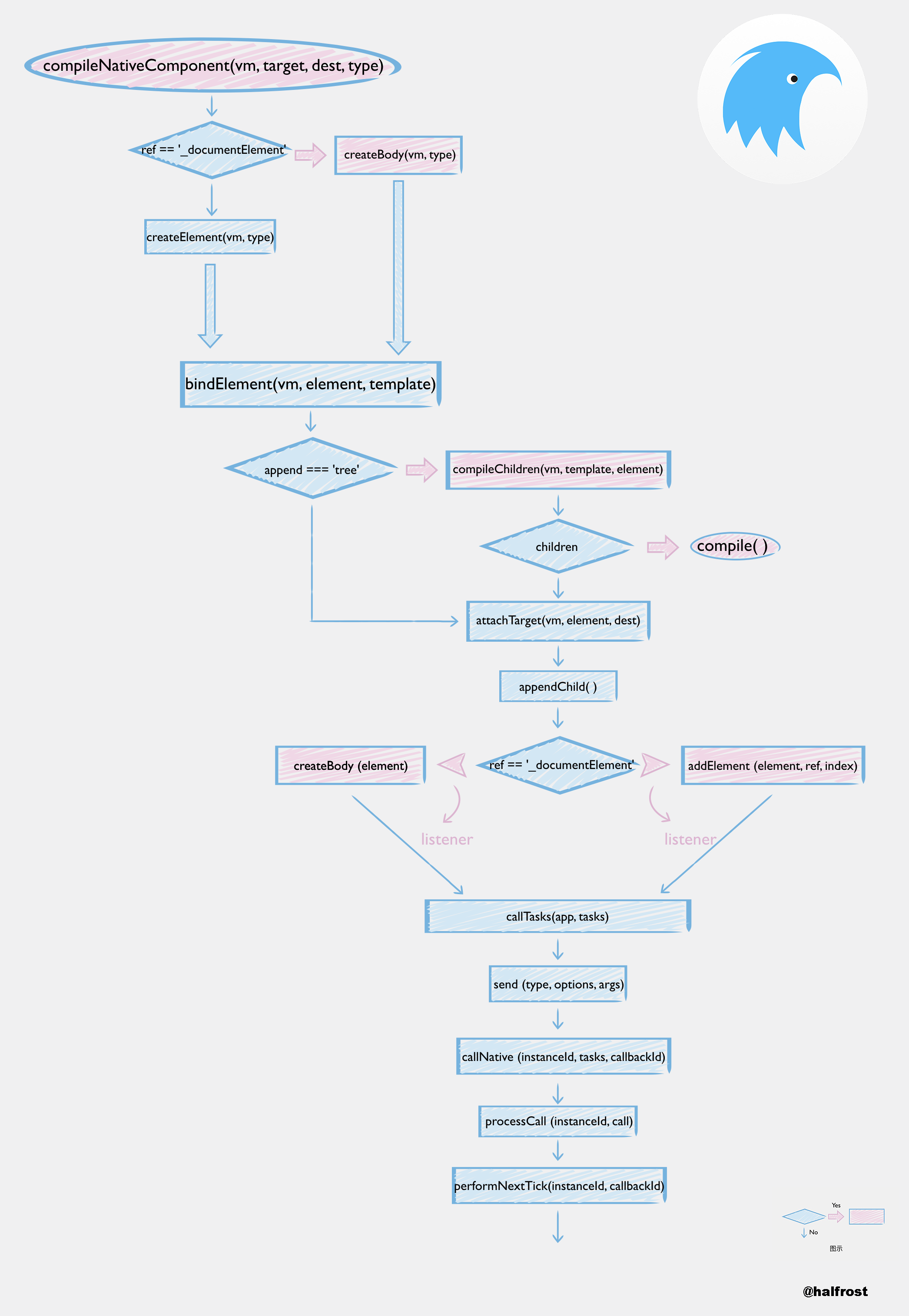
- compileNativeComponent compiles built-in native components. This method calls createBody or createElement to communicate with the native module and create the Native UI.
Among the seven methods above, the five methods other than compileBlock and compileNativeComponent all make recursive calls.
After the template is compiled, the original JS Bundle is transformed into a JSON-like Virtual DOM. The next step is to render the Native UI.
4. Rendering the Native UI
The core method for rendering the Native UI is compileNativeComponent (vm, template, dest, type).
The core implementation of compileNativeComponent is as follows:
function compileNativeComponent (vm, template, dest, type) {
  applyNaitveComponentOptions(template)

  let element
  if (dest.ref === '_documentElement') {
    // if its parent is documentElement then it's a body
    console.debug(`[JS Framework] compile to create body for ${type}`)
    // Build DOM root
    element = createBody(vm, type)
  }
  else {
    console.debug(`[JS Framework] compile to create element for ${type}`)
    // Add element
    element = createElement(vm, type)
  }

  if (!vm._rootEl) {
    vm._rootEl = element
    // bind event earlier because of lifecycle issues
    const binding = vm._externalBinding || {}
    const target = binding.template
    const parentVm = binding.parent
    if (target && target.events && parentVm && element) {
      for (const type in target.events) {
        const handler = parentVm[target.events[type]]
        if (handler) {
          element.addEvent(type, bind(handler, parentVm))
        }
      }
    }
  }

  bindElement(vm, element, template)

  if (template.attr && template.attr.append) { // backward, append prop in attr
    template.append = template.attr.append
  }

  if (template.append) { // give the append attribute for ios adaptation
    element.attr = element.attr || {}
    element.attr.append = template.append
  }

  const treeMode = template.append === 'tree'
  const app = vm._app || {}
  if (app.lastSignal !== -1 && !treeMode) {
    console.debug('[JS Framework] compile to append single node for', element)
    app.lastSignal = attachTarget(vm, element, dest)
  }
  if (app.lastSignal !== -1) {
    compileChildren(vm, template, element)
  }
  if (app.lastSignal !== -1 && treeMode) {
    console.debug('[JS Framework] compile to append whole tree for', element)
    app.lastSignal = attachTarget(vm, element, dest)
  }
}
Rendering Native UI first renders the root of the DOM, then renders its child elements. Child elements must be checked recursively; if they have their own children, the previous compile process needs to continue.
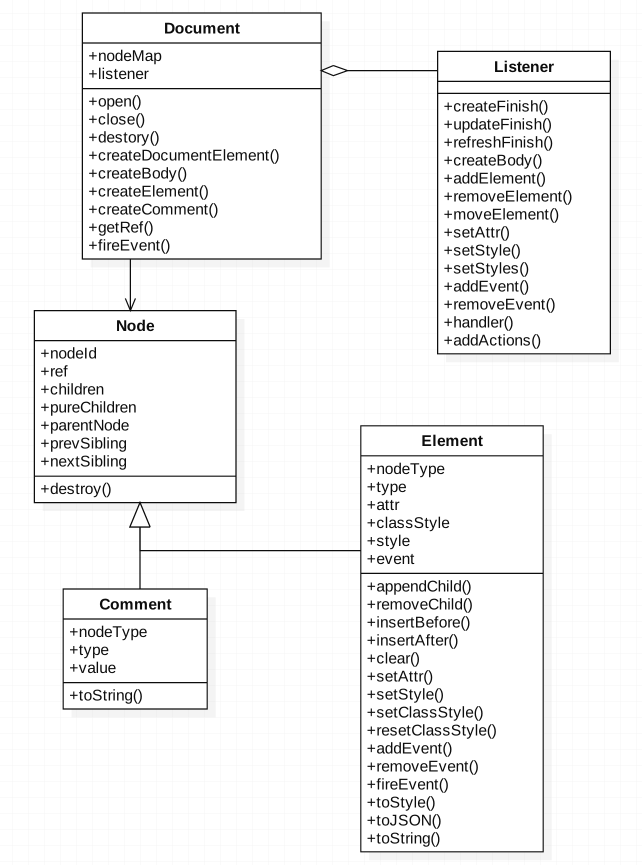
Each Document object contains a listener property, which can send messages to the Native side. Whenever an element is created or an update operation occurs, the listener assembles an action in a specified format and eventually calls callNative to pass the action to the native module. The native module also defines corresponding methods to execute the action.
For example, when an element executes element.appendChild(), listener.addElement() is called. It then assembles data in a JSON-like format and calls the callTasks method.
export function callTasks (app, tasks) {
  let result

  /* istanbul ignore next */
  if (typof(tasks) !== 'array') {
    tasks = [tasks]
  }

  tasks.forEach(task => {
    result = app.doc.taskCenter.send(
      'module',
      {
        module: task.module,
        method: task.method
      },
      task.args
    )
  })

  return result
}
The above method will then call the send method in html5/runtime/task-center.js.
send (type, options, args) {
    const { action, component, ref, module, method } = options

    args = args.map(arg => this.normalize(arg))

    switch (type) {
      case 'dom':
        return this[action](this.instanceId, args)
      case 'component':
        return this.componentHandler(this.instanceId, ref, method, args, { component })
      default:
        return this.moduleHandler(this.instanceId, module, method, args, {})
    }
  }
There are two handlers here, both implemented by the sendTasks method that was passed in earlier.
const config = {
  Document, Element, Comment, Listener,
  TaskCenter,
  sendTasks (...args) {
    return global.callNative(...args)
  }
}
The sendTasks method ultimately calls callNative, invoking the local native UI to perform rendering.
IV. How the Weex JS Framework Handles Events Triggered by Native
Finally, let’s look at how the Weex JS Framework handles events passed in from Native.
In html5/framework/legacy/static/bridge.js, the corresponding logic is the event-handling method for events passed in from Native.
const jsHandlers = {
  fireEvent: (id, ...args) => {
    return fireEvent(instanceMap[id], ...args)
  },
  callback: (id, ...args) => {
    return callback(instanceMap[id], ...args)
  }
}

/**
 * Receive events and callbacks from Native
 */
export function receiveTasks (id, tasks) {
  const instance = instanceMap[id]
  if (instance && Array.isArray(tasks)) {
    const results = []
    tasks.forEach((task) => {
      const handler = jsHandlers[task.method]
      const args = [...task.args]
      /* istanbul ignore else */
      if (typeof handler === 'function') {
        args.unshift(id)
        results.push(handler(...args))
      }
    })
    return results
  }
  return new Error(`invalid instance id "${id}" or tasks`)
}
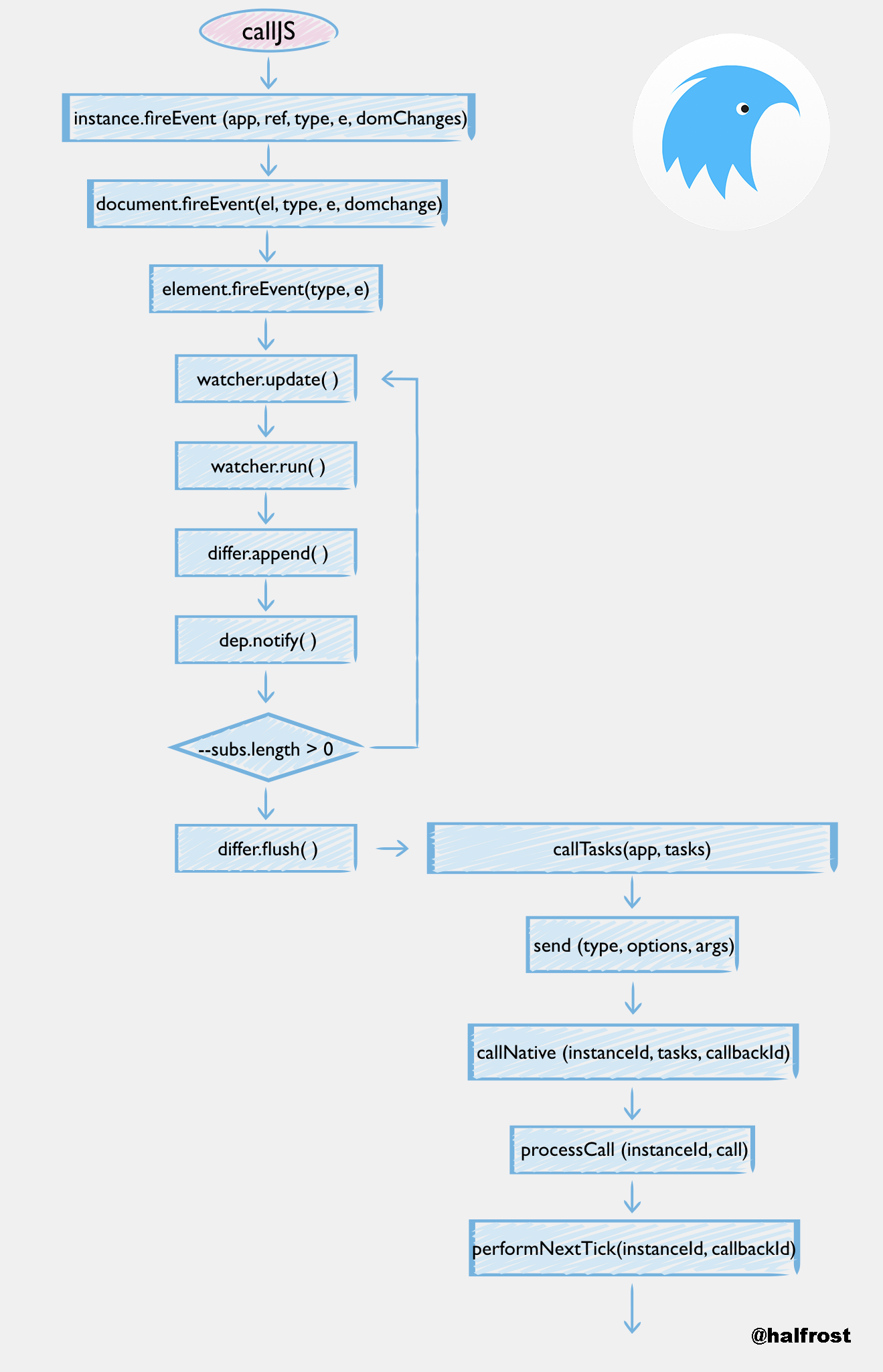
Each Weex instance includes a global callJS method. After the native side calls this callJS method, the receiveTasks method is invoked.
For details on which events Native passes in, see this article: “All About Weex Event Delivery”
The jsHandler encapsulates the fireEvent and callback methods. These two methods are in html5/frameworks/legacy/app/ctrl/misc.js.
export function fireEvent (app, ref, type, e, domChanges) {
  console.debug(`[JS Framework] Fire a "${type}" event on an element(${ref}) in instance(${app.id})`)
  if (Array.isArray(ref)) {
    ref.some((ref) => {
      return fireEvent(app, ref, type, e) !== false
    })
    return
  }
  const el = app.doc.getRef(ref)
  if (el) {
    const result = app.doc.fireEvent(el, type, e, domChanges)
    app.differ.flush()
    app.doc.taskCenter.send('dom', { action: 'updateFinish' }, [])
    return result
  }
  return new Error(`invalid element reference "${ref}"`)
}
The parameters passed in by fireEvent include the event type and the event object, which is a ref to an element. If the event causes DOM changes, it will also include a parameter describing the DOM changes.
Inside htlm5/frameworks/runtime/vdom/document.js
  fireEvent (el, type, e, domChanges) {
    if (!el) {
      return
    }
    e = e || {}
    e.type = type
    e.target = el
    e.timestamp = Date.now()
    if (domChanges) {
      updateElement(el, domChanges)
    }
    return el.fireEvent(type, e)
  }
Here you can see that updates to the DOM are actually handled separately, and then the event continues to be propagated downward to the element.
Next, in htlm5/frameworks/runtime/vdom/element.js
  fireEvent (type, e) {
    const handler = this.event[type]
    if (handler) {
      return handler.call(this, e)
    }
  }
Ultimately, the event is invoked here via the handler’s call method.
When data changes, the watcher’s data listener is triggered, and the current value is compared against oldValue. The watcher’s update method is called first.
Watcher.prototype.update = function (shallow) {
  if (this.lazy) {
    this.dirty = true
  } else {
    this.run()
  }
The update method calls the run method.
Watcher.prototype.run = function () {
  if (this.active) {
    const value = this.get()
    if (
      value !== this.value ||
      // Deep watchers and watchers on Object/Arrays should fire even
      // when the value is the same, because the value may
      // have mutated; but only do so if this is a
      // non-shallow update (caused by a vm digest).
      ((isObject(value) || this.deep) && !this.shallow)
    ) {
      // set new value
      const oldValue = this.value
      this.value = value
      this.cb.call(this.vm, value, oldValue)
    }
    this.queued = this.shallow = false
  }
}
After the run method is called, differ is triggered, and dep notifies all related subviews of the changes.
Dep.prototype.notify = function () {
  const subs = this.subs.slice()
  for (let i = 0, l = subs.length; i < l; i++) {
    subs[i].update()
  }
}
Associated subviews also trigger the update method.
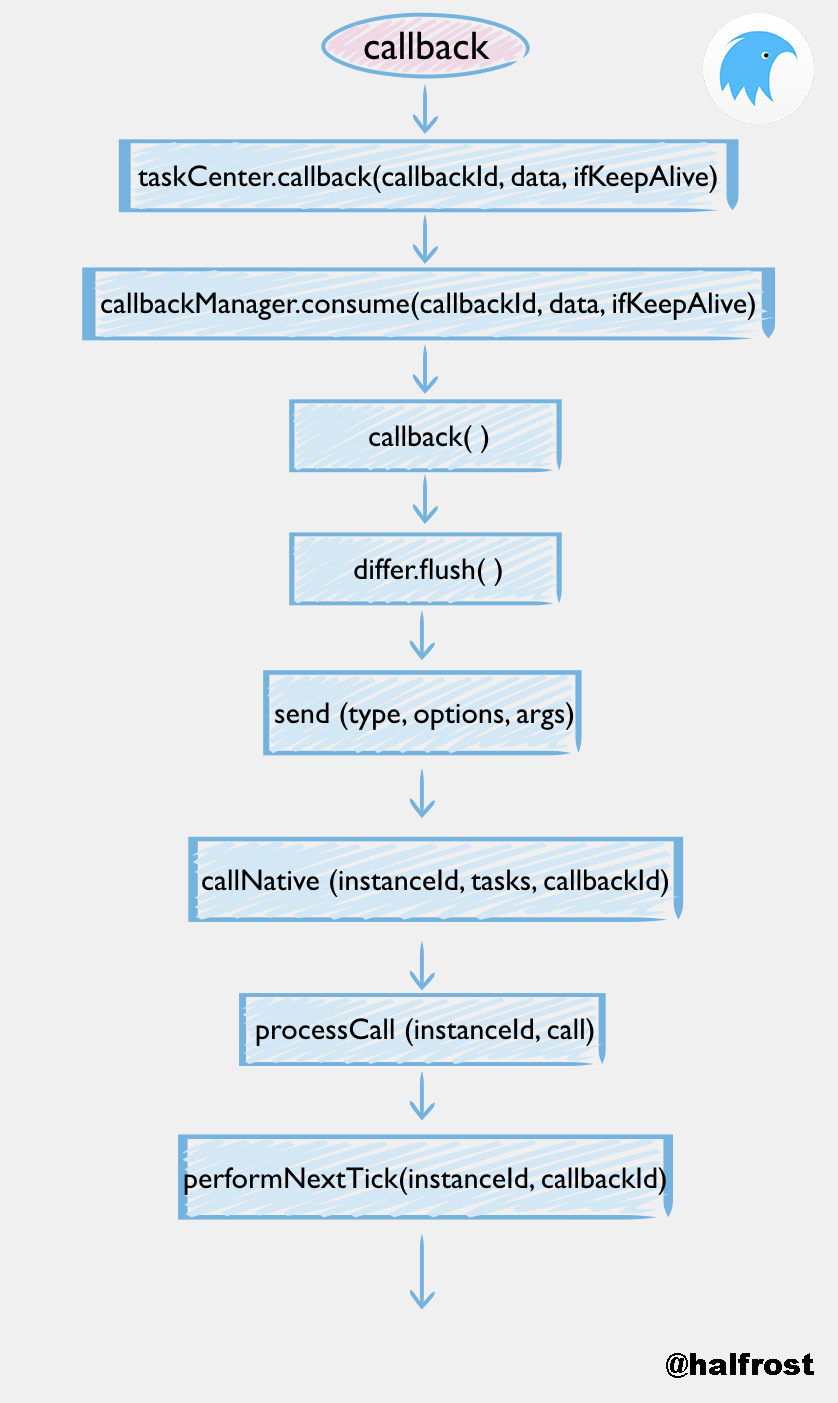
Another type of event is delivered from Native via a module callback.
export function callback (app, callbackId, data, ifKeepAlive) {
  console.debug(`[JS Framework] Invoke a callback(${callbackId}) with`, data,
            `in instance(${app.id})`)
  const result = app.doc.taskCenter.callback(callbackId, data, ifKeepAlive)
  updateActions(app)
  app.doc.taskCenter.send('dom', { action: 'updateFinish' }, [])
  return result
}
The callback process is relatively simple: taskCenter.callback calls callbackManager.consume. After the callback method finishes executing, differ.flush is executed next, and the final step is to call back into Native to notify updateFinish.
At this point, the three fundamental capabilities of the Weex JS Framework have all been analyzed. Here is a large diagram summarizing what it does:

Click here for the full-size image.
5. What the Weex JS Framework May Do in the Future
In addition to the officially supported Vue 2.0 and Rax frameworks, it can also support JS Frameworks for other platforms. Weex can also support custom JS Frameworks. As long as you follow the steps below to customize it, you can write a complete JS Framework.
- First, you need to have a complete JS Framework.
- Understand the feature support provided by Weex’s JS engine.
- Adapt to Weex’s native DOM APIs.
- Adapt to Weex’s initialization entry point and multi-instance management mechanism.
- Add your own JS Framework to the
frameworkconfiguration in the Weex JS runtime, and then package it. - Write a JS bundle based on that JS Framework and add a specific prefix comment so that the Weex JS runtime can correctly recognize it.
After extending it through the steps above, code like the following can be produced:
import * as Vue from '...'
import * as React from '...'
import * as Angular from '...'
export default { Vue, React, Angular };
This supports Vue, React, and Angular.
If the JS Bundle includes a comment in the following format at the beginning of the file:
// { "framework": "Vue" }
...
This way, the Weex JS engine can recognize that this JS bundle needs to be parsed with the Vue framework, and dispatch it to the Vue framework for processing.
With this, each JS Framework only needs to:
- Wrap these interfaces.
- Add a specially formatted comment to the first line of its own JS Bundle, and Weex can properly run pages based on various JS Frameworks.
Weex supports multiple frameworks coexisting in the same mobile application, each parsing JS bundles based on different frameworks.
The author has not yet tried parsing different JS bundles with different frameworks in practice. I believe this part may enable many interesting things in the future.
Finally

This article briefly walked through how the JS Framework works on the native side in Weex. The only point not explored in depth is probably how Weex uses Vue for data binding and how it listens for data changes. I plan to write another article to analyze that in detail. With this article, the analysis of all source-code implementations of Weex on the native side is now complete.
Feedback and suggestions are very welcome.
References:
Weex Official Documentation
The Structure of the JS Framework in the Weex Framework
A Brief Analysis of VDOM Rendering in Weex
Extreme Optimization of Native Performance and Stability
